Caprine: Dark mode toggle is not working on Linux

As you can see there is no dark mode but option is checked.
Toggling option have no impact.
OS: KDE neon 5.17
Kernel: x86_64 Linux 5.0.0-32-generic
DE: KDE 5.63.0 / Plasma 5.17.2
Caprine version: v2.41.0 Installed via .deb package
 vanushwashere
All 6 comments
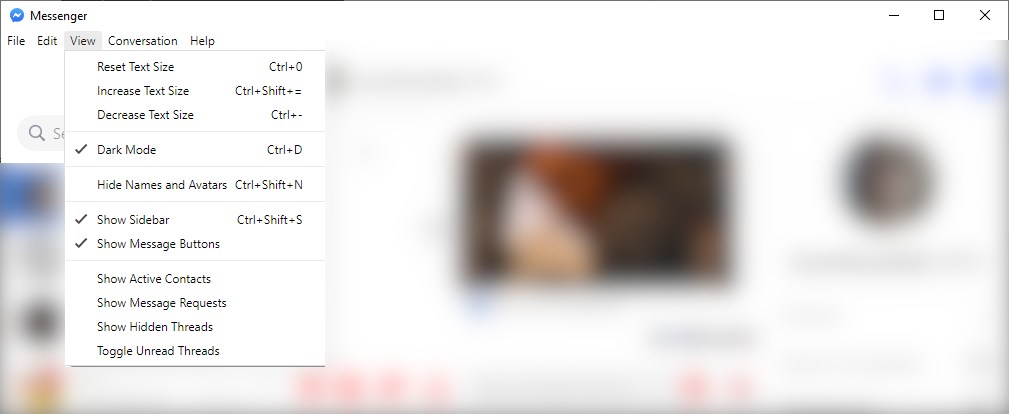
I second this on Windows 10 64-bit
Caprine v2.41.0
 yxinolija
on 11 Nov 2019
yxinolija
on 11 Nov 2019
Dark mode does not work for me in v2.41.0 :x:
Dark mode works for me in v2.40.0 :heavy_check_mark: Downgraded to check.
So dark mode has stopped working between v2.40.0 and v2.41.0.
OS: Arch Linux
Caprine version: v2.41.0 Arch Linux package
 aude
on 12 Nov 2019
aude
on 12 Nov 2019
This appears to have been broken in the changes to source/browser.ts in commit 2c1a3c95a40d1fbb4b3be8a5058269278d1e4e67. Specifically, reverting the change to line 275 of that file (adding back is.macos && to the condition) should fix it. Dark mode is still there and it still works; that commit just made it impossible to enable unless you are on macOS.
For a temporary fix, close Caprine, open ~/.config/Caprine/config.json (on Linux) or %APPDATA%/Caprine/config.json (on Windows), and change "followSystemAppearance": true to "followSystemAppearance": false.
 cptpcrd
on 12 Nov 2019
cptpcrd
on 12 Nov 2019
Great, you've found it.
The Follow System Appearance menu item is not visible on Windows and Linux: https://github.com/sindresorhus/caprine/blob/74416e6c299d3034196d3e48ec7817f41678621c/source/menu.ts#L351
That option is being set to true on my Linux at least, probably because it was unset.
So then the darkMode setting is ignored:
https://github.com/sindresorhus/caprine/blob/74416e6c299d3034196d3e48ec7817f41678621c/source/browser.ts#L275-L279
Might need to add back is.macos &&, like @cptpcrd is saying.
aude
on 12 Nov 2019
Okay, I've released 2.41.1 that fixes this issue. 🙂
 CvX
on 13 Nov 2019
CvX
on 13 Nov 2019
@CvX Hey, Its not working again. Version 2.51.2 (both Manjaro Official Repository and Snap) 😥
The reason I want to use Caprine is that its more responsive than their damn messenger.com website. But when I cant have a dark mode Im not going to use it because I like to have my eyes not burnet
 John15321
on 17 Jan 2021
John15321
on 17 Jan 2021
Related issues
 dmythro
·
4Comments
dmythro
·
4Comments
 PanagiotisGts
·
4Comments
PanagiotisGts
·
4Comments
 kingmustard
·
3Comments
kingmustard
·
3Comments
 skymakai
·
3Comments
skymakai
·
3Comments
 Martina-Neumayer
·
4Comments
Martina-Neumayer
·
4Comments
Most helpful comment
This appears to have been broken in the changes to
source/browser.tsin commit 2c1a3c95a40d1fbb4b3be8a5058269278d1e4e67. Specifically, reverting the change to line 275 of that file (adding backis.macos &&to the condition) should fix it. Dark mode is still there and it still works; that commit just made it impossible to enable unless you are on macOS.For a temporary fix, close Caprine, open
~/.config/Caprine/config.json(on Linux) or%APPDATA%/Caprine/config.json(on Windows), and change"followSystemAppearance": trueto"followSystemAppearance": false.