Caprine: Changing font in custom styles
Can't seem to figure out how to change the font of the program. I tried editing font and font-family in custom.css but the font never changes, something seems to be overriding it since I can change the colours in custom.css just fine.
Any suggestions?
 hurani
All 2 comments
@hurani
custom.css is a css file included in Caprine. You can change the font family by writing css targeting your needs. !important might be needed for the changes to override caprine/messenger defaults.
For example:
Adding this inside your custom.css
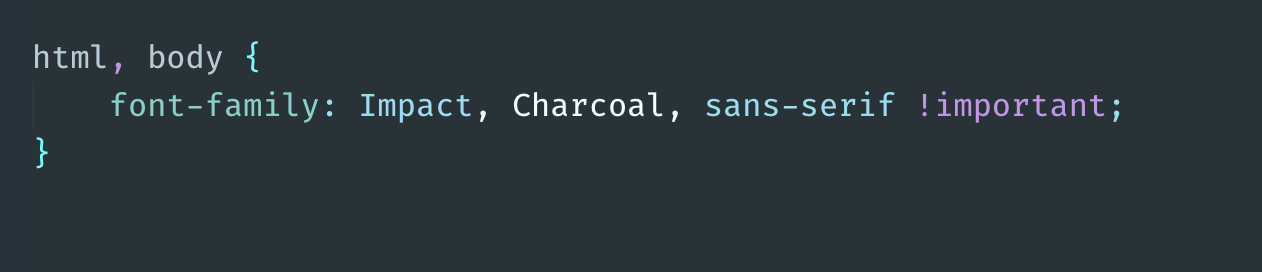
In app:

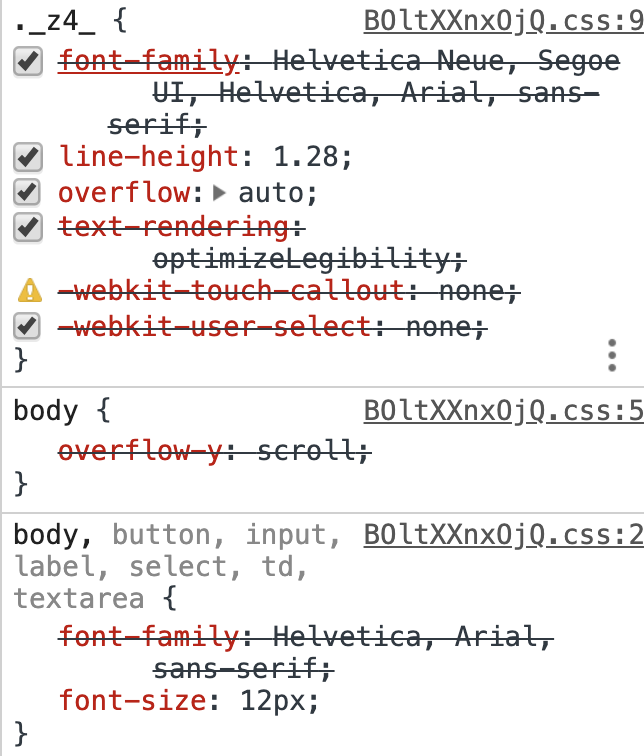
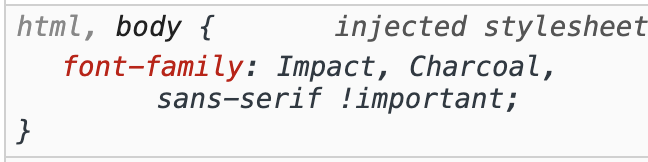
In devtools you can see the default font-family overwritten:
 whitecrownclown
on 25 Jun 2019
whitecrownclown
on 25 Jun 2019
👍2
❤1
love
this is my edit (just in the lower part of custom.css)
html, body { font-family:Noto Sans Bengali !important;}
 Abdunnafi
on 6 Jul 2020
Abdunnafi
on 6 Jul 2020
Was this page helpful?
0 / 5 - 0 ratings
Related issues
 logxseven
·
3Comments
logxseven
·
3Comments
 mmatyas
·
3Comments
mmatyas
·
3Comments
 sindresorhus
·
3Comments
sindresorhus
·
3Comments
 dmythro
·
4Comments
dmythro
·
4Comments
 Yukaii
·
3Comments
Yukaii
·
3Comments
Most helpful comment
@hurani
custom.cssis a css file included inCaprine. You can change the font family by writing css targeting your needs. !important might be needed for the changes to overridecaprine/messengerdefaults.For example:
Adding this inside your
custom.cssIn app:
In devtools you can see the default font-family overwritten: