Caprine: Menu icon missing in 2.30.1 Linux
Using the 64bit deb package on Github. See below, self explanatory:
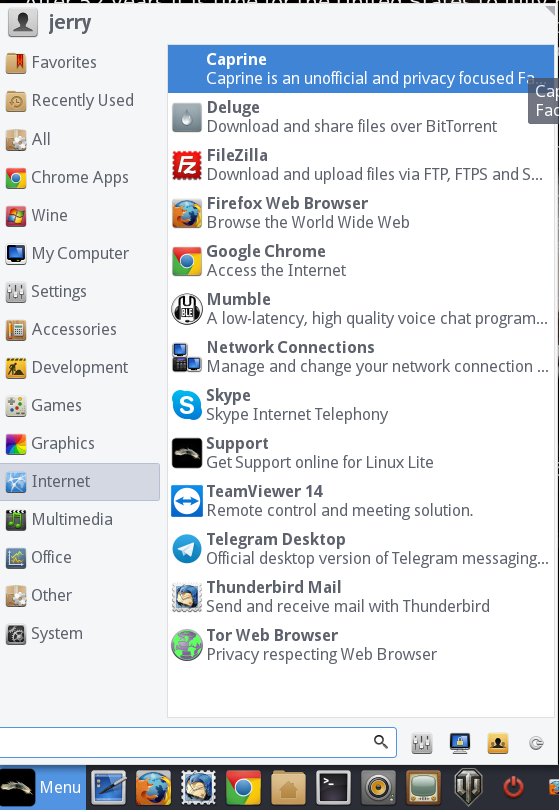
Icon has been there in previous versions.
 linuxlite
All 4 comments
Simple fix.
- Resize icon from 1024x1024 in 0x0 dir. to 48x48 and move icon to 48x48 dir.
- Rebuild hicolor icon-theme.cache
sudo gtk-update-icon-cache /usr/share/icons/hicolor/
Icon now appears in Menu.
linuxlite
on 22 Mar 2019
I have the same problem since a few months and still didn't resolved.
I don't have 0x0 dir in /usr/share/icons/hicolor/ and in 48x48 there is caprine icon, also in other directories I can find them.
Command didn't changed anything.
Edit:
Removed AppImage version and installed from .deb
Now it's perfect...
 Leny1996
on 13 Apr 2019
Leny1996
on 13 Apr 2019
The proposed workaround for this issue doesn't seem to work for myself since there is no /usr/share/icons/hicolor/0x0 directory created by the appimage build (since it is self-contained).
For those looking for a sure-fire, distro-agnostic solution to giving the appimage build an icon, I recommend downloading the Caprine icon and using the menu editor Menu Libre (search for the menulibre package in your systems repositories) and from there it should be straight forward to create a launcher.
 yerbestpal
on 22 Aug 2019
yerbestpal
on 22 Aug 2019
This is fixed in the latest release. Please update Caprine.
 dusansimic
on 1 Nov 2020
dusansimic
on 1 Nov 2020
Related issues
 sindresorhus
·
3Comments
sindresorhus
·
3Comments
 PanagiotisGts
·
4Comments
PanagiotisGts
·
4Comments
 vogu66
·
3Comments
vogu66
·
3Comments
 Vexorify
·
3Comments
Vexorify
·
3Comments
 ChristianKlee
·
4Comments
ChristianKlee
·
4Comments
Most helpful comment
Simple fix.
sudo gtk-update-icon-cache /usr/share/icons/hicolor/Icon now appears in Menu.