Dark mode appears greyed out and can not be enabled.
 slayerbrk
All 7 comments
You probably have the "View > Follow System Appearance" enabled. If you want to enable the "Dark Mode" independently of system theme setting, disable that first.
@sindresorhus, maybe it would be better to have the "Follow System Appearance" always enabled, and just toggle it off if you change the "Dark Mode" setting? Dunno which way is less confusing. 🤷♂️
 CvX
on 19 Jan 2019
CvX
on 19 Jan 2019
I have dark mode enabled in Windows 10 settings but the dark mode is still grayed out.
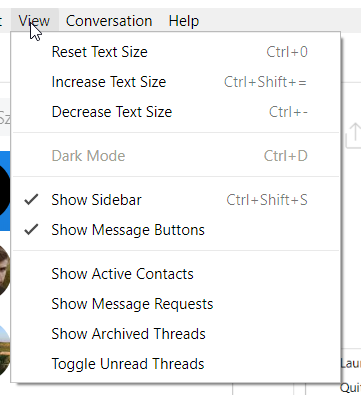
I also don't have the "Follow system apperance" options 😕
 MichalLytek
on 19 Jan 2019
MichalLytek
on 19 Jan 2019
The "Follow System Appearance" shows only on MacOS.
The "Dark mode" enabled if the "followSystemAppearance" config is false, but it is always true in config.
The "followSystemAppearance" needs to true only on MacOS.
 janosorcsik
on 19 Jan 2019
janosorcsik
on 19 Jan 2019
The same thing happens to me, the dark mode is not activated, it happens to me in Linux, Mac and Windows, the strange thing is that a couple of days ago it worked correctly, but then the color changed to a gray one and with the texts in white color so that can not be distinguished, and in the conversations the conversation panel is shown in dark mode, but the contacts panel keeps the gray color with white texts...

 dhuertasanchez
on 29 Jan 2019
dhuertasanchez
on 29 Jan 2019
@dhuertasanchez This issue is tracked in #712.
The current workaround is to disable vibrancy "View -> Vibrancy -> No Vibrancy"
CvX
on 29 Jan 2019
@CvX Hi, thank you, yep, i have already deactivated vibrancy, although in Linux and Windows the error persists with the dark mode, something strange happens there, I will have to continue with the light mode
dhuertasanchez
on 29 Jan 2019
I'll look into dark mode on Windows tomorrow. Thanks for the info!
CvX
on 29 Jan 2019
Related issues
 0wlyW00d
·
3Comments
0wlyW00d
·
3Comments
 willashley23
·
3Comments
willashley23
·
3Comments
 vogu66
·
3Comments
vogu66
·
3Comments
 IdiosApps
·
3Comments
IdiosApps
·
3Comments
 petersng
·
3Comments
petersng
·
3Comments
Most helpful comment
The "Follow System Appearance" shows only on MacOS.
The "Dark mode" enabled if the "followSystemAppearance" config is false, but it is always true in config.
The "followSystemAppearance" needs to true only on MacOS.