Caprine: v2.25.0: A JavaScript error occurred in the main process
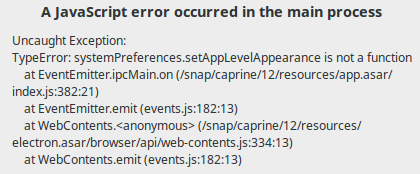
Uncaught Exception:
TypeError: systemPreferences.setAppLevelAppearance is not a function
    at EventEmitter.ipcMain.on (/opt/Caprine/resources/app.asar/index.js:382:21)
    at EventEmitter.emit (events.js:182:13)
    at WebContents.<anonymous> (/opt/Caprine/resources/electron.asar/browser/api/web-contents.js:334:13)
    at WebContents.emit (events.js:182:13)
Linux Mint 17.3 Rosa (Ubuntu 14.04 based).
Previous version works fine for me.
 yermulnik
All 11 comments
// @neegool
 sindresorhus
on 9 Jan 2019
sindresorhus
on 9 Jan 2019
Same problem on Windows 7 (On launch and reload)

 rtsp
on 9 Jan 2019
rtsp
on 9 Jan 2019
Same problem on Windows 10 Pro (1809), 64-bit..
 petko
on 9 Jan 2019
petko
on 9 Jan 2019
Same here on Ubuntu 18.10, installed via Snap
 malyzeli
on 9 Jan 2019
malyzeli
on 9 Jan 2019
I noticed Facebook updated Messenger appearance (and maybe also some functionality?) the same time this error started happening.
I guess it might be related.
malyzeli
on 9 Jan 2019
@sindresorhus This issue was closed together with referenced #711, but there are no information about it being resolved. Was it closed by mistake?
Another thing I realized - since this error started, the application does not respond to hotkey events anymore. I tried all bindings and none of them worked (including system default stuff like Ctrl+W).
malyzeli
on 10 Jan 2019
Note this part:

sindresorhus
on 10 Jan 2019
@sindresorhus Thanks for info, i missed the mention about closing in commit 04cb6a1.
I can confirm the error disappeared after updating the application to latest version. Hotkeys are still broken though, for which I will create new issue.
malyzeli
on 10 Jan 2019
Since this update new messages are not showing in app anymore. I can see typing notifications but no messages until app restart =(
yermulnik
on 10 Jan 2019
Seems that problem returns after last update.
(Ubuntu 19.04, snap, Caprine 2.37.0.)
 zhartus
on 22 Aug 2019
zhartus
on 22 Aug 2019
Windows 10 64-bit (commenting on closed issue here cause it's currently the first hit on Google search):
A potential solution I found was having an existing and working installation of Caprine (2.36) and then updating to 2.44. I actually tested it out going from 2.36 to 2.37, to 2.38... etc., so it may be the case that you need some combination or collection of pre-2.44 versions of Caprine working first (not necessarily any working version).
My guess is that whatever vibrancy issues are related to it checking something that it expects to be there, but isn't. I was initially uninstalling whatever version of Caprine I had before updating to 2.44.
 adoster
on 12 Feb 2020
adoster
on 12 Feb 2020
Related issues
 mmatyas
·
3Comments
mmatyas
·
3Comments
 skymakai
·
3Comments
sindresorhus
·
4Comments
skymakai
·
3Comments
sindresorhus
·
4Comments
 dmythro
·
4Comments
dmythro
·
4Comments
 willashley23
·
3Comments
willashley23
·
3Comments
Most helpful comment
Same problem on Windows 10 Pro (1809), 64-bit..