Caprine: Caprine on macOS requiring high performance GPU 100% of the time
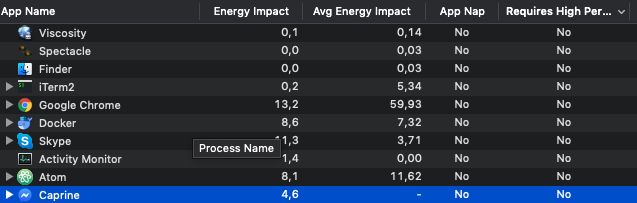
I just recently got a new MacBook Pro 2016 (up from a MacBook Air), and now Caprine is requiring the high performance GPU to be on 100% of the time, which significantly reduces battery life. As my MacBook Air didn't have a discrete GPU, I don't know if this is a new issue.

I believe this is actually an issue with Facebook Messenger on Chrome, not Caprine itself, as when I opened m.me in Chrome, it made Chrome start using the dGPU. However, opening m.me in Safari doesn't force the dGPU.
I'm wondering if there is a way that we could disable Caprine from ever using the dGPU, as I don't see a reason it should ever need it, except maybe for the new games.
 dudeofawesome
All 9 comments
I think I fixed this in MFD with app.disableHardwareAcceleration: https://github.com/aluxian/Messenger-for-Desktop/commit/e4c8138c93935cbc1e1312161ed0b6efe56ac01b
Not sure what its side-effects are though.
 aluxian
on 15 Mar 2017
aluxian
on 15 Mar 2017
Can we verify that this is still an issue?
NSSupportsAutomaticGraphicsSwitching is currently set to true in Info.plist on macOS builds, probably as a result of switching to electron-builder in 8f430bc. This allows using integrated GPU as preferred option instead of dGPU.
 veniversum
on 14 May 2017
veniversum
on 14 May 2017
I just updated to 2.3.1.437, and it looks like it's still using the "High Perf." GPU.
dudeofawesome
on 15 May 2017
This is still an issue.
 gklka
on 9 Aug 2018
gklka
on 9 Aug 2018
Still an issue for me as well. Saw the same issue with the latest version of Mailplane, so likely something to do with Electron in general.
 abhivs
on 12 Aug 2018
abhivs
on 12 Aug 2018
Just got a 2015 Macbook Pro and having the same issue...
 simonhaenisch
on 3 Sep 2018
simonhaenisch
on 3 Sep 2018
Still an issue. I contacted Mailplane support and they fixed it in the next release very quickly. Issue still remains in Caprine.
 Lownin
on 29 Nov 2018
Lownin
on 29 Nov 2018
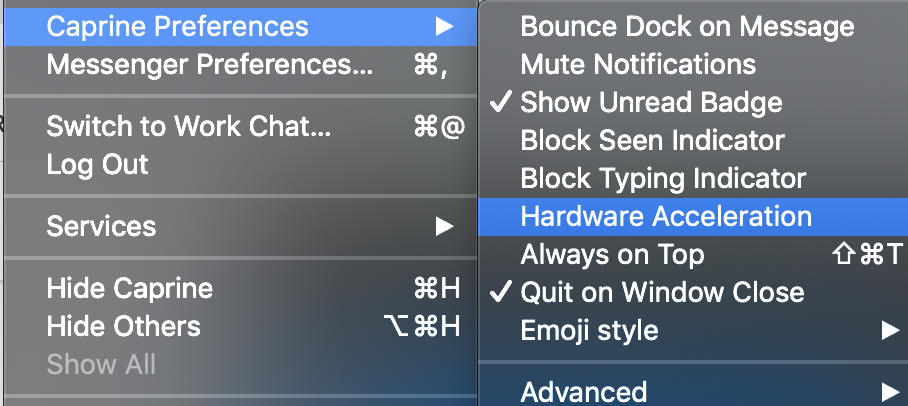
@Lownin @simonhaenisch Disabling hardware acceleration should work.

 whitecrownclown
on 1 Mar 2019
whitecrownclown
on 1 Mar 2019
Confirmed, that does the trick.
Lownin
on 1 Mar 2019
Related issues
 petersng
·
3Comments
petersng
·
3Comments
 bsucker98
·
3Comments
bsucker98
·
3Comments
 sindresorhus
·
3Comments
sindresorhus
·
3Comments
 charlwillia6
·
4Comments
charlwillia6
·
4Comments
 PanagiotisGts
·
4Comments
PanagiotisGts
·
4Comments
Most helpful comment
@Lownin @simonhaenisch Disabling



hardware accelerationshould work.