Capacitor: How can i fix ther overlay with statusbar or navbar?
Description of the problem:
The navbar is overlay of header os cellphone, i've trying all article on internet pages
The navbar merges with the header of the ios device, I am using reactjs in the project and when compiling it to the native, the navbar has an erroneous position.
Affected platform
- [ ] Android
- [* ] iOS
- [ ] electron
- [ ] web
OS of the development machine
- [ ] Windows
- [ *] macOS
- [ ] linux
Other information:
The code of project waas make on reactjs without ionic framework
Capacitor version:
1.2.0
node version:
10.16.0
npm version:
6.9.0
CocoaPods version:
1.7.5
Steps to reproduce:
Link to sample project:
 DarkCode01
All 16 comments
Do you have viewport-fit=contain in your tag?
With this flag you will still need to offset using Apple's env() CSS functions. https://developer.mozilla.org/en-US/docs/Web/CSS/env
 brian-g
on 10 Sep 2019
brian-g
on 10 Sep 2019
yes, i use that tag <meta name="viewport" content="viewport-fit=contain, width=device-width, initial-scale=1"> on my index.html.
DarkCode01
on 10 Sep 2019
@brian-g @DarkCode01 This is an issue in the latest version of capacitor for ios. The older version does not have this issue. The app header is under the status bar and the styling is broken. You can test this by pulling down the ionic stencil conference app and running it on a device or simulator.
 cambronjay
on 9 Oct 2019
cambronjay
on 9 Oct 2019
@cambronjay in which version was it broken? or in which version does it work as you expect?
can any of you provide a sample app where it can be easily reproduced? also screenshots can help
 jcesarmobile
on 13 Jan 2020
jcesarmobile
on 13 Jan 2020
To me it is like that.
https://github.com/ionic-team/capacitor/issues/2036#issuecomment-542287878
status bar is over the webcontent.
 knona
on 14 Jan 2020
knona
on 14 Jan 2020
so you want apps to look like this (web content is shown below the status bar)
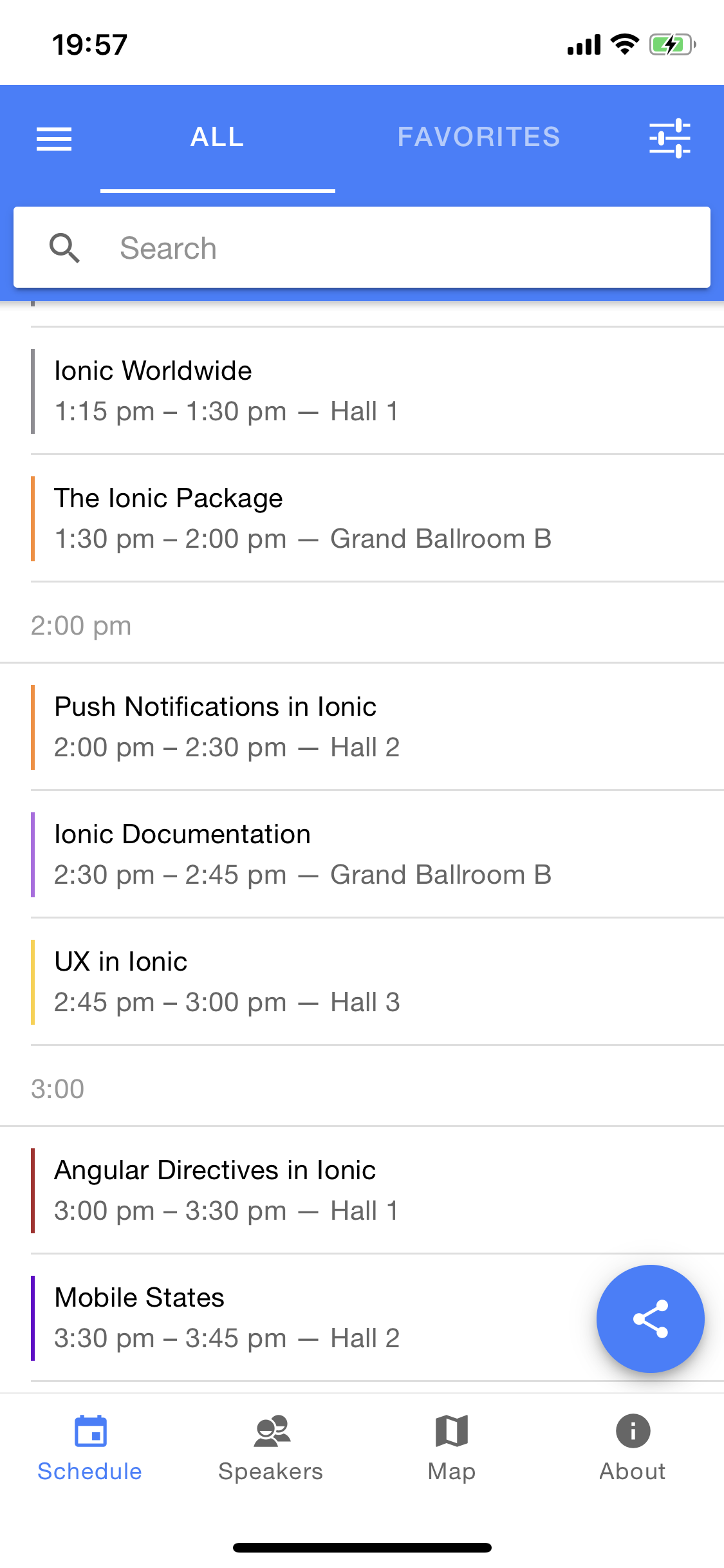
instead of like this (web content is integrated into the status bar)
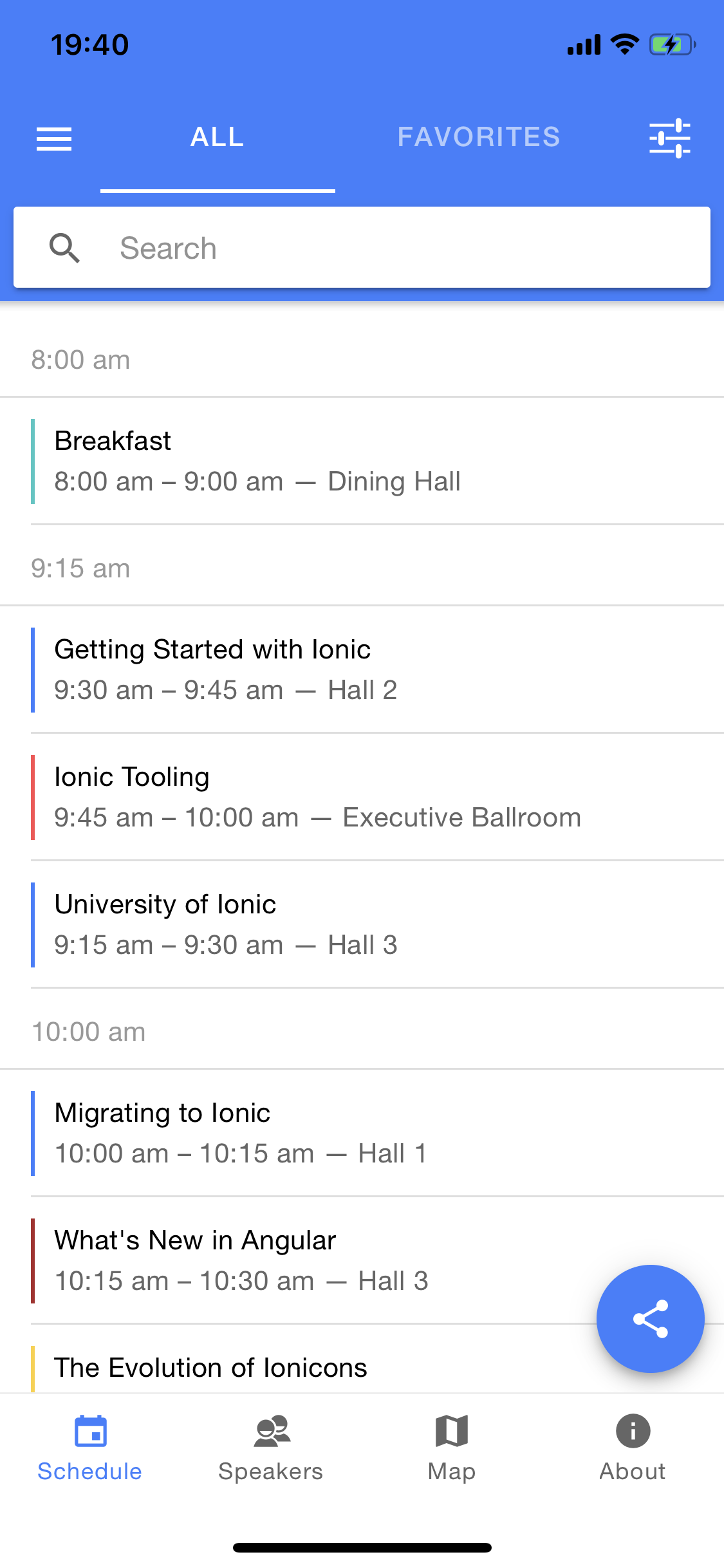
is that right?
capacitor has worked like this since beta 7, on the linked issue cambronjay says the bahaviour changed from 1.1.1 to 1.2.0, so still not sure if this is the issue you mean, but if that's what you are looking for, then we can probably make it configurable to also allow this behaviour.
jcesarmobile
on 14 Jan 2020
It is precisely that, it would be really great if you can add it !
I come from the cordova world and i'm trying to migrate to capacitor.
Cordova provide these options for ios:
- StatusBarBackgroundColor
- StatusBarStyle
- StatusBarOverlaysWebView
The first two have been implemented in capacitor (StatusBar setStyle and setBackgroundColor) but the last one is not available.
Thank you
knona
on 15 Jan 2020
Your message is contradictory, what I mean has nothing to do with StatusBarOverlaysWebView
jcesarmobile
on 15 Jan 2020
What is contradictory ? With cordova, the StatusBarOverlaysWebView option do what you described (i.e. web content is shown below or integrated into the status bar).
knona
on 15 Jan 2020
It’s a different thing, what I’ve shown are the safe areas, while StatusBarOverlaysWebView is a hack that resizes the webview and we won’t implement that
jcesarmobile
on 15 Jan 2020
Wheter it be safe areas or StatusBarOverlaysWebView option, the goal isn't the same ?
Anyways, the safe areas could be very useful. It would be perfect if you implement it as you said before.
knona
on 15 Jan 2020
I now understand what you said about safe areas. Indeed, it would be really usefull if we had an option to change that. On ios, the status bar and home bar are annoying. The only way to simulate safe ares is to play with css.
https://developer.mozilla.org/en-US/docs/Web/CSS/env
I'm gonna try this.
knona
on 28 Jan 2020
Since it looks like the problem was Capacitor disabling content insets, I've added a new configuration option, see https://github.com/ionic-team/capacitor/pull/2392 for more details.
TLDR, add this to capacitor.config.json to get the old behaviour. (there are move possible values)
"ios": {
      "contentInset": "always"
  }
Thanks !
knona
on 30 Jan 2020
I've added "contentInset": "always" in capacitor.config.json and now the page is correctly fit in safe area but when i scroll, the content goes under transparent statusbar.
How i can to solve this issue? Thanks!
 Snake231088
on 24 Apr 2020
Snake231088
on 24 Apr 2020
@Snake231088 set viewport-fit=cover to fix it
 pradella
on 9 May 2020
pradella
on 9 May 2020
Related issues
 bogdbo
·
3Comments
bogdbo
·
3Comments
 daniel-lucas-silva
·
3Comments
daniel-lucas-silva
·
3Comments
 danielsogl
·
3Comments
danielsogl
·
3Comments
 moberwasserlechner
·
3Comments
moberwasserlechner
·
3Comments
 json-derulo
·
3Comments
json-derulo
·
3Comments
Most helpful comment
Since it looks like the problem was Capacitor disabling content insets, I've added a new configuration option, see https://github.com/ionic-team/capacitor/pull/2392 for more details.
TLDR, add this to
capacitor.config.jsonto get the old behaviour. (there are move possible values)