Capacitor: Splashscreen is displayed twice
Description of the problem:
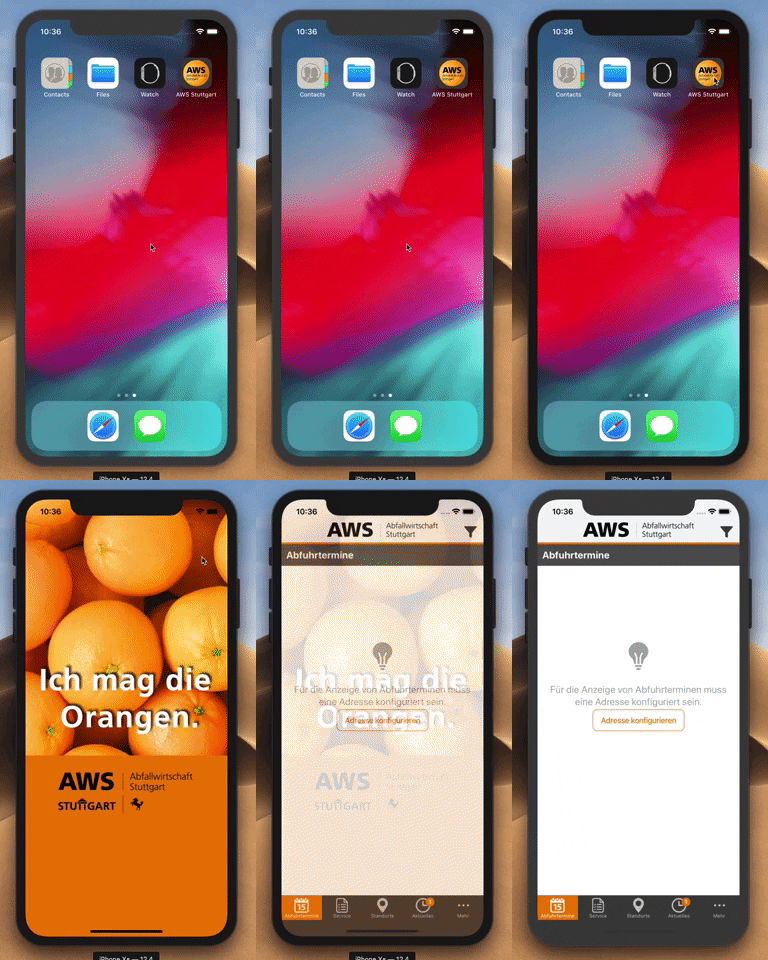
I replaced the default Splashscreens with my own. Since then the app will show to differente splaschreens. First the default Capacitor Screen and after that my own.
Affected platform
- [x] Android
- [x] iOS
- [ ] electron
- [ ] web
OS of the development machine
- [ ] Windows
- [x] macOS
- [ ] linux
Capacitor version:
latest
node version:
latest
npm version:
latest
CocoaPods version:
latest
Steps to reproduce:
Replace the default Splashscreens with your own
 danielsogl
>All comments
Splash is displayed "twice" by design because first the launch image (or launch storyboard) that can't be controlled, it gets hidden by the system whenever it wants. Then we show the splash image that mimics the launch storyboard and we can control.
Your problem is iOS caches the launch storyboard, that only happen while in development, not when installed from app store. If you want to uncache the image you can delete the app, power off the device, power on again and reinstall. If in simulator, do a Reset Contents and Settings. Another way is changing the bundle identifier as the app will then be installed as a new app.
 jcesarmobile
on 24 Jul 2019
jcesarmobile
on 24 Jul 2019
Related issues
 TayKara
·
3Comments
danielsogl
·
3Comments
TayKara
·
3Comments
danielsogl
·
3Comments
 peterpeterparker
·
3Comments
peterpeterparker
·
3Comments
 Hansel03
·
3Comments
Hansel03
·
3Comments
 json-derulo
·
3Comments
json-derulo
·
3Comments
Most helpful comment
Splash is displayed "twice" by design because first the launch image (or launch storyboard) that can't be controlled, it gets hidden by the system whenever it wants. Then we show the splash image that mimics the launch storyboard and we can control.
Your problem is iOS caches the launch storyboard, that only happen while in development, not when installed from app store. If you want to uncache the image you can delete the app, power off the device, power on again and reinstall. If in simulator, do a
Reset Contents and Settings. Another way is changing the bundle identifier as the app will then be installed as a new app.