Capacitor: Assets in folder with underscore not loaded on Android
Description of the problem:
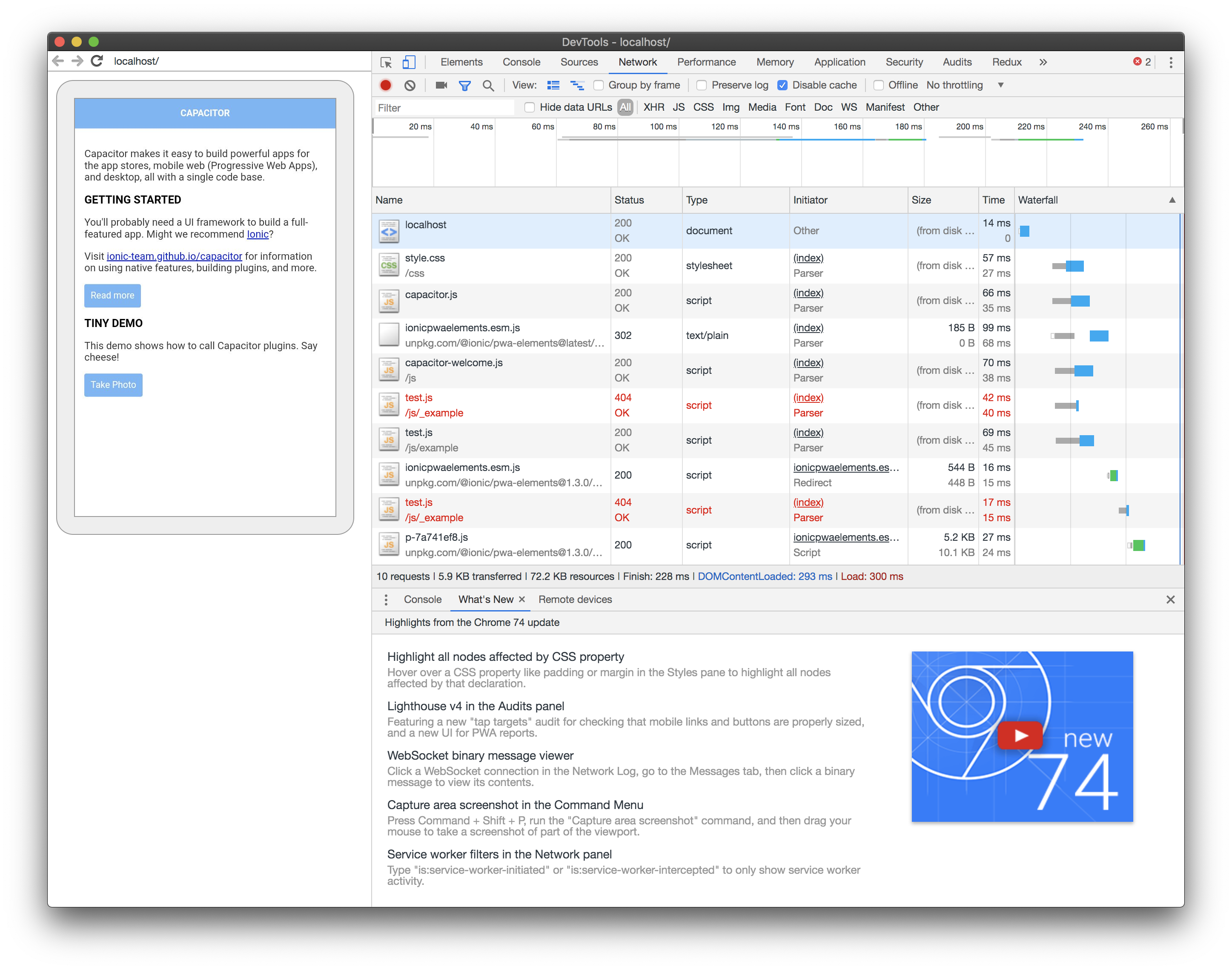
When trying to load an asset in folder beginning with an underscore like "_next" a 404 is returned in the browser.
Affected platform
- [x] Android
- [ ] iOS
- [ ] electron
- [ ] web
OS of the development machine
- [ ] Windows
- [x] macOS
- [ ] linux
Other information:
Capacitor version:
1.1.0
node version:
v11.6.0
npm version:
6.5.0-next.0
CocoaPods version:
-
Steps to reproduce:
1) npx @capacitor/cli create
2) npx cap add android
3) mkdir www/js/{_example,example}``
4)touch www/js/{_example,example}/test.js`
5) add following to index.html
  <script src="js/_example/test.js"></script>
  <script src="js/example/test.js"></script>
6) run the app an checke dev tools -> the file is not loaded
Link to sample project:
 olivereisenhut
All 2 comments
This is really an Android "feature". By default it doesn't copy assets folders starting with _ to the resulting apk (see https://android.googlesource.com/platform/frameworks/base/+/b41af58f49d371cedf041443d20a1893f7f6c840/tools/aapt/AaptAssets.cpp#60).
You can workaround it by adding custom aaptOptions with the pattern to ignore, removing the <dir>_* so they get copied. Something like this:
aaptOptions {
    ignoreAssetsPattern '!.svn:!.git:!.ds_store:!*.scc:!CVS:!thumbs.db:!picasa.ini:!*~'
}
It should go in the app's build.gradle inside android -> defaultConfig
android {
    ...
    defaultConfig {
        ...
        aaptOptions {
            ignoreAssetsPattern '!.svn:!.git:!.ds_store:!*.scc:!CVS:!thumbs.db:!picasa.ini:!*~'
        }
    }
}
 jcesarmobile
on 16 Jul 2019
jcesarmobile
on 16 Jul 2019
@jcesarmobile I'm having trouble getting this to work. In my case it's blazor wasm....
I see this in the logs:
E/Capacitor: Unable to open asset URL: http://localhost/_framework/blazor.webassembly.js
here's my config in the ./android/app/build.gradle file:
android {
    compileSdkVersion rootProject.ext.compileSdkVersion
    defaultConfig {
        applicationId "com.store.app"
        minSdkVersion rootProject.ext.minSdkVersion
        targetSdkVersion rootProject.ext.targetSdkVersion
        versionCode 1
        versionName "1.0"
        testInstrumentationRunner "androidx.test.runner.AndroidJUnitRunner"
        aaptOptions{
            ignoreAssetsPattern  '!.svn:!.git:!.ds_store:!*.scc:.*:!CVS:!thumbs.db:!picasa.ini:!*~'
        }
    }
    buildTypes {
        release {
            minifyEnabled false
            proguardFiles getDefaultProguardFile('proguard-android.txt'), 'proguard-rules.pro'
        }
    }
}
I saved, sycned and hit run. To no avail.
What am I doing wrong?
edit I also tried copying in the bin/**/wwwroot instead of just the wwwroot and then in android studio I get duplicate resources errors with the above configuration which seems bizarre.
Thanks!
 JohnGalt1717
on 18 Jun 2020
JohnGalt1717
on 18 Jun 2020
Related issues
 GuilhermeBCC
·
20Comments
GuilhermeBCC
·
20Comments
 codedge
·
24Comments
codedge
·
24Comments
 aadriann
·
19Comments
aadriann
·
19Comments
 mlynch
·
21Comments
mlynch
·
21Comments
 planesandunicorns
·
26Comments
planesandunicorns
·
26Comments
Most helpful comment
This is really an Android "feature". By default it doesn't copy assets folders starting with _ to the resulting apk (see https://android.googlesource.com/platform/frameworks/base/+/b41af58f49d371cedf041443d20a1893f7f6c840/tools/aapt/AaptAssets.cpp#60).
You can workaround it by adding custom
aaptOptionswith the pattern to ignore, removing the<dir>_*so they get copied. Something like this:It should go in the app's build.gradle inside android -> defaultConfig