Capacitor: Splash Screen scaling displays twice
Description of the problem:
I followed the instructions to configure splash screen scaling described here: https://capacitor.ionicframework.com/docs/apis/splash-screen/#configuration. When the app launches, Capacitor displays my splash screen scaled incorrectly, then adjusts to the scaling I have in my capacitor.config.json file:
"plugins": {
    "SplashScreen": {
      "launchShowDuration": 1000,
      "launchAutoHide": true,
      "androidSplashResourceName": "splash",
      "androidScaleType": "CENTER_CROP"
    }
  },
What I'm expecting is that the splash screen displays once, at the specified scale.
Affected platform
- [X] Android
- [ ] iOS
- [ ] electron
- [ ] web
OS of the development machine
- [X] Windows
- [ ] macOS
- [ ] linux
Other information:
Capacitor version:
5.0
node version:
10.15.3
npm version:
6.9.0
CocoaPods version:
Steps to reproduce:
As described above.
Link to sample project:
 johnwargo
All 41 comments
Unlike Cordova, which first shows a grey empty screen and then the splash screen, Capacitor is able to show the splash image from the beginning. But this "trick" is done by first showing theme with the image and then a native view showing the same image (similar to iOS where it first shows the launch storyboard and then the native image).
For some reason, in your case, the theme and the native view don't match and you see the transition from one to the another.
Would be helpful if you could provide the images you are using, or even better if you can provide a sample project.
Meanwhile, if the effect is very annoying for you, you can just remove android:theme="@style/AppTheme.NoActionBarLaunch" from the activity and then it will behave like Cordova apps, showing an empty screen before the native screen with the splash image.
 jcesarmobile
on 7 Jun 2019
jcesarmobile
on 7 Jun 2019
@jcesarmobile I can make a sample project that shows this, but won't be able to do so for a couple of weeks. Can you delete these once you pull it down?
johnwargo
on 7 Jun 2019
I got the same issue... first splash is stretched and then shown correctly. Removing android:theme="@style/AppTheme.NoActionBarLaunch" is a good workarround though
 digaus
on 31 Jul 2019
digaus
on 31 Jul 2019
Having the same issue here wiht a Xiami MI A9SE (5.97-inch touchscreen display with a resolution of 1080x2340 pixels at a pixel density of 432 pixels per inch)
In my case Android is using the xxhdpi image that is this one: https://user-images.githubusercontent.com/1107782/65594996-1317ee00-df94-11e9-9d3c-b0aa3dc56e9e.png
And this is a GIF of the bad behaviour:

As you can see, the first image show is deformed and then have a FOUC to the actual splash screen with androidScaleType set as CENTER_CROP
 vfportero
on 25 Sep 2019
vfportero
on 25 Sep 2019
Any news on how to fix this?
I'm currently facing the same issue where the scaling of the initial splash image does not match the androidScaleType: CENTER_CROP I've defined in capacitor.config.json.
I also did try to remove the android:theme="@style/AppTheme.NoActionBarLaunch" but then the screen is white at first which looks odd since my splash screen is a red image. I haven't been able to find a way to change the background color since that would also kind of solve the issue at this moment. If anyone knows how to do achieve that, please let me know :)
Thanks in advance,
Kevin
 KevinSleegers
on 26 Nov 2019
KevinSleegers
on 26 Nov 2019
Same issue
 raycarter
on 3 Dec 2019
raycarter
on 3 Dec 2019
This issue still is a problem. Hoping this will get fixed :)
 katzenjunge
on 18 Dec 2019
katzenjunge
on 18 Dec 2019
Instead of removing android:theme="@style/AppTheme.NoActionBarLaunch" as @jcesarmobile suggested, which would display a grey screen before booting your splash, I suggest to set a color as workaround for this first screen, in my case my splash screen main predominant background.
In file android/app/src/main/res/values/styles.xml modify AppTheme.NoActionBarLaunch with your background color, for example:
<style name="AppTheme.NoActionBarLaunch" parent="AppTheme.NoActionBar">
<item name="android:background">#230F29</item>
</style>
Doing so it is at least a bit less flashy

 peterpeterparker
on 31 Dec 2019
peterpeterparker
on 31 Dec 2019
This issue still is a problem. Hoping this will get fixed :)
Tried to fix it myself but it is quite hard or not even possible since you also would have to respect the androidScaleType.
Don't know if @jcesarmobile has an idea how to solve that.
digaus
on 31 Dec 2019
@peterpeterparker nice work around with the background colour, thank you!
 alexcroox
on 31 Dec 2019
alexcroox
on 31 Dec 2019
This becomes big issue if custom splash screen is made i.e. in iOS using lottie animation or something it initially shows that screen, then goes to second one that shows just static splash screen image. Is there a way to leave just one of them for easier and more consistent maintenance?
 IljaDaderko
on 2 Feb 2020
IljaDaderko
on 2 Feb 2020
As I explained, the way it works is by first showing a theme with the image as background and then a native view showing the same image. This works fine for simple images, but for more complex images you'll have to tweak your theme, or try 9-Patch images.
With the OP's provided images, there is no noticeable change from the background image to the native image if using the default FIT_XY, but of course, the image is not properly sized.
Sadly the background image can't be sized, I think the people is getting confused because there was a launch_splash.xml file that had android:scaleType="centerCrop" on it.
But that file was not being used, and even if the user changes the theme to use the file, the android:scaleType="centerCrop" doesn't work on bitmaps, only on ImageViews (And ImageViews can't be used in a drawable).
We have removed that file to avoid this kind of confusions. (see https://github.com/ionic-team/capacitor/pull/2411).
Though, for the OP's provided images, I've found another way of displaying the image with the "androidScaleType": "CENTER_CROP" configuration option.
This way is showing the Splash image in full screen mode (available on Capacitor 1.5.0).
First in capacitor.config.json add
"androidScaleType": "CENTER_CROP",
"splashFullScreen": true
Then change the theme to also show in full screen
<style name="AppTheme.NoActionBarLaunch" parent="AppTheme.NoActionBar">
<item name="android:windowNoTitle">true</item>
<item name="android:windowActionBar">false</item>
<item name="android:windowFullscreen">true</item>
<item name="android:background">@drawable/splash</item>
</style>
Going to close since we can't really do anything about this since the launch theme has this limitations, if it doesn't work for you try one of the mentioned workarounds:
- Use FIT_XY
- Remove the theme (a grey area will be shown instead)
- Keep the theme but remove the image and use a color instead
- Use a full screen theme and full screen splash screen.
jcesarmobile
on 6 Feb 2020
@jcesarmobile Point 4 is not working. The drawable splash screen is always FIT_XY and ignores scaletype. The only way it worked was by replacing android:background with android:src - but then my app crashes from missing images:
android.content.res.Resources$NotFoundException: Drawable android:drawable/edit_text_material with resource ID #0x108029e
Caused by: java.lang.RuntimeException: org.xmlpull.v1.XmlPullParserException: <internal>: <nine-patch> requires a valid 9-patch source image
 sofiageo
on 26 Mar 2020
sofiageo
on 26 Mar 2020
I am migrating a Cordova app to Capacitor and am experiencing this problem using the exact same splash images the Cordova app renders perfectly. The workaround of adding a background colour works but it's a degradation. I'd love to see Lottie support in Capacitor, that would make this problem disappear and allow us to deliver the best possible user experience. Unfortunately, the Cordova plugin doesn't work: https://github.com/timbru31/cordova-plugin-lottie-splashscreen/issues/188
 alex-steinberg
on 1 Apr 2020
alex-steinberg
on 1 Apr 2020
@peterpeterparker This is the only acceptable solution here. It's honestly pathetic that this isn't mentioned in the Capacitor docs, as if it's a perfect replacement for Cordova splash out of the box.
@mlynch @mhartington This is not good enough. If you want people to trust Capacitor over Cordova, get these basic things right and make sure the docs are correct please.
For anyone else, this is my capacitor.config.json:
"plugins": {
"SplashScreen": {
"launchAutoHide": false,
"androidScaleType": "CENTER_CROP",
"showSpinner": true,
"splashFullScreen": false,
"splashImmersive": false
}
}
My styles.xml - where the hex is the same colour as the background on my splash:
<style name="AppTheme.NoActionBarLaunch" parent="AppTheme.NoActionBar">
<item name="android:background">#4D4D4D</item>
</style>
NOTE: I have autohide set to false as I programatically hide when I'm ready.
 daveshirman
on 19 May 2020
daveshirman
on 19 May 2020
+1 on @daveshirman comment, this is happening on capacitor 2.0 also I find quite frustrating for basic stuffs but essential and we have to effortly fix this issue and yes I used the @peterpeterparker method for now and that is the only visible way of solving the issues.
 Boby
on 21 May 2020
Boby
on 21 May 2020
Hi,
having the same issue and digged on Ionic Forums and find the following.
Just appying as follows it did the job for me, without setting up a color as @peterpeterparker said (it also works but this seems to do the trick on a better way).
Check it out.
<style name="AppTheme.NoActionBarLaunch" parent="AppTheme.NoActionBar">
        <item name="android:windowNoTitle">true</item>
        <item name="android:windowActionBar">false</item>
        <item name="android:windowFullscreen">true</item>
        <item name="android:windowContentOverlay">@null</item>
        <item name="android:windowIsTranslucent">true</item>
    </style>
By the way, i also agree such a simple thing to be so frustating. Maybe not the worst issue on an app but, if all customers have a similarity all around the world is for putting their eyes in such little things - just opening the app - before all the incredible effort behind the scenes.
Regards.
 Nuajan
on 25 May 2020
Nuajan
on 25 May 2020
THANKS @Nuajan
THIS IS THE SOLUTION FOR ME!
PS: i also agree such a simple thing to be so frustating.
 losciur
on 1 Jun 2020
losciur
on 1 Jun 2020
Hi,
having the same issue and digged on Ionic Forums and find the following.
Just appying as follows it did the job for me, without setting up a color as @peterpeterparker said (it also works but this seems to do the trick on a better way).
Check it out.
<style name="AppTheme.NoActionBarLaunch" parent="AppTheme.NoActionBar">
        <item name="android:windowNoTitle">true</item>
        <item name="android:windowActionBar">false</item>
        <item name="android:windowFullscreen">true</item>
        <item name="android:windowContentOverlay">@null</item>
        <item name="android:windowIsTranslucent">true</item>
    </style>
By the way, i also agree such a simple thing to be so frustating. Maybe not the worst issue on an app but, if all customers have a similarity all around the world is for putting their eyes in such little things - just opening the app - before all the incredible effort behind the scenes.
Regards.
Could you share your capacitor.config.json?
btw. between the App Start and the Splash Screen and the WebView load there is a quick blank background with a Color that i am not able to change. Do you know where I can change that?
 danielehrhardt
on 29 Jun 2020
danielehrhardt
on 29 Jun 2020
This is how i do it now:
app.component.ts
setTimeout(() => {
      SplashScreen.hide();
    }, 300);
styles.xml
<style name="AppTheme.NoActionBarLaunch" parent="AppTheme.NoActionBar">

    </style>
capacitor.config.json
"plugins": {
    "SplashScreen": {
      "launchAutoHide": false,
      "showSpinner": true,
      "androidSpinnerStyle": "small",
      "iosSpinnerStyle": "small",
      "spinnerColor": "#ffffff",
      "backgroundColor": "#21252dff",
      "splashFullScreen": true,
      "androidScaleType": "CENTER_CROP",
      "splashImmersive": false
    }
  },
This was with the native Android start Animations the smoothest way.
danielehrhardt
on 29 Jun 2020
The solution of @Nuajan cause crash on android 8 if you set android:screenOrientation="portrait on AndroidManifest.xml
Exception : java.lang.IllegalStateException: Only fullscreen opaque activities can request orientation
To solve problem you should :
- remove
android:screenOrientation="portraiton AndroidManifest.xml - set orientation on MainActivity.java :
if (android.os.Build.VERSION.SDK_INT > Build.VERSION_CODES.O) {
    setRequestedOrientation(ActivityInfo.SCREEN_ORIENTATION_PORTRAIT);
}
 maxime-guyot
on 1 Jul 2020
maxime-guyot
on 1 Jul 2020
Hi,
having the same issue and digged on Ionic Forums and find the following.
Just appying as follows it did the job for me, without setting up a color as @peterpeterparker said (it also works but this seems to do the trick on a better way).
Check it out.
<style name="AppTheme.NoActionBarLaunch" parent="AppTheme.NoActionBar"> <item name="android:windowNoTitle">true</item> <item name="android:windowActionBar">false</item> <item name="android:windowFullscreen">true</item> <item name="android:windowContentOverlay">@null</item> <item name="android:windowIsTranslucent">true</item> </style>By the way, i also agree such a simple thing to be so frustating. Maybe not the worst issue on an app but, if all customers have a similarity all around the world is for putting their eyes in such little things - just opening the app - before all the incredible effort behind the scenes.
Regards.
This Worked! Thank you
 tronix99
on 12 Jul 2020
tronix99
on 12 Jul 2020
When the app launches, ,I found twice splash.I fixed:
    <!-- default -->
    <style name="AppTheme.NoActionBarLaunch" parent="AppTheme.NoActionBar">
        <item name="android:background">@drawable/splash</item>
    </style>

    <!-- modified-->
    <style name="AppTheme.NoActionBarLaunch" parent="AppTheme.NoActionBar">
        <item name="android:background">@null</item>
    </style>
 DuebassLei
on 15 Jul 2020
DuebassLei
on 15 Jul 2020
So frustrating, It takes me the whole night to fix this.
 SnowBases
on 8 Aug 2020
SnowBases
on 8 Aug 2020
So frustrating, It takes me the whole night to fix this.
How did you fixed it?
danielehrhardt
on 11 Aug 2020
After spending a lot of time on this I found solution for my app.
In AndroidManifest.xml use android:theme="@android:style/Theme.Translucent.NoTitleBar.Fullscreen" rather than using NoActionBar.
Cheers,
 vishnuvardhana
on 24 Aug 2020
vishnuvardhana
on 24 Aug 2020
@danielehrhardt
btw. between the App Start and the Splash Screen and the WebView load there is a quick blank background with a Color that i am not able to change. Do you know where I can change that?
capacitor.config.json
{
    ...
    // Either for android + ios
    "backgroundColor": "#123456",
    // Or specific
    "android": {
        "backgroundColor": "#123456"
    },
    "plugins": {
        "SplashScreen": {
            ...
            "backgroundColor": "#123456"
        }
    }
}
 AE1NS
on 30 Aug 2020
AE1NS
on 30 Aug 2020
Hi,
having the same issue and digged on Ionic Forums and find the following.
Just appying as follows it did the job for me, without setting up a color as @peterpeterparker said (it also works but this seems to do the trick on a better way).
Check it out.
<style name="AppTheme.NoActionBarLaunch" parent="AppTheme.NoActionBar"> <item name="android:windowNoTitle">true</item> <item name="android:windowActionBar">false</item> <item name="android:windowFullscreen">true</item> <item name="android:windowContentOverlay">@null</item> <item name="android:windowIsTranslucent">true</item> </style>By the way, i also agree such a simple thing to be so frustating. Maybe not the worst issue on an app but, if all customers have a similarity all around the world is for putting their eyes in such little things - just opening the app - before all the incredible effort behind the scenes.
Regards.
This might be upvoted a lot, but I think it is a bad solution. This solution results in the behaviour shown in this comment: https://github.com/ionic-team/capacitor/issues/2992#issuecomment-689815690
On slower devices the user does not get any visual feedback if the application has started or not.
So either we should show a loading icon before the splashscreen or just a blank page. Optimally the splash screen should not be scaled differently at first but I have not found a solution for that.
digaus
on 12 Oct 2020
@danielehrhardt
This is only my workaround in Android:
- AndroidManifest.xml,
application: android:theme="@style/AppTheme"
activity: android:theme="@style/AppTheme.NoActionBar"
<application
    android:allowBackup="true"
    android:icon="@mipmap/ic_launcher"
    android:label="@string/app_name"
    android:roundIcon="@mipmap/ic_launcher_round"
    android:supportsRtl="true"
    android:theme="@style/AppTheme">

    <activity
        android:configChanges="orientation|keyboardHidden|keyboard|screenSize|locale|smallestScreenSize|screenLayout|uiMode"
        android:name="com.snowbases.workoutapp.MainActivity"
        android:label="@string/title_activity_main"
        android:theme="@style/AppTheme.NoActionBar"
        android:launchMode="singleTask">
- res > values > styles.xml ( this one will show immediately after you open the app )
<!-- Base application theme. -->
<style name="AppTheme" parent="AppTheme.NoActionBar">
    <!-- Customize your theme here. -->
    <item name="colorPrimary">@color/colorPrimary</item>
    <item name="colorPrimaryDark">@color/colorPrimaryDark</item>
    <item name="colorAccent">@color/colorAccent</item>
</style>

<style name="AppTheme.NoActionBar" parent="Theme.AppCompat">
    <item name="windowActionBar">false</item>
    <item name="windowNoTitle">true</item>
    <item name="android:background">@drawable/splash</item>
    <item name="android:navigationBarColor">@android:color/white</item>
    <item name="android:windowLightNavigationBar">true</item>
    <item name="android:statusBarColor">@android:color/white</item>
</style>
This line you can change yourself, I'm using this holo_orange_light, holo_red_dark for testing.
<item name="android:navigationBarColor">@android:color/white</item>
<item name="android:windowLightNavigationBar">true</item>
<item name="android:statusBarColor">@android:color/white</item>
- changing capacitor code, Splash.java ( this one will run in Bridge.java for the second time )
You can search this:
Splash.showOnLaunch((BridgeActivity) context, this.config);
show():
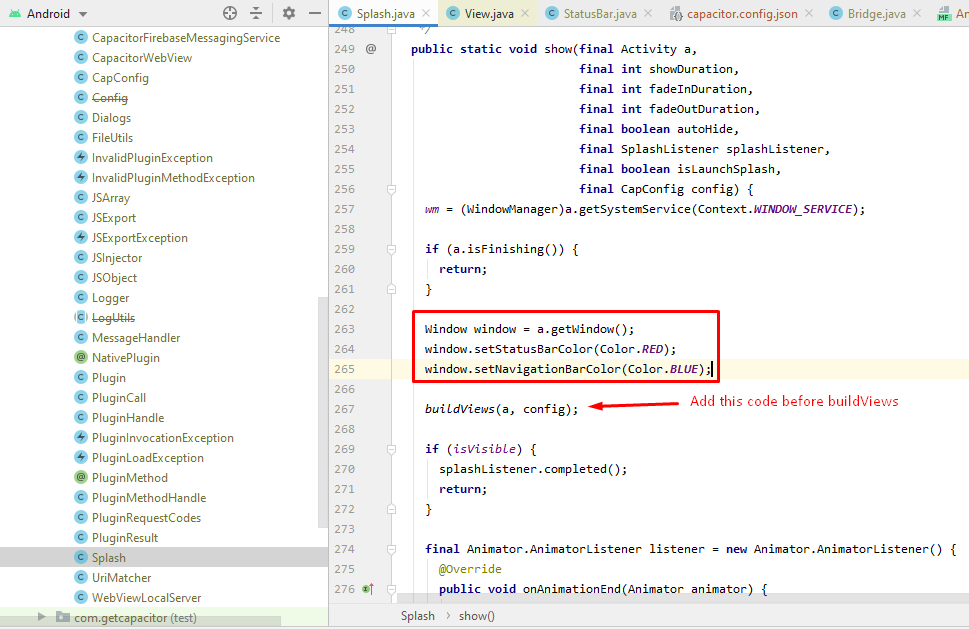
Window window = a.getWindow();
window.setStatusBarColor(Color.RED);
window.setNavigationBarColor(Color.BLUE);
buildViews()

- and the last line was in capacitor.config.json (this is important)
capacitor.config.json
"plugins": {
    "SplashScreen": {
      "launchShowDuration": 60000
    }
}
launchShowDuration is set to 60sec but in this case, it's hiding the splash screen it in my home page ts, so it will immediately hide after the page is ready
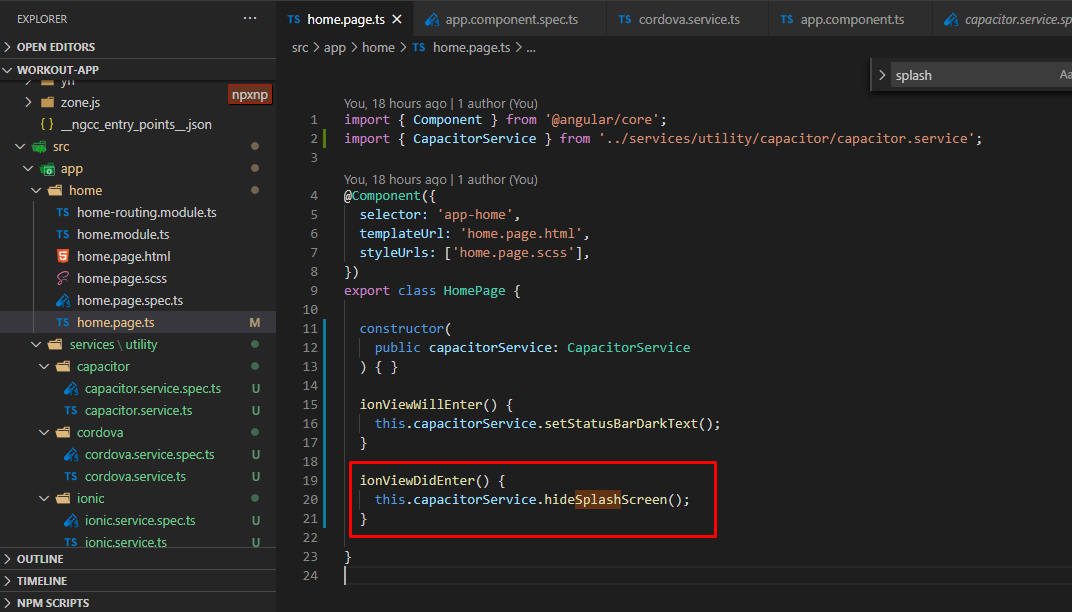
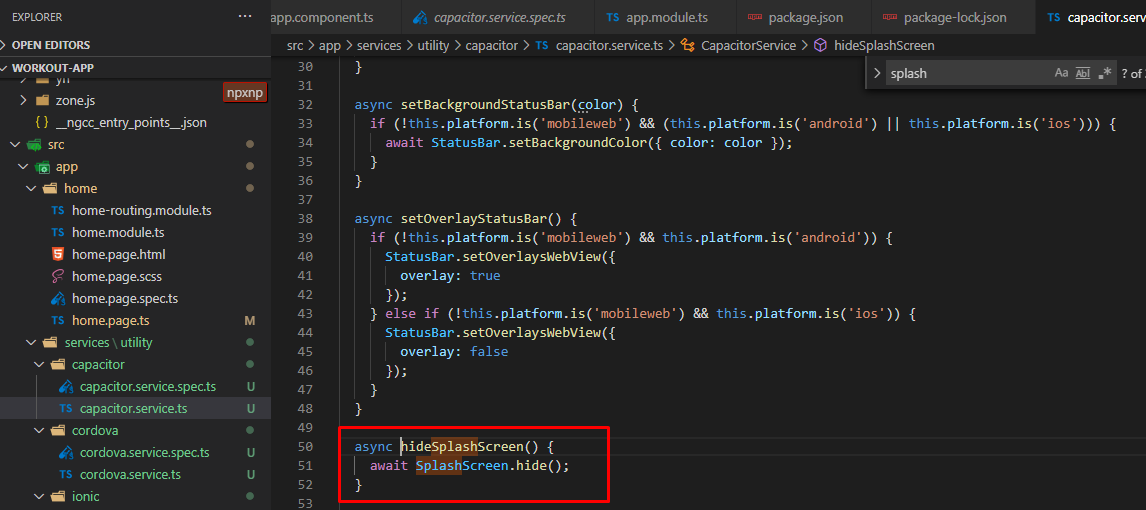
using statusbar overlay true:
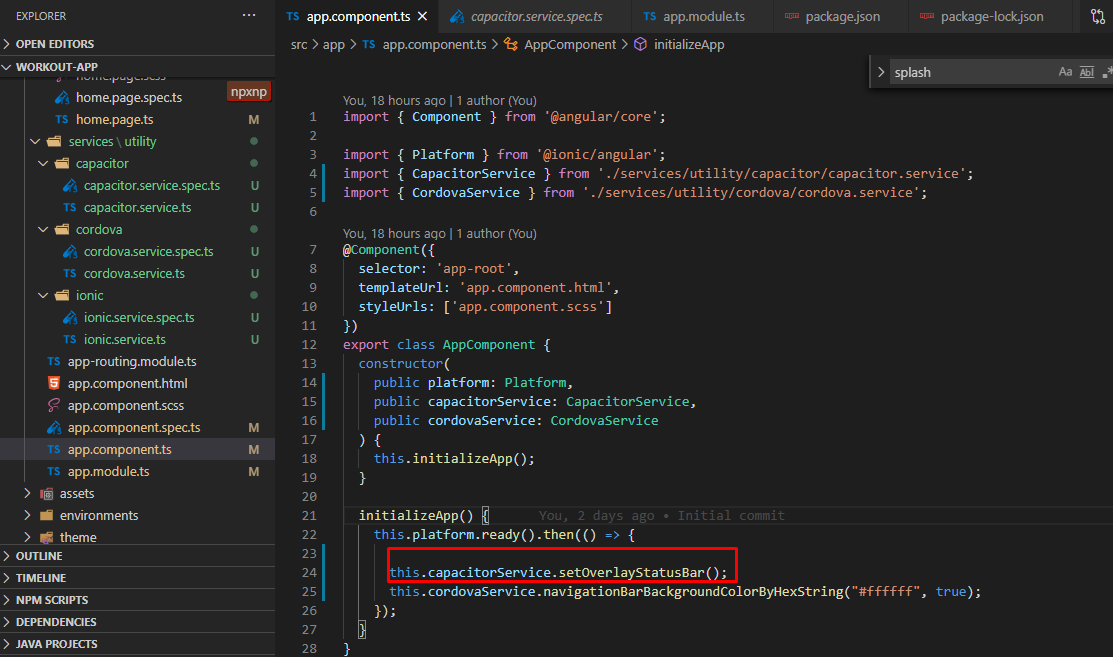
force the toolbar component to have some padding for the status bar
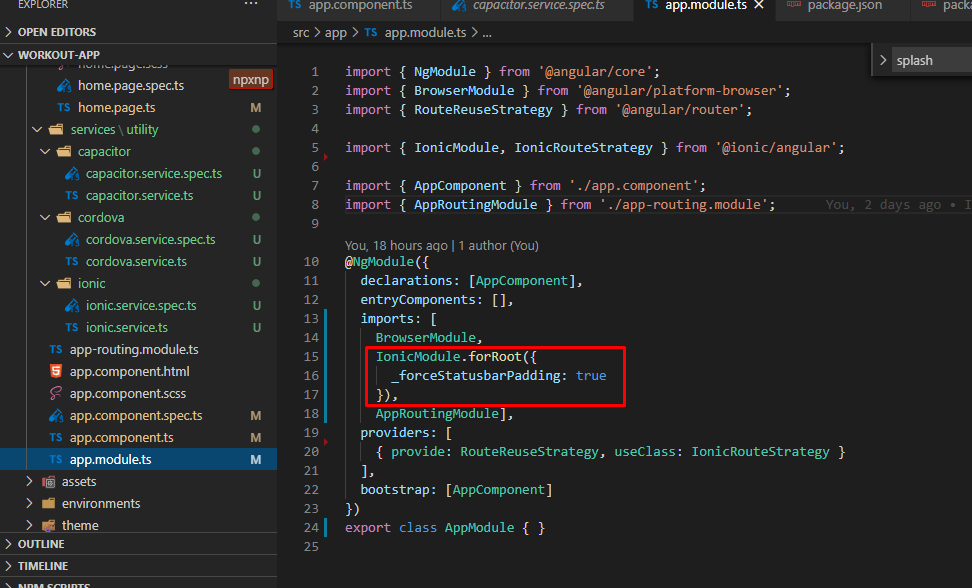
Please note that I'm using https://github.com/fagundes/cordova-plugin-navigationbar to change the in-app navigation bar color to white.
Result:
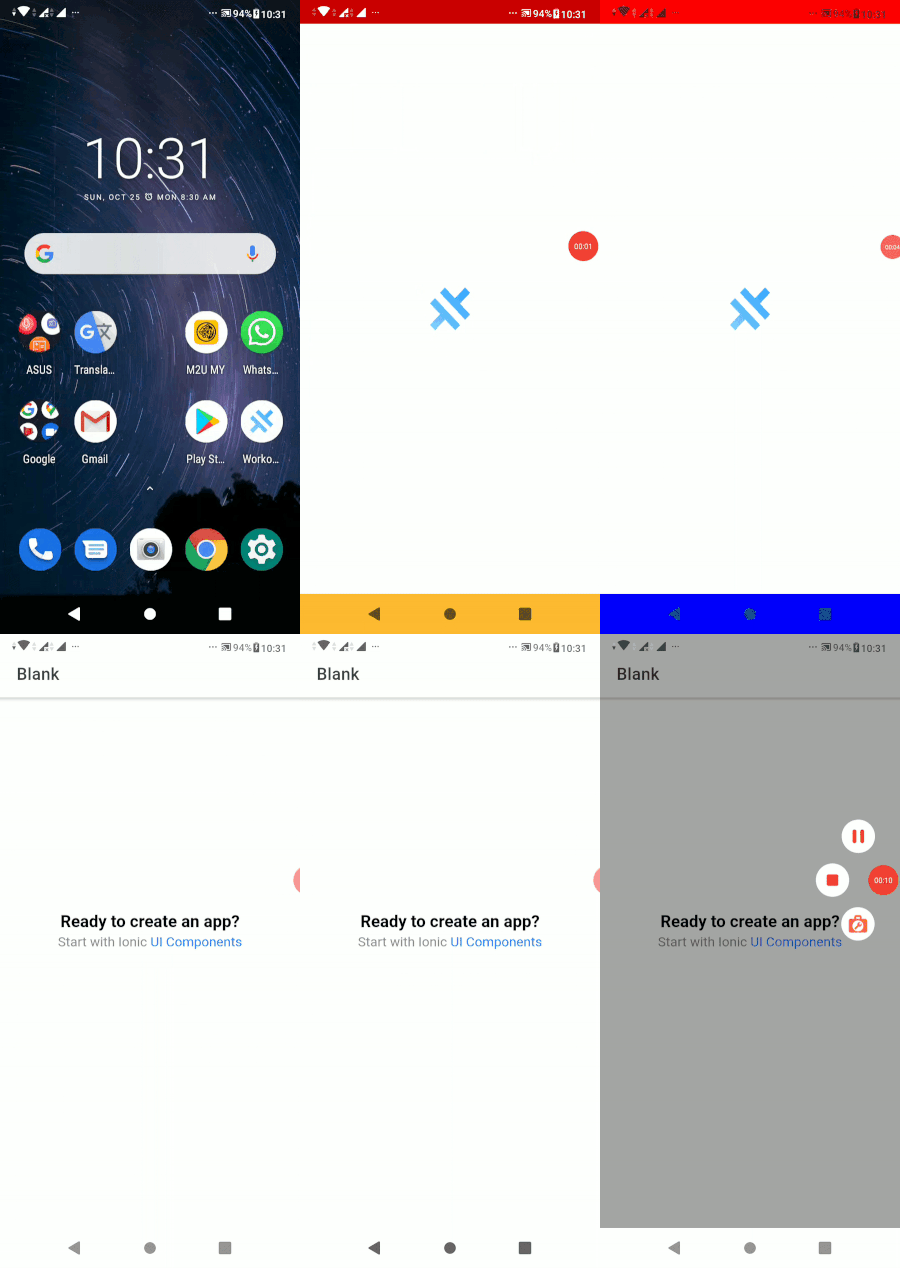
SnowBases
on 25 Oct 2020
Just an FYI, hopefully this week I'll be releasing a new splash screen plugin that will let you use layouts as the splash screen and add your own custom animation code without having to hack Capacitor.
 aparajita
on 25 Oct 2020
aparajita
on 25 Oct 2020
In addition to tons of other features. 😁
aparajita
on 26 Oct 2020
@aparajita Looking forward to seeing your implementation! When it's ready, would you be willing to work with us (Capacitor team) to incorporate your new plugin into the official Splash Screen plugin for Capacitor 3?
Another possibility is to have it be a community plugin, but it's best if there aren't competing plugins doing the same thing.
Thanks!
 dwieeb
on 26 Oct 2020
dwieeb
on 26 Oct 2020
When it's ready, would you be willing to work with us (Capacitor team) to incorporate your new plugin into the official Splash Screen plugin for Capacitor 3?
@dwieeb I thought you'd never ask. 😁 Of course, I have been designing it all along to be a replacement for the current splash screen machinery.
aparajita
on 26 Oct 2020
I have been designing it all along to be a replacement for the current splash screen machinery.
Not that I expected it would — I'm not that conceited — but I wanted it to be as compatible as possible with the existing plugin with as few breaking changes as possible to the config.
aparajita
on 26 Oct 2020
Hey @dwieeb, is the new config API fairly stable?
aparajita
on 27 Oct 2020
is the new config API fairly stable?
Likely not. 😬 We are trying to improve the config API dramatically to achieve independence from capacitor.config.json. We're working on this right now, so watch for PRs in this repo and also the plugins repo.
@aparajita This issue has a lot of participants. Would you mind creating a discussion if you have further questions about Capacitor 3? You can also open a PR early as a "draft PR" and tag me if you questions.
dwieeb
on 27 Oct 2020
The original behaviour this issue was about (splash screen flickering/showing twice) was fixed for me by updating to Capacitor 2.4.2. See these release notes: https://github.com/ionic-team/capacitor/blob/2.x/CHANGELOG.md#242-2020-09-24
I have removed all workarounds now and it's looking great! Thanks for everyone participating in this thread and sharing solutions though. 😊
@aparajita That's great news, looking forward to it!
katzenjunge
on 28 Oct 2020
The original behaviour this issue was about (splash screen flickering/showing twice) was fixed for me by updating to Capacitor 2.4.2. See these release notes: https://github.com/ionic-team/capacitor/blob/2.x/CHANGELOG.md#242-2020-09-24
I have removed all workarounds now and it's looking great! Thanks for everyone participating in this thread and sharing solutions though. 😊
@aparajita That's great news, looking forward to it!
Does not work for me
danielehrhardt
on 4 Nov 2020
Just an FYI, hopefully this week I'll be releasing a new splash screen plugin that will let you use layouts as the splash screen and add your own custom animation code without having to hack Capacitor.
Did you released it somewhere?
danielehrhardt
on 4 Nov 2020
@danielehrhardt Coming later this week hopefully. The code is done, I have to document everything and make some examples.
aparajita
on 4 Nov 2020
@aparajita Am I right, that your plugin does not affect the native splash image in the first second when launching the app? One Android problem is the stretched image in the first second on certain devices (Pixel 4, Galaxy S20, ...), so I removed the image in my case and set a background color. After this second, the Capacitor Splashscreen or your Splashscreen take over and shows the image properly. But the initial problem with this stretched image cant be fixed, neither with your plugin, right?
AE1NS
on 10 Dec 2020
Related issues
 bogdbo
·
3Comments
bogdbo
·
3Comments
 Hansel03
·
3Comments
peterpeterparker
·
3Comments
Hansel03
·
3Comments
peterpeterparker
·
3Comments
 json-derulo
·
3Comments
json-derulo
·
3Comments
 ebk46
·
3Comments
ebk46
·
3Comments
Most helpful comment
Hi,
having the same issue and digged on Ionic Forums and find the following.
Just appying as follows it did the job for me, without setting up a color as @peterpeterparker said (it also works but this seems to do the trick on a better way).
Check it out.
<style name="AppTheme.NoActionBarLaunch" parent="AppTheme.NoActionBar"> <item name="android:windowNoTitle">true</item> <item name="android:windowActionBar">false</item> <item name="android:windowFullscreen">true</item> <item name="android:windowContentOverlay">@null</item> <item name="android:windowIsTranslucent">true</item> </style>By the way, i also agree such a simple thing to be so frustating. Maybe not the worst issue on an app but, if all customers have a similarity all around the world is for putting their eyes in such little things - just opening the app - before all the incredible effort behind the scenes.
Regards.