Capacitor: Keyboard events not triggered
Description of the problem:
I need to get the keyboard height when the keyboard will show (documented here : https://capacitor.ionicframework.com/docs/apis/keyboard).
All keyboard events is not triggered with method Keyboard.addListener('keyboardWillShow', ...) but triggered with window.addEventListener('keyboardWillShow', ...).
Problem, window.addEventListener('keyboardWillShow', ...) do not send that informations ...
Affected platform
- [ ] Android
- [x] iOS
- [ ] electron
- [ ] web
OS of the development machine
- [ ] Windows
- [x] macOS
- [ ] linux
Other information:
- Application build with vuecli 3.2.3
Capacitor version: 1.0.0-beta.22
node version: v11.2.0
npm version: 6.9.0
CocoaPods version: 1.6.1
Steps to reproduce:
import { Plugins, Capacitor } from "@capacitor/core";
const { Keyboard } = Plugins;

Keyboard.addListener("keyboardWillShow", function(e) {
    console.log(e); //not logged :(
});
window.addEventListener("keyboardWillShow", function(e) {
    console.log(e); //log {"isTrusted":false}
});
 maxime-guyot
All 17 comments
I actually use this in my Vue-app. And it's working, both on Android and iOS.
If you try to log the following, what do you get?
e.detail.keyboardHeight
What kind of device and iOS-version have you tested with?
 solojuve1897
on 3 May 2019
solojuve1897
on 3 May 2019
🤔 that's not logged
Iphone X - IOS 12.2
import { Plugins } from "@capacitor/core";
const { Keyboard } = Plugins;
Keyboard.addListener("keyboardWillShow", function(e) {
console.log("Hey !?"); //not logged :(
console.log(e); //not logged :(
console.log(e.detail.keyboardHeight); //not logged :(
});
window.addEventListener("keyboardWillShow", function(e) {
console.log(e); //log {"isTrusted":false}
});
On XCode logs, i can see :
⚡️ To Native -> Keyboard addListener 69934130
......
......
⚡️ [log] - {"isTrusted":false}
I'have tried to follow this steps :
rm -R /Users/maxime/Library/Developer/Xcode/DerivedData/*
rm -R node_modules ios package-lock.json
npm install
npx cap add ios
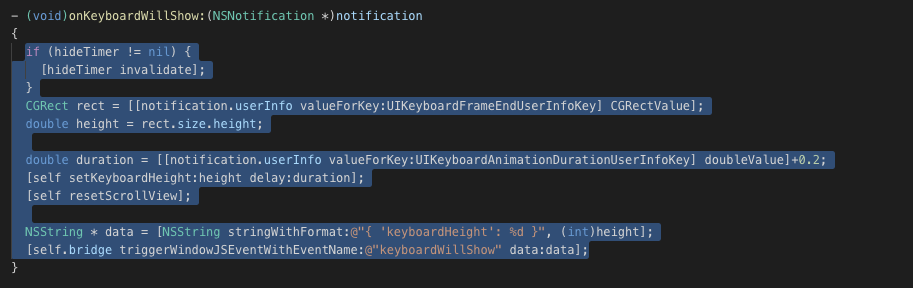
first problem, when i see Keyboard.m file, the file seems to be a wrong version
file on ios/App/Pods/Capacitor/Capacitor/Pugins/Keyboard.m:
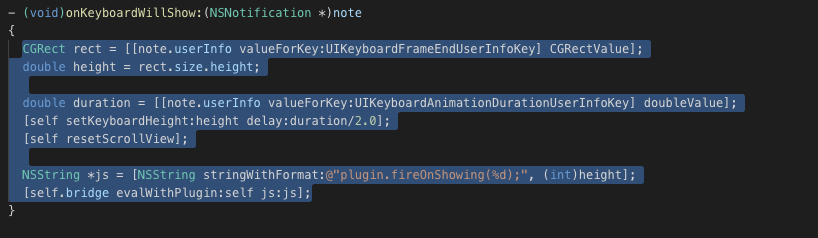
file on node_modules/@Capacitor/ios/ios/Capacitor/Capacitor/Plugins/Keyboard.m:
maxime-guyot
on 3 May 2019
Try to log what I wrote inside the window.addEventListener...
solojuve1897
on 3 May 2019
Do you have some custom plugin?
Can you post your Podfile content?
Doesn't look like it's using node_modules version, but instead an old version.
 jcesarmobile
on 3 May 2019
jcesarmobile
on 3 May 2019
Yes! with window.addEventListener it work !
import { Plugins } from "@capacitor/core";
const { Keyboard } = Plugins;
Keyboard.addListener("keyboardWillShow", function(e) {
console.log("Hey !?"); //not logged :(
console.log(e); //not logged :(
console.log(e.detail.keyboardHeight); //not logged :(
});
window.addEventListener("keyboardWillShow", function(e) {
console.log(e); //log {"isTrusted":false}
console.log(e.detail.keyboardHeight); //log 335
});
No custom plugin.
Have you an idea for the version of my Keyboard.m file ?
Podfile:
platform :ios, '11.0'
use_frameworks!
# workaround to avoid Xcode 10 caching of Pods that requires
# Product -> Clean Build Folder after new Cordova plugins installed
# Requires CocoaPods 1.6 or newer
install! 'cocoapods', :disable_input_output_paths => true
def capacitor_pods
# Automatic Capacitor Pod dependencies, do not delete
pod 'Capacitor', :path => '../../node_modules/@capacitor/ios'
pod 'CapacitorCordova', :path => '../../node_modules/@capacitor/ios'
# Do not delete
end
target 'App' do
capacitor_pods
# Add your Pods here
end
Yes @maxime-guyot as I suspected. I think I encountered the same while implementing it myself. Why it behaves like this though I can't explain.
solojuve1897
on 3 May 2019
No idea, I don't even have ios/App/Pods/Capacitor, I only have ios/App/Pods/Local Podspecs/Capacitor.
Anyway, if it works with console.log(e.detail.keyboardHeight);, that's how it's supposed to work, I think the problem of console.log(e) might be a bug in the console plugin. I can't reproduce it at the moment, but I've certainly seen it in the past.
Will keep the issue open to also add the event to the Keyboard plugin listener as seems more natural, I added it to window for compatibility reasons.
jcesarmobile
on 3 May 2019
Bellow my ios folder after npx cap add ios :
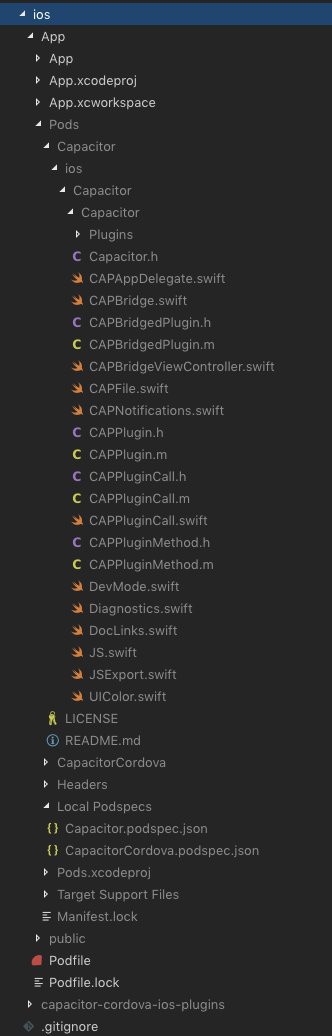
Another point, i can see on Capacitor.podspec.json version "1.0.0-beta.21" but my version on package.json is "^1.0.0-beta.22" ...
maxime-guyot
on 3 May 2019
The version mismatch is a known issue on the publish script.
Not sure why your Local Podspecs folder is empty, Capacitor and CapacitorCordova should be there instead of being on the root.
Anyway, if it's working now, looks like it's using the good ones.
jcesarmobile
on 3 May 2019
@solojuve1897 as you are using the window event, be aware that on next release the keyboardHeight will be in the event directly instead of being on the event details, there won't be details anymore. This is for better Cordova compatibility.
But I would recommend using the new events that can be consumed from the plugin directly instead of using the window events.
jcesarmobile
on 16 May 2019
Thanx for the heads up!
solojuve1897
on 16 May 2019
please how can I pass the value to data not working I can only log the result
window.addEventListener('keyboardWillShow', (e) => {
this.KeyHight = e.keyboardHeight
console.log('keyboard will show with height', e.keyboardHeight)
})
Keyboard.addListener('keyboardDidShow', (e) => {
this.KeyHight = e.keyboardHeight
})
none work I cant get the value to this.KeyHight
 diadal
on 20 Feb 2020
diadal
on 20 Feb 2020
@diadal I had the same problem, it seems like the native Capacitor addListener (or the code, which needs to be executed within it) runs outside the Angulars Zone. So we need to let the code run within the Angualars Zone again.
I'm setting a variables value to true or false, when the keyboard will show or hide.
My (shortened) code:
import { NgZone } from '@angular/core';

[...]

constructor(
   private ngZone: NgZone
) {}

[...]

private keyboardIsVisible: boolean = false;

[...]

public myInitFunction(): void {

    try {

        // Listen to `keyboardWillShow` event
        Keyboard.addListener('keyboardWillShow', () => {

            this.ngZone.run(() => {
                this.keyboardIsVisible = true;
            });

        });

        // Listen to `keyboardWillHide` event
        Keyboard.addListener('keyboardWillHide', () => {

            this.ngZone.run(() => {
                this.keyboardIsVisible = false;
            });

        });

    } catch (error) {

        // Error
        console.error(error);

    } finally {

        // Return
        return;

    }

}

[...]
Could this may be a general bug, when using Ionic 4 / 5 with Capactior(s native Bridge)?
Hope it helps.
Cheers
Unkn0wn0x
 Unkn0wn0x
on 18 Apr 2020
Unkn0wn0x
on 18 Apr 2020
I use different method to fix this issue without using the plugin
diadal
on 18 Apr 2020
Keyboard.addListener('keyboardWillShow', () => {
        this.ngZone.run(() => {
            this.keyboardIsVisible = true;
        });

    });

    // Listen to `keyboardWillHide` event
    Keyboard.addListener('keyboardWillHide', () => {

        this.ngZone.run(() => {
            this.keyboardIsVisible = false;
        });

    });
This Logic works for me....Thanks unknownn
 sujeetulli
on 4 Jun 2020
sujeetulli
on 4 Jun 2020
Related issues
 MatanYadaev
·
3Comments
MatanYadaev
·
3Comments
 alexcroox
·
3Comments
alexcroox
·
3Comments
 peterpeterparker
·
3Comments
peterpeterparker
·
3Comments
 daniel-lucas-silva
·
3Comments
daniel-lucas-silva
·
3Comments
 json-derulo
·
3Comments
json-derulo
·
3Comments
Most helpful comment
@diadal I had the same problem, it seems like the native Capacitor
addListener(or the code, which needs to be executed within it) runs outside the Angulars Zone. So we need to let the code run within the Angualars Zone again.I'm setting a variables value to true or false, when the keyboard will show or hide.
My (shortened) code:
Could this may be a general bug, when using Ionic 4 / 5 with Capactior(s native Bridge)?
Hope it helps.
Cheers
Unkn0wn0x