Capacitor: [1.0.0-beta.17][iOS] Keyboard shows up at a different speed than the padding is set
Hi,
1119 has fixed the keyboard showing up but there is a issue on synchronization : the keyboard shows up slower than the content area being resized. So it renders a white (or black) space during the transition.
You can see it in the video attached below (in this case it's white but that's the same behavior):
https://github.com/ionic-team/capacitor/files/2753038/ScreenRecording_01-13-2019.12-44-22.zip
While inspecting the ion-content element with my browser and my iPhone, I can see this white space is not part of the ion-content nor the ion-app.
I can confirm it by setting a background color to it and it doesn't change this space color.
But I figured out it works when setting the background color on either the
Thank you,
 sneko
sneko
All 19 comments
Which resize mode are you using?
 jcesarmobile
on 29 Jan 2019
jcesarmobile
on 29 Jan 2019
"ionic"
sneko
on 29 Jan 2019
So should be fixed by https://github.com/ionic-team/capacitor/pull/1180 too
jcesarmobile
on 29 Jan 2019
I just applied this PR to my project but I'm still seeing the content area being reduced too quickly compared to the keyboard showing up. I can see a white background during this transition (as shown on the video).
My settings are:
  "plugins": {
    "Keyboard": {
      "resize": "ionic"
    },
Well, I made some other changes in a previous PR already merged, so just applying the changes is not enough, you should copy the full class to make sure it contains the same content
jcesarmobile
on 30 Jan 2019
I tried by copying the whole file but this doesn't work. Maybe there are other things I missed.
I will either try with beta.18 or when I will have more time to replace my local Capacitor with a fork, then will close this issue as soon as possible :)
sneko
on 30 Jan 2019
Hi @jcesarmobile ,
I was having the same issue as #1180 and was able to resolve it by replacing the code in keyboard.m with your revision. But I am now having the same issue as @sneko . Is there a succinct way to npm install the latest and greatest without a release?
 zsoflin
on 25 Feb 2019
zsoflin
on 25 Feb 2019
Can you try with beta 19?
jcesarmobile
on 20 Mar 2019
@jcesarmobile I will reach you on that as soon as I don't have anymore any trouble to upgrade to beta.18+ without breaking Typescript definitions to Capacitor plugins I use. It will be easier to answer according to my application environment.
Thank you,
sneko
on 20 Mar 2019
@jcesarmobile I just tested with the beta.19 and the problem is still there although a bit different: on the video I posted for this issue the blank space was visible when keyboard showing up and not when hiding.
But now I notice a little white space when it shows up and not when it goes down.
After having made some tests with the beta.19 I can affirm that's the ion-app element that takes time to synchronize. On the other side the body element has still a height of 100vh so if I give it a red background the "blank space" I was talking about is now red.
A solution could be to give to the body element the same background than what's currently in the ion-app/ion-content. But we would also have to prevent the keyboard from being translucent (I can see the red background through the keyboard)
sneko
on 26 Mar 2019
Here is the same kind of video with the red background to illustrate (much easier to understand I guess 😄 ):
Ionic issue with keyboard.MP4.zip
sneko
on 26 Mar 2019
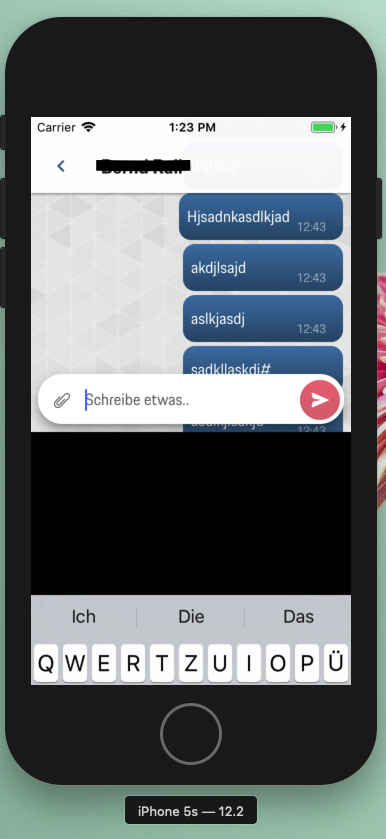
Hi, I think I'm having the same Issue. (I tried beta17 - 19)
See screenshot below.
 Kalenia
on 5 Apr 2019
Kalenia
on 5 Apr 2019
This PR should fix the black area problem when using native resize mode (default) https://github.com/ionic-team/capacitor/pull/1401
Might also fix this problem when using ionic resize mode.
jcesarmobile
on 8 Apr 2019
@jcesarmobile The black area problem was indeed fixed with your PR. Thank you!
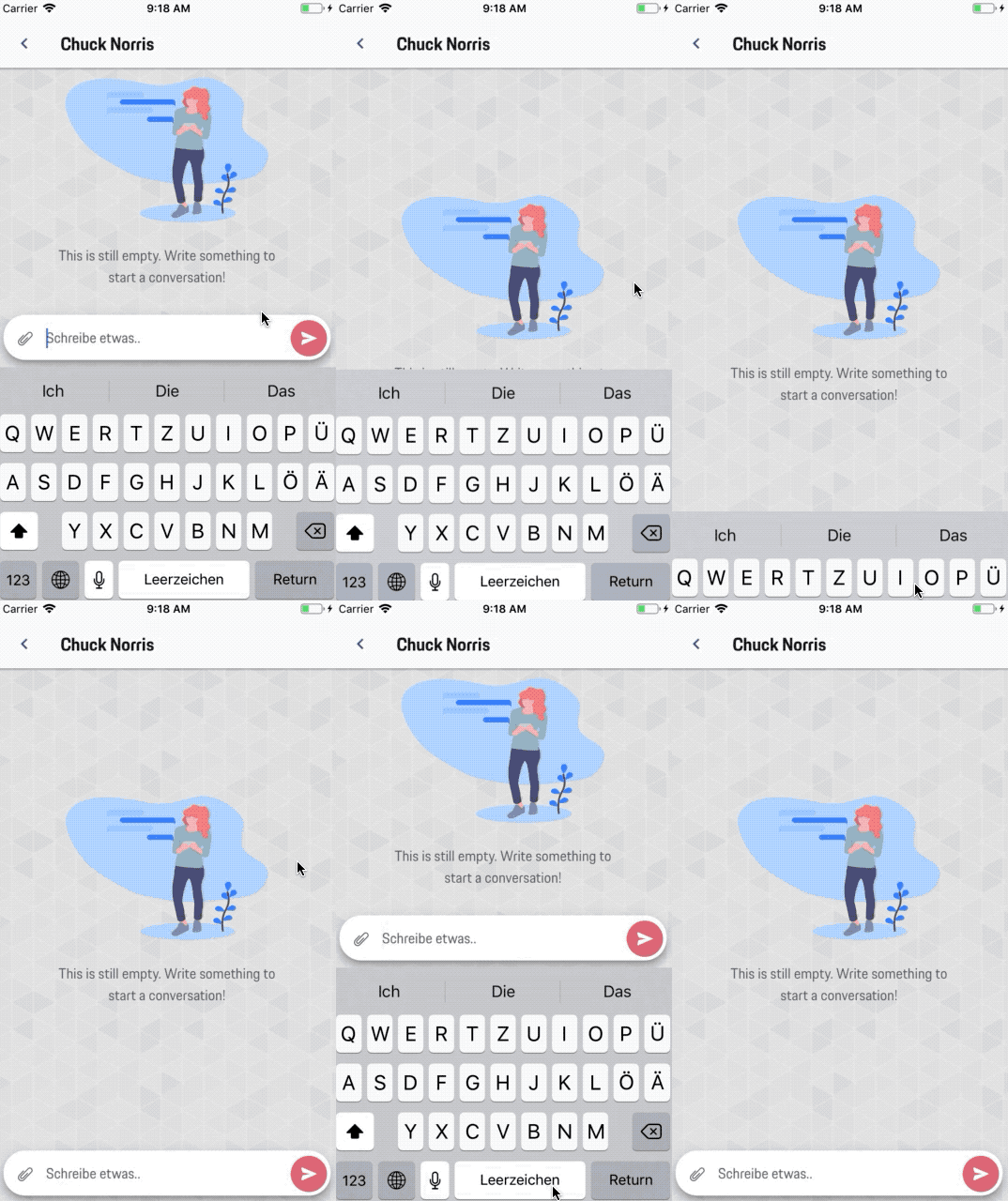
But it seems like the WebView gets shifted up too slow. Even if the keyboard is already displayed it takes some time until the whole WebView gets shifted up.. (Before I had this issue together with the black area problem)
**EDIT:
I just realized that I did not have both issues together. Before the PR I had the black area issue after the PR the Input field is too slow (as can be seen above)
Kalenia
on 16 Apr 2019
Yes. As @Kalenia has described. I have the same behaviour.
 solojuve1897
on 1 May 2019
solojuve1897
on 1 May 2019
I'm having this issue as well
 reed-lawrence
on 9 Aug 2019
reed-lawrence
on 9 Aug 2019
Also having the same issue as @Kalenia described.
 hnlpower
on 14 Oct 2019
hnlpower
on 14 Oct 2019
I have seen this issue before in Cordova, going back a few years, with the different keyboard plugins.
I believe if you use native resize the OS does the resizing and everything is in sync, if you use one of the other method which I believe makes the iOS keyboard resize the viewport as Android does, this is no longer a native implementation and as such there is going to be a jump / background showing through.
 MatthewPringle
on 5 Nov 2019
MatthewPringle
on 5 Nov 2019
this should be fixed, the new problem about being slow is already reported here https://github.com/ionic-team/capacitor/issues/1540, so closing
jcesarmobile
on 17 Jan 2020
Related issues
 nicobytes
·
3Comments
nicobytes
·
3Comments
 peterpeterparker
·
3Comments
peterpeterparker
·
3Comments
 bogdbo
·
3Comments
bogdbo
·
3Comments
 daniel-lucas-silva
·
3Comments
daniel-lucas-silva
·
3Comments
 json-derulo
·
3Comments
json-derulo
·
3Comments
Most helpful comment
@jcesarmobile The black area problem was indeed fixed with your PR. Thank you!

But it seems like the WebView gets shifted up too slow. Even if the keyboard is already displayed it takes some time until the whole WebView gets shifted up.. (Before I had this issue together with the black area problem)
**EDIT:
I just realized that I did not have both issues together. Before the PR I had the black area issue after the PR the Input field is too slow (as can be seen above)