I have been unable to find any capacitor method of setting the app version for android/ios it appears to always set the generated files to version 0.0.1/1, ignoring the package.json version defined.
Is there plans to have the generator set the app version or have I missed something in the way it currently works?
 dahlb
dahlb
All 5 comments
Capacitor doesn't edit your project, so you have to handle the version numbers in the native way for each platform.
So for iOS you set it in the target details by setting Version and Build fields

For Android you set the versionCode and versionName in the App build.gradle

 jcesarmobile
on 2 Oct 2018
jcesarmobile
on 2 Oct 2018
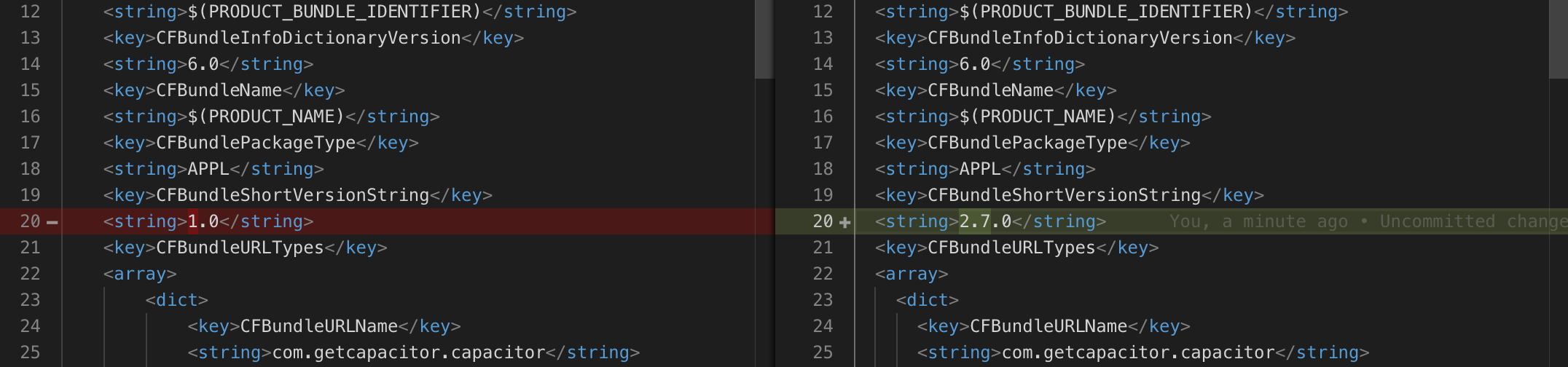
For anyone finding this as well, you can also update your ios Info.plist file too if you want to do it programmatically or something..
Changing the version number as outlined above, changed my info.plist file too:
 MikeyBeLike
on 11 Jul 2019
MikeyBeLike
on 11 Jul 2019
This would be come in handy if xcode can pickup the build and version from capacitor.config.json
{
  "appId": "za.co.stech.brand",
  "appName": "Abashwe",
  "bundledWebRuntime": false,
  "npmClient": "npm",
  "webDir": "dist",
  "build": "6",
  "version": "2"
}
 dlodeprojuicer
on 26 Jul 2019
dlodeprojuicer
on 26 Jul 2019
If you're still having this issue, check if you have your version set in build.gradle file for Android (default in android/app/build.gradle).
 marekgoczol
on 28 Aug 2019
marekgoczol
on 28 Aug 2019
+1 for being able to set this in capacitor.config.json
 REPTILEHAUS
on 1 Nov 2019
REPTILEHAUS
on 1 Nov 2019
Related issues
 TayKara
·
3Comments
TayKara
·
3Comments
 daniel-lucas-silva
·
3Comments
daniel-lucas-silva
·
3Comments
 bogdbo
·
3Comments
bogdbo
·
3Comments
 gnesher
·
3Comments
gnesher
·
3Comments
 stripathix
·
3Comments
stripathix
·
3Comments
Most helpful comment
This would be come in handy if xcode can pickup the build and version from capacitor.config.json