Capacitor: StatusBar.setBackgroundColor(color) for iOs or Plugin
Version
1.0.0-beta.4
Platfrom
iOS built application
Question
There was already a similar question or request at #194. There it is stated that setting the StatusBar background-color is not supported on iOs, but that it would be possible to use the cordova-plugin-statusbar.
But when trying to install the plugin it says that the plugin is incompatible:
$ npm install cordova-plugin-statusbar
+ [email protected]
added 1 package in 6.12s

$ npx cap sync ios
✔ Copying web assets from www to ios/App/public in 55.72ms
✔ Copying native bridge in 911.66μp
✔ Copying capacitor.config.json in 1.19ms
✔ copy in 92.41ms
✔ Updating iOS plugins in 5.71ms
  Found 0 Capacitor plugins for ios:
✔ Updating iOS native dependencies in 3.76s
  Found 1 incompatible Cordova plugin for ios, skipped install
    CordovaPluginStatusbar (2.4.2)
✔ update ios in 3.77s
Sync finished in 3.877s
Did I miss something? Is there another already implemented way to get customised background-colors for the status bar via JS code?
 philipp-schaerer-lambdait
All 10 comments
I've searched why I added the statusbar plugin to the incompatible ones and the reason was statusbar plugin makes the Capacitor app crash if UIViewControllerBasedStatusBarAppearance is set to YES (which is the default value now), so basically installing it made the app crash.
At the beginning we had UIViewControllerBasedStatusBarAppearance set to NO and when I tried the statusbar was working, that's why on that commend I recommended to use the cordova one.
As I also said on that comment, setting the statusbar background color is not really supported on iOS, the statusbar it's been transparent since iOS 7 and it's not possible to change the color. What cordova-plugin-statusbar does it to add a fake view and set it's color. We want to avoid this kind of hacks in Capacitor.
Going to close this as feature request and if it gets enough +1 reactions (it already have 2) we might consider to add it in the future. But I think this should be avoided as adding a fake view is not a good solution and most times requires resizing the webview, which causes a lot of new problems.
 jcesarmobile
on 19 Sep 2018
jcesarmobile
on 19 Sep 2018
@jcesarmobile How to match status bar with the header?
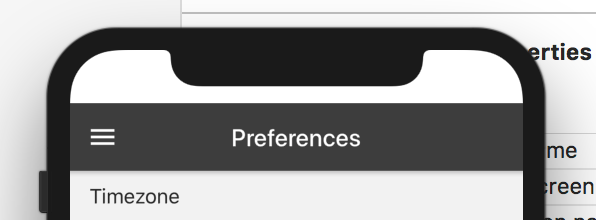
If I have to use cordova plugin then please can you share a sample code and will this cause any issue with window.innerHeight? Right now without cordova plugin window.innerHeight is giving me screen height excluding header notch and footer line.
 stripathix
on 25 Sep 2018
stripathix
on 25 Sep 2018
That looks like a safe area, not a status bar, can you provide your viewport meta tag? Are you using some framework?
jcesarmobile
on 25 Sep 2018
I am using ionic 4 + VueJs
@jcesarmobile
<meta name="viewport" content="width=device-width,initial-scale=1.0">
When I change my viewport to
<meta name="viewport" content="viewport-fit=cover, width=device-width,initial-scale=1.0, user-scalable=no">
I get this result.

I even tried below css and it has no effect.
ion-app {
  margin-top: env(safe-area-inset-top) !important;
  margin-bottom: env(safe-area-inset-bottom) !important;
}
I have it working.
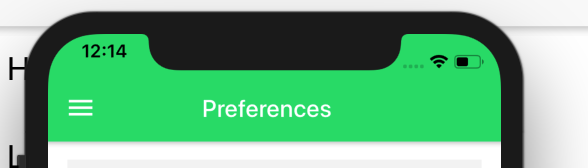
I was missing CSS reference in index.html. This is so weired in not Doc I found that we have to link Ionic.css also. I thought ionic.js itself injects css library. Am I missing something?
<link rel="stylesheet" href="https://unpkg.com/@ionic/[email protected]/css/ionic.bundle.css">
stripathix
on 26 Sep 2018
I think this feature should be added to the statusbar plugin. Let's just let those who want to fake a statusbar do it 🤔
Not much sense on making us use cordova if this is easy...
 UlisesCeca
on 20 Jun 2019
UlisesCeca
on 20 Jun 2019
Is not easy, it's an ugly hack that causes more problems than it's worth. When cordova statusbar plugin was created there weren't safe areas available you could use.
jcesarmobile
on 20 Jun 2019
My fix for this is to add div that covers the notch and you can set any background for it:
.app-navbar-notch {
  position: fixed;
  top: 0;
  left: 0;
  right: 0;
  z-index: 99;
  height: env(safe-area-inset-top);
}
 voidale
on 24 Dec 2019
voidale
on 24 Dec 2019
There is a dropwon in xcode which you can select:

 Robinhoeh
on 3 Apr 2020
Robinhoeh
on 3 Apr 2020
@Robinhoeh Its applied to the whole iOS apps.
 SnowBases
on 12 Jul 2020
SnowBases
on 12 Jul 2020
Related issues
 ebk46
·
3Comments
ebk46
·
3Comments
 nicobytes
·
3Comments
nicobytes
·
3Comments
 natevw
·
3Comments
natevw
·
3Comments
 bogdbo
·
3Comments
bogdbo
·
3Comments
 moberwasserlechner
·
3Comments
moberwasserlechner
·
3Comments
Most helpful comment
I've searched why I added the statusbar plugin to the incompatible ones and the reason was statusbar plugin makes the Capacitor app crash if
UIViewControllerBasedStatusBarAppearanceis set toYES(which is the default value now), so basically installing it made the app crash.At the beginning we had
UIViewControllerBasedStatusBarAppearanceset toNOand when I tried the statusbar was working, that's why on that commend I recommended to use the cordova one.As I also said on that comment, setting the statusbar background color is not really supported on iOS, the statusbar it's been transparent since iOS 7 and it's not possible to change the color. What cordova-plugin-statusbar does it to add a fake view and set it's color. We want to avoid this kind of hacks in Capacitor.
Going to close this as feature request and if it gets enough +1 reactions (it already have 2) we might consider to add it in the future. But I think this should be avoided as adding a fake view is not a good solution and most times requires resizing the webview, which causes a lot of new problems.