Capacitor: [Android Studio] Errors after Capacitor update in Android Studio
[X] I would to submit a bug or support question
Current behavior
I'm not sure if it's a bug or just something I should ignore, but each time I update capacitor in my existing test project, build, copy and then open Android Studio I face the following errors (first error popup straight after Android Studio open, the other one after automatic build)
16.03.18
15:02 Unsupported Modules Detected: Compilation is not supported for following modules: assets-capacitor-android-plugins~1, capacitor-android-plugins. Unfortunately you can't have non-Gradle Java modules and Android-Gradle modules in one project.15:02 Unsupported Modules Detected: Compilation is not supported for following modules: assets-capacitor-android-plugins~1, capacitor-android-plugins. Unfortunately you can't have non-Gradle Java modules and Android-Gradle modules in one project.
15:02 Unregistered VCS root detected
The directory /Users/me/Documents/projects/lab/capacitor-camera is under Git, but is not registered in the Settings.
Add root Configure Ignore15:03 Gradle sync started
15:03 Error Loading Project: Cannot load module assets-capacitor-android-plugins Details...
15:03 Platform and Plugin Updates: The following components are ready to update: Android Emulator, Google Play services
15:03 Project setup started
15:03 Gradle sync failed: java.lang.NullPointerException (41s 709ms)

Expected behavior
No error I guess, but like I said, maybe I do something wrong
Current way to solve this
To solve this, each time I remove the "platform"
rm -r android
and then add it again
npx cap add android
npx cap sync
npx cap open android
Steps to reproduce
npm remove --save @capacitor/core @capacitor/cli
npm install --save @capacitor/core @capacitor/cli
ionic build --prod
npx cap copy
npx cap open android
p.s.: all the above steps are successful and produce no errors
Others informations
Gradle 4.6
Groovy: 2.4.12
Ant: Apache Ant(TM) version 1.9.9 compiled on February 2 2017
JVM: 1.8.0_60 (Oracle Corporation 25.60-b23)
OS: Mac OS X 10.12.6 x86_64
 peterpeterparker
All 44 comments
Do you have cordova plugins in your project?
 jcesarmobile
on 16 Mar 2018
jcesarmobile
on 16 Mar 2018
@jcesarmobile to create the project I did "ionic start ..." answered no to "would you like to add iOS/android" and then as described in the doc, as far as I remember, deleted the splash screen plugin
peterpeterparker
on 16 Mar 2018
@jcesarmobile to create the project I did "ionic start ..." answered no to "would you like to add iOS/android" and then as described in the doc, as far as I remember, deleted the splash screen plugin
but like I said, it's an existing one (the one I use for my camera tests)
peterpeterparker
on 16 Mar 2018
what template did you choose?
jcesarmobile
on 16 Mar 2018
@jcesarmobile menu ("hamburger menu top left")
peterpeterparker
on 16 Mar 2018
I'm not able to reproduce, but might be related to removing capacitor cli as we write a lot of things there, so after removing it, better run a cap sync or cap update to make sure everything is recreated, specially if you have Cordova or custom plugins.
jcesarmobile
on 16 Mar 2018
Same same.
You know what, this problem appears because Android Studio, the very first time I open the project (npx cap open android after having created a fresh new platform like described above) in it, create a folder capacitor-android-plugins with the following manifests/AndroidManifest.xml file in it
<?xml version='1.0' encoding='utf-8'?>
  <manifest package='capacitor.android.plugins' xmlns:android='http://schemas.android.com/apk/res/android'>
</manifest>
Then, if I close it and open it again, it will try to compile this and complains.
Does that make sense? Do you also have such a folder/file in your project?

peterpeterparker
on 16 Mar 2018
Yeah, I have it and doesn't complain about it
jcesarmobile
on 16 Mar 2018
Weird....I'll keep an eye on it. I saw that I "need" to update one or two Android libs, maybe it will help
peterpeterparker
on 17 Mar 2018
Maybe it is because the android studio files are committed. I had the same issue. After removing them it was not a problem any longer. I modified the default gitignore to reflect this:
https://github.com/ionic-team/capacitor/pull/378
 JStumpp
on 26 Mar 2018
JStumpp
on 26 Mar 2018
Keeping an eye on this. I haven't run into it myself
 mlynch
on 26 Mar 2018
mlynch
on 26 Mar 2018
cool @JStumpp I'll will keep an eye on it too
if I can't reproduce it anymore, count on me to close the issue
peterpeterparker
on 27 Mar 2018
mmmmh I could "still" reproduce the problem after upgrading from alpha25 to alpha31
I tried to remove the git origin (git remote rm origin) but they were none to remove
so I did
npm install --save @capacitor/core @capacitor/cli
ionic build --prod
npx cap sync
npx cap open android
I've left the project for about a week, then when returned faced the same set of errors. I even didn't change anything in it!
npx cap sync or npx cap update didn't make any difference, nor attempts to clear or rebuild project.
 ArmorDarks
on 26 Jul 2018
ArmorDarks
on 26 Jul 2018
Removing and adding android directory again helped, though, none of the tracked by Git files changed, so I assume it is something to do with files listed in .gitignore...
ArmorDarks
on 27 Jul 2018
Seems to be unrelated to the android directory at all, since resetting it to defaults doesn't help. However, resetting @capacitor node_modules content does help.
I assume Gradle writes in Capacitor node_modules something that later leads to this issue.
ArmorDarks
on 30 Jul 2018
I had the same problem after I've returned to my project and updated the capacitor.
However, invalidating the cache and restarting (File > Invalidate Caches/Restart) did the job. Is that something you've tried?
 durasj
on 29 Aug 2018
durasj
on 29 Aug 2018
Closing without more info there's not much we can do here. Try invalidating caches and restarting as recommended above. It's just one of those things you get used to when doing Android development as Android Studio makes mistakes sometimes.
mlynch
on 24 Jan 2019
I am still facing the issue
 krithikuntukad
on 5 Nov 2019
krithikuntukad
on 5 Nov 2019
same here
 SergioSuarezDev
on 5 Nov 2019
SergioSuarezDev
on 5 Nov 2019
@SergioSuarezDev @krithikuntukad , i solved this issue by sync the project ( File -> Sync Project with gradle files)
Hope it will help
 Brayan233
on 6 Nov 2019
Brayan233
on 6 Nov 2019
Ty @Brayan233 , that fixes my build
 jnettome
on 13 Nov 2019
jnettome
on 13 Nov 2019
I'm getting: Unsupported Modules Detected: Compilation is not supported for following modules: capacitor-cordova-android-plugins. Unfortunately you can't have non-Gradle Java modules and Android-Gradle modules in one project. which results in the same problem
 kristianmandrup
on 20 Nov 2019
kristianmandrup
on 20 Nov 2019
@SergioSuarezDev @krithikuntukad , i solved this issue by sync the project ( File -> Sync Project with gradle files)
Hope it will help
works like a charm! thx
SergioSuarezDev
on 23 Nov 2019
@SergioSuarezDev @krithikuntukad , i solved this issue by sync the project ( File -> Sync Project with gradle files)
Hope it will help
This worked.
 jdcifuentes
on 14 Dec 2019
jdcifuentes
on 14 Dec 2019
There's another way I've found to fix it, File -> Invalidate Caches / Restart -> Invalidate and Restart
jnettome
on 14 Dec 2019
Faced the issue, again.
Neither "Invalidate Caches / Restart" nor "Sync Project with gradle files" solved the problem, after each restart I still faced the issue.
Add no other choice than delete (rm -r android) and add (npx cap add android) the android project to clean it and "solve" the issue.
peterpeterparker
on 2 Feb 2020
@SergioSuarezDev @krithikuntukad , i solved this issue by sync the project ( File -> Sync Project with gradle files)
Hope it will help
This works!
 razmans
on 4 Feb 2020
razmans
on 4 Feb 2020
i solved this by running the following command : ionic capacitor update android
it works fine !
 hichamregoug
on 26 Feb 2020
hichamregoug
on 26 Feb 2020
I am still getting this error. Tried all recommended solution.
 wannadream
on 10 Mar 2020
wannadream
on 10 Mar 2020
None of the recommended solutions worked for me.
Removing the /android/.idea folder did the job
 Niiitzer
on 26 Mar 2020
Niiitzer
on 26 Mar 2020
Try to close android studio, re open it and retry again : ionic capacitor update android
hichamregoug
on 26 Mar 2020
@hichambranis thanks but that wasn't working on my side, don't know why.
Removing the /android/.idea folder helped me
Niiitzer
on 26 Mar 2020
Removing the /android/.idea folder helped me :)
 skmohammadi
on 27 Mar 2020
skmohammadi
on 27 Mar 2020
Removing the /android/.idea folder did the job
That did the trick for me!
 heniotierra
on 30 Mar 2020
heniotierra
on 30 Mar 2020
Faced the issue, again.
Neither "Invalidate Caches / Restart" nor "Sync Project with gradle files" solved the problem, after each restart I still faced the issue.
Add no other choice than delete (
rm -r android) and add (npx cap add android) the android project to clean it and "solve" the issue.
Same here. I didn't remove android but even with the error shown by Android Studio saying that you cannot compile the project, I hit Build > Build Bundle(s) / APK(s) > Build APK(s) and it worked (and that's what I wanted)
 cdCarlos
on 7 Apr 2020
cdCarlos
on 7 Apr 2020
Removing the /android/.idea folder helped me :)
This removes the error
cdCarlos
on 7 Apr 2020
Removing the /android/.idea folder did the job
Same here. It was the only solution that worked for me. Thanks @Niiitzer !
 florian-sander
on 14 Apr 2020
florian-sander
on 14 Apr 2020
Removing the /android/.idea folder helped me :)
Yes, did the trick. Thanks.
 sunil-developer-ios
on 29 Apr 2020
sunil-developer-ios
on 29 Apr 2020
This just keeps... coming... back. Anyone else keep having this issue over and over again? If so, how did you solve it?
 lincolnthree
on 6 May 2020
lincolnthree
on 6 May 2020
Yep, just keeps coming back for me, keep having to remove the idea folder
 coffeymatt
on 7 May 2020
coffeymatt
on 7 May 2020
@mlynch Any chance this could be reopened? It seems simple to reproduce with the latest versions of everything:
- Clear out and recreate the android project
- Run it, it works first time (asks to update gradle). Close it.
- Run npx cap sync android
- Run npx cap open android, error is back:
Unsupported Modules Detected: Compilation is not supported for following modules: capacitor-cordova-android-plugins, android-capacitor-cordova-android-plugins. Unfortunately you can't have non-Gradle Java modules and Android-Gradle modules in one project.
coffeymatt
on 7 May 2020
I'm getting this error too @mlynch so maybe this should be re-opened.
 richardkshergold
on 21 May 2020
richardkshergold
on 21 May 2020
I'm getting the error too. Trying to run a Vue Ionic app using 'npm run build:android' which just packages the npx stages.
"build:android": "npm run build; npx cap sync android; npx cap open android"
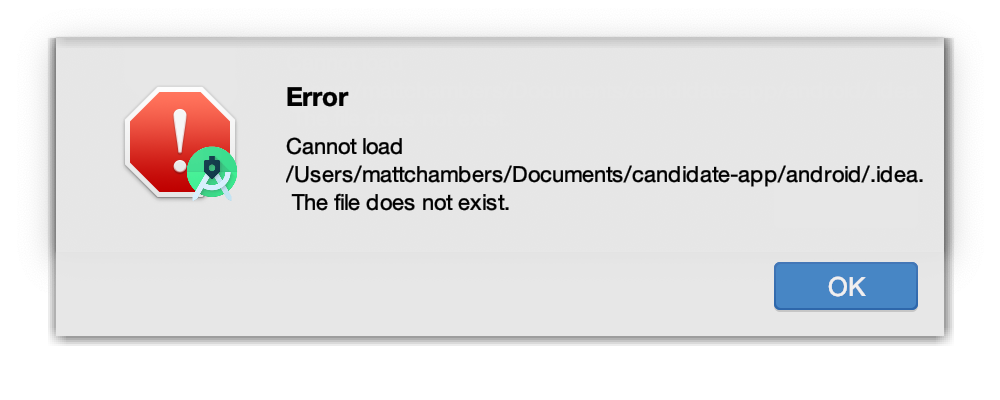
 miainchambers
on 21 May 2020
miainchambers
on 21 May 2020
Related issues
 nicobytes
·
3Comments
nicobytes
·
3Comments
 stripathix
·
3Comments
stripathix
·
3Comments
 json-derulo
·
3Comments
json-derulo
·
3Comments
 bogdbo
·
3Comments
mlynch
·
3Comments
bogdbo
·
3Comments
mlynch
·
3Comments
Most helpful comment
@SergioSuarezDev @krithikuntukad , i solved this issue by sync the project ( File -> Sync Project with gradle files)
Hope it will help