Canvasblocker: "CanvasBlocker navigator settings" page does not work (Bug)
I am having a problem with "CanvasBlocker navigator settings".
When I click on the buttons to select the operating system and or browser, nothing happens. The values do not change, the buttons are not highlighted in red.
Due to the above problem, the "Navigator test" page shows that sometimes the protection of the Navigator does not work. By restarting the browser several times, sometimes it turns out to achieve the inclusion of protection.
Sometimes the navigator settings page works fine (but very rarely).
 troubleword
All 23 comments
Please give me the exact Firefox Version, CB Version and your settings. Can you reproduce the problem on a fresh profile?
 kkapsner
on 23 Feb 2020
kkapsner
on 23 Feb 2020
Do you see any error messages in the browser console (Ctrl + Shift + K)?
kkapsner
on 23 Feb 2020
Firefox version: 73.0.1 (64 bit)
CanvasBlocker Version used: 1.1
Operating System: Windows 10 Pro x64 v. 1809 (17763.1039)
I also reinstalled Mozilla, but that did not help.
Errors in the browser console appear only on the "navigator test" page and only when the test is failed.
Errors in the console I attach to the letter.
CB Errors.txt
troubleword
on 23 Feb 2020
troubleword
on 23 Feb 2020
I found that the problem of CanvasBlocker malfunctioning is due to incompatibility with several plugins (more than 3).
Tomorrow I will check and send you a list of plug-ins incompatible with the CanvasBlocker.
One way or another, the problem with the operation of buttons ("Navigator settings"), check-boxes ("Navigator API" list does not open without a reboot) is observed only in CanvasBlocker (from all installed plugins).
troubleword
on 23 Feb 2020
I checked with which plug-ins the CanvasBlocker does not work correctly, there were a lot of them. For instance, NoScript, Font Fingerprint Defender, StoragErazor, etc..
There is a problem with each of them individually. However, when disabling problem plugins, the CanvasBlocker worked correctly.
However, on another computer there were no problems with the CanvasBlocker, even with all installed plugins.
I am attaching a screenshot with one of the bugs.
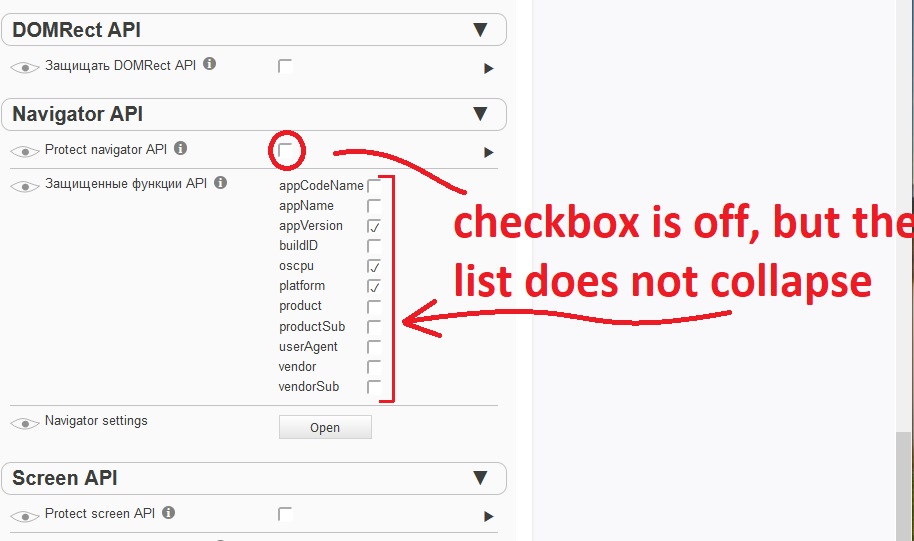
troubleword
on 24 Feb 2020
This is really weird... especially as WebExtensions should not influence the GUI of each other.
Is the problem also visible if you open the options page in a new tab (link in the top of the page)?
I see no problems with NoScript on my end.
Have you tried removing CB, restarting the browser and the reinstalling it?
PS: I would advice not to use Font Fingerprint Defender: https://github.com/kkapsner/CanvasBlocker/issues/200#issuecomment-578158039
kkapsner
on 24 Feb 2020
Is the problem also visible if you open the options page in a new tab (link in the top of the page)?
In a new tab, the problem is visible.
Have you tried removing CB, restarting the browser and the reinstalling it?
Yes, I completely reinstalled the browser and reinstalled all the plugins.
I guess the problem is in Windows. It's time to reinstall.
PS: Font Fingerprint Defender - thanks, I'll look for analogues.
troubleword
on 25 Feb 2020
Maybe you can try with deleting profile folder.
Exit firefox.
Delete (you can also make a backup copy/zip before) folder %appdata%\Mozilla\Firefox
Start FF, install CB and test again.
 crssi
on 25 Feb 2020
crssi
on 25 Feb 2020
At first it seemed to help (even with the plugins installed), but after setting up all the plugins, it does not work again.
troubleword
on 26 Feb 2020
Put the same plugins with the same settings on another computer. Everything works there. Apparently, it's time to reinstall Windows. Thanks to all!
troubleword
on 26 Feb 2020
This issue is a little bit weird...
But thanks for investigating further. If you see the problem again and have more information you can simply reopen this issue.
kkapsner
on 27 Feb 2020
Hi!
Sorry for resurrecting the closed issue, but I think I have similar problem that the OP. I' m using Firefox 78.0.1(64-bit) on ArchLinux. After some time of working the CanvasBlocker preferences page becomes "dead", its content is not being updated when i make any changes in settings. For example, if I check the 'Expert mode' checkbox, nothing happened, the additional settings does not show up. If I change RNG mode from 'persistent' to 'none', I still see the options for the 'persistent' mode. If I manually refresh the settings page, Its content is being updated, but the changes I made is not being applied until I disable the add-on, restart Firefox and re-enable the add-on. After that the issue is gone for a while, but after some time it comes back again. The issue occurs with a fresh Firefox profile as well.
This is my settings:
{
    "logLevel": 1,
    "urlSettings": [],
    "hiddenSettings": {},
    "expandStatus": {},
    "displayHiddenSettings": true,
    "whiteList": "192.168.0.1",
    "sessionWhiteList": "",
    "blackList": "",
    "blockMode": "fake",
    "protectedCanvasPart": "input",
    "minFakeSize": 10,
    "maxFakeSize": 0,
    "rng": "persistent",
    "protectedAPIFeatures": {},
    "useCanvasCache": true,
    "ignoreFrequentColors": 3,
    "minColors": 3,
    "fakeAlphaChannel": false,
    "webGLVendor": "",
    "webGLRenderer": "",
    "webGLUnmaskedVendor": "",
    "webGLUnmaskedRenderer": "",
    "persistentRndStorage": "{\"[email protected]\":[72,76,81,37,172,231,192,238,1,6,39,143,78,253,53,224,40,71,47,203,154,103,220,45,100,218,174,140,66,208,247,201,108,22,14,99,11,177,189,92,186,226,31,112,164,250,51,90,217,25,22,205,31,175,169,83,166,30,92,254,176,12,161,0,76,227,29,230,174,8,252,233,214,86,125,49,13,3,87,63,215,2,89,77,68,50,111,159,184,63,2,10,237,48,198,6,157,181,253,73,54,255,1,228,101,206,65,8,111,45,28,66,41,206,115,32,164,81,204,236,186,10,218,146,189,195,124,222],\"[email protected]\":[212,121,184,81,94,165,141,87,19,132,225,136,64,243,236,178,228,218,219,96,109,146,247,160,98,186,245,215,160,77,144,234,39,47,127,11,48,167,227,132,14,217,96,104,32,242,249,65,134,175,201,147,100,162,113,151,245,24,121,143,226,159,34,11,95,142,20,204,161,225,77,24,205,39,241,233,12,161,143,215,85,1,111,173,195,227,183,207,16,110,194,114,96,220,44,98,89,16,95,45,23,59,196,35,74,168,88,226,206,231,148,160,10,18,101,227,71,42,75,7,194,171,101,73,4,107,10,214],\"[email protected]\":[33,231,75,171,189,80,235,75,14,49,196,246,172,164,129,3,66,21,207,198,160,115,160,253,190,209,18,250,87,121,90,70,153,179,46,223,235,77,228,219,114,245,209,233,227,209,130,95,220,158,141,153,196,182,107,9,138,178,35,168,117,106,148,234,236,103,24,64,19,228,123,59,128,96,139,144,139,92,230,18,114,160,162,236,85,97,47,22,140,190,69,137,102,38,131,116,0,52,200,42,0,112,23,174,252,36,124,179,87,165,217,124,156,94,65,229,199,18,15,61,170,230,104,108,208,41,231,23],\"[email protected]\":[87,38,194,97,150,155,83,87,181,139,203,158,131,64,165,140,67,50,195,61,158,238,56,218,171,28,199,34,143,44,223,203,78,43,138,130,148,73,131,84,150,78,74,234,132,14,230,41,47,44,17,145,254,53,217,185,100,152,243,231,54,71,233,47,102,240,77,237,113,149,26,71,98,97,114,96,146,28,17,47,192,181,86,13,124,101,130,75,167,148,36,74,165,209,126,223,148,23,64,192,66,199,15,202,40,121,139,87,104,198,200,233,62,79,151,80,82,96,238,207,18,86,202,202,81,181,70,45],\"[email protected]\":[132,181,1,18,155,237,75,67,71,250,246,159,140,5,204,199,11,162,77,227,255,166,198,15,51,160,215,234,192,140,153,248,24,14,254,211,245,48,47,103,204,109,173,240,214,216,147,42,210,130,179,226,88,144,235,236,45,231,41,234,30,177,102,161,194,186,60,94,26,244,114,148,174,79,144,73,84,67,223,112,90,111,244,232,106,148,115,63,32,98,171,152,21,63,11,175,240,22,189,239,253,88,87,158,229,246,7,81,126,8,50,240,40,118,12,56,213,27,89,143,90,227,8,182,125,235,51,82],\"[email protected]\":[50,156,255,21,145,97,123,208,94,241,132,174,171,26,30,127,110,63,88,115,208,159,217,39,38,106,198,140,179,251,176,183,6,6,208,172,14,151,173,101,174,205,138,22,109,60,175,195,23,149,169,120,90,115,131,58,148,100,59,23,11,232,156,25,38,27,83,159,216,202,183,83,27,109,232,136,27,202,213,112,54,38,54,116,248,150,198,189,241,2,108,149,128,181,191,253,185,228,115,83,218,96,110,27,171,52,44,124,173,4,22,79,248,133,115,31,43,210,192,25,73,36,235,219,70,132,216,67],\"[email protected]\":[137,184,214,251,99,137,194,7,110,91,63,232,248,30,245,13,47,120,123,154,70,25,140,228,166,146,232,187,71,49,97,207,191,130,34,32,229,81,237,84,162,41,115,68,104,174,180,114,45,6,191,186,54,99,151,92,108,12,191,236,182,150,11,142,115,236,49,97,73,2,103,170,25,151,9,195,71,85,107,252,36,248,26,200,229,22,18,75,82,23,87,100,241,106,56,212,12,129,106,213,227,102,230,253,134,244,158,144,7,169,120,29,245,99,16,3,89,16,193,198,27,4,150,153,249,33,43,193]}",
    "persistentIncognitoRndStorage": "{}",
    "storePersistentRnd": true,
    "persistentRndClearIntervalValue": 0,
    "persistentRndClearIntervalUnit": "days",
    "lastPersistentRndClearing": 1594039927911,
    "sharePersistentRndBetweenDomains": false,
    "askOnlyOnce": "individual",
    "askDenyMode": "block",
    "showCanvasWhileAsking": true,
    "showNotifications": true,
    "highlightPageAction": "blink",
    "highlightBrowserAction": "color",
    "displayBadge": true,
    "storeNotificationData": false,
    "storeImageForInspection": false,
    "ignoreList": "",
    "ignoredAPIs": {},
    "showCallingFile": false,
    "showCompleteCallingStack": false,
    "enableStackList": false,
    "stackList": "",
    "protectAudio": true,
    "audioFakeRate": "100",
    "audioNoiseLevel": "minimal",
    "useAudioCache": true,
    "audioUseFixedIndices": true,
    "audioFixedIndices": "5",
    "historyLengthThreshold": 2,
    "protectWindow": false,
    "allowWindowNameInFrames": false,
    "protectDOMRect": true,
    "domRectIntegerFactor": 4,
    "protectTextMetrics": true,
    "blockDataURLs": true,
    "protectNavigator": false,
    "navigatorDetails": {},
    "protectScreen": true,
    "screenSize": "",
    "fakeMinimalScreenSize": false,
    "displayAdvancedSettings": true,
    "displayDescriptions": false,
    "theme": "auto",
    "dontShowOptionsOnUpdate": false,
    "isStillDefault": false,
    "storageVersion": 1
}
 Alexey104
on 6 Jul 2020
Alexey104
on 6 Jul 2020
I cannot reproduce your problem. Do you see any error messages in the browser console (ctrl+shift+j)?
kkapsner
on 6 Jul 2020
Do you see any error messages in the browser console
These errors appear when opening CB settings:
target is null MessageManagerProxy.jsm:171
WebExtension context not found! ExtensionParent.jsm:1113
target is null MessageManagerProxy.jsm:171
WebExtension context not found! ExtensionParent.jsm:1113
[Exception... "Component returned failure code: 0x80004005 (NS_ERROR_FAILURE) [nsIDOMWindowUtils.addSheet]"  nsresult: "0x80004005 (NS_ERROR_FAILURE)"  location: "JS frame :: resource://gre/modules/ExtensionCommon.jsm :: runSafeSyncWithoutClone :: line 75"  data: no] ExtensionCommon.jsm:75:12
TypeError: wgc is null ExtensionCommon.jsm:501:19
sender.tab is undefined main.js:672
sendRemoveListener on closed conduit [email protected] ConduitsChild.jsm:108
uncaught exception: Object
Promise resolved after context unloaded
settings.js:442
Promise resolved after context unloaded
2 utils.js:291
DataCloneError: The object could not be cloned. ExtensionChild.jsm:912
sendRemoveListener on closed conduit [email protected] ConduitsChild.jsm:108
Error: Called raw() on unloaded/inactive context 2 ExtensionCommon.jsm:2419:17
Actually, this is not a big issue for me, because I don't need to change my settings once I set up the add-on. It still works fine and does its job after the problem explained above occurs. I just found this issue report and thought it may be useful to report about similar behavior.
Alexey104
on 6 Jul 2020
Hm... I think only the settings.js:442 is from CB. All the others are either other extensions or Firefox core functions. Does resetting the settings to default help?
kkapsner
on 7 Jul 2020
No, resetting the settings does not help. I also think it may be some cross-addon conflicts. When I find some time I will check how CB works with all other addons disabled and report back here. Thank you for the response!
Alexey104
on 7 Jul 2020
This is strange. I've reinstalled Firefox removing all its directories, created a completely new profile with only CanvasBlocker installed, but still have this issue on my Linux machine. At the same time, no such problem on another machine running Windows10 with the same Firefox version(78.0.1 64-bit).
Alexey104
on 8 Jul 2020
How did you install Firefox on Linux (which distro?)? Some of the distros do strange things to Firefox.
Have you tried to use the binary that Mozilla provides for Firefox?
kkapsner
on 8 Jul 2020
Arch. I installed Firefox with pacman from the official Arch repos. I've also tested CanvasBlocker on three different machines with different OS and same Firefox versions, and I have the issue only on one of those machines, so I think it might be not a CB issue, but something related to my certain system configuration. Furthermore, it seems that nobody else experiences such a behavior. Maybe we should just close this.
Alexey104
on 9 Jul 2020
Could be a problem with the OS and the IDB that stores the settings for CB...
If you find something specific that I can look into I can reopen this issue.
kkapsner
on 9 Jul 2020
Just for the info:
After upgrading Firefox to 78.0.2 my problem is magically gone. Everything is working fine now.
Alexey104
on 10 Jul 2020
Thanks for the info.
I don't see anything in the release notes which would indicate a correlation, but solved is solved...
kkapsner
on 10 Jul 2020
Related issues
 StealthBlackOxide
·
6Comments
StealthBlackOxide
·
6Comments
 ghost
·
6Comments
ghost
·
6Comments
 Kherby
·
6Comments
Kherby
·
6Comments
 ChromeExtensionsOperator
·
3Comments
ghost
·
4Comments
ChromeExtensionsOperator
·
3Comments
ghost
·
4Comments