Could you expand the area for the white list of domain names. If we add 2 or 3, that's fine, but now I have about 30 of them and it's not at all intuitive and annoying enough to manage this list.
Add a little button to whitelist the site would be quite nice too;)
The idea is that you should not use it at all. It's legacy from previous versions (and people complained when I hid it).
Instead you should use the url specific settings (indicated by the black arrow at the very right that you can click). With this you can manage url specific settings much better and more granular.
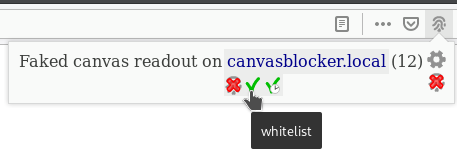
There is already a little button to whitelist a site:
Yes, I know, but I don't think we're talking about the same thing.
I'm talking about changing the to

Regards
OK - that I can do.
Release 0.5.9 is published.
I think the textarea is still small, but it's already much better.
You should use bootstrap to style your fields:)
Thank you for your work anyway!
You can drag the textarea bigger:

I know i know :)
@kkapsner Why not add a button to the list to put a site on the white list? like adblock or ublock for example?
If you get the browser address bar icon (indicating that something was blocked or faked on that page) you can click it and whitelist the page there.
I also think that the url specific settings (particularly the blocking mode) are a much better way to allow certain things for a domani or url. There you have a simple input and a button do add something.
The old and simple white list is actually just legacy code and at some point in the future I will get rid of it.
Sorry, but when I click on it, I end up with a list of options like this: https://i.imgur.com/1II3lGV.jpg
This is the wrong icon. You have to click the one in the address bar:

It only appears if CB did something on the page.
I can see the icon but it's still grayed out, and I can't move it from the "page action bar"
Did you disable the notifications? It should automatically appear in the address bar when CB does something and you do not have to move it there.
no, my notification is enabled
edit: i have restart firefox, now its good thanks
OK. Good that it works now.
This is the wrong icon. You have to click the one in the address bar:
It only appears if CB did something on the page.
I think I commented on all points here.