Canvasblocker: Persistent high CPU load on some web sites
While the tab is selected, I am seeing high CPU usage in Firefox on some web sites… as if a thread is remaining active and the process never completes. When I disable CanvasBlocker in about:addons and select the tab again, Firefox CPU loading for the page has returned to its normal idle state.
Example: https://homebiogas.com/
 ms1121
All 48 comments
How many notifications do you see in the notification popup?

 kkapsner
on 11 Sep 2018
kkapsner
on 11 Sep 2018
Can you please try the latest Alpha (you have to disable the normal first): https://github.com/kkapsner/CanvasBlocker/releases/tag/0.5.4-Alpha3
kkapsner
on 13 Sep 2018
kkapsner
on 16 Sep 2018
Please try 0.5.4: https://github.com/kkapsner/CanvasBlocker/releases/tag/0.5.4
kkapsner
on 23 Sep 2018
I'm on 0.5.4 and the problem still exists. Here's an address that will produce the problem without fail: https://www.windowscentral.com/how-use-custom-environments-windows-mixed-reality
 tavyra
on 28 Sep 2018
tavyra
on 28 Sep 2018
Well... this pages requests ~200 DOMRect values per second - it seems that it's the ads. If I simply activate µBlock the number of requested DOMRects and therefore the CPU loads goes down.
As CB fakes this value I'm not surprised that you see an CPU load increase. But there is little I can do about it. I already try to be as efficient as possible.
PS: you will not see the high DOMRect numbers as CB only reports once for requests for the same object.
kkapsner
on 29 Sep 2018
Can you please check which protection causes the problems on the other pages?
kkapsner
on 29 Sep 2018
I use ublock origin and umatrix, is there a rule or something I should add to keep this from happening? Disabling CB makes my cpu idle normally but I've only got like 70 notifications from ublock+umatrix+disconnect combined. I'm not sure what the other pages were that ended up freezing firefox and I can't think of any other add-ons that would be interfering.
Not knocking your efficiency either, with the exception of the random page that goes from 5% to 100% like a supercar, I haven't noticed any performance impact.
tavyra
on 5 Oct 2018
I do not know of a specific rule. I also use NoScript which also helps.
With number of notifications I mean the number in the page action popup (see screenshot in first comment).
kkapsner
on 6 Oct 2018
I'm seeing some pretty bad performance dips on Amazon as of late. Browsing to a product and scrolling is extremely choppy, even after comments load. Issue seems to be stemming from DOMRect API.
Meanwhile, Audio API causes https://amiunique.org/fp to completely lock up.
 mitomenai
on 23 Oct 2018
mitomenai
on 23 Oct 2018
Can you give an example link for amazon? It runs well for me.
The amiunique thing is known and there is not really anything I can do about it - they use a very poorly written script.
You can disable the audio cache temporarily to let it run a little bit faster. But I can tell you that it will say that you are unique...
If you want to test if the fingerprint is changing with every load you can use the CB test pages: https://canvasblocker.kkapsner.de/test/
kkapsner
on 23 Oct 2018
Here's a random link:
https://www.amazon.com/Ultraviolet-Sanitizer-Sanitizing-Portable-Bacteria/dp/B007DK8FKW/
Keep scrolling, and once you hit the reviews it turns into a slideshow. Turning off DOMRect immediately resolves the issue.
I disabled all other addons, and the issue is still exhibited.
mitomenai
on 24 Oct 2018
@Leeweez I can't reproduce this issue either.. maybe open a new Issue, to share detailed information about your configurations and console logs?
 spodermenpls
on 24 Oct 2018
spodermenpls
on 24 Oct 2018
Same for me. Page scrolls fine.
kkapsner
on 24 Oct 2018
For me, it slows down on amazon when the mouse is on the image product and the zoomed version appears to the right.
--EDIT--
You may need to search i also tried to disable the protection for dom api, but it is still slow.
the only way to make it fast seems to disable the extension.
 kokoko3k
on 30 Oct 2018
kokoko3k
on 30 Oct 2018
What do you see in the page action popup:

kkapsner
on 31 Oct 2018
Sorry for the delay, i see the following:
Faked DOMRect readout on www.amazon.it (157)
kokoko3k
on 5 Nov 2018
Can you please give me your settings?
kkapsner
on 9 Nov 2018
Here they are (i've whitelisted amazon)
{
    "logLevel": 1,
    "urlSettings": [
        {
            "url": "www.amazon.it",
            "blockMode": "allowEverything"
        }
    ],
    "hiddenSettings": {},
    "expandStatus": {
        "blockMode": true
    },
    "displayHiddenSettings": false,
    "whiteList": "",
    "sessionWhiteList": "",
    "blackList": "",
    "blockMode": "fakeReadout",
    "minFakeSize": 1,
    "maxFakeSize": 0,
    "rng": "nonPersistent",
    "protectedAPIFeatures": {},
    "useCanvasCache": true,
    "ignoreFrequentColors": 0,
    "minColors": 0,
    "fakeAlphaChannel": false,
    "persistentRndStorage": "",
    "persistentIncognitoRndStorage": "",
    "storePersistentRnd": false,
    "persistentRndClearIntervalValue": 0,
    "persistentRndClearIntervalUnit": "days",
    "lastPersistentRndClearing": 1541763252068,
    "askOnlyOnce": "individual",
    "askDenyMode": "block",
    "showCanvasWhileAsking": true,
    "showNotifications": true,
    "highlightPageAction": "none",
    "highlightBrowserAction": "color",
    "displayBadge": true,
    "storeNotificationData": false,
    "storeImageForInspection": false,
    "ignoreList": "",
    "ignoredAPIs": {},
    "showCallingFile": false,
    "showCompleteCallingStack": false,
    "enableStackList": false,
    "stackList": "",
    "protectAudio": true,
    "audioFakeRate": "100",
    "audioNoiseLevel": "minimal",
    "useAudioCache": true,
    "audioUseFixedIndices": true,
    "audioFixedIndices": "11",
    "historyLengthThreshold": 2,
    "protectWindow": false,
    "protectDOMRect": true,
    "domRectIntegerFactor": 4,
    "blockDataURLs": true,
    "displayAdvancedSettings": false,
    "displayDescriptions": false,
    "theme": "default",
    "dontShowOptionsOnUpdate": false,
    "isStillDefault": false,
    "storageVersion": 0.4
}
Hm... I do not see anything bad there. Does the problem persist when you disable the DOMRect protection?
kkapsner
on 10 Nov 2018
Hi,
if i disable DOMRect API protection, the problem goes away.
kokoko3k
on 12 Nov 2018
Hm... I still cannot reproduce but I recommend that you then only disable the DOMRect API for amazon and not whitelist it completely.
kkapsner
on 12 Nov 2018
Thanks, but it is not clear to me how to disable just the DOMRect API for a specific site.
In the specific site option, i've "block only blacklist", but i'm unable to find where to edit this blacklist, or maybe i'm completely wrong and there's another way (?)
-EDIT-
Whops, sorry, i completely missed the checkbox :)
kokoko3k
on 13 Nov 2018
For all other searchers:
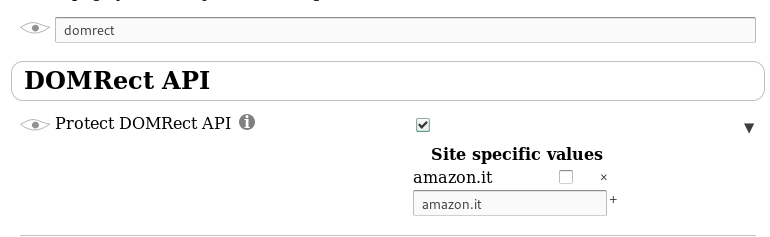
kkapsner
on 15 Nov 2018
Someone on a forum had an old Windows XP box that he had to disable CanvasBlocker on as it caused websites like Amazon to become choppy like others have mentioned and he all so had to disable it on a more modern Linux skylake box as 60fps media at Youtube would stutter but was perfectly fine when CanvasBlocker was disabled so something is causing a high overhead or I/O polling that it's not always practical to use?
It might be something to do with Firefoxes API as other extensions can become sluggish on certain pages as i've noticed this with lastpass taking forever.
 Lucapz
on 5 Dec 2018
Lucapz
on 5 Dec 2018
I always recommend to identify the part of CB that causes the slowdown (in the case of Youtube I would guess it's the DOMRect-API). The problematic parts can be disabled individually (also on a site by site level).
kkapsner
on 23 Dec 2018
I'm getting Firefox errors CanvasBlocker is slowing things down on https://steamdb.info.
This is what CanvasBlocker reports after the page loads (for instance, on the Sales page):
Faked DOMRect readout on steamdb.info
(92)
 lazycrypt
on 29 Dec 2018
lazycrypt
on 29 Dec 2018
It's working fine for me - what are your settings and versions (Firefox/CB)?
kkapsner
on 30 Dec 2018
Other than appearance settings I'm running on the default CB settings. Testing it a bit more over the past two days the warning seems to appear only sometimes now. It could be that the official SteamDB Firefox addon could be conflicting with something, I'll test it out some more.
lazycrypt
on 1 Jan 2019
Hello Korbinian,
I also noted excessive load after installing the CanvasBlocker addon/extension. Then i tried to figure things and found that another extension, EclipsedMoon (for the Palemoon browser) has a setting 'canvas.poison' checked, in the prefs section 'reduce fingerprinting', and when i uncheck that, the abnormal load is gone, at least on the few sites i tried since then.
This is not totally obvious since that Moon extension is supposed to fake useragents, but actually does a lot more.
So my idea is that the two are somehow fighting over the final result :D
I would not go so far as to notify the Eclipsed Moon developers. I mean, they're doing the best they can.
I think CanvasBlocker should just include a comment directly in the prefs, that the user is responsible for having not any other plugin mingling into the Canvas business.
Cheers,
mi
 codejodler
on 31 Jan 2019
codejodler
on 31 Jan 2019
Hm... I'm not quite sure where to put such a comment so it's not too in the way but the people read it.
kkapsner
on 1 Feb 2019
@kkapsner Maybe put such a disclaimer just in the descriptions here and on AMO for now?
spodermenpls
on 1 Feb 2019
Sounds like a good idea.
kkapsner
on 2 Feb 2019
Done
kkapsner
on 2 Feb 2019
This is website that triggers persistent script/CPU warning:
https://paizo.com/community/forums/pathfinder/playtest
Also, it happens on Twitter.
The warning doesn't occur, but Disqus discussions won't even display without CB disabled.
(not even logged in to be able to comment, but Disqus comments won't even load with CB)
 mutantsushi
on 13 Feb 2019
mutantsushi
on 13 Feb 2019
I don't get a single CanvasBlocker notification or warning on this page. Please check the notifications to get to know which API/scripts trigger the CB protection.
Twitter is probably the DOM-Rect API. It usually gets a little bit better if you disable the notifications for DOM-Rect.
I have no clue about the Disqus problem (but I know that their technological approach is horrible). Can you give me an example page?
kkapsner
on 13 Feb 2019
I've just installed this extension today and can attest to it causing serious performance issues.
Observe: https://aelius.keybase.pub/canvasblocker%20amazon%20image%20performance.mp4
 AeliusSaionji
on 23 Mar 2019
AeliusSaionji
on 23 Mar 2019
Also, even when I'm not interacting with the Amazon webpage, firefox is chewing through 20% of my CPU when canvas blocker is loaded. Disabling canvasblocker and refreshing the page allows firefox to idle again.
(I've since read through the thread and excluded amazon from DOM-Rect api, which does sidestep the issue)
AeliusSaionji
on 23 Mar 2019
I am aware of this issue but have no good idea how to solve it. There is no good way to distinguish between fingerprinting and legit use of the DOMRect-API.
Maybe I should analyse the amazon code to get the exact problem...
kkapsner
on 23 Mar 2019
The code at amazon is not great. It seems to me that they read the DOMRect more often than necessary. The numbers I get when I count every readout are insane (several thousand for one mouse movement). So the only thing I can do is to improve the overall performance of the DOMRect API.
kkapsner
on 4 May 2019
I managed to get some performance improvements. The zoomed view at amazon is better but far of being good.
kkapsner
on 4 May 2019
Thanks kkapsner!
I'm thinking...
Would it be possible to add an "antihammer" option so that CanvasBlocker wouldn't allow more than (insert number here) requests per second?
kokoko3k
on 6 May 2019
Hi,thx for the great addon!
Can you check the message system on ebay!
I have to disable the addon if i want to write a message...
The edit field is not writable...
 manyplay
on 7 May 2019
manyplay
on 7 May 2019
@kokoko3k I could implement that but it would not help the user of such sites as it would completely break them. And despite it being written poorly it's a legitimate use of the API.
@manyplay please open a separate issue for your problem with all the details needed.
kkapsner
on 8 May 2019
With the latest improvements the amazon page is usable. Not good, but usable.
kkapsner
on 11 May 2019
Please test the latest 0.5.9 as it has some performance improvements.
kkapsner
on 26 May 2019
Definitely better, thank you!
kokoko3k
on 27 May 2019
I think with 0.5.10 the performance is acceptable. So I will close this issue. If someone still has an example page that uses lots of CPU or is slow I can reopen this issue.
kkapsner
on 9 Jun 2019
Related issues
spodermenpls
·
4Comments
 ghost
·
4Comments
spodermenpls
·
6Comments
ghost
·
4Comments
spodermenpls
·
6Comments
 Aq32
·
4Comments
Aq32
·
4Comments
 ChromeExtensionsOperator
·
3Comments
ChromeExtensionsOperator
·
3Comments