Canvasblocker: Indicate whitelisting on toolbar icon (or badge)
If a page is whitelisted it should be indicated on the toolbar icon or the badge.
Spec:
- only the top level URL (what's in the address bar) will be checked
- following settings will be checked:
- block mode (indicator when is set to "allow")
- whitelist
- temporary whitelist
Ideas:
- different badge color (preferred)
- different icon color (would collide with the notification highlighting)
- special badge text
@Thorin-Oakenpants: what are your thoughts?
 kkapsner
All 9 comments
So assuming badges are not optional
You can deactivate the badge if you want to.
I'm not sure I follow this. The badge is the notification indicator
You can also have a color change on the toolbar icon as a notification indicator
kkapsner
on 2 Sep 2018
I will go with the gray icon for whitelisting:

Should the toolip text also reflect the whitelisting?
kkapsner
on 6 Sep 2018
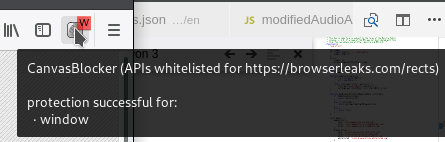
The question is: what happens if the url of a tab is whitelisted but an iframe within is not? And the other way round?
Should the icon stay gray? Or should it be red?
kkapsner
on 6 Sep 2018
Not sure if this only just a little bit confusing or a lot:
kkapsner
on 8 Sep 2018
Is a whitelist badge even useful, with all the external resources that are embedded in modern websites? This message would confuse the shit out of me, if I didn't think about it for 5 minutes before posting this..
 spodermenpls
on 8 Sep 2018
spodermenpls
on 8 Sep 2018
Most of the external resources are not included via iFrames/frames and will therefore not create this kind of message (they are also whitelisted as I check the URL of the tab and not the URL of the executed script).
kkapsner
on 8 Sep 2018
I think I will go with that in the first place and see how many confused user arrive. In the notification popup the user can have more information about which URL/domain was protected.
kkapsner
on 16 Sep 2018
kkapsner
on 19 Sep 2018
kkapsner
on 23 Sep 2018
Related issues
spodermenpls
·
4Comments
 ghost
·
4Comments
ghost
·
4Comments
 scottstensland
·
7Comments
scottstensland
·
7Comments
 DRigby26
·
5Comments
kkapsner
·
5Comments
DRigby26
·
5Comments
kkapsner
·
5Comments