Canvasblocker: waterfox : broken settings page
3 issues:
- Clicking buttons on the left made items disappear permanently. Reset is gone, stuck.
- Main Menu item canvasblocker does nothing.
- Accessing settings via add-ons page is broken, settings page is in a 10% height scroll frame
Description
Expected Behavior
Current Behavior
Possible Solution
Steps to Reproduce (for bugs)
- Click the icon to the left of the reset on the settings page
Context
Tried disabling, clearing cache, restarting browser, no change.
Looked in about:config, searched canvas, all show defaults.
Your Environment
- CanvasBlocker Version used: 0.5.2b
- Firefox version incl. 32- or 64-bit:
Waterfox 56.1.0 - Operating System and version (desktop or mobile):
Android 7 - Installed addons:
Ublock origin
Privacy settings
Https everywhere
Decentraleyes
Copy profile
Smart https
NoProfile
Your Settings
Not accessible due to this bug
 crgithubmoth
All 32 comments
{
"logLevel": 1,
"urlSettings": [],
"hiddenSettings": {
"displayAdvancedSettings": true,
"blockMode": false,
"displayDescriptions": true,
"minFakeSize": true,
"rng": false,
"ignoreFrequentColors": false,
"blackList": true,
"sessionWhiteList": true,
"whiteList": true,
"enableStackList": true,
"resetSettings": true
},
"displayHiddenSettings": false,
"whiteList": "",
"sessionWhiteList": "",
"blackList": "eff.org",
"blockMode": "fakeReadout",
"minFakeSize": 1,
"maxFakeSize": 0,
"rng": "nonPersistent",
"apiWhiteList": {},
"useCanvasCache": true,
"ignoreFrequentColors": 0,
"minColors": 0,
"fakeAlphaChannel": false,
"persistentRndStorage": "",
"persistentIncognitoRndStorage": "",
"storePersistentRnd": false,
"persistentRndClearIntervalValue": 0,
"persistentRndClearIntervalUnit": "days",
"lastPersistentRndClearing": 1533155581559,
"askOnlyOnce": "individual",
"askDenyMode": "block",
"showCanvasWhileAsking": true,
"showNotifications": false,
"storeImageForInspection": false,
"notificationDisplayTime": 30,
"ignoreList": "",
"showCallingFile": false,
"showCompleteCallingStack": false,
"enableStackList": false,
"stackList": "",
"protectAudio": true,
"audioFakeRate": "100",
"audioNoiseLevel": "minimal",
"useAudioCache": true,
"audioUseFixedIndices": true,
"audioFixedIndices": "19",
"blockDataURLs": true,
"displayAdvancedSettings": true,
"displayDescriptions": false,
"isStillDefault": false,
"storageVersion": 0.3
}
crgithubmoth
on 1 Aug 2018
Can confirm that at least in Firefox 62.0b6
 ald0n
on 1 Aug 2018
ald0n
on 1 Aug 2018
The first point is intentional if you mean the little eye icon:
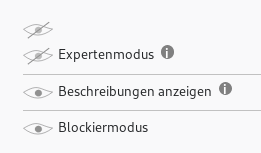
If you click the eye at the very top you will see the hidden settings again. I introduced that because I was bothered with the long "API white list" setting.
I cannot confirm the second point: clicking on the toolbar icon (it's called browser action for some reason...) should open a popup. And it does in my Waterfox 56.2.2 64-bit (Linux)
Same for the third.
Can you update to 56.2.2 and recheck?
@ald0n which of the points do you confirm? In My FF 61.0.1 and 62.0a1 everything works fine.
 kkapsner
on 2 Aug 2018
kkapsner
on 2 Aug 2018
The frame that is too small is not controlled by me. I hope you bookmarked the direct settings page - this is the content that I provide. Everything around it is provided by the browser itself: the title, description, update settings, etc. and the frame that displays the actual settings.
... but as I think about it: the content is completely dynamically generated (which is easier to maintain). Maybe if I preallocate some screen space... I can make a beta version for testing if you want to test this hypothesis.
kkapsner
on 2 Aug 2018
@kkapsner
which of the points do you confirm?
almost the whole post
Browser restarting solve the issue in my case tho, now it's working as you expected :-)
ald0n
on 2 Aug 2018
Good to hear that it's working now. Maybe the update did not run completely before restarting...
kkapsner
on 2 Aug 2018
Guys do not hesitate to donate toward his hard work, On some point its going to pay you back if not already.
 NewGen66
on 2 Aug 2018
NewGen66
on 2 Aug 2018
Please try https://github.com/kkapsner/CanvasBlocker/releases/tag/0.5.3-Alpha1 to the settings problem.
kkapsner
on 2 Aug 2018
When I click the eye again, no hidden settings come back. It just toggles
hidng every setting.
On Wed, Aug 1, 2018, 6:08 PM kkapsner notifications@github.com wrote:
The first point is intentional if you mean the little eye icon:
[image: grafik]
https://user-images.githubusercontent.com/1105157/43551606-e0ae64cc-95e7-11e8-81ee-83a9b4270582.png
If you click the eye at the very top you will see the hidden settings
again. I introduced that because I was bothered with the long "API white
list" setting.The
—
You are receiving this because you authored the thread.
Reply to this email directly, view it on GitHub
https://github.com/kkapsner/CanvasBlocker/issues/221#issuecomment-409741070,
or mute the thread
https://github.com/notifications/unsubscribe-auth/AnmRKEctq5Sz5clX6_RPYvtTsV5nTkImks5uMibkgaJpZM4VrL7I
.
crgithubmoth
on 9 Aug 2018
Got new CB version [had to disable old version, both showed!?]
All hidden settings are back now, thanks!
Please add the CB version number to the settings page.
On Thu, Aug 2, 2018, 3:58 PM kkapsner notifications@github.com wrote:
Please try
https://github.com/kkapsner/CanvasBlocker/releases/tag/0.5.3-Alpha1 to
the settings problem.—
You are receiving this because you authored the thread.
Reply to this email directly, view it on GitHub
https://github.com/kkapsner/CanvasBlocker/issues/221#issuecomment-410049240,
or mute the thread
https://github.com/notifications/unsubscribe-auth/AnmRKCjRDqOPQGGHv_0FekFdDm7HrjYnks5uM1nZgaJpZM4VrL7I
.
crgithubmoth
on 9 Aug 2018
Still having the tiny frame, please add at the top a link that opens a new
tab
Menu item still not working
On Thu, Aug 2, 2018, 3:58 PM kkapsner notifications@github.com wrote:
Please try
https://github.com/kkapsner/CanvasBlocker/releases/tag/0.5.3-Alpha1 to
the settings problem.—
You are receiving this because you authored the thread.
Reply to this email directly, view it on GitHub
https://github.com/kkapsner/CanvasBlocker/issues/221#issuecomment-410049240,
or mute the thread
https://github.com/notifications/unsubscribe-auth/AnmRKCjRDqOPQGGHv_0FekFdDm7HrjYnks5uM1nZgaJpZM4VrL7I
.
crgithubmoth
on 9 Aug 2018
Good suggestions. Added both. The non working menu is weird. Have you checked the latest WaterFox?
Does the main menu button work for uBlock?
kkapsner
on 18 Aug 2018
kkapsner
on 21 Aug 2018
Ublock main menu works fine in waterfox
Thanks for the upgrade, will try it soon
On Sat, Aug 18, 2018, 4:43 PM kkapsner notifications@github.com wrote:
Good suggestions. Added both. The non working menu is weird. Have you
checked the latest WaterFox?
Does the main menu button work for uBlock?—
You are receiving this because you authored the thread.
Reply to this email directly, view it on GitHub
https://github.com/kkapsner/CanvasBlocker/issues/221#issuecomment-414085179,
or mute the thread
https://github.com/notifications/unsubscribe-auth/AnmRKDuoWckgiOLWPC1SukFYX42vJTpSks5uSHxcgaJpZM4VrL7I
.
crgithubmoth
on 22 Aug 2018
Desktop or Mobile?
Everything workes fine in my Waterfox.
kkapsner
on 22 Aug 2018
Waterfox56.1Android from google play store, got new beta3 CB:
Still tiny frame, but link works, easy now.
Menu item : Still not working
(ublock works, https everywhere works, smart https & CB do not)
crgithubmoth
on 27 Aug 2018
FYI: Using CB with Blend In & Privacy Settings,
Panopticlick: put eff.org on CB blacklist -> individual scores are now all low, UA under 350, rest under 30.
Ublock Origin, Decentraleyes limit 3rd party IP tracking.
Noprofile stops behavior scoring
Low confidence for basic trackers at least
Sadly Few Mozilla users out there...
Kudos
crgithubmoth
on 27 Aug 2018
More menu fails:
Privacy settings (in tools submenu)
Decentraleyes
Blend in
crgithubmoth
on 27 Aug 2018
Tiny frame fails:
Blend In
Decentraleyes
crgithubmoth
on 27 Aug 2018
Another Tiny frame: smart https
Looks like a pattern here, tiny frame= menu fail?
crgithubmoth
on 27 Aug 2018
Is it possible to put CB menu item into Tools submenu?
Menu goes past screen, have to scroll it.
crgithubmoth
on 27 Aug 2018
CB builds the entire HTML markup via script in the settings and the menu popup. I think this is the problem. And an author usually sticks with one method. That could explain the correlation.
I could add an entry in the tools menu... but there is nothing that cannot be found elsewhere.
kkapsner
on 27 Aug 2018
Can you please test Please test https://github.com/kkapsner/CanvasBlocker/releases/tag/0.5.3-RC3
kkapsner
on 31 Aug 2018
AFAICT rc3 works identical to beta3, tiny frame, main menu item not working.
CB otherwise works.
3 red on detection page.
crgithubmoth
on 31 Aug 2018
Which three are red? With the default settings you should only get one.
kkapsner
on 1 Sep 2018
Ah... on Waterfox the fix for the other two is not integrated (I think it was Firefox 59 or 60 that solved them).
kkapsner
on 2 Sep 2018
I have no big hopes... but nevertheless: https://github.com/kkapsner/CanvasBlocker/releases/tag/0.5.4-RC2
kkapsner
on 20 Sep 2018
Since I do not see the problem in Waterfox (56.2.3) on desktop I think you should report this as an issue on Waterfox mobile.
kkapsner
on 10 Oct 2018
Waterfox 60.1 android + canvasblocker 0.5.5 has full size settings frame now.
Stuck script which had returned is gone again.
Main menu is now working.
Thanks!
crgithubmoth
on 18 Oct 2018
Oh great! Did not expect that.
kkapsner
on 19 Oct 2018
More issues with WF 60.1:
CB 0.5.5 settings page is missing expert mode, entire Lists section.
crgithubmoth
on 20 Oct 2018
Please post your settings.
kkapsner
on 21 Oct 2018
Related issues
kkapsner
·
5Comments
 ghost
·
6Comments
ghost
·
6Comments
 spodermenpls
·
4Comments
spodermenpls
·
4Comments
 ChromeExtensionsOperator
·
3Comments
ChromeExtensionsOperator
·
3Comments
 DRigby26
·
5Comments
DRigby26
·
5Comments
Most helpful comment
The first point is intentional if you mean the little eye icon:

If you click the eye at the very top you will see the hidden settings again. I introduced that because I was bothered with the long "API white list" setting.
I cannot confirm the second point: clicking on the toolbar icon (it's called browser action for some reason...) should open a popup. And it does in my Waterfox 56.2.2 64-bit (Linux)
Same for the third.
Can you update to 56.2.2 and recheck?
@ald0n which of the points do you confirm? In My FF 61.0.1 and 62.0a1 everything works fine.