Canvasblocker: Canvas Blocker 0.4.5b - "freezes" Google Maps in Firefox 60.0.1 (64Bit)
Description
When using google maps (maps.google.com) to navigate, zoom/move the map, or plan a route, with activated canvas blocker, the browser repeatedly takes "pauses for thought" and does not react for a few seconds. This happens especially when zooming in/out, or moving the map, as well when planning a route with multiple stops. In the current version of Firefox you will also get a small "banner" on top of the page telling you, something like "The extension Canvas Blocker is slowing down the current page and should be disabled" - however: as it seems to lock the current "transaction" only for a few seconds this popup is just shown for a few milliseconds (on my computer) before maps continues working again and the popup disappears.
When disabling canvas blocker, the issue disappears.
Expected Behavior
I would expect canvas blocker to not have a negative impact on the performance / usage experience using google maps.
Steps to Reproduce (for bugs)
- open maps.google.com
- zoom in / out repeatedly (or move map, plan a route etc.)
Context
I tried it with a fresh profile, only having CanvasBlocker as only extension > Same problem.
A closer obervation shows the following:
- Opening maps.google.com (locates me based on my IP / ...)
- zooming in/out (using mousewheel) works smoothly for about 2 seconds. During this phase, the "fingerprint" indicator in the address bar is not showing
- after 2 more seconds, the fingerprint indicator shows up and the map can neither be moved nor zoomed - I even assume, that Firefox freezes completely.
- after 2 more seconds the popup is displayed, that the extension CanvasBlocker slows down FF/Current page
- after ~ 200ms the popup disappears (which makes it so hard to read) and maps / FF returns to normal usage
Your Environment
- CanvasBlocker Version used: 0.4.5b
- Firefox version incl. 32- or 64-bit: 60.0.1 - 64 Bit
- Operating System and version (desktop or mobile): Windows 7 Pro, 64Bit
- Installed addons: CanvasBlocker
Your Settings
{
"logLevel": 1,
"urlSettings": [],
"whiteList": "",
"blackList": "",
"blockMode": "fakeReadout",
"minFakeSize": 1,
"maxFakeSize": 0,
"rng": "nonPersistent",
"useCanvasCache": true,
"ignoreFrequentColors": 0,
"minColors": 0,
"fakeAlphaChannel": false,
"persistentRndStorage": "",
"storePersistentRnd": false,
"persistentRndClearIntervalValue": 0,
"persistentRndClearIntervalUnit": "days",
"lastPersistentRndClearing": xx26xx93xxxxx,
"askOnlyOnce": "individual",
"askDenyMode": "block",
"showCanvasWhileAsking": true,
"showNotifications": false,
"storeImageForInspection": false,
"notificationDisplayTime": 30,
"ignoreList": "",
"showCallingFile": false,
"showCompleteCallingStack": false,
"enableStackList": false,
"stackList": "",
"displayAdvancedSettings": true,
"displayDescriptions": false,
"isStillDefault": false,
"storageVersion": 0.3
}

The moment, before maps freezes is when the fingerprint-icon appears
The Browser Console shows this Error:
[CanvasBlocker] frame script: [2018-05-21 13:10:36.142] Dynamic content script was too late to provide settings. logging.js:68:5
 schlaubstar
All 10 comments
Unfortunately I'm not able to reproduce the problem (on a Windows 10 machine... I have no 7 on hand).
I guess that google tries to read a very big canvas. This readout will be faked (your block mode is "fakeReadout") which can take quite a while when the canvas is very big. I think this is the root cause of the issue.
If you just want to get rid of the lag you can set the parameter "Maximal fake size" to 1000000. This prevents big canvas to be faked at all. Since these canvas are usually not used for fingerprinting it should not be a problem.
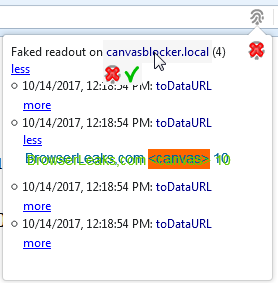
If you want to know what google is doing there you can activate the "Store image for inspection" temporarily and click on the fingerprint icon to see further information and the content of the canvas that was faked:
But the error in the browser console is kind of weird. Can you please visit the CB test page and see if the error appears there as well: http://kkapsner.github.io/CanvasBlocker/test/test.html
 kkapsner
on 21 May 2018
kkapsner
on 21 May 2018
Hi kkapsner, thank you so much for your fast reply.
The first hint "nailed" it: setting maximal fake size to 2000000 (even bigger than you proposed) instantly restored maps.google.com to the state known before using canvas Blocker.
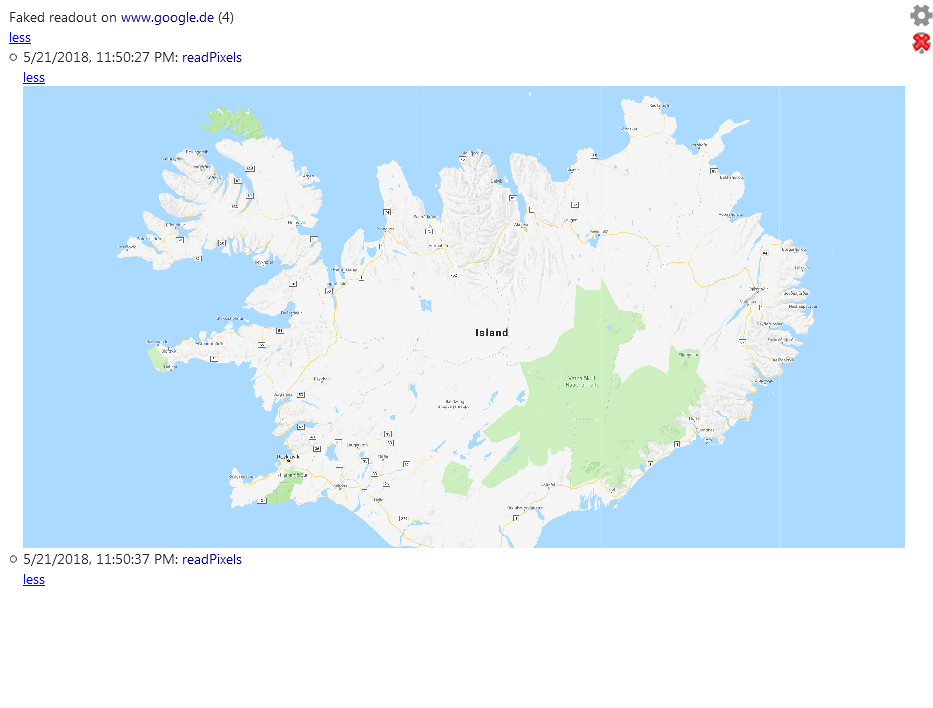
Using the stored image revealed something strange: Most of the time, the captured image seems to be empty - only some read-pixel attemps seem to deliver the whole screen (I assume something around 2560x1440 pixel - currently zooming in and out on iceland)
Visiting your testpage does not bring up any CanvasBlocker related message in the console at all (level set to warning)
From my point of view, this issue can be closed. Thanks a lot again.
schlaubstar
on 21 May 2018
You're welcome.
I guess this is a legitimate use of readPixels - I do not know why it's not triggering for me.
It's fine if the error messages does not show up in the test page. I will keep an eye open for the warning - but it should not be a problem. It's just a little bit strange.
kkapsner
on 22 May 2018
I'm glad I found this issue and wish it was addressed here in the middle of 2019 because it's still an issue for macOS/Firefox and Canvasblocker using Google Maps. I was confused at first because I didn't have "Expert Mode" checked, having to reload after checking the box, and so I didn't see the additional settings.
 asuh
on 25 Jun 2019
asuh
on 25 Jun 2019
Unfortunately there is nothing I can address. I do not want to set the setting to that value as the user should know that this value is set (and understand why - that's why it's in the expert mode).
kkapsner
on 28 Jun 2019
I hear you. I wonder how many other people have experienced this with sites that use large Canvases like on Google Maps or an image editor, also using DOMRect, like Canva.
I personally treated this plugin like set it and forget it, expecting it to do its thing. And without this thread, I wouldn't have known that setting this value was the fix for these types of issues.
asuh
on 28 Jun 2019
I am with asuh, that there should something be done!
Many users will not even link the "freezing browser" to this extension, they might find out after resetting firefox and enabling one by one of the extensions. The most of them will not find this thread and deinstall the plugin, which is kind of sad.
Couldn't you just show a popup/message in case some site is trying to read a very large canvas? In my case, I found out due to the warning of Firefox that an extension is slowing down the browser?
And another approach: set a limit of 1.000.000 or 2.000.000 per default and add a note somewhere, that this value might negatively impact your 'privacy' but will avoid popular sites from breaking.
By the way: I have encountered exactly the same issue on my new Notebook with Win10 x64 and Firefox x86, also.
schlaubstar
on 28 Jun 2019
There is already a notice in the description of the setting and also in the setting sanitation there is a warning is the value is too low.
Showing a message in the case of a very large canvas could be very annoying after some time. There could be a setting to not show this warning, but I'm not sure if that really solves the underlying problem.
I guess that a lot of people are like you and just want to be protected against most fingerprinting threads but also want the websites not to break or the browser to slow down. But there are also a lot of people that want to be best protected. Both would install the extension and would not think much about tinkering with the expert settings.
I'm currently thinking of having some setting presets that the user can select upon installation (and also later). In my mind I have "default" (as currently defined), "casual" (for users like you and also actually me), "sneaky" (hard to detect CB but might slow down pages and the browser) and "high security" (YOU SHALL NOT GET MY FINGERPRINT).
kkapsner
on 29 Jun 2019
What you're sayig makes sense and I agree with and understand your reasons. I want to be in "high security" mode at all times. I also want this to work when using sites with large canvases. Unfortunately, it's frustrating with these various large canvas based pages that Firefox displays that yellow warning bar at the top of the viewport (which usually goes away too quickly for me to really understand what it says), fans start cranking up on my MacBook Pro, and the page takes several seconds longer to load.
I think your suggestions of various presets is a good idea and maybe that'll help resolve it. I'm also wondering if this could be a whitelist-type setting for specific domains or pages.
Nonetheless, thanks for a great plugin!
asuh
on 30 Jun 2019
Opened #376 for this.
kkapsner
on 30 Jun 2019
Related issues
kkapsner
·
5Comments
kkapsner
·
5Comments
 kekukui
·
7Comments
kekukui
·
7Comments
 Kherby
·
6Comments
Kherby
·
6Comments
 spodermenpls
·
4Comments
spodermenpls
·
4Comments
Most helpful comment
Hi kkapsner, thank you so much for your fast reply.
The first hint "nailed" it: setting maximal fake size to 2000000 (even bigger than you proposed) instantly restored maps.google.com to the state known before using canvas Blocker.
Using the stored image revealed something strange: Most of the time, the captured image seems to be empty - only some read-pixel attemps seem to deliver the whole screen (I assume something around 2560x1440 pixel - currently zooming in and out on iceland)
Visiting your testpage does not bring up any CanvasBlocker related message in the console at all (level set to warning)
From my point of view, this issue can be closed. Thanks a lot again.