Canvasblocker: Instagram.com doesn't load anymore
Instagram.com doesn't load anymore with block everything ver 0.4.2
          Loading failed for the <script> with source “https://connect.facebook.net/en_US/sdk.js”.  www.instagram.com:1
Loading failed for the <script> with source “https://connect.facebook.net/en_US/fbevents.js”.  www.instagram.com:1
TypeError: e.getContext is not a function
Stack trace:
s/this.$StoryRing11<@https://www.instagram.com/static/bundles/en_US_FeedPage.js/716e8242d6df.js:1:113712
o/<@https://www.instagram.com/static/bundles/en_US_Commons.js/6b4835c1adb4.js:6:21845
[253]/s.prototype.$StoryRing12@https://www.instagram.com/static/bundles/en_US_FeedPage.js/716e8242d6df.js:1:120662
s/this.$StoryRing7@https://www.instagram.com/static/bundles/en_US_FeedPage.js/716e8242d6df.js:1:113786
[253]/s.prototype.componentDidMount@https://www.instagram.com/static/bundles/en_US_FeedPage.js/716e8242d6df.js:1:119805
commitLifeCycles@https://www.instagram.com/static/bundles/en_US_Commons.js/6b4835c1adb4.js:10:28220
n@https://www.instagram.com/static/bundles/en_US_Commons.js/6b4835c1adb4.js:10:32327
c@https://www.instagram.com/static/bundles/en_US_Commons.js/6b4835c1adb4.js:10:33993
l@https://www.instagram.com/static/bundles/en_US_Commons.js/6b4835c1adb4.js:10:34436
m@https://www.instagram.com/static/bundles/en_US_Commons.js/6b4835c1adb4.js:10:36458
h@https://www.instagram.com/static/bundles/en_US_Commons.js/6b4835c1adb4.js:10:35967
updateContainer@https://www.instagram.com/static/bundles/en_US_Commons.js/6b4835c1adb4.js:10:102352
dt/<@https://www.instagram.com/static/bundles/en_US_Commons.js/6b4835c1adb4.js:10:43652
unbatchedUpdates@https://www.instagram.com/static/bundles/en_US_Commons.js/6b4835c1adb4.js:10:37368
dt@https://www.instagram.com/static/bundles/en_US_Commons.js/6b4835c1adb4.js:10:43621
render@https://www.instagram.com/static/bundles/en_US_Commons.js/6b4835c1adb4.js:10:105544
@https://www.instagram.com/static/bundles/en_US_Commons.js/6b4835c1adb4.js:10:402566
t.b@https://www.instagram.com/static/bundles/en_US_Commons.js/6b4835c1adb4.js:10:377861
@https://www.instagram.com/static/bundles/en_US_Commons.js/6b4835c1adb4.js:10:402536
  6b4835c1adb4.js:10:35735
TypeError: e.getContext is not a function[Learn More]  716e8242d6df.js:1:113712
 Osahashi
All 20 comments
It works for me... are you sure it's not just a coincident? You could downgrade CB to an older version and check if it's related. But wait... yes it could be new with version 0.4.2 compared to 0.4.1. You should check with version 0.3.8.
But that the "block everything" setting might break some web sites is not really a surprise. And there is little I can do about it. If I block the API and the site is fragile enough to break upon this... what should I do?
 kkapsner
on 14 Nov 2017
kkapsner
on 14 Nov 2017
I tried all down and 0.3.8 now, even with 0.3.8 Instagram is not loading on my Firefox 56.0.2. with block everything. No idea why.
But Instagram works with block readout API normal, so I guess it's a CanvasBlocker problem and not related to ublock or anything.
I really like block everything and want to use it. A normal white list for block everything makes no sense, because you give up all your protection, but can you maybe make a setting to make a block readout API white list as second defense line? Like for Instagram in this case, I can use block everything for all sites and Instagram.com works with block readout API.
Loading failed for the <script> with source “https://connect.facebook.net/en_US/sdk.js”.  www.instagram.com:1
Loading failed for the <script> with source “https://connect.facebook.net/en_US/fbevents.js”.  www.instagram.com:1
TypeError: e.getContext is not a function
Stack trace:
s/this.$StoryRing11<@https://www.instagram.com/static/bundles/en_US_FeedPage.js/716e8242d6df.js:1:113712
o/<@https://www.instagram.com/static/bundles/en_US_Commons.js/6b4835c1adb4.js:6:21845
[253]/s.prototype.$StoryRing12@https://www.instagram.com/static/bundles/en_US_FeedPage.js/716e8242d6df.js:1:120662
s/this.$StoryRing7@https://www.instagram.com/static/bundles/en_US_FeedPage.js/716e8242d6df.js:1:113786
[253]/s.prototype.componentDidMount@https://www.instagram.com/static/bundles/en_US_FeedPage.js/716e8242d6df.js:1:119805
commitLifeCycles@https://www.instagram.com/static/bundles/en_US_Commons.js/6b4835c1adb4.js:10:28220
n@https://www.instagram.com/static/bundles/en_US_Commons.js/6b4835c1adb4.js:10:32327
c@https://www.instagram.com/static/bundles/en_US_Commons.js/6b4835c1adb4.js:10:33993
l@https://www.instagram.com/static/bundles/en_US_Commons.js/6b4835c1adb4.js:10:34436
m@https://www.instagram.com/static/bundles/en_US_Commons.js/6b4835c1adb4.js:10:36458
h@https://www.instagram.com/static/bundles/en_US_Commons.js/6b4835c1adb4.js:10:35967
updateContainer@https://www.instagram.com/static/bundles/en_US_Commons.js/6b4835c1adb4.js:10:102352
dt/<@https://www.instagram.com/static/bundles/en_US_Commons.js/6b4835c1adb4.js:10:43652
unbatchedUpdates@https://www.instagram.com/static/bundles/en_US_Commons.js/6b4835c1adb4.js:10:37368
dt@https://www.instagram.com/static/bundles/en_US_Commons.js/6b4835c1adb4.js:10:43621
render@https://www.instagram.com/static/bundles/en_US_Commons.js/6b4835c1adb4.js:10:105544
@https://www.instagram.com/static/bundles/en_US_Commons.js/6b4835c1adb4.js:10:402566
t.b@https://www.instagram.com/static/bundles/en_US_Commons.js/6b4835c1adb4.js:10:377861
@https://www.instagram.com/static/bundles/en_US_Commons.js/6b4835c1adb4.js:10:402536
  6b4835c1adb4.js:10:35735
TypeError: e.getContext is not a function[Learn More]  716e8242d6df.js:1:113712
Guess that instagram changed something on their end. I do not know why it's working for me (different country?), but from the error message it's quite obvious that CB is causing the problem.
I kind of like your idea of a site based blocking mode - it's a little bit of work on the settings GUI but the internal adjustments should be easy.
kkapsner
on 15 Nov 2017
Actually it might be good to enable a way to have all setting specific for a site. Or is this overkill?
Anyway I will first only make the blocking mode site specific as this would be a lot of work.
kkapsner
on 15 Nov 2017
Beta for 0.4.3 is out (https://github.com/kkapsner/CanvasBlocker/releases/tag/0.4.3-Beta.1) - you check out how the url specific settings are done and give feedback if you like it.
kkapsner
on 4 Dec 2017
It seems NoScript blocks something on the addon page, I can't click on the + to add a site, its grey if I try it and then the everything gets grey and I can't click anything inside the addonpage
Osahashi
on 4 Dec 2017
Which Firefox are you using? Which version of NoScript?
As a workaround you could add an URL to the white list. This is now done with a URL specific block mode. Then you can change the block mode there.
kkapsner
on 4 Dec 2017
I'm on FF 57.0.1 and NoScript 10.1.5.5
I remember this type of problem with the old NoScript versions, it was related to the setting "Cascade top document's permissions to 3rd party scripts".
But in the new NoScript version there are no settings for that, it is more like a piece of shit... 2-3 patches sometimes every day for fixes and the UI is crap.
Osahashi
on 5 Dec 2017
@Daisenki Maybe you should switch to uMatrix instead?
 spodermenpls
on 5 Dec 2017
spodermenpls
on 5 Dec 2017
I test it now again complete without NoScript and it's the same for me, with the beta version, something broke the addon setting page on my Firefox in that moment when I click on the "+" and try to add a site to the filter. The settings are freezing and the mouse goes to grey, but I can still deactivate and re enable the addon to get it work again.
Osahashi
on 6 Dec 2017
Thanks for testing. I can think of what could be the problem - I create a new Beta with the changes. You will be notified.
kkapsner
on 7 Dec 2017
I have a new beta: https://github.com/kkapsner/CanvasBlocker/releases/tag/0.4.3-Beta.2
kkapsner
on 8 Dec 2017
The new beta 2 works for me! The problem from beta 1 is now fixed. I'm on block everything and have set Instagram to fake readout API, it works and Instagram loads without any issues.
Really cool feature! Thanks a lot for your update man. :D
Osahashi
on 12 Dec 2017
You're welcome. If the other tests are positive as well version 0.4.3 will be released soon.
PS: There is a beta 3: https://github.com/kkapsner/CanvasBlocker/releases/tag/0.4.3-Beta.3
Beta 2 should only be used for testing - beta 3 should hopefully be the same as the released version.
kkapsner
on 12 Dec 2017
@kkapsner I've just tested Beta 3 myself and it seems to work fine, especially Google Maps and Street View still work (those would break with a blocked Canvas API).
spodermenpls
on 12 Dec 2017
Thanks for the input.
kkapsner
on 13 Dec 2017
I don't see the site specific settings in version 0.5.3, is it still a feature?
 sheddup
on 4 Sep 2018
sheddup
on 4 Sep 2018
Yes they are still present:
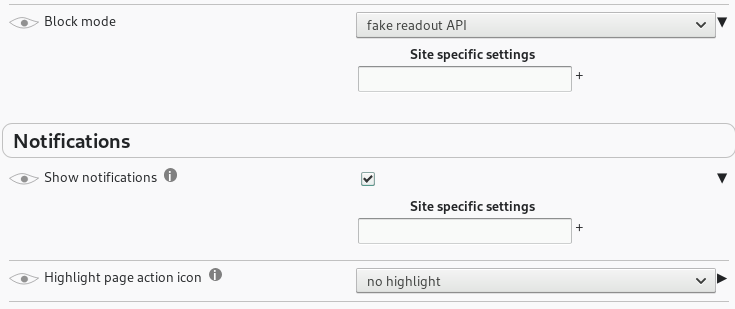
But not all settings can be site specific. Which one are you searching for?
kkapsner
on 4 Sep 2018
@sheddup Make sure "expert mode" is activated and click on the little arrow to open the site-specific menu:

spodermenpls
on 4 Sep 2018
Oh the little arrow, I've never even noticed that. Thanks.
sheddup
on 4 Sep 2018
Related issues
 ChromeExtensionsOperator
·
3Comments
ChromeExtensionsOperator
·
3Comments
 Aq32
·
4Comments
Aq32
·
4Comments
 nkestrel
·
7Comments
spodermenpls
·
4Comments
nkestrel
·
7Comments
spodermenpls
·
4Comments
 ghost
·
4Comments
ghost
·
4Comments