I've been trying to display all the tags associated with any particular post and I've found it very complicated to figure out. But it could all be very easy if the post table has foreign keys to the tags and topics table. That way, querying wouldn't be so complicated.
 Anthonynzube
All 26 comments
The easiest way to retrieve tags/topics for each post is based on their relationship:
$post = Post::first();

$tags = $post->tags;
$topics = $post->topics;
Are you looking at doing something more complicated than that?
 austintoddj
on 16 Mar 2020
austintoddj
on 16 Mar 2020
i'm not looking to get just the tags associated with the first post. i want to loop through all the tags associated with all the posts so that i can display them underneath their respective post title in my view file.
Anthonynzube
on 17 Mar 2020
Ok, so then you could try:
$posts = Post::with('tags', 'topics')->get()
You can then loop through all the posts and see their respective taxonomy.
austintoddj
on 17 Mar 2020
Thanks @austintoddj.
I had to modify
$posts = Post::with('tags', 'topics')->get()
to
$posts = \Canvas\Post::with('tags', 'topics')->get()
Then i was able to access the tags using
 @foreach($post->tags as $tag)
        <li> <b>{{$tag->name}}</b> |</li>
@endforeach
on my view file.
Anthonynzube
on 17 Mar 2020
Do you have more questions on this @Anthonynzube?
austintoddj
on 17 Mar 2020
@austintoddj how do i get the total views and read time for each post?
Anthonynzube
on 18 Mar 2020
It would look like this:
$post = Canvas\Post::first();

$totalViews = $post->views;
$totalVisits = $post->visits;
$readTime = $post->read_time;
Thanks. Whats's the difference between views and visits? I took a look at the tracker model and i couldn't really spot a difference. What did you intend to achieve by having them?
Anthonynzube
on 18 Mar 2020
A _view_ is captured when a user loads a post for the first time. A _visit_ is captured when a user loads a post for the first time in a given day.
So, users are only visiting posts once a day, however they may view them multiple times.
austintoddj
on 18 Mar 2020
I have an issue. I have changed the /canvas path name to /admin and i have a middleware i want to assign to that route i just renamed.
i tried to access the canvas package and attach the middleware to the route in the file
Route::prefix('stats')->group(function () {
        Route::get('/', 'StatsController@index')->middleware('admin');
        Route::get('{id}', 'StatsController@show')->middleware('admin');
    });
But i didn't work. what's the best way to go about this
Anthonynzube
on 19 Mar 2020
You shouldn't try to access those routes yourself, the package has a built-in way to do what you're intending. The configuration section of the Readme goes through the config/canvas.php file, and all its available options. So, simply drop your new middleware into the array provided:
/*
|--------------------------------------------------------------------------
| Route Middleware
|--------------------------------------------------------------------------
|
| These middleware will be attached to every route in Canvas, giving you
| the chance to add your own middleware to this list or change any of
| the existing middleware. Or, you can simply stick with the list.
|
*/

'middleware' => [
    'web',
    'auth',
],
I did that already.
If i understand correctly, adding my middleware to the middleware array in canvas.php file registers my middleware but i still need my middleware to act on a route which is the admin/stats route.
because my middleware checks for a column in the user table and is supposed to restrict access to that route or grant access.
This is my middleware for clarification
public function handle($request, Closure $next)
    {
        if (auth()->user()->is_admin == 1) {

            return $next($request);

        }
        return redirect(404);
    }
Please if there's something i'm missing, do let me know
Anthonynzube
on 19 Mar 2020
Did you register your middleware properly?
Per the docs, you can add route middleware like this:
/**
 * The application's route middleware.
 *
 * These middleware may be assigned to groups or used individually.
 *
 * @var array
 */
protected $routeMiddleware = [
    ...
    'admin' => \App\Http\Middleware\Admin::class
    ....
];
Yeah. did that already
 protected $routeMiddleware = [
        'auth' => \Illuminate\Auth\Middleware\Authenticate::class,
        'auth.basic' => \Illuminate\Auth\Middleware\AuthenticateWithBasicAuth::class,
        'bindings' => \Illuminate\Routing\Middleware\SubstituteBindings::class,
        'cache.headers' => \Illuminate\Http\Middleware\SetCacheHeaders::class,
        'can' => \Illuminate\Auth\Middleware\Authorize::class,
        'guest' => \App\Http\Middleware\RedirectIfAuthenticated::class,
        'signed' => \Illuminate\Routing\Middleware\ValidateSignature::class,
        'throttle' => \Illuminate\Routing\Middleware\ThrottleRequests::class,
        'admin' => \App\Http\Middleware\Admin::class,
    ];
When you run php artisan route:list do you see the admin middleware attached to the routes?
austintoddj
on 19 Mar 2020
i do
|        | GET|HEAD | admin                   |                  | Closure                                                                | web,admin    |
|        | POST     | admin/api/media/uploads |                  | Canvas\Http\Controllers\MediaController@store                          | web,auth     |
|        | DELETE   | admin/api/media/uploads |                  | Canvas\Http\Controllers\MediaController@destroy                        | web,auth     |
|        | GET|HEAD | admin/api/posts         |                  | Canvas\Http\Controllers\PostController@index                           | web,auth     |
|        | GET|HEAD | admin/api/posts/{id?}   |                  | Canvas\Http\Controllers\PostController@show                            | web,auth     |
|        | POST     | admin/api/posts/{id}    |                  | Canvas\Http\Controllers\PostController@store                           | web,auth     |
|        | DELETE   | admin/api/posts/{id}    |                  | Canvas\Http\Controllers\PostController@destroy                         | web,auth     |
|        | POST     | admin/api/settings      |                  | Canvas\Http\Controllers\SettingsController@update                      | web,auth     |
|        | GET|HEAD | admin/api/settings      |                  | Canvas\Http\Controllers\SettingsController@show                        | web,auth     |
|        | GET|HEAD | admin/api/stats         |                  | Canvas\Http\Controllers\StatsController@index                          | web,auth     |
|        | GET|HEAD | admin/api/stats/{id}    |                  | Canvas\Http\Controllers\StatsController@show                           | web,auth     |
|        | GET|HEAD | admin/api/tags          |                  | Canvas\Http\Controllers\TagController@index                            | web,auth     |
|        | GET|HEAD | admin/api/tags/{id?}    |                  | Canvas\Http\Controllers\TagController@show                             | web,auth     |
|        | DELETE   | admin/api/tags/{id}     |                  | Canvas\Http\Controllers\TagController@destroy                          | web,auth     |
|        | POST     | admin/api/tags/{id}     |                  | Canvas\Http\Controllers\TagController@store                            | web,auth     |
|        | GET|HEAD | admin/api/topics        |                  | Canvas\Http\Controllers\TopicController@index                          | web,auth     |
|        | GET|HEAD | admin/api/topics/{id?}  |                  | Canvas\Http\Controllers\TopicController@show                           | web,auth     |
|        | DELETE   | admin/api/topics/{id}   |                  | Canvas\Http\Controllers\TopicController@destroy                        | web,auth     |
|        | POST     | admin/api/topics/{id}   |                  | Canvas\Http\Controllers\TopicController@store                          | web,auth     |
|        | GET|HEAD | admin/{view?}           | canvas           | Canvas\Http\Controllers\ViewController                                 | web,auth     |
|        | GET|HEAD | api/user                |                  | Closure                                                                | api,auth:api |
You shouldn't have anything in your routes/web.php file that references routes that pertain to Canvas, since those are handled in the package itself.
It looks like the admin middleware _is not_ attaching to every route, so perhaps the config is cached and you need to clear it.
The intention is to allow custom middleware attach itself to all aspects of Canvas, not specific pages.
austintoddj
on 19 Mar 2020
Okay, i removed the /admin route in my route/web.php file and i cleared my route cache but the admin middleware is still not attached to the canvas routes. still the same as before
'middleware' => [
        'admin',
        'web',
        'auth',

    ],
This is from the canvas.php
Anthonynzube
on 19 Mar 2020
Try moving the admin middleware to below auth. Any changes?
austintoddj
on 19 Mar 2020
No changes either. I'm pulling my hair right now. lol
I also want to add that i really appreciate your support . Thanks man
Anthonynzube
on 19 Mar 2020
Hm odd. I just did a fresh install with all of the same steps, and it worked like a charm. Let me see if I can think of anything else that might be awry.
austintoddj
on 19 Mar 2020
Can you outline the steps you took? So that i can cross reference mine?
Anthonynzube
on 19 Mar 2020
Hey @Anthonynzube, make sure you don't have routes or config cached:
php artisan route:clear

php artisan config:clear
Edit: you might even need to clear cache:
php artisan cache:clear
If that all fails, make sure you don't have any PHP files in bootstrap/cache.
If you have Opcache enabled, you might need to reset that also (restarting PHP usually does the trick).
 mikemand
on 19 Mar 2020
mikemand
on 19 Mar 2020
@mikemand I just did all that still nothing.
Anthonynzube
on 20 Mar 2020
@Anthonynzube Here you go, all the steps and the successful middleware being attached.
- Created a database named
blog laravel new blog --auth- Edited the
.env php artisan migratecomposer require cnvs/canvasphp artisan canvas:install- Added
CANVAS_PATH_NAME=adminto the.env php artisan make:middleware Admin- Added
'admin' => \App\Http\Middleware\Admin::classto the$routeMiddlewarein the Kernel.php - Added
adminto the Canvas middleware configuration
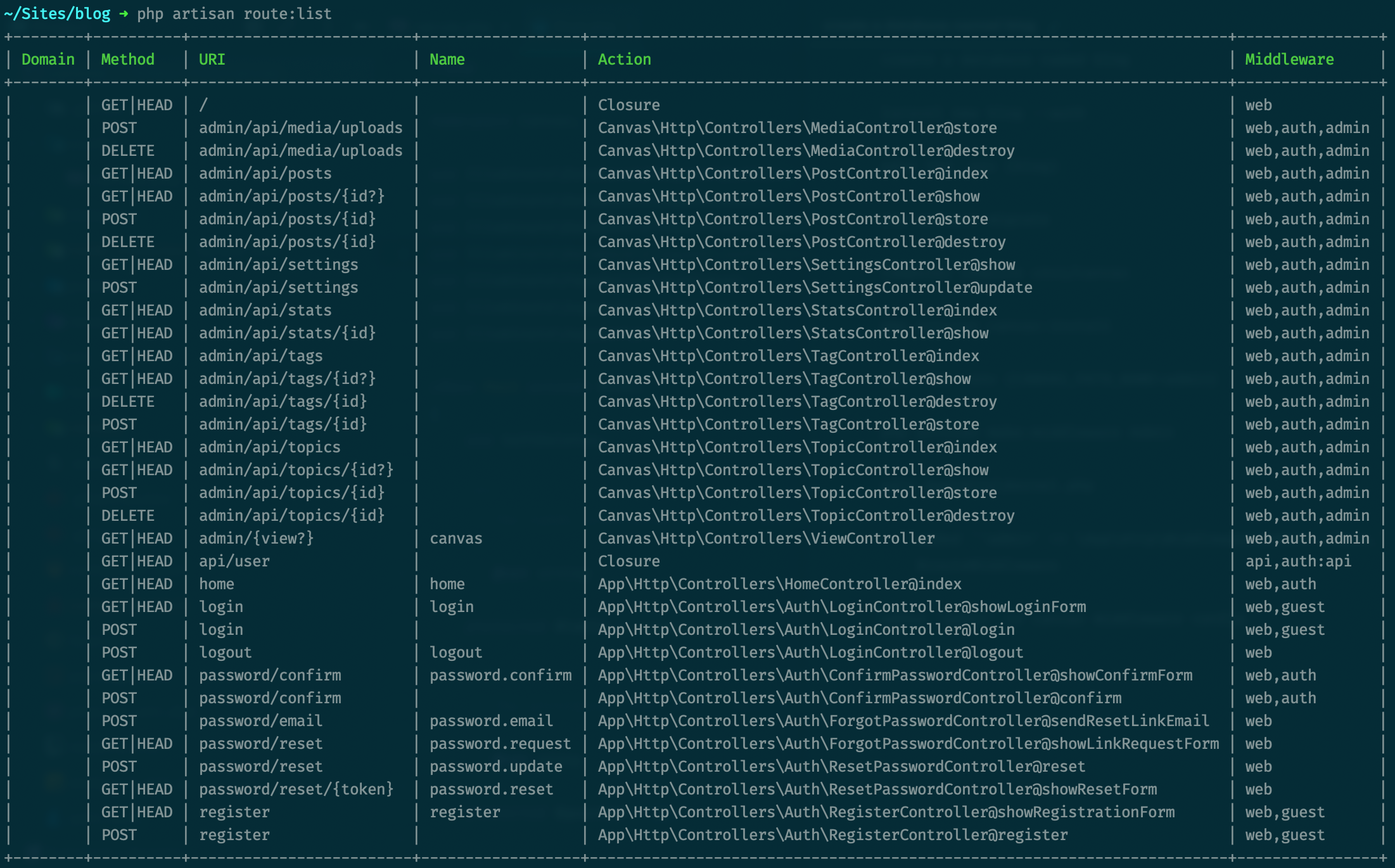
austintoddj
on 20 Mar 2020
After seeing your steps which was what I did, I rolled back my progress.
- I deleted the middleware
- I unregistered the middleware in kernel.php
- I removed the middleware from the canvas configuration file
- I updated my canvas package and composer
- I ran the artisan command
php artisan optimize:clear
- I created the middleware
- I registered it in kernel.php and canvas configuration file
And it worked.
Anthonynzube
on 20 Mar 2020
Related issues
 hoRacy
·
5Comments
hoRacy
·
5Comments
 karlmonson
·
10Comments
karlmonson
·
10Comments
 canatufkansu
·
6Comments
canatufkansu
·
6Comments
 dtovar
·
3Comments
dtovar
·
3Comments
 hide-me
·
5Comments
hide-me
·
5Comments
Most helpful comment
After seeing your steps which was what I did, I rolled back my progress.
And it worked.