Caniuse: Uncited/wrong claim about optimizeLegibility in "High-quality kerning pairs & ligatures" description
Not sure if this is the correct place for this, but the description for High-quality kerning pairs & ligatures (text-rendering) erroneously claims that "Newer browsers have this behavior [optimizeLegibility] enabled by default." This doesn't appear to be the case: Chrome and Safari both use auto as the default, while only Firefox intelligently swaps between them (@ 20px font-size threshold). (In fact, Chrome & Safari treat auto as optimizeSpeed, see MDN.)
Edit: see also https://stackoverflow.com/questions/52731988/is-it-valid-to-optimize-speed-for-text-rendering-and-then-asynchronously-optimi
 jacecotton
All 6 comments
This was added by @FremyCompany in #4324. @FremyCompany care to comment?
 Fyrd
on 11 Oct 2018
Fyrd
on 11 Oct 2018
That was the conclusion we came up with by looking at the Chromium source code at the time. As far as we understood, the property didn't do anything anymore as all browsers now enabled kerning and ligatures by default in all their codepaths in the last two years, and no "optimized" codepath remain in those browsers.
Let me see if I can find any reference to the property in Google source code, but I think it's dead for all purposes at this point, but maybe we missed some specific thing when we looked at this.
 FremyCompany
on 12 Oct 2018
FremyCompany
on 12 Oct 2018
Here you go, here is the algorithm in Chrome source code:
https://cs.chromium.org/chromium/src/third_party/blink/renderer/platform/fonts/font_description.cc?sq=package:chromium&dr=CSs&g=0&l=245
As you can see, text-rendering is applied before any other settings, so it is overridden by every other property related to font rendering, and the default value for these properties do the same as optimizeLegibility, so for all intent and purposes this property is useless.
(and I checked the defaultSettings field is never set to a non-0 value elsewhere in the code, so all typesettings changes happen in that function, so there is never any effect to specifying optimizeSpeed)
Also if you want to verify this by yourself: https://wptest.center/#/45zxd8
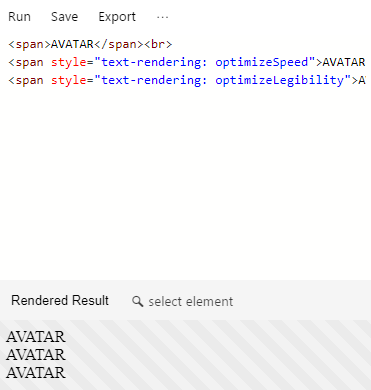
Same applies for ligarues (Candara + define):

The only case where this code might do something, is that if you are using "optimizeLegibility" and a "letter-spacing" bigger than 0 then the code will use ligatures while it wouldn't have been enabled otherwise, but this is a flagrant bug and not a feature.
In all other cases, the text-rendering property doesn't do anything anymore. The 20px switching in Firefox has also been removed, I don't want to go on a hunt to prove it, but I'm sure you can ping a font engineer at Firefox and they will confirm what I said. Previous documentation doesn't apply. Google and Mozilla should just remove this property from their browser.
I haven't checked WebKit but I think the same applies there.
FremyCompany
on 12 Oct 2018
If someone had time to update MDN to reflect correct and not outdated information, that would be neat, I don't have an MDN account and I feel lazy tonight.
FremyCompany
on 12 Oct 2018
So... basically, the _effect_ of optimizeLegibility is the algorithmic default, but text-rendering: optimizeLegibility itself is effectively worthless.
I wonder if this means that explicitly declaring text-rendering: optimizeSpeed would improve performance. 🤔A question for a separate forum I suppose.
Thanks for the clarification Fremy!
jacecotton
on 12 Oct 2018
@jacecotton As far as I know you cannot save time by declaring optimizeSpeed at this point, as all browsers removed the fast path they previously used. If you disable kerning and ligatures entirely on a page, you might be able to save memory by requiring less font data to be loaded in memory to compute the text layout, but I wouldn't expect any significant cpu improvement. The memory improvement only work if you never use kerning and ligature for a font at all, as a single instance that would will require loading the font data anyway.
FremyCompany
on 14 Oct 2018
Related issues
 Schweinepriester
·
3Comments
Fyrd
·
3Comments
Schweinepriester
·
3Comments
Fyrd
·
3Comments
 dnknn
·
3Comments
dnknn
·
3Comments
 SteveALee
·
3Comments
Schweinepriester
·
3Comments
SteveALee
·
3Comments
Schweinepriester
·
3Comments