Camunda-modeler: Modeler PNG export does not create a valid PNG
__Describe the Bug__
The Camunda Modeler does not create a valid PNG for the attached BPMN-file. The PNG file is created but you get an error when you want to open it (0 kb file).
__Steps to Reproduce__
- Open BPMN diagram attached to SUPPORT-6710 in Modeler
- Export Model to PNG (JPEG doesn't work as well)
- Try to open a created image
__Expected Behavior__
A valid PNG is created by the Camunda Modeler.
__Environment__
- OS: MacOS 10.15.1, Windows 10
- Camunda Modeler Version: 3.4.1, 3.3.4
Related to SUPPORT-6710
 michaldytko
All 25 comments
This popped up in support. I linked relevant support case in issue description
michaldytko
on 18 Nov 2019
The attached bpmn file is very large, so it might belong to a bug in canvg, which is used when generating the image, cf. https://github.com/canvg/canvg/issues/669
 pinussilvestrus
on 18 Nov 2019
pinussilvestrus
on 18 Nov 2019
I think this is related to this: https://stackoverflow.com/questions/695151/data-protocol-url-size-limitations
Using Blob might be a solution
 oguzeroglu
on 19 Nov 2019
oguzeroglu
on 19 Nov 2019
@linus-amg shared with me that he is experimenting with canvg in Cawemo right now.
Using blobs seems to solve the issue (@oguzeroglu thanks for the hint)!
Code snippet @linus-amg shared:
async generateImage(svg) {
const { default: canvg } = await import('utils/canvg-browser' /* webpackChunkName: "canvg-browser" */);
const canvas = document.createElement('canvas');
canvg(canvas, svg, {
ignoreMouse: true,
ignoreAnimation: true,
log: false
});
return new Promise(resolve => {
canvas.toBlob(blob => {
resolve(blob);
const context = canvas.getContext('2d');
context.clearRect(0, 0, canvas.width, canvas.height);
});
});
}
 nikku
on 19 Nov 2019
nikku
on 19 Nov 2019
@pinussilvestrus I guess we'd need to change from data URL export to blob export to get rid of this bug then. Could you check how much effort that would be?
nikku
on 19 Nov 2019
I wanted to mention that I additionally added a polyfill for edge, since toBlob is not supported there, the polyfill is the following:
if (!HTMLCanvasElement.prototype.toBlob) {
Object.defineProperty(HTMLCanvasElement.prototype, 'toBlob', {
value: function (callback, type, quality) {
var dataURL = this.toDataURL(type, quality).split(',')[1];
setTimeout(function() {
var binStr = atob( dataURL ),
len = binStr.length,
arr = new Uint8Array(len);
for (var i = 0; i < len; i++ ) {
arr[i] = binStr.charCodeAt(i);
}
callback( new Blob( [arr], {type: type || 'image/png'} ) );
});
}
});
}
Interesting here is that the polyfill uses toDataURL, but worked anyways for me with the diagram in question (on edge).

 linus-amg
on 19 Nov 2019
linus-amg
on 19 Nov 2019
Interesting here is that the polyfill uses
toDataURL, but worked anyways for me with the diagram in question (on edge).
That is very interesting indeed :thinking:.
nikku
on 19 Nov 2019
@nikku @linus-amg
Based on here the limit in IE 9 / Edge is increased to 4GB so maybe that's why we can get away with toDataURL in the first place.
oguzeroglu
on 19 Nov 2019
@oguzeroglu I remember things like electron / nexe / pkg / node having some memory limits, not sure though if this is till a thing, see: https://medium.com/@vuongtran/how-to-solve-process-out-of-memory-in-node-js-5f0de8f8464c maybe electron is getting out of memory in this case.
linus-amg
on 19 Nov 2019
@linus-amg I believe this is more like a URL size limit thing. Every browser has its own URL length limitations. So if the base64 encoded URL of canvas.toDataURL() exceeds that certain limit, it causes problems. It's possible that Edge can tolerate more than Chrome (I'm not sure but Electron probably uses some sort of Chromium related engine) etc.
oguzeroglu
on 19 Nov 2019
@oguzeroglu I also tried the toDataURL variant in Chrome 78 and it worked, maybe would be nice to try with the same v8 version as the modeler/electron uses, do we know which one that is?
linus-amg
on 19 Nov 2019
process.versions.chrome returns v66 so I'll try with that version to see if that's the case :)
oguzeroglu
on 19 Nov 2019
Interestingly I could export that diagram through Cawemo on Chrome v60 :suspect: This is indeed something going on inside Electron.
oguzeroglu
on 19 Nov 2019
The export function in production cawemo is not using canvg, thus should not work as a comparison.
linus-amg
on 19 Nov 2019
@pinussilvestrus I guess we'd need to change from data URL export to blob export to get rid of this bug then. Could you check how much effort that would be?
Changing the export to blob would work, in order to change the file system implementation a little bit to handle blobs. It's doable in some way
_But_: It wouldn't fix the bug, because when trying out:
canvg(canvas, svg);
// make the background white for every format
context = canvas.getContext('2d');
context.globalCompositeOperation = 'destination-over';
context.fillStyle = 'white';
context.fillRect(0, 0, canvas.width, canvas.height);
// solution shared by Cawemo
return new Promise(resolve => {
canvas.toBlob(blob => {
resolve(blob);
const context = canvas.getContext('2d');
context.clearRect(0, 0, canvas.width, canvas.height);
});
});
in the generateImage function would return null for the large diagram (and work for all other diagrams).
pinussilvestrus
on 20 Nov 2019
@andreasremdt found a nice way without relying on canvg, referencing him here so he can paste his example snippet, maybe it works for your product as well.
linus-amg
on 20 Nov 2019
So the function is basically this:
generateImage(svg) {
    const canvas = document.createElement('canvas');
    const ctx = canvas.getContext('2d');
    const image = new Image();
    const parsedSVG = new DOMParser().parseFromString(svg, 'application/xml').activeElement;
    const url = URL.createObjectURL(new Blob([svg], { type: 'image/svg+xml;charset=utf-8' }));

    // Set the correct width and height of the canvas, depending on the
    // SVG's dimensions.
    canvas.width = Number(parsedSVG.getAttribute('width'));
    canvas.height = Number(parsedSVG.getAttribute('height'));

    return new Promise(resolve => {
      image.onload = () => {
        ctx.drawImage(image, 0, 0);
        URL.revokeObjectURL(url);

        // Could also be 'image/jpg', the quality by default is 0.92
        canvas.toBlob(resolve, 'image/png', 1.0);
        ctx.clearRect(0, 0, canvas.width, canvas.height);
      };

      image.src = url;
    });
  }
And in Cawemo, we use the snippet by calling it with the modeler's SVG export:
const svgFromBrowser = await this.modeler.getSvg();
const data = this.sanitizeSvg(svgFromBrowser);

const content = await this.generateImage(data);
Tested with a few bigger diagrams, all looked fine.
Right now there's an issue in Edge due to the fact that it has issues with the activeElement property on the SVGElement it seems, I'm looking into it.
 andreasremdt
on 20 Nov 2019
andreasremdt
on 20 Nov 2019
@nikku @volkergersabeck @pinussilvestrus
I think I understand now why it works on Cawemo but fails on Camunda Modeler. I believe it's because of this line. After experimenting with Blobs also, given a diagram with such width, after multiplying it by 3 canvas.toBlob returns a null blob as well. Using a SCALE = 1 fixes the problem (even with toDataUrl, without blobs). I think Cawemo team simply does not SCALE their SVG's to 3.
My proposition is: while canvas.toDataURL returns an invalid string we scale it down from 3. We can consider 1 as the limit. Scale = 1 means the original image anyway.
The fix then would take a couple of minutes to implement.
Another solution would be to split the image into chunks, merge the generated PNGs in the backend.
oguzeroglu
on 20 Nov 2019
Well, scaling huuuuge diagrams by 3 times doesn't make sense at all....
pinussilvestrus
on 20 Nov 2019
Oh, interesting find @oguzeroglu , I also saw that line yesterday and figured that's the only difference to our use of canvg, but did not think more about it 😨 sorry. Why are they scaled anyways? Isn't it like 1:1 when not scaled?
linus-amg
on 20 Nov 2019
@linus-amg I'm not exactly sure, probably because we can get away with a more detailed image for most of the diagrams even when scaled to 3. 1:1 looks visually good enough to me as well. IMO we could even get away scaling this diagram x3 if it grew a bit more height-wise instead of growing all the way to such width. My best guess is that this is some sort of low-level GPU texture limitation, not something related to javascript itself.
oguzeroglu
on 20 Nov 2019
Reminder: When we fix this in Camunda Modeler, we should also fix this for Zeebe Modeler, as the piece of code that exports PNG is not shared between these two projects.
oguzeroglu
on 22 Nov 2019
Why it's not shared with the Zeebe Modeler? All changes (except some unrelated stuff) should be synced then automatically.
pinussilvestrus
on 22 Nov 2019
Wow, did not know about that syncing stuff. I just happened to see this in my workspace:
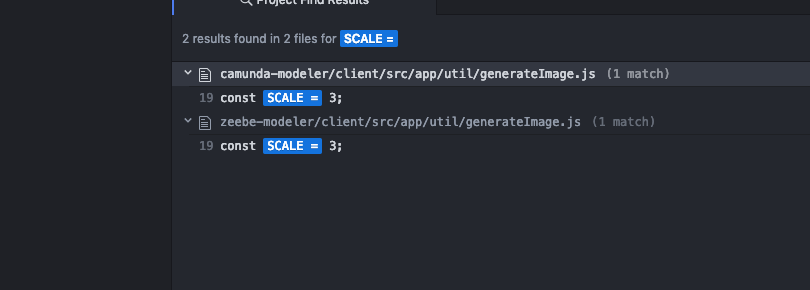
Thought this was a duplicate :)
oguzeroglu
on 22 Nov 2019
closed via #1634
oguzeroglu
on 16 Dec 2019
Related issues
 akifhazarvi
·
5Comments
pinussilvestrus
·
5Comments
akifhazarvi
·
5Comments
pinussilvestrus
·
5Comments
 StephenOTT
·
5Comments
StephenOTT
·
5Comments
 yanavasileva
·
5Comments
nikku
·
3Comments
yanavasileva
·
5Comments
nikku
·
3Comments
Most helpful comment
So the function is basically this:
And in Cawemo, we use the snippet by calling it with the modeler's SVG export:
Tested with a few bigger diagrams, all looked fine.
Right now there's an issue in Edge due to the fact that it has issues with the
activeElementproperty on theSVGElementit seems, I'm looking into it.