Camunda-modeler: Support default gestures for two finger scroll/zoom via touch pad (Mac / Windows / ...)
__Edit__: Updated for clarity.
The default mapping of two finger move on most desktop platforms is _scrolling_ (horizontally or vertically) rather than zooming. Two finger pinching on the other hand is the default gesture for _zooming in_.
Switching to the default operating system behavior would improve the usability of the Camunda Modeler for average users. See suggested mappings / scroll directions below.
__Tasks__
- [ ] Support default 2-finger scroll / zoom gestures on all OS(s)
__Note__
- This needs changes in the underlying modeling toolkits. We need to investigate, whether to provide fallbacks to the current behavior there.
__Suggested Mappings__
| gesture | action |
|:--|:--|
| two finger vertical move | scroll vertically |
| two finger horizontal move | scroll horizontally |
| two finger pinch | zoom in/out |
__Document/Canvas Scroll Directions__
The following table summarizes the __document scroll direction on two finger gestures__ for the different OS(s):
| gesture | default | Mac |
|:--|:--|:--|
| 2-finger-up | to top | to bottom |
| 2-finger-down | to bottom | to up |
| 2-finger-left | to left | to right |
| 2-finger-right | to right | to left |
| pinch-in *| zoom out | zoom out |
| pinch-out ** | zoom in | zoom in |
* moving fingers closer to each other
** moving fingers away from each other
 tsabirgaliev
All 22 comments
yup, did you find a workaround? I tried with BetterTouchTool to at least "cancel" the current behaviour with no luck
 ghost
on 12 Aug 2017
ghost
on 12 Aug 2017
@nikku would be great if we had a fix for this! Very problematic on trackpad users.
 StephenOTT
on 5 Sep 2017
StephenOTT
on 5 Sep 2017
Sounds like quite bad usability. What do you guys expect? Just a revert to the pre 1.8.1 behavior?
 nikku
on 6 Sep 2017
nikku
on 6 Sep 2017
@nikku no, sorry for my wording, "as of 1.8.1" merely means "I confirm this behavior at 1.8.1". Probably it works the same in all versions.
tsabirgaliev
on 6 Sep 2017
@nikku What is needed is to change the current behavior and make touchpad horizontal/vertical scroll gestures actually scroll instead of zooming
tsabirgaliev
on 6 Sep 2017
Okay, this should be discussed. Applications like draw.io work like you describe. Horizontally/vertically scrolling the canvas when using two fingers and then with the use of an addional modifier key (CTRL) zooming the canvas. This makes sense for me and I would go for this behavior. Needs discussion though.
 philippfromme
on 6 Sep 2017
philippfromme
on 6 Sep 2017
it's the default mac behavior, no-brainer
ghost
on 6 Sep 2017
I wanted to join this discusssion as a windows user instead of creating new one. Basically I also need to exchange the scroll and zoom behaviours. Please find my summary and suggestions as attached:
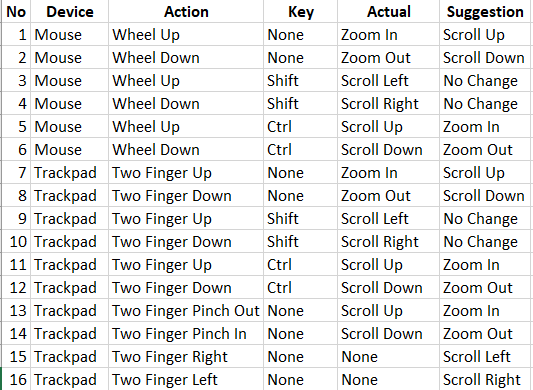
 kayazeren
on 19 Sep 2017
kayazeren
on 19 Sep 2017
@kayazeren this issue is specifically about Mac scroll/zoom behaviour. I think it is better to keep this issue focused. And the issue is not about "what I need". The core problem is that the current Mac UX doesn't align with a traditional Mac experience (aka unintuitive)
tsabirgaliev
on 19 Sep 2017
@tsabirgaliev thank you for your fast repy. Taking with your words; I guess Mac scroll/zoom behavior is very similar to Windows and Windows User Interface also does not align with traditional Windows experience. So plase take my "what I need" phrase as a "Which experience a Windows user need.."
I will create new issue on Windows navigation. Sorry for inconvenience.
kayazeren
on 19 Sep 2017
Thanks all for your valuable feedback :heart:.
As mentioned by @kayazeren native-like support for two finger gestures this is not specific to Mac but relevant across all platforms. Because of that I've edited the issues title and provided a detailed summary of the mapping in the issue description. Feel free to double check and correct me, if I'm wrong!
Good user experience is important for the Camunda Modeler and proper support for these core touch gestures is something we plan look into in the future.
nikku
on 23 Oct 2017
@nikku why the proposed scroll direction is opposite for Windows and Mac? The direction depends on user preference set in System Preferences. I hope it is possible to delegate the direction to OS setting (or at least, have an app level setting for that)
tsabirgaliev
on 23 Oct 2017
@nikku this is what I mean by 'OS setting':

tsabirgaliev
on 23 Oct 2017
I concur with @tsabirgaliev's statements. Not everybody enjoys Mac's "natural" scroll direction. This camunda setting should be system setting dependent.
 olescheller
on 23 Oct 2017
olescheller
on 23 Oct 2017
@nikku why the proposed scroll direction is opposite for Windows and Mac?
Because there is different default behaviors for Mac and other platforms.
Unfortunately, we'll most likely not be able to react to users special settings. This is due to the fact, that we need to work with raw pointer events and interpret these
nikku
on 23 Oct 2017
Adding a switch to toggle between natural scrolling and default (Windows / other OS(s)) would be an addition to consider.
nikku
on 23 Oct 2017
Needs fix via https://github.com/bpmn-io/diagram-js/issues/240.
nikku
on 18 Dec 2017
Will be addressed in the next version of the Camunda Modeler.
nikku
on 18 Dec 2017
You can get a sneak peek of the the new interaction patterns at demo.bpmn.io.
nikku
on 28 Dec 2017
Closed via https://github.com/camunda/camunda-modeler/commit/bdc5463c369dd57a0181c999078f363eb2ce650b.
nikku
on 4 Jan 2018
Feels fantastic! Thank you for this
olescheller
on 4 Jan 2018
Great... and what a luck. I'm just at the end of the mapping 250+ processes...
Next week I will deploy Camunda Modeler and process maps to the users for change management.
Now teaching them how to use the Modeler will be easier.
Thanks a lot.
kayazeren
on 5 Jan 2018
Related issues
StephenOTT
·
5Comments
 tasso94
·
5Comments
tasso94
·
5Comments
 slizenko
·
3Comments
slizenko
·
3Comments
 akifhazarvi
·
5Comments
akifhazarvi
·
5Comments
 leolux
·
5Comments
leolux
·
5Comments
Most helpful comment
Will be addressed in the next version of the Camunda Modeler.