Calva: Code loses syntax colors when switching from one window to the other
Issue Type: Bug
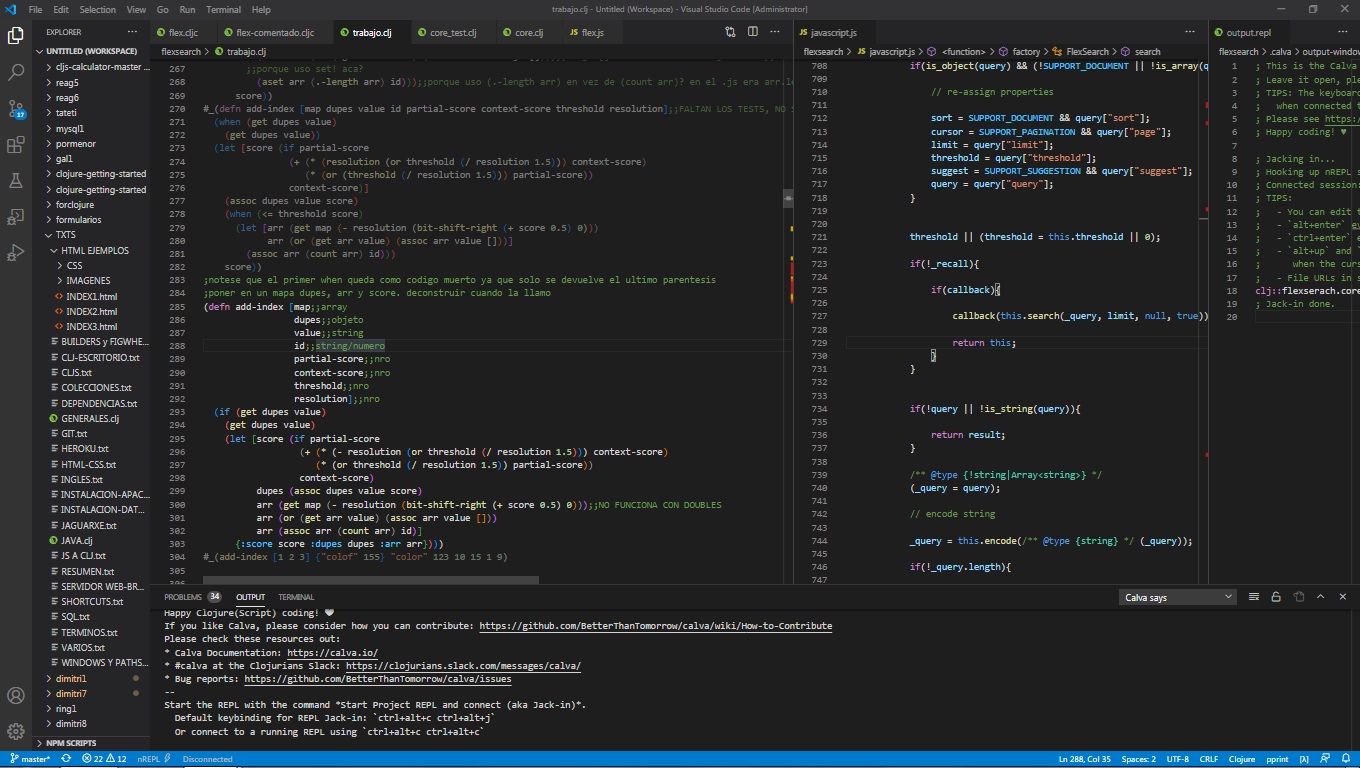
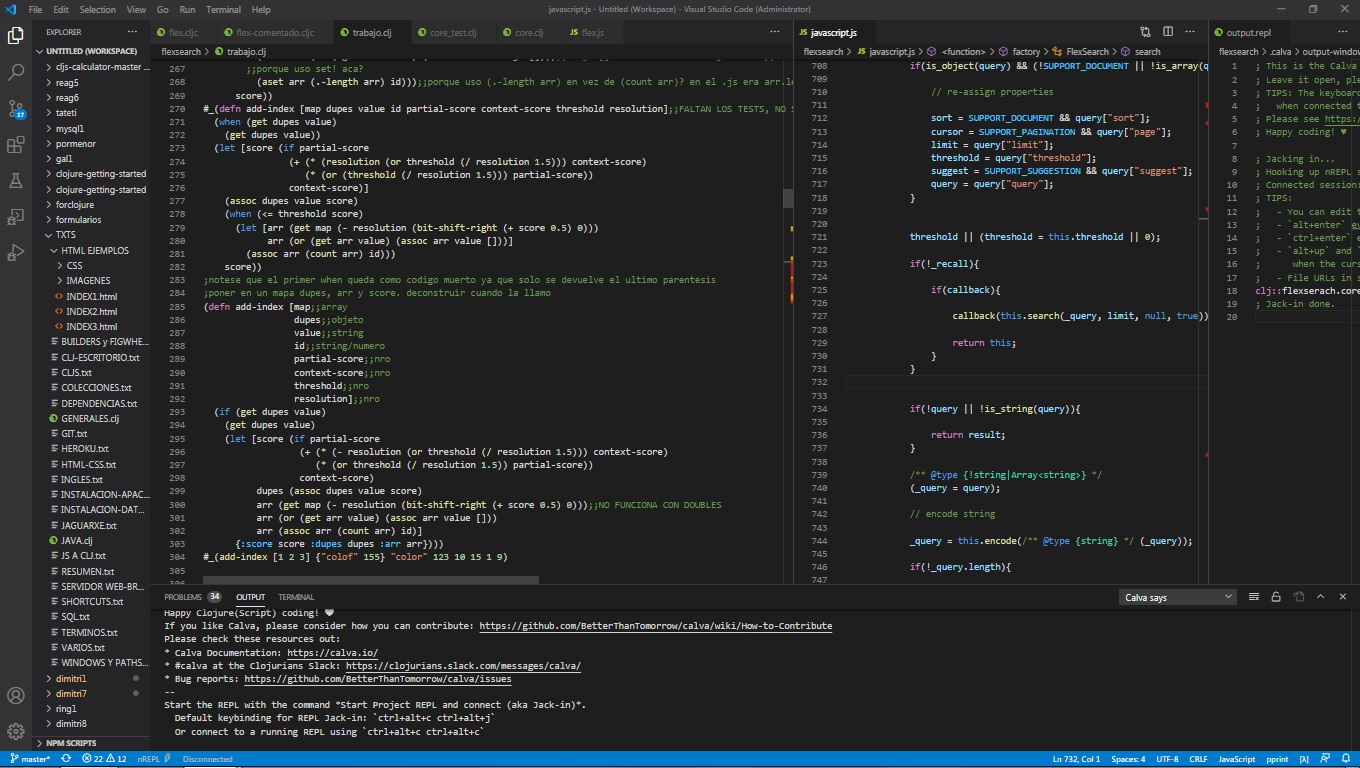
I normally open the editor, and go to one of the tabs (e.g. file1.cljc). then I click on another open tab (e.g. file2.js) and when I want to scroll up or down on the file1.cljc tab, the code colors disappear and all the letters are white. This happens only when doing scroll, if I click again on file1.cljc, the colors appear again.
Extension version: 2.0.122
VS Code version: Code 1.48.1 (3dd905126b34dcd4de81fa624eb3a8cbe7485f13, 2020-08-19T17:12:39.269Z)
OS version: Windows_NT ia32 6.1.7601
System Info
|Item|Value|
|---|---|
|CPUs|Intel(R) Core(TM) i3-2120 CPU @ 3.30GHz (4 x 3292)|
|GPU Status|2d_canvas: enabled
flash_3d: enabled
flash_stage3d: enabled
flash_stage3d_baseline: enabled
gpu_compositing: enabled
multiple_raster_threads: enabled_on
oop_rasterization: unavailable_off
protected_video_decode: unavailable_off
rasterization: unavailable_off
skia_renderer: disabled_off_ok
video_decode: enabled
viz_display_compositor: enabled_on
viz_hit_test_surface_layer: disabled_off_ok
webgl: enabled
webgl2: unavailable_off|
|Load (avg)|undefined|
|Memory (System)|3.40GB (1.09GB free)|
|Process Argv||
|Screen Reader|no|
|VM|0%|
 fabricioc8
All 9 comments
Thanks for the report. I believe this is by design / intended. Calva only does highlighting on the part of the active editor that is in view for performance reasons. So if you're scrolling in a non-active editor, the parts that were out of view last time it was active will not be highlighted.
@PEZ Is there a way to highlight non-active docs, but only their parts in view while being scrolled?
 bpringe
on 21 Aug 2020
bpringe
on 21 Aug 2020
Thanks for answering! I don't remember noticing this behavior before anyway...
fabricioc8
on 21 Aug 2020
Just so I understand this correctly:
all the letters are white
I can't see this in screenshots. However, what I do see is that the ignored form (prepended by #_) is not dimmed in the second one. Let me take this opportunity to clarify/explain some of what is going on in Calva when it concerns syntax highlighting.
There are two syntax highlighters in Calva:
- A tmLanguage based grammar, provided by Calva, but managed/executed by VS Code. (Let's call this HL1)
- A Calva provided and managed highlighter written in TypeScript. (HL2, but aka Calva Highlight).
HL2 also replaces the VS Code built in active bracket matching, which used to be confusing for structural editing (I'm saying ”used to”, because this might have been fixed in VS Code, I am not sure).
In Calva most of the ”basic” highlighting, functions, keywords, symbols, line comments, etcetera, is performed by HL1. tmLanguage isn't very structural in the LISP sense, so rainbow brackets, rainbow guides, (comment ..), #_, and reader tags are hard to express in that language. At least I don't know how to do it. So those parts are handled by HL2/Calva Highlighter.
VS Code has some rocket science, super efficient, ways of optimising the highlighting it does using the tmLanguage grammar. It is really efficient, and can highlight huge files really fast. Even so, HL1 throws in the towel with lines larger than 20K characters (this is configurable in settings, iirc).
HL2 is a nice piece of engineering, but it starts to take noticeable time when working on large forms. This usually isn't a problem when opening a file, if it takes 150ms for HL2 to paint the rainbows, it's not a very big deal.
But HL2 also has that active bracket highlighting, which need a lot of context, and for performance reasons we gather that context in the same pass as we do the other HL2 work. If it takes 150ms to repaint the rainbows when scrolling by moving the cursor down (maybe by pressing the down key), that makes things be sluggish. Unbearably so if the file is 100K lines. Therefore we make an optimisation by trying to limit the highlighting to what is visible in the viewport. This is the optimisation that @bpringe mentions.
However, it is not what is causing the glitch you experience here. I've just used a lot of words to establish this, I realise, but I think this information should be available anyway, so ... 😀
I think that the reason you think this has not been the case before, @fabricioc8 , is that before version 2.0.109 of Calva, HL2 was only working on the active editor. So if you scrolled file1.cljc without making it active, that dimmed form would have stayed dimmed because HL2 wouldn't touch it again. But text being scrolled into view, that HL2 had not done any work on, would not get rainbows or dimming and such.
Calva 2.0.109 introduced a new output/repl window, that is designed to be left in view side by side with the code you work on. This meant that I needed to change Calva so that HL2 would work on a non-active editor as well. I guess what is happening in your repro there is that HL2 manages to clear its highlighting, but not apply a correct one.
So. Now I have convinced myself that this is a bug and not by design. 😄 (If it had been reported prior to 2.0.109 it would have been a feature request.).
What you can do to give us some more info here, @fabricioc8 , is to try and see if this happens with all your files, or if it is only for some. That would help us guess where the bug originates.
Thanks for reporting!
 PEZ
on 21 Aug 2020
PEZ
on 21 Aug 2020
I'm sorry, I expressed wrong. Not 'all the letters', the ones that don't acquire color are all the parentheses, braces and brackets. (in addition to not attenuating #_(forms) as you said). I tried with several files and it happened with all. Sorry if the terms I use are not the ones that are used, it is that I am relatively new in this world of programming.
fabricioc8
on 21 Aug 2020
There is another behavior that I am experiencing which is that when I make some modification and evaluate the expression in the repl, when I scroll down, the rainbow disappears. I have to click out and then click in the file to see the colors. If the file is active it shouldn't get colored when scrolling?
fabricioc8
on 26 Aug 2020
If the file is active it should be highlighted (colored) as you scroll. Can you provide a video/gif of this happening?
When you say you make a change and then "evaluate the expression in the repl," if you mean you are clicking on the repl window/editor and running the code, then scrolling in the source editor (where you made the changes) without clicking the source editor, then the source editor is not the active editor and it will not be colored as you scroll. Rather, the repl editor is the active editor at that point.
bpringe
on 26 Aug 2020
Not even making a change, I just evaluate with the repl and then scroll. Without clicking on the repl at any time. without touching the repl editor.
https://drive.google.com/file/d/1UkfCijk_cLpzCQZ2qqyv_bJxHVXzEX5I/view?usp=sharing
fabricioc8
on 27 Aug 2020
Thanks for taking the time to provide the gif. Which version of Calva are you using? And what's the name of the command you're running? I can't replicate with the current commands, and I know we used to have a command ctrl+alt+c v by default in an older version of Calva that is no longer there.
But with all the evaluate commands I cannot replicate :thinking:
bpringe
on 27 Aug 2020
v2.0.123. I used ctrl+alt+c v but I tried with ctrl+enter and it's the same.
fabricioc8
on 27 Aug 2020
Related issues
 TwiceII
·
6Comments
bpringe
·
5Comments
TwiceII
·
6Comments
bpringe
·
5Comments
 FongHou
·
5Comments
FongHou
·
5Comments
 lspector
·
5Comments
PEZ
·
3Comments
lspector
·
5Comments
PEZ
·
3Comments