Calva: Unable to jack-in on Windows 10/Powershell
Project
https://github.com/alzadude/cljc-hello-world
Steps
Start VSCode
Jack In
Select Clojure CLI
Select "dev" alias (or no alias, same result)
Expected
Nrepl starts successfully.
Actual
Nrepl doesn't start, error message displayed.
> Executing task: C:\Windows\System32\WindowsPowerShell\v1.0\powershell.exe clojure -Sdeps '{:deps {nrepl {:mvn/version ""0.6.0""} cider/cider-nrepl {:mvn/version ""0.22.1""} cider/piggieback {:mvn/version ""0.4.1""} com.bhauman/figwheel-main {:mvn/version ""0.2.3""}}}' -A:dev -m nrepl.cmdline --middleware "[cider.nrepl/cider-middleware cider.piggieback/wrap-cljs-repl]" <


The string is missing the terminator: ".
    + CategoryInfo          : ParserError: (:) [], ParentContainsErrorRecordException
    + FullyQualifiedErrorId : TerminatorExpectedAtEndOfString


Terminal will be reused by tasks, press any key to close it.
 alzadude
All 49 comments
String quoting issue? There's some examples here: https://github.com/clojure/tools.deps.alpha/wiki/clj-on-Windows
alzadude
on 10 Oct 2019
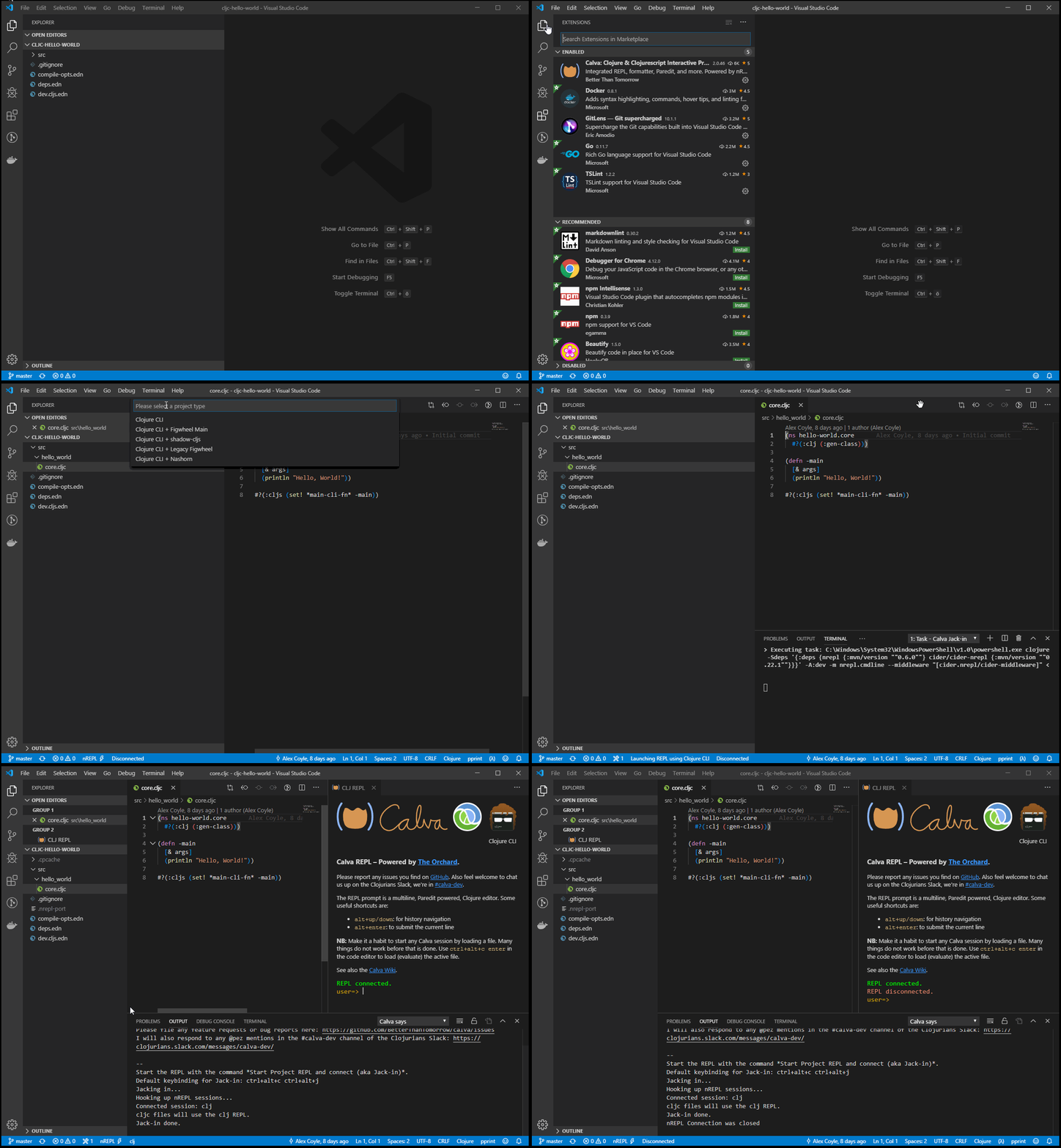
@alzadude Unfortunately I cannot reproduce the behavior on my machine. Here is a short screen gif of my jack-in process for your specified project:
 cfehse
on 10 Oct 2019
cfehse
on 10 Oct 2019
@alzadude Unfortunately I cannot reproduce the behavior on my machine. Here is a short screen gif of my jack-in process for your specified project:
Ah @cfehse ok thanks for the video.. I wanted to compare your Powershell command with mine, but you can't pause a GIF video aha!
Can you paste the Powershell command Calva is using on your machine?
The only other thing of note from my side is that I installed Clojure using Scoop. Having said that, when I paste the command used by Calva into a Powershell prompt, I get the same error.
On my machine, the Powershell command Calva is using:
clojure -Sdeps '{:deps {nrepl {:mvn/version ""0.6.0""} cider/cider-nrepl {:mvn/version ""0.22.1""}}}' -A:dev -m nrepl.cmdline --middleware "[cider.nrepl/cider-middleware]"
This is my commandline (retrieved from Process Explorer):
C:\Windows\System32\WindowsPowerShell\v1.0\powershell.exe clojure -Sdeps "'{:deps {nrepl {:mvn/version \"\"0.6.0\"\"} cider/cider-nrepl {:mvn/version \"\"0.22.1\"\"}}}'" -A:dev -m nrepl.cmdline --middleware \"[cider.nrepl/cider-middleware]\"
This is quite depressing.
Can you copy the command line you get in the Jack-in task terminal, @cfehse ?
 PEZ
on 10 Oct 2019
PEZ
on 10 Oct 2019
This is the output from the task in vscode:
> Executing task: C:\Windows\System32\WindowsPowerShell\v1.0\powershell.exe clojure -Sdeps '{:deps {nrepl {:mvn/version ""0.6.0""} cider/cider-nrepl {:mvn/version ""0.22.1""}}}' -A:dev -m nrepl.cmdline --middleware "[cider.nrepl/cider-middleware]" <
On my system the commandline is correctly quoted.
cfehse
on 10 Oct 2019
It seems @alzadude gets a Clojure CLI + Figwheel Main command line... That seems quite odd.
PEZ
on 10 Oct 2019
Shouldn't result in a quoting error, regardless, though. Can you try with Figwheel Main, @cfehse ?
PEZ
on 10 Oct 2019
@PEZ no problem with Figwheel Main
Calva output:
> Executing task: C:\Windows\System32\WindowsPowerShell\v1.0\powershell.exe clojure -Sdeps '{:deps {nrepl {:mvn/version ""0.6.0""} cider/cider-nrepl {:mvn/version ""0.22.1""} cider/piggieback {:mvn/version ""0.4.1""} com.bhauman/figwheel-main {:mvn/version ""0.2.3""}}}' -A:dev -m nrepl.cmdline --middleware "[cider.nrepl/cider-middleware cider.piggieback/wrap-cljs-repl]" <
Process Explorer:
C:\Windows\System32\WindowsPowerShell\v1.0\powershell.exe clojure -Sdeps "'{:deps {nrepl {:mvn/version \"\"0.6.0\"\"} cider/cider-nrepl {:mvn/version \"\"0.22.1\"\"} cider/piggieback {:mvn/version \"\"0.4.1\"\"} com.bhauman/figwheel-main {:mvn/version \"\"0.2.3\"\"}}}'" -A:dev -m nrepl.cmdline --middleware \"[cider.nrepl/cider-middleware cider.piggieback/wrap-cljs-repl]\"
That's exactly the same command line on both machines. Maybe it has something to do with different default shells.
I think I fixed that, but anyway. Let's compare default shells.
PEZ
on 10 Oct 2019
@alzadude @PEZ
Perhaps you can try to connect with a different shell for the internal terminal. ctrl+shift+p to open die Command prompt then select Terminal: Select default Shell
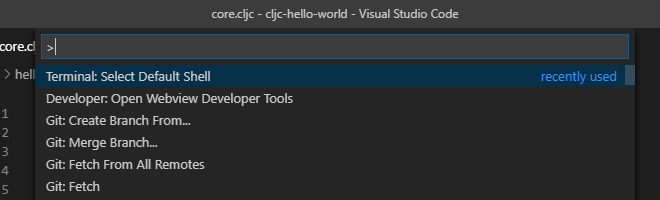
On my system I get this selection chooses:
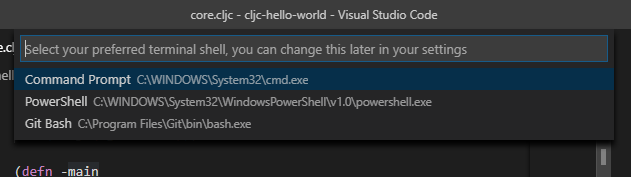
I tried all 3 and they worked all.
cfehse
on 11 Oct 2019
@alzadude @PEZ
Perhaps you can try to connect with a different shell for the internal terminal.
ctrl+shift+pto open die Command prompt then selectTerminal: Select default Shell
Hi @PEZ @cfehse I tried with Powershell, and the old command prompt, and I get the same result:
> Executing task in folder cljc-hello-world: C:\Windows\System32\WindowsPowerShell\v1.0\powershell.exe clojure -Sdeps '{:deps {nrepl {:mvn/version ""0.6.0""} cider/cider-nrepl {:mvn/version ""0.22.1""}}}'  -m nrepl.cmdline --middleware "[cider.nrepl/cider-middleware]" <

The string is missing the terminator: ".
    + CategoryInfo          : ParserError: (:) [], ParentContainsErrorRecordException
    + FullyQualifiedErrorId : TerminatorExpectedAtEndOfString


Terminal will be reused by tasks, press any key to close it.
Note: when asked to select the project type, I choose Clojure CLI, not Clojure CLI + Figwheel Main (just to try and narrow down the issue).
alzadude
on 11 Oct 2019
Maybe there is some difference between the scoop install and the official one? I don't know what we could do about it, but it would be good to know, so that we can advice Calva users. Is there a way you can try a non-scoop install, @alzadude ?
PEZ
on 12 Oct 2019
@PEZ I just uninstalled the Scoop-installed Clojure, and installed the "standard" one following these steps: https://github.com/clojure/tools.deps.alpha/wiki/clj-on-Windows
Unfortunately, I'm still getting the same error on Jack-in 😭
alzadude
on 12 Oct 2019
Thanks for trying that for us. I'm sorry it didn't help, but in a way that is good news. Still... what on earth could be going on?
PEZ
on 12 Oct 2019
Can you try pasting these commands in the cmd.exe shell?
C:\Windows\System32\WindowsPowerShell\v1.0\powershell.exe clojure -Sdeps '{:deps {nrepl {:mvn/version ""0.6.0""} cider/cider-nrepl {:mvn/version ""0.22.1""} cider/piggieback {:mvn/version ""0.4.1""} com.bhauman/figwheel-main {:mvn/version ""0.2.3""}}}' -A:dev -m nrepl.cmdline --middleware "[cider.nrepl/cider-middleware cider.piggieback/wrap-cljs-repl]"
C:\Windows\System32\WindowsPowerShell\v1.0\powershell.exe clojure -Sdeps '{:deps {nrepl {:mvn/version """""0.6.0"""""} cider/cider-nrepl {:mvn/version """""0.22.1"""""} cider/piggieback {:mvn/version """""0.4.1"""""} com.bhauman/figwheel-main {:mvn/version """""0.2.3"""""}}}' -A:dev -m nrepl.cmdline --middleware "[cider.nrepl/cider-middleware cider.piggieback/wrap-cljs-repl]"
Hi @PEZ in cmd.exe I get the same result for both commands:
Unknown option: "-i"
Unknown option: "-n"
Unknown option: "-p"
Unknown option: "-u"
Unknown option: "-t"
Unknown option: "-F"
Unknown option: "-o"
Unknown option: "-r"
Unknown option: "-m"
Unknown option: "-a"
Unknown option: "-t"
Unknown option: "-o"
Unknown option: "-u"
Unknown option: "-t"
Unknown option: "-p"
Unknown option: "-u"
Unknown option: "-t"
Unknown option: "-F"
Unknown option: "-o"
Unknown option: "-r"
Unknown option: "-m"
Unknown option: "-a"
Unknown option: "-t"
Interesting. What do you get if you try those in cmd.exe, @cfehse ? (Sorry for being lazy and not firing up Virtual Box. :smile:
PEZ
on 12 Oct 2019
The first one:
Error while parsing option "--config-data {:deps {nrepl {:mvn/version 0.6.0} cider/cider-nrepl {:mvn/version 0.22.1} cider/piggieback {:mvn/version 0.4.1} com.bhauman/figwheel-main {:mvn/version 0.2.3}}}": java.lang.NumberFormatException: Invalid number: 0.6.0
The second one:
Error while parsing option "--config-data {:deps {nrepl {:mvn/version 0.6.0} cider/cider-nrepl {:mvn/version 0.22.1} cider/piggieback {:mvn/version 0.4.1} com.bhauman/figwheel-main {:mvn/version 0.2.3}}}": java.lang.NumberFormatException: Invalid number: 0.6.0
Which version of Calva are you using, @alzadude ?
PEZ
on 13 Oct 2019
Not that it should matter much, the command line used is exactly the same as for @cfehse . I really am out of ideas now for what it could be that is going wrong.
PEZ
on 13 Oct 2019
Which version of Calva are you using, @alzadude ?
2.0.49
alzadude
on 13 Oct 2019
Not that it should matter much, the command line used is exactly the same as for @cfehse . I really am out of ideas now for what it could be that is going wrong.
😭 I also can't think of anything else at the moment.. It just doesn't make sense 😞
As an aside, I only switched from WSL to a native Windows stack (Java, Clojure, NodeJS) due to hitting #357.
Aside from that issue, Calva with WSL works great! But I need a CLJS REPL, which isn't going to work for me until I can work out what's causing WSL to hang..
alzadude
on 13 Oct 2019
One interesting thing here is:
Unknown option: "-i"
Unknown option: "-n"
Unknown option: "-p"
Unknown option: "-u"
Unknown option: "-t"
Unknown option: "-F"
Unknown option: "-o"
Unknown option: "-r"
Unknown option: "-m"
Unknown option: "-a"
Unknown option: "-t"
Unknown option: "-o"
Unknown option: "-u"
Unknown option: "-t"
Unknown option: "-p"
Unknown option: "-u"
Unknown option: "-t"
Unknown option: "-F"
Unknown option: "-o"
Unknown option: "-r"
Unknown option: "-m"
Unknown option: "-a"
Unknown option: "-t"
that these reads to inputFormatoutputFormat from top to buttom. It is not random staff. Can you please try one of the commandline directly in cmd.exe (not vscode terminal) and see if the output is the same? Or is your output from outside vscode?
cfehse
on 13 Oct 2019
Sorry wrong button. :(
cfehse
on 13 Oct 2019
that these reads to
inputFormatoutputFormatfrom top to buttom. It is not random staff. Can you please try one of the commandline directly incmd.exe(not vscode terminal) and see if the output is the same? Or is your output from outside vscode?
Hi @cfehse I just tried with cmd.exe, and I get the same result...
alzadude
on 13 Oct 2019
Can you test the following commandlines in the directory of your sample project?
C:\Windows\System32\WindowsPowerShell\v1.0\powershell.exe clojure

C:\Windows\System32\WindowsPowerShell\v1.0\powershell.exe clojure -Sdeps

C:\Windows\System32\WindowsPowerShell\v1.0\powershell.exe clojure -Sdeps "'{:deps {nrepl {:mvn/version \"\"0.6.0\"\"} cider/cider-nrepl {:mvn/version \"\"0.22.1\"\"} cider/piggieback {:mvn/version \"\"0.4.1\"\"} com.bhauman/figwheel-main {:mvn/version \"\"0.2.3\"\"}}}'"

C:\Windows\System32\WindowsPowerShell\v1.0\powershell.exe clojure -A:dev

C:\Windows\System32\WindowsPowerShell\v1.0\powershell.exe clojure -m nrepl.cmdline

C:\Windows\System32\WindowsPowerShell\v1.0\powershell.exe clojure -A:dev -m nrepl.cmdline

C:\Windows\System32\WindowsPowerShell\v1.0\powershell.exe clojure -A:dev -m nrepl.cmdline --middleware \"[cider.nrepl/cider-middleware cider.piggieback/wrap-cljs-repl]\"

C:\Windows\System32\WindowsPowerShell\v1.0\powershell.exe clojure -Sdeps "'{:deps {nrepl {:mvn/version \"\"0.6.0\"\"} cider/cider-nrepl {:mvn/version \"\"0.22.1\"\"} cider/piggieback {:mvn/version \"\"0.4.1\"\"} com.bhauman/figwheel-main {:mvn/version \"\"0.2.3\"\"}}}'" -A:dev -m nrepl.cmdline --middleware \"[cider.nrepl/cider-middleware cider.piggieback/wrap-cljs-repl]\"
This would be the output on my system:
>C:\Windows\System32\WindowsPowerShell\v1.0\powershell.exe clojure
Clojure 1.10.1
user=>

>C:\Windows\System32\WindowsPowerShell\v1.0\powershell.exe clojure -Sdeps
Clojure 1.10.1
user=> exit
Syntax error compiling at (REPL:0:0).
Unable to resolve symbol: exit in this context
user=>

>C:\Windows\System32\WindowsPowerShell\v1.0\powershell.exe clojure -A:dev
Clojure 1.10.1
user=>

>C:\Windows\System32\WindowsPowerShell\v1.0\powershell.exe clojure -m nrepl.cmdline
Execution error (FileNotFoundException) at clojure.main/main (main.java:40).
Could not locate nrepl/cmdline__init.class, nrepl/cmdline.clj or nrepl/cmdline.cljc on classpath.

Full report at:
C:\Users\CC8EE~1.FEH\AppData\Local\Temp\clojure-6717034516988935151.edn

>C:\Windows\System32\WindowsPowerShell\v1.0\powershell.exe clojure -A:dev -m nrepl.cmdline
Execution error (FileNotFoundException) at clojure.main/main (main.java:40).
Could not locate nrepl/cmdline__init.class, nrepl/cmdline.clj or nrepl/cmdline.cljc on classpath.

Full report at:
C:\Users\CC8EE~1.FEH\AppData\Local\Temp\clojure-369926797082737457.edn

>C:\Windows\System32\WindowsPowerShell\v1.0\powershell.exe clojure -A:dev -m nrepl.cmdline --middleware \"[cider.nrepl/cider-middleware cider.piggieback/wrap-cljs-repl]\"
Execution error (FileNotFoundException) at clojure.main/main (main.java:40).
Could not locate nrepl/cmdline__init.class, nrepl/cmdline.clj or nrepl/cmdline.cljc on classpath.

Full report at:
C:\Users\CC8EE~1.FEH\AppData\Local\Temp\clojure-8600439413413099723.edn

>C:\Windows\System32\WindowsPowerShell\v1.0\powershell.exe clojure -Sdeps "'{:deps {nrepl {:mvn/version \"\"0.6.0\"\"} cider/cider-nrepl {:mvn/version \"\"0.22.1\"\"} cider/piggieback {:mvn/version \"\"0.4.1\"\"} com.bhauman/figwheel-main {:mvn/version \"\"0.2.3\"\"}}}'"
Clojure 1.10.1
user=>

>C:\Windows\System32\WindowsPowerShell\v1.0\powershell.exe clojure -Sdeps "'{:deps {nrepl {:mvn/version \"\"0.6.0\"\"} cider/cider-nrepl {:mvn/version \"\"0.22.1\"\"} cider/piggieback {:mvn/version \"\"0.4.1\"\"} com.bhauman/figwheel-main {:mvn/version \"\"0.2.3\"\"}}}'" -A:dev -m nrepl.cmdline --middleware \"[cider.nrepl/cider-middleware cider.piggieback/wrap-cljs-repl]\"
WARNING: Specified aliases are undeclared: [:dev]
nREPL server started on port 52564 on host 127.0.0.1 - nrepl://127.0.0.1:52564
Hi @cfehse here's the output from running those commands on my system:
Microsoft Windows [Version 10.0.18362.418]
(c) 2019 Microsoft Corporation. All rights reserved.

C:\Users\alex>d:

D:\>cd Projects\dj-data-converter
D:\Projects\dj-data-converter>C:\Windows\System32\WindowsPowerShell\v1.0\powershell.exe clojure
Clojure 1.10.1
user=>


md5-00572bb04ac5bc839792f8b82d63fdc0


D:\Projects\dj-data-converter>C:\Windows\System32\WindowsPowerShell\v1.0\powershell.exe clojure -Sdeps
Clojure 1.10.1
user=> exit
Syntax error compiling at (REPL:0:0).
Unable to resolve symbol: exit in this context
user=>


md5-00572bb04ac5bc839792f8b82d63fdc0


D:\Projects\dj-data-converter>C:\Windows\System32\WindowsPowerShell\v1.0\powershell.exe clojure -Sdeps "'{:deps {nrepl {:mvn/version \"\"0.6.0\"\"} cider/cider-nrepl {:mvn/version \"\"0.22.1\"\"} cider/piggieback {:mvn/version \"\"0.4.1\"\"} com.bhauman/figwheel-main {:mvn/version \"\"0.2.3\"\"}}}'"
The string is missing the terminator: ".
    + CategoryInfo          : ParserError: (:) [], ParentContainsErrorRecordException
    + FullyQualifiedErrorId : TerminatorExpectedAtEndOfString


md5-00572bb04ac5bc839792f8b82d63fdc0


D:\Projects\dj-data-converter>C:\Windows\System32\WindowsPowerShell\v1.0\powershell.exe clojure -A:dev
Clojure 1.10.1
user=>


md5-00572bb04ac5bc839792f8b82d63fdc0


D:\Projects\dj-data-converter>C:\Windows\System32\WindowsPowerShell\v1.0\powershell.exe clojure -m nrepl.cmdline
Execution error (FileNotFoundException) at clojure.main/main (main.java:40).
Could not locate nrepl/cmdline__init.class, nrepl/cmdline.clj or nrepl/cmdline.cljc on classpath.

Full report at:
C:\Users\alex\AppData\Local\Temp\clojure-5275965308690667332.edn


md5-00572bb04ac5bc839792f8b82d63fdc0


D:\Projects\dj-data-converter>C:\Windows\System32\WindowsPowerShell\v1.0\powershell.exe clojure -A:dev -m nrepl.cmdline
Execution error (FileNotFoundException) at clojure.main/main (main.java:40).
Could not locate nrepl/cmdline__init.class, nrepl/cmdline.clj or nrepl/cmdline.cljc on classpath.

Full report at:
C:\Users\alex\AppData\Local\Temp\clojure-1284938347637229781.edn


md5-00572bb04ac5bc839792f8b82d63fdc0


D:\Projects\dj-data-converter>
D:\Projects\dj-data-converter>C:\Windows\System32\WindowsPowerShell\v1.0\powershell.exe clojure -A:dev -m nrepl.cmdline --middleware \"[cider.nrepl/cider-middleware cider.piggieback/wrap-cljs-repl]\"
Execution error (FileNotFoundException) at clojure.main/main (main.java:40).
Could not locate nrepl/cmdline__init.class, nrepl/cmdline.clj or nrepl/cmdline.cljc on classpath.

Full report at:
C:\Users\alex\AppData\Local\Temp\clojure-15572503195302186075.edn


md5-00572bb04ac5bc839792f8b82d63fdc0


D:\Projects\dj-data-converter>C:\Windows\System32\WindowsPowerShell\v1.0\powershell.exe clojure -Sdeps "'{:deps {nrepl {:mvn/version \"\"0.6.0\"\"} cider/cider-nrepl {:mvn/version \"\"0.22.1\"\"} cider/piggieback {:mvn/version \"\"0.4.1\"\"} com.bhauman/figwheel-main {:mvn/version \"\"0.2.3\"\"}}}'" -A:dev -m nrepl.cmdline --middleware \"[cider.nrepl/cider-middleware cider.piggieback/wrap-cljs-repl]\"
The string is missing the terminator: ".
    + CategoryInfo          : ParserError: (:) [], ParentContainsErrorRecordException
    + FullyQualifiedErrorId : TerminatorExpectedAtEndOfString
Can you please execute the following commands so see with what kind of powershell we are dealing with:
>C:\Windows\System32\WindowsPowerShell\v1.0\powershell.exe
Windows PowerShell
Copyright (C) Microsoft Corporation. Alle Rechte vorbehalten.

Lernen Sie das neue plattformübergreifende PowerShell kennen – https://aka.ms/pscore6

> $PSVersionTable

Name                           Value
----                           -----
PSVersion                      5.1.18362.145
PSEdition                      Desktop
PSCompatibleVersions           {1.0, 2.0, 3.0, 4.0...}
BuildVersion                   10.0.18362.145
CLRVersion                     4.0.30319.42000
WSManStackVersion              3.0
PSRemotingProtocolVersion      2.3
SerializationVersion           1.1.0.1
Thanks!
cfehse
on 16 Oct 2019
And if you would share your locale settings as well?
>C:\Windows\System32\WindowsPowerShell\v1.0\powershell.exe
Windows PowerShell
Copyright (C) Microsoft Corporation. Alle Rechte vorbehalten.

Lernen Sie das neue plattformübergreifende PowerShell kennen – https://aka.ms/pscore6

> Get-Culture

LCID             Name             DisplayName
----             ----             -----------
1031             de-DE            Deutsch (Deutschland)


> Get-Culture | format-list -property *

Parent                         : de
LCID                           : 1031
KeyboardLayoutId               : 1031
Name                           : de-DE
IetfLanguageTag                : de-DE
DisplayName                    : Deutsch (Deutschland)
NativeName                     : Deutsch (Deutschland)
EnglishName                    : German (Germany)
TwoLetterISOLanguageName       : de
ThreeLetterISOLanguageName     : deu
ThreeLetterWindowsLanguageName : DEU
CompareInfo                    : CompareInfo - de-DE
TextInfo                       : TextInfo - de-DE
IsNeutralCulture               : False
CultureTypes                   : SpecificCultures, InstalledWin32Cultures, FrameworkCultures
NumberFormat                   : System.Globalization.NumberFormatInfo
DateTimeFormat                 : System.Globalization.DateTimeFormatInfo
Calendar                       : System.Globalization.GregorianCalendar
OptionalCalendars              : {System.Globalization.GregorianCalendar}
UseUserOverride                : True
IsReadOnly                     : False

>
Hi @cfehse
Firstly my Powershell version info:
Microsoft Windows [Version 10.0.18362.418]
(c) 2019 Microsoft Corporation. All rights reserved.

C:\Users\alex>C:\Windows\System32\WindowsPowerShell\v1.0\powershell.exe
Windows PowerShell
Copyright (C) Microsoft Corporation. All rights reserved.

Try the new cross-platform PowerShell https://aka.ms/pscore6
PS C:\Users\alex> $PSVersionTable

Name                           Value
----                           -----
PSVersion                      5.1.18362.145
PSEdition                      Desktop
PSCompatibleVersions           {1.0, 2.0, 3.0, 4.0...}
BuildVersion                   10.0.18362.145
CLRVersion                     4.0.30319.42000
WSManStackVersion              3.0
PSRemotingProtocolVersion      2.3
SerializationVersion           1.1.0.1


md5-1f99325b09dec5726e77dcc09ab881ef


PS C:\Users\alex> Get-Culture

LCID             Name             DisplayName
----             ----             -----------
2057             en-GB            English (United Kingdom)


md5-00572bb04ac5bc839792f8b82d63fdc0


PS C:\Users\alex> Get-Culture | format-list -property *


Parent                         : en
LCID                           : 2057
KeyboardLayoutId               : 2057
Name                           : en-GB
IetfLanguageTag                : en-GB
DisplayName                    : English (United Kingdom)
NativeName                     : English (United Kingdom)
EnglishName                    : English (United Kingdom)
TwoLetterISOLanguageName       : en
ThreeLetterISOLanguageName     : eng
ThreeLetterWindowsLanguageName : ENG
CompareInfo                    : CompareInfo - en-GB
TextInfo                       : TextInfo - en-GB
IsNeutralCulture               : False
CultureTypes                   : SpecificCultures, InstalledWin32Cultures, FrameworkCultures
NumberFormat                   : System.Globalization.NumberFormatInfo
DateTimeFormat                 : System.Globalization.DateTimeFormatInfo
Calendar                       : System.Globalization.GregorianCalendar
OptionalCalendars              : {System.Globalization.GregorianCalendar, System.Globalization.GregorianCalendar}
UseUserOverride                : True
IsReadOnly                     : False
@alzadude
Okay I will try to reproduce the issue in an English(United Kingdom) environment. Let's see what happens.
cfehse
on 18 Oct 2019
I'm having this issue that the Jack-in task seems to insist on using C:WINDOWSsystem32cmd.exe to run lein, whereas I have the Powershell version of leiningen, lein.ps1, in my PATH.
Even though I set powershell to be my Default Shell, this is the task that ctrl-alt-c ctrl-alt-j executes:
Executing task: C:\WINDOWS\system32\cmd.exe /d /c lein update-in :dependencies conj [nrepl"0.6.0"] -- update-in :plugins conj [cider/cider-nrepl"0.22.4"] -- update-in [:repl-options^ :nrepl-middleware] conj '["cider.nrepl/cider-middleware"]' -- repl :headless <
With this output:
`'lein' is not recognized as an internal or external command,
operable program or batch file.
The terminal process terminated with exit code: 1
Terminal will be reused by tasks, press any key to close it.`
On advice by @cfehse, I opened another issue for this: https://github.com/BetterThanTomorrow/calva/issues/428
 rogererens
on 25 Oct 2019
rogererens
on 25 Oct 2019
I'm having this issue as well, one thing I noticed is that if I use Invoke-Clojure directly it works, but the command from the VSCode Jack-In command gives me the same error.
Invoking the powershell executable seems to trigger all sorts of parsing shenanigans that I couldn't possibly explain. For example, I need to double curly braces to get single braces to show up from a Write-Host, and missing a curly brace gives me an error like "Missing closing '}' in statement block or type definition." it seems when invoking the powershell executable, it tries to parse strings sent into it as powershell data structures.
 bascott
on 8 Nov 2019
bascott
on 8 Nov 2019
@alzadude
Hi Alex, I now tried to reproduce your behavior on a Windows 10 en-GB system and I can connect and start the cljs app without any problems. I am afraid that the problem is caused by something special to your system configuration.
cfehse
on 15 Nov 2019
It apparantly does have to do with the scoop install. If you're using the scoop install, the workaround is adding Import-Module ClojureTools to your Powershell profile.
Trying to solve the problem, I uninstalled the scoop install and installed through the method at https://github.com/clojure/tools.deps.alpha/wiki/clj-on-Windows, and jack-in worked. I believe it's because of scoop's shim generation: the scoop manifest for the clojure install generates a ps1 script that's getting invoked instead of the alias to the module function Invoke-Clojure. The shim internally invokes powershell again with the arguments now unquoted, which was why we were getting the quoting error. Powershell is resolving only the shim scripts found on the path, and will only resolve the alias for a session when the module function is invoked explicitely for the first time or when the module is explcitely imported (see https://github.com/PowerShell/PowerShell/issues/5877).
bascott
on 16 Nov 2019
@alzadude @bascott
I made a fresh install of the Clojure CLI Tools using:
````
scoop bucket add scoop-clojure https://github.com/littleli/scoop-clojure
scoop install clojure
````
And the Jack-in worked out of the box without any modifications. Your explanation sounds very plausible but I think it is not the root cause of this problem.
cfehse
on 16 Nov 2019
@bascott Hi Brian, I was able to reproduce malicious behaviour as described on my Windows 10 box. I removed shims as you suggested and now I'm able to connect. Thank you for analyzing and reporting the issue. @alzadude Thank you too for project and steps to reproduce.
@cfehse Hi Christian, you reported that it was working for you. Can I kindly ask you to test it again now after shims have been removed?
Please make sure you uninstall with
scoop uninstall clojure
just to make sure shims are gone.
 littleli
on 18 Nov 2019
littleli
on 18 Nov 2019
@littleli @bascott @alzadude
I uninstalled the package and reinstalled it again and I can still connect successfully. Works for me!
cfehse
on 18 Nov 2019
Closing this as we have no clues right now on what is going on.
PEZ
on 6 Aug 2020
I was having the same issue, and blowing away my .cpcache folder got me unstuck.
 ceedon
on 1 Dec 2020
ceedon
on 1 Dec 2020
I'm getting this on jack in with lein. My workaround is currently doing this in settings to escape the quotes:
"calva.jackInDependencyVersions": {
    "nrepl": "\"\"0.8.3\"\"",
    "cider-nrepl": "\"\"0.25.5\"\"",
    "cider/piggieback": "\"\"0.5.2\"\"",
    "clj-kondo": "\"\"2020.04.05\"\""
}
Resulting in a jack in command of:
cmd.exe /d /c lein update-in :dependencies conj [nrepl,"""0.8.3"""] -- update-in :dependencies conj [clj-kondo,"""2020.04.05"""] -- update-in :plugins conj [cider/cider-nrepl,"""0.25.5"""] -- update-in [:repl-options,:nrepl-middleware] conj '["cider.nrepl/cider-middleware"]' -- repl :headless
This is a relatively new Windows 10 install, I'm not aware of having done anything fruity.
 deepxg
on 31 Dec 2020
deepxg
on 31 Dec 2020
Weird... I'm on a fresh Windows install (VM) and with version 2.0.140 jack-in works fine for me how it is by default :thinking:
 bpringe
on 31 Dec 2020
bpringe
on 31 Dec 2020
I'm getting this on jack in with lein. My workaround is currently doing this in settings to escape the quotes:
"calva.jackInDependencyVersions": {
    "nrepl": "\"\"0.8.3\"\"",
    "cider-nrepl": "\"\"0.25.5\"\"",
    "cider/piggieback": "\"\"0.5.2\"\"",
    "clj-kondo": "\"\"2020.04.05\"\""
}
Resulting in a jack in command of:
cmd.exe /d /c lein update-in :dependencies conj [nrepl,"""0.8.3"""] -- update-in :dependencies conj [clj-kondo,"""2020.04.05"""] -- update-in :plugins conj [cider/cider-nrepl,"""0.25.5"""] -- update-in [:repl-options,:nrepl-middleware] conj '["cider.nrepl/cider-middleware"]' -- repl :headlessThis is a relatively new Windows 10 install, I'm not aware of having done anything fruity.
Pardon, but where is this settings that you're talking about? It would help me since I'm having similar troubles.
 George-the-1st
on 5 Jan 2021
George-the-1st
on 5 Jan 2021
@George-the-1st you can put that in your settings.json. Those values are also in the Calva section of the settings UI.
deepxg
on 5 Jan 2021
It's awesome that we finally have a workaround. I will update https://calva.io with this and also figure if there might be some way we can make it a bit easier. Maybe a setting for adding the extra quotes would do it. At least until we figure out why this is sometimes even needed.
PEZ
on 5 Jan 2021
@George-the-1st you can put that in your settings.json. Those values are also in the Calva section of the settings UI.
It's awesome that we finally have a workaround. I will update https://calva.io with this and also figure if there might be some way we can make it a bit easier. Maybe a setting for adding the extra quotes would do it. At least until we figure out why this is sometimes even needed.
I THINK I might have tracked the issue (at least for windows, where I'm using this).
Here is the lein.bat file snippet that looks like it's causing problems
set "bootstrapfile=!LEIN_ROOT!\leiningen-core\.lein-bootstrap"
rem in .lein-bootstrap there is only one line where each path is concatenated to each other via a semicolon, there's no semicolon at the end
rem each path is NOT inside double quotes and may contain spaces (even semicolons but this is not supported here) in their names,
rem  but they won't/cannot contain double quotes " or colons :  in their names (at least on windows it's not allowed/won't work)

rem tested when folders contain spaces and when LEIN_ROOT contains semicolon
Basically, there's extra quotes being added here (If I'm correct). I can't track down this directory to check. Can anyone help?
George-the-1st
on 5 Jan 2021
I'm not sure I follow how/where double quotes are being added, but it's interesting to think that this problem, as reported since the issue was closed, may now be specific to lein on windows. Although, on my Windows 10 VM, I recently installed lein from the lein.bat I'm pretty sure, and it's worked fine.
I wonder if reinstalling lein using the latest lein.bat could fix the issue for you, or if installing via chocolatey would fix.
bpringe
on 6 Jan 2021
I'm not sure I follow how/where double quotes are being added, but it's interesting to think that this problem, as reported since the issue was closed, may now be specific to lein on windows. Although, on my Windows 10 VM, I recently installed lein from the lein.bat I'm pretty sure, and it's worked fine.
I wonder if reinstalling lein using the latest lein.bat could fix the issue for you, or if installing via chocolatey would fix.
I further tracked it in cider.el since then. It's a line: (cider-add-to-alist 'cider-jack-in-dependencies
"nrepl/nrepl" "0.8.3") I'm fairly sure. Trying to figure out how to compile this to bytecode so it gets loaded in properly (I'm using emacs, but this same error occurred).
George-the-1st
on 6 Jan 2021
Related issues
 svdo
·
4Comments
PEZ
·
3Comments
svdo
·
4Comments
PEZ
·
3Comments
 zerg000000
·
6Comments
zerg000000
·
6Comments
 slipset
·
5Comments
bpringe
·
5Comments
slipset
·
5Comments
bpringe
·
5Comments