Calva: Windows 10 WSL hangs when connecting to nrepl / starting Figwheel Main
Hi there,
I'm seeing WSL hanging / left unusable after Calva tries to connect..
Steps:
- Launch VSCode
- Open WSL terminal (bash)
- Start nrepl server
clj -Adev:nrepl-server - Connect from Calva
- Select Clojure CLI + Figwheel Main
- Confirm displayed host:port
Expected: Calva connects, opens CLJ repl, opens CLJS repl
Actual: Calva connects, opens CLJ repl, then WSL hangs while opening CLJS repl.. WSL processes can't be killed, no new WSL terminals can be opened, and Windows needs to be restarted to use WSL again!!
A. nrepl server output
2019-09-28 12:43:40.375:INFO::nRepl-session-6d0bbcfd-d687-4002-92e9-fb5abb864022: Logging initialized @48570ms to org.eclipse.jetty.util.log.StdErrLog
[Figwheel] Compiling build dev to "target/node/dev/dev-main.js"
[Figwheel] Successfully compiled build dev to "target/node/dev/dev-main.js" in 5.623 seconds.
[Figwheel] Watching paths: ("src") to compile build - dev
[Figwheel] Starting Server at http://localhost:9500
[Figwheel] Starting REPL

<WSL hangs here>
B. Calva connection log output
Prompt will show when REPL connects to evaluation environment (i.e. Node)
Figwheel Main Controls:
          (figwheel.main/stop-builds id ...)  ;; stops Figwheel autobuilder for ids
          (figwheel.main/start-builds id ...) ;; starts autobuilder focused on ids
          (figwheel.main/reset)               ;; stops, cleans, reloads config, and starts autobuilder
          (figwheel.main/build-once id ...)   ;; builds source one time
          (figwheel.main/clean id ...)        ;; deletes compiled cljs target files
          (figwheel.main/status)              ;; displays current state of system
Figwheel REPL Controls:
          (figwheel.repl/conns)               ;; displays the current connections
          (figwheel.repl/focus session-name)  ;; choose which session name to focus on
In the cljs.user ns, controls can be called without ns ie. (conns) instead of (figwheel.repl/conns)
    Docs: (doc function-name-here)
    Exit: :cljs/quit
 Results: Stored in vars *1, *2, *3, *e holds last exception object
Starting node ...
Node output being logged to: target/node/dev/node.log
For a better development experience:
  1. Open chrome://inspect/#devices ... (in Chrome)
  2. Click "Open dedicated DevTools for Node"

<WSL hangs here>
C. Calva says output
Connecting ...
Hooking up nREPL sessions...
Connected session: clj
Creating cljs repl session...
Connecting cljs repl: Clojure CLI + Figwheel Main...
The Calva Connection Log might have more connection progress information.
Starting cljs repl for: Clojure CLI + Figwheel Main...
CLJS REPL ready to connect. Please, start your ClojureScript app.
Cljs builds started

<WSL hangs here>
D. deps.edn
{:paths ["src"]
 :deps
 {org.clojure/clojure {:mvn/version "1.10.1"}
  org.clojure/clojurescript {:mvn/version "1.10.520"}}
 :aliases {:dev {:extra-deps {^:depot/ignore org.clojure/tools.namespace {:mvn/version "0.2.11"}}}
           :nrepl-server {:extra-deps {cider/cider-nrepl {:mvn/version "0.22.3"}
                                       cider/piggieback {:mvn/version "0.4.1"}
                                       com.bhauman/figwheel-main {:mvn/version "0.2.3"}}
                          :main-opts ["-m" "nrepl.cmdline"
                                      "--middleware" "[cider.nrepl/cider-middleware,cider.piggieback/wrap-cljs-repl]"]}
           :outdated {:extra-deps {olical/depot {:mvn/version "1.8.4"}}
                      :main-opts ["-m" "depot.outdated.main"]}}}
E. dev.cljs.edn
{:main hello-world.core
 :target :nodejs}
F. src/hello_world/core.cljc
(ns hello-world.core
  #?(:clj (:gen-class)))

(defn -main
  [& args]
  (println "Hello, World!"))

#?(:cljs (set! *main-cli-fn* -main))
 alzadude
All 20 comments
Not good Can you publish a project that exposes this?
 PEZ
on 29 Sep 2019
PEZ
on 29 Sep 2019
Not good Can you publish a project that exposes this?
Hi @PEZ,
I've created a repo here: https://github.com/alzadude/cljc-hello-world
Please see screenshot below for effect of WSL hang.
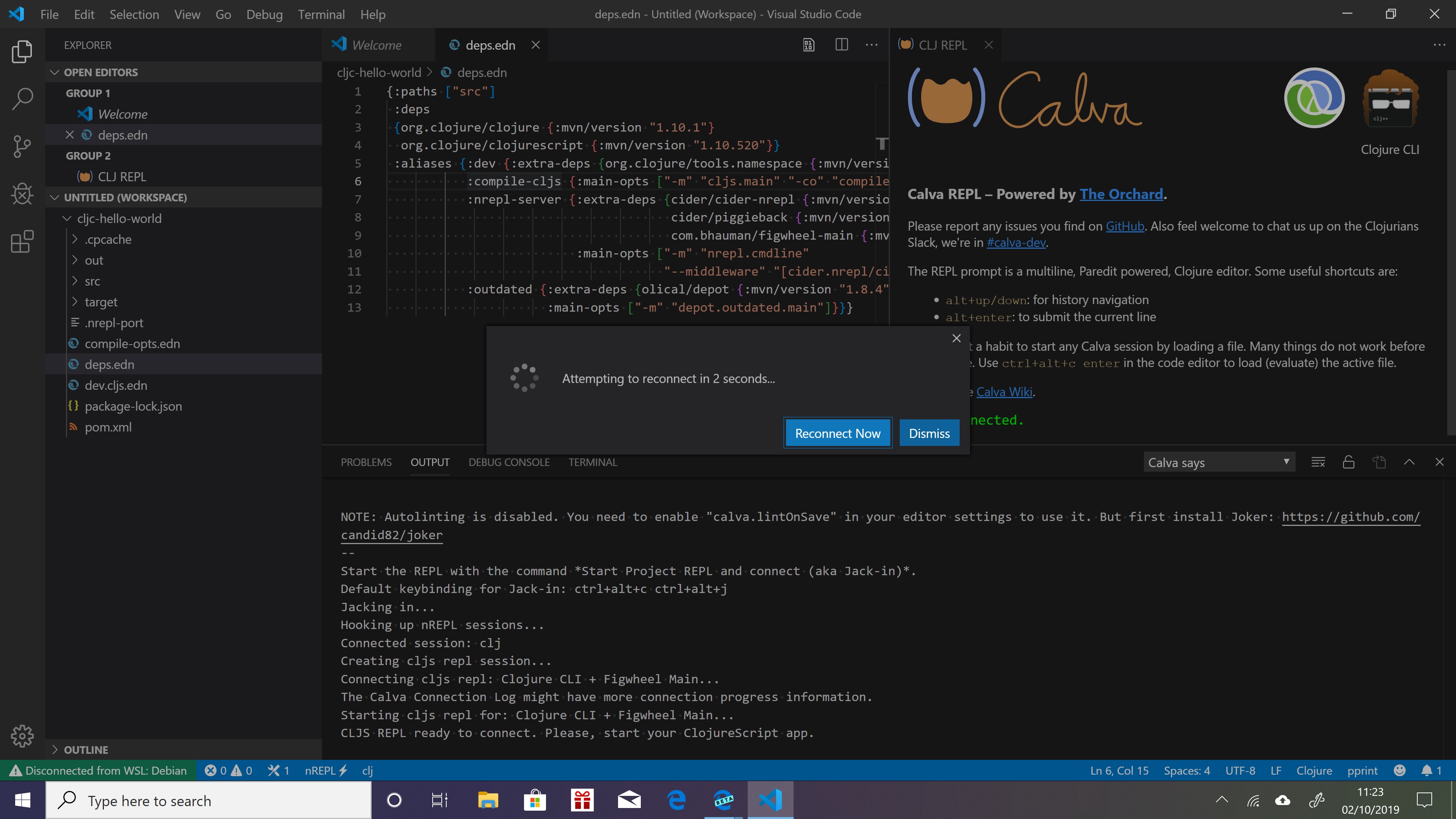
Note, I get this same result regardless of whether I use connect to nrepl, or jack-in.
When I connect/jack-in, I select the 'dev' alias only from the drop-down list.
One other useful observation, is that this sometimes happens on connecting, and other times it will connect fine, but then after a short time WSL will then hang, and then I see the "Attempting to reconnect" message...
alzadude
on 2 Oct 2019
Hi @PEZ,
I just found this, it sounds suspiciously similar: https://superuser.com/questions/1430009/windows-wsl-ubuntu-hangs-freezes-randomly-when-listening-to-ports
The "listening to ports" could be Figwheel Main in this case, so perhaps this is some generic WSL issue.. 😕
alzadude
on 4 Oct 2019
@alzadude @PEZ
I can reproduce this behavior on my system - but with the current version 2.0.49 you can click on the button nREPL - trying to connect in the status bar to interrupt the connection process and set vscode and the terminal back into a usable state.
I am not sure how to tackle this issue but I am trying to get this debugged.
 cfehse
on 12 Oct 2019
cfehse
on 12 Oct 2019
@PEZ
I found the cause for the connection to hang. The webview is not loaded at all and therefore it is not initialized and the connection process waits for the webview to answer. This is a vscode bug:
cfehse
on 14 Oct 2019
@PEZ
I found the cause for the connection to hang. The webview is not loaded at all and therefore it is not initialized and the connection process waits for the webview to answer. This is a vscode bug:
Amazing work @cfehse good job finding the cause! I am hoping the fix won't require a change in VSCode, since I am guessing that could take a while (I am not using the insiders build)...
alzadude
on 15 Oct 2019
@alzadude
Version 1.39.2 of vscode was just released which fixes at least the bug regarding webviews preventing our REPL window from starting (the vscode git extension still seems to have problems).
I tested your test repro any the connection worked fine:
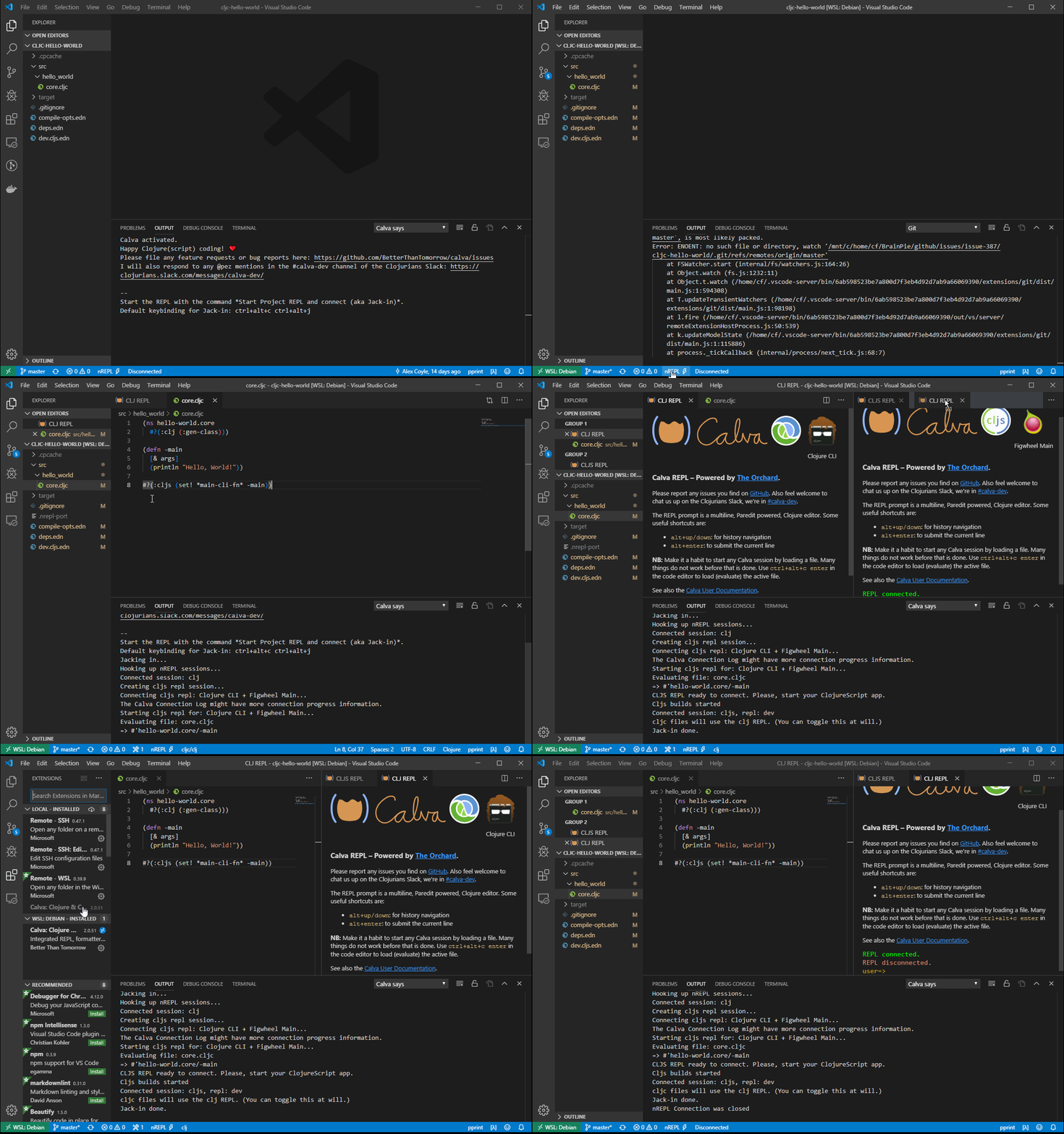
Please give it a try and share how it behaves on our system.
cfehse
on 16 Oct 2019
@cfehse
I tried with VSCode 1.39.2, Remote - WSL 0.39.9 and Calva 2.0.51, repeating the exact same steps in the issue description, but unfortunately I get the same result: WSL hangs, and I get the "Attempting to reconnect" message... I can't start any new WSL sessions, the only way to get it working again is to restart Windows 🙁
alzadude
on 16 Oct 2019
@alzadude
This seems to be an issue either with vscode or the remote extension from Microsoft - see this for example microsoft/vscode-remote-release#1646. There are a bunch of similar issues around but the behavior seems not to be reproducible easily.
In the discussion to the above there the following "solution" was mentioned to "somethines" work:
- On the Windows side delete
C:\Users\<yourname>\AppData\Roaming\Code
(the Windows configuration in the current user profile) - On the WSL side delete
~/.vscode
(the WSL configuration for the WSL user) - Try again
This is indeed radical but if you want to give it a try? Honestly I am a bit out of ideas in the moment. I will observe the issues on the vscode side to see if any findings happen there.
cfehse
on 18 Oct 2019
@cfehse thanks, I tried these steps but I got the same result unfortunately..
n.b. When I looked for ~/.vscode, I only found ~/.vscode-server, so I deleted that instead.
alzadude
on 18 Oct 2019
Hi @cfehse any more ideas/news on this one?
The reporter of the upstream issue appears to be satisfied that in their case, the cause is the presence of some other extension (IoT workbench) which when removed, makes the issue go away. However, clearly in my case, this is not the cause. So I am wondering if this is a different problem.
Not sure what to do next...
alzadude
on 2 Nov 2019
Hi @alzadude
I still can't reproduce this and your other issue (#387) on any of my systems. If you want to take the afford and try a different Windows system to see if there are any differences in behavior. I am a bit out of ideas right now. Sorry.
cfehse
on 3 Nov 2019
I still can't reproduce this and your other issue (#387) on any of my systems. If you want to take the afford and try a different Windows system to see if there are any differences in behavior. I am a bit out of ideas right now. Sorry.
Hi @cfehse a quick update from me: I just tried on VS Code 1.40.0, Remote WSL 0.40.2 and unfortunately I still get the same result 🙁
Just so you can see what I'm seeing, here's a video I recorded: https://drive.google.com/open?id=1kP7jqCUDJ9pC8wTGdbrCyBQj7q18MqQ4
In terms of trying a different Windows system, I only have one laptop unfortunately.. I then had a brainwave, and thought I could use the new "Windows Sandbox" in Windows 10 Pro, but "Windows Features" is missing inside there, so I can't install WSL! Oh, Microsoft 🙁 🤦♂️
So as it stands I am also out of ideas.. I have switched to using VSCode on Windows proper instead of WSL because of this issue, but unfortunately Figwheel Main currently has a bug that means it doesn't work on Windows: https://github.com/bhauman/figwheel-main/issues/19
So I'm fairly stuck at the moment! I'll keep investigating..
alzadude
on 9 Nov 2019
@alzadude
I don't know why these rock stars do not fix there issues, or make the software at least open source (remote extension) so that others can have a look at it.
The only idea I currently have for your issue(s) -> linux on a virtual maschine.
I very sorry.
cfehse
on 10 Nov 2019
@alzadude
Hi Alex,
I am just testing your project configuration all over the place to see if I find any problems in my configuration. I see in the video that your project is located on the Windows D: drive. Have you tested to clone the sources in your home directory under WSL and to connect there? I have no problems connecting and starting the cljs application under linux (and when I change the generated target\node\dev\dev-main.js to correct the pathnames) and Windows.
cfehse
on 12 Nov 2019
Hi @cfehse thanks for the suggestion,
I just tried and unfortunately I still get the same result. This is with the project located at ~/Projects/cljc-hello-world, so inside the WSL home directory instead of a mounted Windows drive. It did work for about 5 seconds (see the screenshot below), but then it still hangs 🙁
If it's working for you and not for me, I am suspecting some different state on my machine for some reason, but who knows what that could be. I've tried re-installing WSL, VSCode etc and also deleting the C:\Users\<yourname>\AppData\Roaming\Code and ~/.vscode-server, but that didn't affect the result for me.
Perhaps I could tail the logs for VSCode and Remote WSL, would you know where those are located?
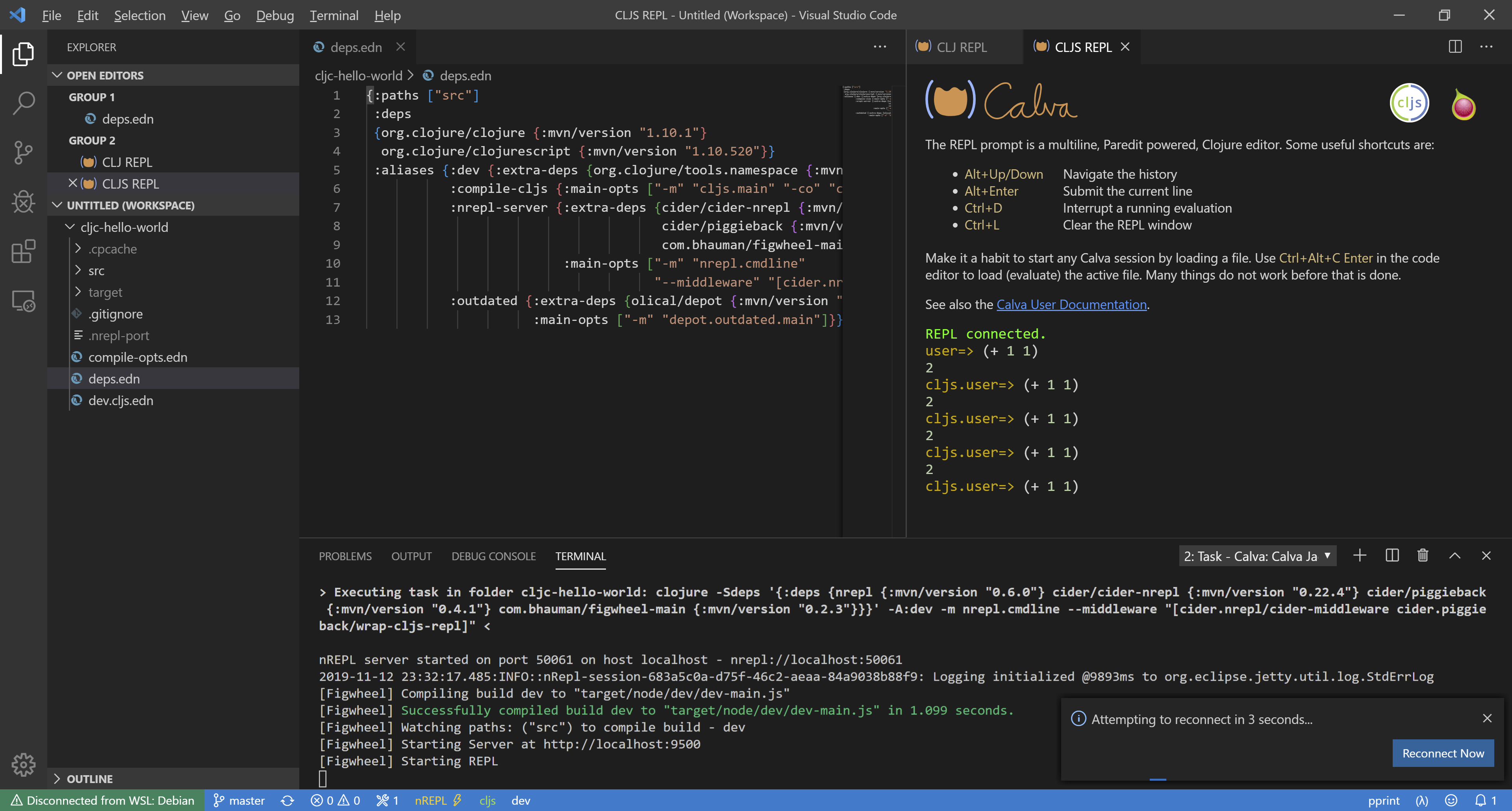
I could reset my PC, but of course I'm reluctant to go to those lengths.
The investigation continues..
alzadude
on 13 Nov 2019
I have switched to using VSCode on Windows proper instead of WSL because of this issue, but unfortunately Figwheel Main currently has a bug that means it doesn't work on Windows: bhauman/figwheel-main#19
At least I figured out how to avoid the compilation issue withe the main js file (in fact this is not an issue with figwheel-main it is more an issue with the ClojureScript compler). I created a PR for your demo project to view the change required.
cfehse
on 15 Nov 2019
Hi @cfehse good news!
After performing the following steps, the issue seems to have resolved itself:
- Uninstall VSCode
- Delete
C:\Users\<yourname>\AppData\Roaming\Code - Delete
C:\Users\<yourname>\.vscode - Delete
~/.vscode-server - Uninstall WSL distro (Debian Stretch)
- Remove WSL feature
- Reboot
- Add WSL feature
- Install WSL distro (Debian Stretch)
- Install Java (openjdk-11-jdk-headless), Clojure (1.10.1), NodeJS (10.17.0-1nodesource1) in WSL
- Install VSCode (1.40.1)
- Install Remote - WSL (0.40.3)
- Install Calva (2.0.66)
I still don't know what the underlying problem was before, but it's working now. I am just praying the issue doesn't return 😱
Thanks for the help! 🙂
alzadude
on 3 Dec 2019
@alzadude
Oh my God! What a procedure. :(
On my systems WSL with Remote Extension works pretty good. Let's keep fingers crossed. gg
I close this issue for now.
cfehse
on 3 Dec 2019
Hi @cfehse I'm sorry to say, this issue has returned 😭
VSCode 1.41.1
Remote - WSL 0.41.9
Calva 2.0.75
Unfortunately it's been a while since I tried to start the Clojure CLI + Figwheel Main project type, so I don't know at what point it stopped working 😫
I've not tried repeating the full list of steps above which resolved it for me last time, but I did try the following three steps alone which did not work on their own unfortunately:
- Delete
C:\Users\<yourname>\AppData\Roaming\Code - Delete
C:\Users\<yourname>\.vscode - Delete
~/.vscode-server
I don't understand why I appear to be alone in experiencing this issue! 😕
alzadude
on 4 Feb 2020
Related issues
 kstehn
·
4Comments
kstehn
·
4Comments
 bpringe
·
5Comments
bpringe
·
5Comments
 slipset
·
5Comments
bpringe
·
3Comments
slipset
·
5Comments
bpringe
·
3Comments
 taylorwood
·
3Comments
taylorwood
·
3Comments
Most helpful comment
@PEZ
I found the cause for the connection to hang. The webview is not loaded at all and therefore it is not initialized and the connection process waits for the webview to answer. This is a vscode bug: