Calva: [Feature] Adding selected calva commands to the editors context menu
Motivation
It would be nice to have calva commands in the editors context menu for supported file. This is an easy way to find the available commands and - as vscode shows the keyboard shortcuts in menu items - to quickly see the shortcuts. For users coming from other IDEs like IntelliJ/Cursive this would be an easy way to get started with calva.
Implementation Proposal
Add context aware calva commands to the editor context menu via the editor/context contribution point like Evaluate current form..., Evaluate current top level form..., Load current Namespace in REPL Window and that like for supported file/language types.
 cfehse
All 13 comments
Where is there an editor context menu?
Another way to do this is to figure out how the enablement feature works so that the command palette can show less irrelevant commands, depending on context.
 PEZ
on 22 Sep 2019
PEZ
on 22 Sep 2019
Adding context menu items should be easy:
https://code.visualstudio.com/api/references/contribution-points#contributes.menus
cfehse
on 22 Sep 2019
Very cool. I see we can even add command to the Macbook Touch Bar. :smile:
However, it could be a bit of a maintenance burden to keep several menus populated like that, since it is done in the package.json. It is already quite some work with only shortcuts and the command palette. Not saying we shouldn't do this, but we should weigh this in before going ahead.
PEZ
on 22 Sep 2019
The API for checking to enable/disable commands in menus is very basic and not very flexible (e.g compared to Windows menu item handling). My intention was to perhaps provide the "top 10 list" commands in the appropriate context menus. By the way I find the shortcuts a bit cumbersome to use - but I am only a Windows user. gg
cfehse
on 23 Sep 2019
Do you have a proposal for the top 10 commands?
From my side:
- jackIn
- Format
- send to repl Window
- eval current namespace
All of these i do use most of the time but using shortcuts because quicker :)
 kstehn
on 25 Sep 2019
kstehn
on 25 Sep 2019
@kstehn Checkout my branch, build and run. Just to get an idea how it looks as well. The changes to package.json contain the selection of commands I choose for the context menu.
cfehse
on 25 Sep 2019
@kstehn I created a PR for this: #345
cfehse
on 26 Sep 2019
Yeah i already knew that :)
also just gave it a spin, its pretty nice and should be helpfull for those who dont use that often shortcuts
one thing and not sure if and how to change this
when you are connected with a repl it still shows "Jack-In or connect" in the contextmenu even though you cant do it and only disconnect is available
maybe changing the name a bit to reflect that this happens when you are already connected
kstehn
on 26 Sep 2019
I shortend/unified the command titles a bit an make the following selection for the context menu:
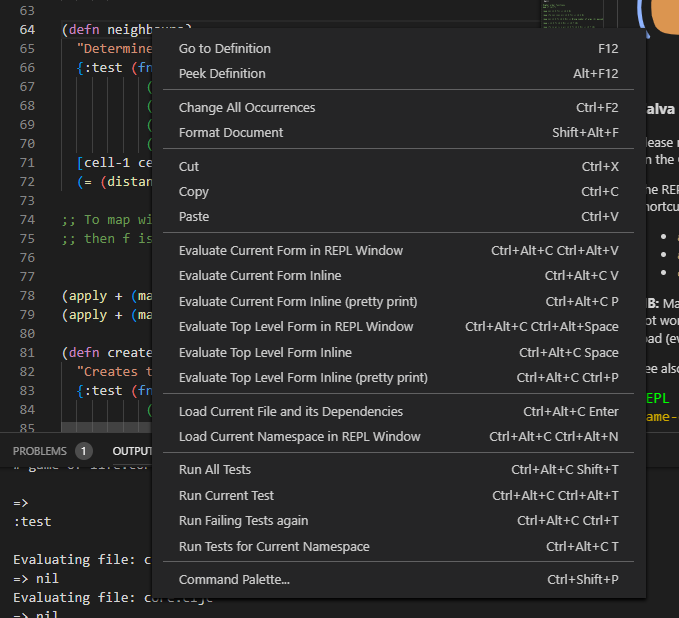
This combines all - especially a newbie - would need to start working without having to read the documentation very closely. What do you think?
cfehse
on 27 Sep 2019
That Looks nice.
Also you can see the categorys :)
kstehn
on 27 Sep 2019
Super duper awesome stuff!
Please mind https://github.com/BetterThanTomorrow/calva/pull/344 too, which I just merged. Two commands gone, one added. :smile:
PEZ
on 28 Sep 2019
Another thing. I would like Calva to actively promote Stuart Halloway's style of REPLing, i.e. using the editor files more, and the REPL prompt less. So I think the send to REPL window commands can be removed from the context menu. And I propose for inclusion of the command for evaluating to comment. Soon to be commands (observe the plural): https://github.com/BetterThanTomorrow/calva/issues/349
PEZ
on 28 Sep 2019
This is implemented in Calva 2.0.44.
cfehse
on 6 Oct 2019
Related issues
 FongHou
·
5Comments
PEZ
·
5Comments
PEZ
·
3Comments
FongHou
·
5Comments
PEZ
·
5Comments
PEZ
·
3Comments
 bpringe
·
3Comments
FongHou
·
5Comments
bpringe
·
3Comments
FongHou
·
5Comments
Most helpful comment
I shortend/unified the command titles a bit an make the following selection for the context menu:
This combines all - especially a newbie - would need to start working without having to read the documentation very closely. What do you think?