Calva: [2.0] clojure.ps1 is not on your PATH, please add it.
I have the Clojure alpha CLI tools installed on my windows 10 machine. From what I can tell there is no clojure.ps1 file that gets installed with these tools (unless I am missing something which is very possible). There is a clojuretools.psm1 which I think is the entry point for this CLI along with another ps library file and a executable jar. (Not familiar with powershell). Is there something I am missing here? Also when I run Calva: open a Clojure repl from inside of a clojure tools project I receive this error Cannot read property 'client' of undefined
Everything else seems to work aside from deploying a repl with the clojure CLI tools. I installed my ClojureTools using Scoop which puts it right on my path via shims so I do know that this is not the issue.
 tensor-programming
All 19 comments
Nevermind, I was able to resolve this problem after reinstalling it via scoop twice. I am not sure why the clojure.ps1 files was installed to a weird place off the path but it was (and that's also why I couldn't find it).
tensor-programming
on 6 Jun 2019
I encountered this problem too:
clojure.ps1 is not on your PATH, please add it.
However, I can run clojure and clj just fine. I don't know what scoop is, but I installed clojure tools from the website.
 johnjelinek
on 19 Jun 2019
johnjelinek
on 19 Jun 2019
@johnjelinek , can you check what the default shell is for the integrated terminal in your VS Code? If it is not "Powershell”, then try to switch to that and see if that helps.
 PEZ
on 19 Jun 2019
PEZ
on 19 Jun 2019
It is powershell.
On Wed, Jun 19, 2019, 1:46 AM Peter Strömberg notifications@github.com
wrote:
@johnjelinek https://github.com/johnjelinek , can you check what the
default shell is for the integrated terminal in your VS Code? If it is not
"Powershell”, then try to switch to that and see if that helps.—
You are receiving this because you were mentioned.
Reply to this email directly, view it on GitHub
https://github.com/BetterThanTomorrow/calva/issues/205?email_source=notifications&email_token=AAGVJCRMNFPSTSY3ENMZ5LTP3HI4TA5CNFSM4HU3XNE2YY3PNVWWK3TUL52HS4DFVREXG43VMVBW63LNMVXHJKTDN5WW2ZLOORPWSZGODYA3XPA#issuecomment-503430076,
or mute the thread
https://github.com/notifications/unsubscribe-auth/AAGVJCWIMLY7OQA5DDZEP43P3HI4TANCNFSM4HU3XNEQ
.
johnjelinek
on 19 Jun 2019
Thanks. Let's see if we can figure this out... The code for finding the script is like so:
/** Finds a file in PATH */
function findInPath(name: string) {
    const paths = process.env.PATH.split(isWin ? ";" : ":");
    for (let path of paths) {
        let fullPath = path + (isWin ? "\\" : "/") + name;
        if (fs.existsSync(fullPath))
            return fullPath;
    }
}
So, if you inspect the PATH environment variable and look for clojure.ps1 in those paths that seem to make sense. Do you find it there? If not, do you have clojure.ps1 anywhere on your computer? (I'm guessing you have, since you can run clojure w/o problems, but maybe it could be something else than a .ps1 file or something...)
PEZ
on 19 Jun 2019
PS C:\Users\john> clojure.ps1
clojure.ps1 : The term 'clojure.ps1' is not recognized as the name of a cmdlet, function,
script file, or operable program. Check the spelling of the name, or if a path was
included, verify that the path is correct and try again.
At line:1 char:1
+ clojure.ps1
+ ~~~~~~~~~~~
    + CategoryInfo          : ObjectNotFound: (clojure.ps1:String) [], CommandNotFoundExce
   ption
    + FullyQualifiedErrorId : CommandNotFoundException
PS C:\Users\john> clojure.psm1
clojure.psm1 : The term 'clojure.psm1' is not recognized as the name of a cmdlet,
function, script file, or operable program. Check the spelling of the name, or if a path
was included, verify that the path is correct and try again.
At line:1 char:1
+ clojure.psm1
+ ~~~~~~~~~~~~
    + CategoryInfo          : ObjectNotFound: (clojure.psm1:String) [], CommandNotFoundExc
   eption
    + FullyQualifiedErrorId : CommandNotFoundException
PS C:\Users\john> which clojure
/usr/bin/which: no clojure in (/c/tools/Cmder/bin:/c/tools/Cmder/vendor/bin:/c/Python37/Scripts:/c/Python37:/c/Windows/system32:/c/Windows:/c/Windows/System32/Wbem:/c/Windows/System32/WindowsPowerShell/v1.0:/c/Windows/System32/OpenSSH:/c/ProgramData/chocolatey/bin:/c/Program
Files/Microsoft VS Code/bin:/cmd:/c/Program Files/Corretto/jdk1.8.0_212/bin:/c/Program Files/Corretto/jdk11.0.2_9/bin:/c/Program Files/OpenJDK/jdk-12.0.1/bin:/c/Program Files (x86)/NVIDIA Corporation/PhysX/Common:/c/Program Files/NVIDIA Corporation/NVIDIA NvDLISR:/c/Program Files/Amazon/AWSCLI/bin:/c/Program Files/nodejs:/c/Go/bin:/c/Program Files/Microsoft VS Code
Insiders/bin:/c/Users/john/AppData/Local/Microsoft/WindowsApps:/c/tools/Cmder:/c/Users/john/AppData/Roaming/npm:/c/Users/john/go/bin:/c/Users/john/AppData/Local/hyper/app-3.0.2/resources/bin:/c/Users/john/AppData/Roaming/Python/Python37/Scripts:/cmd:/mingw64/bin:/usr/bin:/c/tools/Cmder)
PS C:\Users\john> clojure
Clojure 1.10.0
user=>
same for clj :point_up:
johnjelinek
on 21 Jun 2019
Looks like it's installed as a Powershell Module: https://github.com/clojure/tools.deps.alpha/wiki/clj-on-Windows#install
johnjelinek
on 21 Jun 2019
I see the powershell function Invoke-Clojure in here:
λ ls -lah
total 22M
drwxr-xr-x 1 john 197609    0 Jun  7 23:54 ./
drwxr-xr-x 1 john 197609    0 Jun  7 23:54 ../
-rw-r--r-- 1 john 197609 4.0K Mar 16 11:38 ClojureTools.psd1
-rw-r--r-- 1 john 197609 9.9K Mar 16 11:38 ClojureTools.psm1
-rw-r--r-- 1 john 197609  22M Mar 16 11:38 clojure-tools-1.10.0.442.jar
-rw-r--r-- 1 john 197609  340 Mar 16 11:38 deps.edn
-rw-r--r-- 1 john 197609 1.5K Mar 16 11:38 example-deps.edn

C:\Program Files\WindowsPowerShell\Modules\ClojureTools
@PEZ: any updates on this?
johnjelinek
on 10 Jul 2019
I'm entirely sorry for my silence! For some reason I haven't gotten the notifications (or missed them). Maybe because the issue is closed. Reopening now.
I will need help testing my attempts to fix this problem. I don't have Windows and I don't know anything at all about Powershell.
PEZ
on 21 Jul 2019
Sure, I can help test, but also Microsoft has free vagrant images anyone can download for Windows 10: https://developer.microsoft.com/en-us/microsoft-edge/tools/vms/
Powershell depends on a PATH env, just like bash. The issue here is, Clojure is installed as a Powershell Module instead of a binary like it is in bash. So, instead of seeing if clojure.ps1 is in the path, see if Invoke-Clojure is a valid command. Or you could check the PATH env var for that ClojureTools directory.
johnjelinek
on 21 Jul 2019
My old Mac can't handle emulating Windows, unfortunately.
The problem here is a bit deeper than just figuring out if clojure is available. We're trying to find out where it is and execute it with a fully specified path. I am thinking that is maybe unecessary, if clojure is in the path, then it can be executed without fully specifying it...
PEZ
on 21 Jul 2019
Ya, give that a shot. The Powershell Module does some shenanigans to make sure the Clojure command maps to the Invoke-Clojure powershell command, so you won't find a specific binary to point to. Note: Clojure won't be able to run via command prompt, only Powershell.
johnjelinek
on 21 Jul 2019
The current version of Calva expects a version of the CLI tools for windows that is associated to this ticket on Clojure's JIRA: https://clojure.atlassian.net/browse/TDEPS-67 ... the problem is that the alpha tools recommended for Windows on the Clojure website guide point to a totally different set of command line tools.
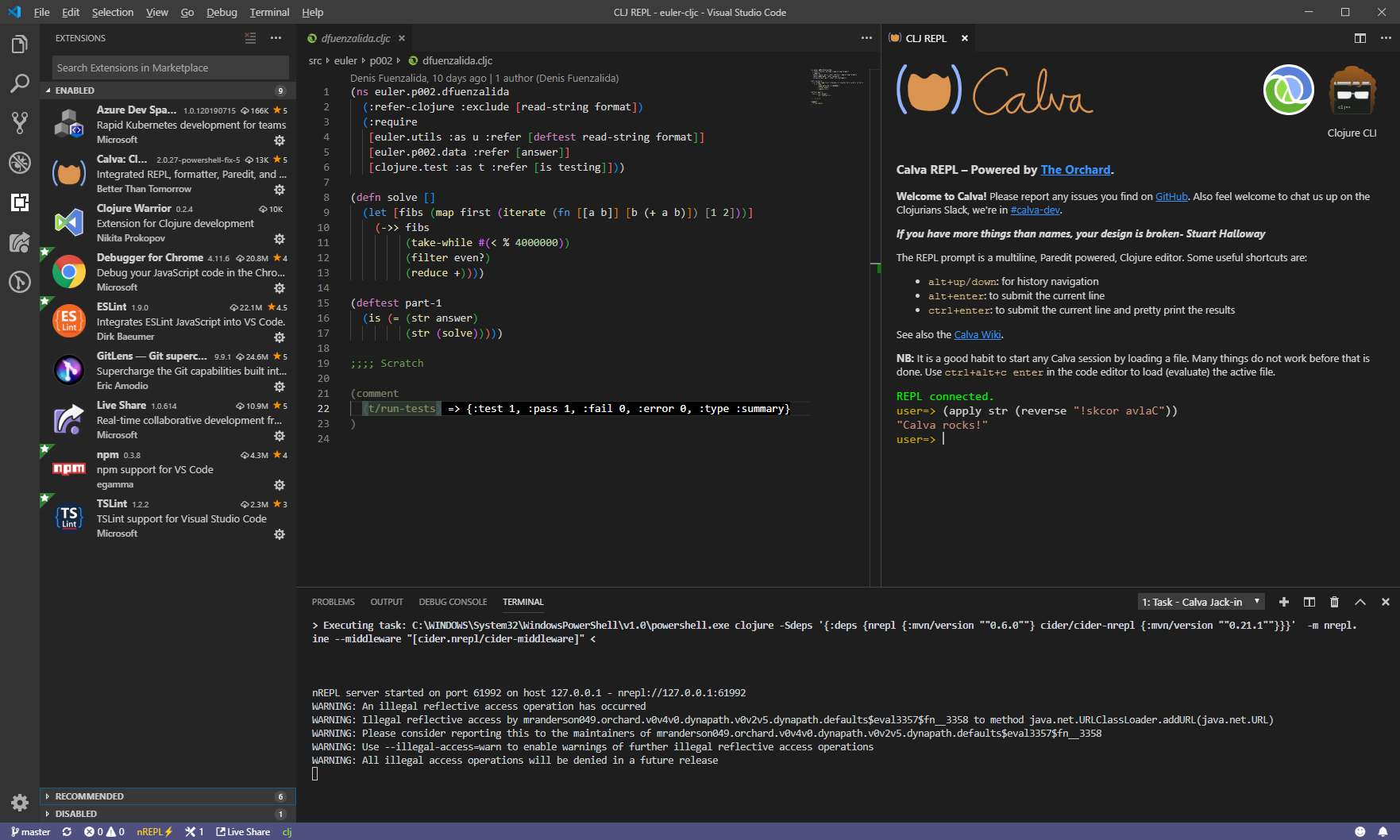
I ran into this issue recently and found that Calva was able to connect to a REPL started with Powershell with the following workaround:
- Install the new Clojure command line tool as described on the Clojure Github wiki. I used the first option (that uses a Powershell module in the Documents folder) but has the advantage of not requiring admin privileges.
- Open the terminal pane in VSCode. If your shell is not powershell, start Powershell with
powershell.exe. - In the Powershell prompt, run the following (reference here):
clj -Sdeps '{:deps {nrepl {:mvn/version ""0.6.0""} cider/cider-nrepl {:mvn/version ""0.21.1""}}}' -m nrepl.cmdline --middleware "[cider.nrepl/cider-middleware]"
Once the nREPL server starts, you can use Ctrl-Shift-P to bring the Command Palette and select Calva: Connect to a running REPL server, and then select if you want any CLJS support (I'm editing a CLJC file) or not, then the port is pre-filled with the right value and boom, we're connected.
 dfuenzalida
on 31 Jul 2019
dfuenzalida
on 31 Jul 2019
Hello @dfuenzalida !
Thanks for confirming that the problem stems from this change in how the clojure command is implemented. I've been suspecting that, but haven't had the Google Fu to find the information about the transition.
I've been quite hard at work on this issue the last few days. From my and @johnjelinek's testing it seems I am about to fix it. Can you try this build and see if it jack-in works?
calva-2.0.27-powershell-fix-5.zip
Rename the extension from .zip to .vsix and then do Install from VSIX in the VS Code Extenisons pane.
PEZ
on 31 Jul 2019
That was fast! ... the usual Ctrl-Alt-C then Ctrl-Alt-J worked for me without any issues, thanks for the fix!
dfuenzalida
on 31 Jul 2019
Thanks for helping me test that, @dfuenzalida .
To support using deps.edn with shadow-cljs on Windows I hade to do some changes in the plumbing. This potentially breaks things that used to work, so I'd appreciate help with testing this build as well.
calva-2.0.27-powershell-fix-6.zip
Both the jack-in and the connect scenarios needs testing.
PEZ
on 1 Aug 2019
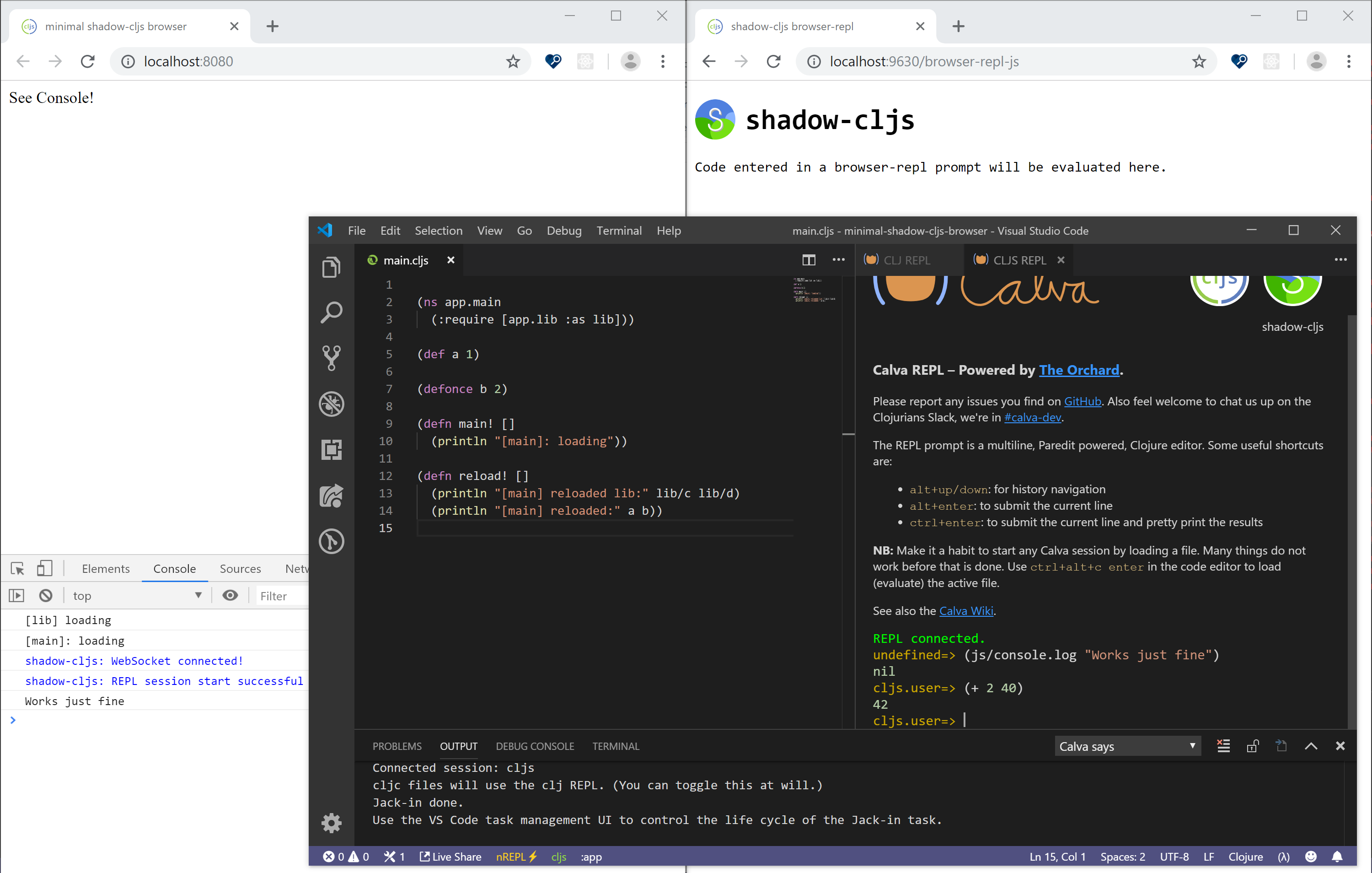
Hi @PEZ , I had a look at the latest fix and it all worked fine for me. I tested the following scenarios:
- Jack in with
Ctrl-Alt-CthenCtrl-Alt-Jin a CLJC project: ✔️ - Connecting from command palette to an external nREPL server in the same project as above: ✔️
- Jack in to the Shadow CLJS sample project: ✔️
- Connecting to an extenal nREPL CLJS server from the sample Shadow CLJS project: ✔️
dfuenzalida
on 1 Aug 2019
Wow, thanks!
I've been testing it myself, in all my various test projects and decided to release these fixes. Closing this issue now.
Please join the #calva-dev slack channel, if you haven't @dfuenzalida.
PEZ
on 1 Aug 2019
Related issues
 taylorwood
·
3Comments
taylorwood
·
3Comments
 kstehn
·
4Comments
kstehn
·
4Comments
 denistakeda
·
6Comments
PEZ
·
3Comments
denistakeda
·
6Comments
PEZ
·
3Comments
 lspector
·
5Comments
lspector
·
5Comments