Calva: [REPL Window] Feature request: allow to browse REPL history with arrow keys.
It would be nice to be able to navigate through REPL history with up and down arrow keys.
 il-tmfv
All 14 comments
I guess you are aware that you can go up and down through the history with Alt+Up and Alt+Down.
I need to work out a way to use just up/down in context in a way that doesn't behave weirdly in the presence of multiple line input.
 mseddon
on 5 Feb 2019
mseddon
on 5 Feb 2019
Is it not enough with being able to use alt+up/down?
 PEZ
on 6 Feb 2019
PEZ
on 6 Feb 2019
Honestly I never knew about alt+up/down combination. Just arrows keys work in "vanilla" lein repl, so it would be nice to have similar behaviour here.
il-tmfv
on 6 Feb 2019
But that repl is not very good at supporting multiline input. You _can_ do alt+enter to get a new line, but how you navigate between those lines I don't know. And then each line becomes a history entry so entering the same multiline form twice is a mess.
PEZ
on 6 Feb 2019
Hm, good point. I enter multiple lines in repl really not so often.
I think it can be closed then.
il-tmfv
on 6 Feb 2019
Maybe you will start doing that more now. :smile:
I vote for keeping this issue open a while longer. There should be a way to surface the alt+up/down thing a bit. Maybe include a hint about that before the first prompt or something. Or maybe offer a key setting for it so that people can choose to use plain up/down for history and alt+up/down for navigating within multiline forms.
PEZ
on 6 Feb 2019
Honestly I never knew about
alt+up/downcombination. Just arrows keys work in "vanilla"lein repl, so it would be nice to have similar behaviour here.
Same here I tried the up/down arrow keys, and when they didn't work for me I thought the REPL just doesn't support history navigation, which is a shame since apparently it does!
There should be a way to surface the alt+up/down thing a bit. Maybe include a hint about that before the first prompt or something. Or maybe offer a key setting for it
I think the up/down arrow is the most prevalent key configuration, so I would prefer to stick with that for the default.
That said, you raised a valid criticism about the dual functionality of up/down arrow keys usually, as both history navigation binding and in-form navigation:
But that repl is not very good at supporting multiline input. You can do alt+enter to get a new line, but how you navigate between those lines I don't know. And then each line becomes a history entry so entering the same multiline form twice is a mess.
I believe that in-form navigation using the same up/down keys as the history navigation should be fine for most users: in-form navigation should just navigate lines until reaching the first form line. up arrow from the first form line will navigate to the previous history. vice-versa when reaching last form line and pressing down to reach the next history.
An additional key binding could be provided for explicitly navigating history and disregarding forms navigation. This is in my mind a more niche functionality that only a power-user would desire for saving them the time of navigating forms in history. this key binding could be introduced when the REPL starts-up as you suggested earlier (perhaps optionally turned off in VSCode settings? something like "calva.repl.suggestBindingsOnStartup": "true") which would get the bindings from Keyboard Shortcuts configuration (Alt+up/down arrow can be used as default Keyboard Shortcut, user can change that if they like).
This seems like quite a lot of configurations, so it's definitely not a trivial amount of work to do this.
Just a discussion at this point for me!
 amitnovick
on 24 Mar 2019
amitnovick
on 24 Mar 2019
I also didn't know about the alt+up/down combination and discovered it only from this thread. I would suggest that since plain up/down scrolls through history in lein repl and many other REPLs, that it should also be the default here, since defaults should generally match expectations people will arrive with. One can still move through a multi-line expression to edit it with the mouse, and I bet most people would try that once they see that the arrow keys move through the history. So no discovery of configuration options etc. would be required to get both kinds of navigation out of the box.
 lspector
on 14 Jul 2019
lspector
on 14 Jul 2019
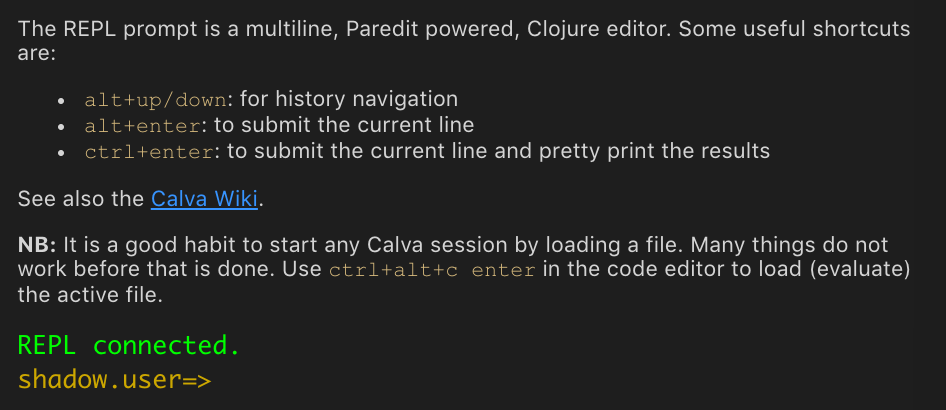
Yeah, maybe the secret is too well hidden:
:smile:
But, anyway, maybe you are right about the choice of keys. I'll ponder it some more.
PEZ
on 15 Jul 2019
Heh, yep -- staring me right in the face but I never read it! 😳
So I am sorry, but perhaps some others will be equally lame in this respect? 😬
lspector
on 15 Jul 2019
How about a way to search the REPL history? And also to list the last n
items in the history. Like the bash shell ctrl-r and history commands.
On Mon, Jul 15, 2019 at 5:47 AM Lee Spector notifications@github.com
wrote:
Heh, yep -- staring me right in the face but I never read it! 😳
So I am sorry, but perhaps some others will be equally lame in this
respect? 😬—
You are receiving this because you are subscribed to this thread.
Reply to this email directly, view it on GitHub
https://github.com/BetterThanTomorrow/calva/issues/117?email_source=notifications&email_token=ABJZLF7ZTIVV3LBYIAUGLN3P7RBSTA5CNFSM4GUETWI2YY3PNVWWK3TUL52HS4DFVREXG43VMVBW63LNMVXHJKTDN5WW2ZLOORPWSZGODZ5GQLA#issuecomment-511338540,
or mute the thread
https://github.com/notifications/unsubscribe-auth/ABJZLF3VIFDBJPJDLY5LV23P7RBSTANCNFSM4GUETWIQ
.
 agoldhammer
on 15 Jul 2019
agoldhammer
on 15 Jul 2019
@agoldhammer : please submit it as a feature request of its own.
PEZ
on 15 Jul 2019
I close this issue for now because scrolling through the history is supported by Alt+Up and Alt+Down.
 cfehse
on 15 Oct 2019
cfehse
on 15 Oct 2019
What is the user prefs keybinding command for "previous REPL command"? I must have reset this while removing some Calva bindings were breaking non-Clojure editors before 2.0.
 ThomDevine
on 7 Nov 2019
ThomDevine
on 7 Nov 2019
Related issues
PEZ
·
3Comments
 svdo
·
4Comments
svdo
·
4Comments
 FongHou
·
5Comments
FongHou
·
5Comments
 TwiceII
·
6Comments
TwiceII
·
6Comments
 taylorwood
·
3Comments
taylorwood
·
3Comments
Most helpful comment
Maybe you will start doing that more now. :smile:
I vote for keeping this issue open a while longer. There should be a way to surface the alt+up/down thing a bit. Maybe include a hint about that before the first prompt or something. Or maybe offer a key setting for it so that people can choose to use plain up/down for history and alt+up/down for navigating within multiline forms.