Calico: Installing Calico 3.6 in Kubernetes results in error in calico-kube-controllers
I am trying to upgrade Calico in my k8s cluster from 3.3 to 3.6. To upgrade, I delete the previously created resources and create new ones. The pod calico-kube-controllers is stuck in ContainerCreating, so none of the calico-node pods start.
Expected Behavior
Calico pods described in the used manifest are created and start running.
Current Behavior
Calico-kube-controllers does not exit the ContainerCreating state.
kubectl describe pod shows this error:
Failed create pod sandbox: rpc error: code = Unknown desc = [failed to set up sandbox container "4a3c5993de2bb25bb59c33f55a1ea65f2584980c83c4704ebde6af5bec3e09b5" network for pod "calico-kube-controllers-5cbcccc885-nddnj": NetworkPlugin cni failed to set up pod "calico-kube-controllers-5cbcccc885-nddnj_kube-system" network: error getting ClusterInformation: connection is unauthorized: Unauthorized, failed to clean up sandbox container "4a3c5993de2bb25bb59c33f55a1ea65f2584980c83c4704ebde6af5bec3e09b5" network for pod "calico-kube-controllers-5cbcccc885-nddnj": NetworkPlugin cni failed to teardown pod "calico-kube-controllers-5cbcccc885-nddnj_kube-system" network: error getting ClusterInformation: connection is unauthorized: Unauthorized]
Possible Solution
I am able to upgrade all the way to 3.5, which is the last version without calico-kube-controllers, so I assume there is something going on with this new addition?
Steps to Reproduce (for bugs)
I do not have a fresh cluster to test this on, but how I got where I am is this:
- Create a cluster with kubeadm (I have been through about 3 major Kubernetes verison upgrades with the cluster)
- Install Calico 3.3 following https://docs.projectcalico.org/v3.3/getting-started/kubernetes/installation/calico#installing-with-the-kubernetes-api-datastore50-nodes-or-less
- Delete the resources created in step 2. with
kubectl delete -f - Install Calico 3.6 following https://docs.projectcalico.org/v3.6/getting-started/kubernetes/installation/calico#installing-with-the-kubernetes-api-datastore50-nodes-or-less
Context
I'm trying to upgrade the Calico version in my cluster.
Your Environment
- Calico version 3.3, trying to get to 3.6
- Orchestrator version (e.g. kubernetes, mesos, rkt): Kubernetes, created via kubeadm
- Operating System and version: Centos 7
 proskehy
All 20 comments
It looks like the same problem I currently have with upgrading from 3.1 to 3.7.
 niekvn1
on 13 May 2019
niekvn1
on 13 May 2019
Had the same problem. I run my lab cluster with this.
As default OS is fedora I did following changes to calico:
- replaced cni-bin-dir to /usr/libexec/cni
echo 1 > /proc/sys/net/ipv4/conf/all/rp_filter(more info here)- tried 3.3 before with addition to rbac:
...
- apiGroups: [""]
    resources:
      - nodes/status
    verbs:
      - patch
...
- set IP_AUTODETECTION_METHOD to "interface=eth1"
- used "10.244.0.0/16" as CALICO_IPV4POOL_CIDR
Resolved all issues by inspecting logs.
 dklesev
on 14 May 2019
dklesev
on 14 May 2019
NetworkPlugin cni failed to teardown pod "calico-kube-controllers-5cbcccc885-nddnj_kube-system" network: error getting ClusterInformation: connection is unauthorized: Unauthorized]
This seems to indicate that calico/node (the CNI plugin, specifically) isn't authorized to get ClusterInformation resources.
Looking at https://docs.projectcalico.org/v3.6/getting-started/kubernetes/installation/hosted/kubernetes-datastore/calico-networking/1.7/calico.yaml, I see the following inside the ClusterRole for calico-node, which seems to indicate it _does_ have access.
  # Calico monitors various CRDs for config.
  - apiGroups: ["crd.projectcalico.org"]
    resources:
      - globalfelixconfigs
      - felixconfigurations
      - bgppeers
      - globalbgpconfigs
      - bgpconfigurations
      - ippools
      - ipamblocks
      - globalnetworkpolicies
      - globalnetworksets
      - networkpolicies
      - clusterinformations
      - hostendpoints
    verbs:
      - get
      - list
      - watch
@proskehy @niekvn1 can you guys do a kubectl get clusterrole calico-node and see if it contains this section?
 caseydavenport
on 18 May 2019
caseydavenport
on 18 May 2019
The pod calico-kube-controllers is stuck in ContainerCreating, so none of the calico-node pods start.
Actually, this isn't quite right - calico-node doesn't require kube-controllers to start. In fact, its the other way around. In this case, it's likely calico-node that is causing the above errors.
Can you check the calico-node logs to see why they are failing?
caseydavenport
on 18 May 2019
Hi @caseydavenport,
This is the output I get,
$  kubectl get clusterrole calico-node -o yaml
- apiGroups:
  - crd.projectcalico.org
  resources:
  - globalfelixconfigs
  - felixconfigurations
  - bgppeers
  - globalbgpconfigs
  - bgpconfigurations
  - ippools
  - ipamblocks
  - globalnetworkpolicies
  - globalnetworksets
  - networkpolicies
  - networksets
  - clusterinformations
  - hostendpoints
  verbs:
  - get
  - list
  - watch
$ kubectl -n kube-system logs calico-node-c8zxp
Error from server (BadRequest): container "calico-node" in pod "calico-node-c8zxp" is waiting to start: PodInitializing
Hi @caseydavenport, sorry for the delayed reply.
I checked the created ClusterRole and got the same result as @niekvn1:
- apiGroups:
  - crd.projectcalico.org
  resources:
  - globalfelixconfigs
  - felixconfigurations
  - bgppeers
  - globalbgpconfigs
  - bgpconfigurations
  - ippools
  - ipamblocks
  - globalnetworkpolicies
  - globalnetworksets
  - networkpolicies
  - clusterinformations
  - hostendpoints
  verbs:
  - get
  - list
  - watch
Could this be something that can only be solved by accessing the node as @dklesev mentions?
proskehy
on 21 May 2019
@proskehy could you provide some more detail? what is the value of /proc/sys/net/ipv4/conf/all/rp_filter on your nodes? are any warning/errors provided from log of calico-nodes, could you include the output of kubectl describe pod calico-kube-controller?
dklesev
on 23 May 2019
Error from server (BadRequest): container "calico-node" in pod "calico-node-c8zxp" is waiting to start: PodInitializing
This is likely because the init containers haven't completed. Could you check to see if the init containers are stuck for some reason? You should be able to get logs from specific containers using the -c argument to kubectl logs.
kubectl describe pod might also have some clues.
caseydavenport
on 4 Jun 2019
I once again apologize for the delay.
@dklesev the value of /proc/sys/net/ipv4/conf/all/rp_filter is 1 on all nodes.
@caseydavenport good idea, I didn't think of doing that. I checked the logs of the init container upgrade-ipam and the repeating message is this:
On node 1:
2019-06-05 06:10:31.139 [INFO][1] migrate.go 64: checking host-local IPAM data dir dir existence...
2019-06-05 06:10:31.139 [INFO][1] migrate.go 71: retrieving node for IPIP tunnel address
2019-06-05 06:10:31.143 [INFO][1] migrate.go 79: IPIP tunnel address not found, assigning...
2019-06-05 06:10:31.145 [INFO][1] ipam.go 575: Assigning IP 192.168.0.1 to host: node1.address
2019-06-05 06:10:31.147 [ERROR][1] ipam_plugin.go 95: failed to migrate ipam, retrying... error=failed to get add IPIP tunnel addr 192.168.0.1: The provided IP address is not in a configured pool
 node="node1.address"
On node 2:
2019-06-05 06:15:32.191 [INFO][1] migrate.go 64: checking host-local IPAM data dir dir existence...
2019-06-05 06:15:32.191 [INFO][1] migrate.go 71: retrieving node for IPIP tunnel address
2019-06-05 06:15:32.195 [INFO][1] migrate.go 79: IPIP tunnel address not found, assigning...
2019-06-05 06:15:32.198 [INFO][1] ipam.go 575: Assigning IP 192.168.1.1 to host: node2.address
2019-06-05 06:15:32.214 [ERROR][1] ipam_plugin.go 95: failed to migrate ipam, retrying... error=failed to get add IPIP tunnel addr 192.168.1.1: The provided IP address is not in a configured pool
 node="node3.address"
On node 3:
2019-06-05 06:14:06.386 [INFO][1] migrate.go 64: checking host-local IPAM data dir dir existence...
2019-06-05 06:14:06.386 [INFO][1] migrate.go 71: retrieving node for IPIP tunnel address
2019-06-05 06:14:06.402 [INFO][1] migrate.go 79: IPIP tunnel address not found, assigning...
2019-06-05 06:14:06.416 [INFO][1] ipam.go 575: Assigning IP 192.168.2.1 to host: node3.address
2019-06-05 06:14:06.432 [ERROR][1] ipam_plugin.go 95: failed to migrate ipam, retrying... error=failed to get add IPIP tunnel addr 192.168.2.1: The provided IP address is not in a configured pool
 node="node3.address"
What might be relevant - the cluster was brought up using kubeadm with config containing
apiVersion: kubeadm.k8s.io/v1beta1
kind: ClusterConfiguration
networking:
  podSubnet: 192.168.0.0/16
...
Do you have
- name: CALICO_IPV4POOL_CIDR
  value: "192.168.0.0/16"
set in calico's DaemonSet?
dklesev
on 5 Jun 2019
2019-06-05 06:14:06.432 [ERROR][1] ipam_plugin.go 95: failed to migrate ipam, retrying... error=failed to get add IPIP tunnel addr 192.168.2.1: The provided IP address is not in a configured pool
Ah, interesting.
I'd check to see what IP pools exist - you can do calicoctl get ippools (or, since you're using kubernetes API mode, kubectl get ippools)
caseydavenport
on 6 Jun 2019
@dklesev yes
@caseydavenport
With the 3.5 installation, kubectl get ippools returns this:
apiVersion: crd.projectcalico.org/v1
kind: IPPool
metadata:
  annotations:
    projectcalico.org/metadata: '{"uid":"a5a347da-8759-11e9-b0f3-005056b26748","creationTimestamp":"2019-06-05T06:17:51Z"}'
  creationTimestamp: "2019-06-05T06:17:51Z"
  generation: 1
  name: default-ipv4-ippool
  resourceVersion: "38865298"
  selfLink: /apis/crd.projectcalico.org/v1/ippools/default-ipv4-ippool
  uid: a5a375c3-8759-11e9-9ff1-005056b2134b
spec:
  blockSize: 26
  cidr: 192.168.0.0/16
  ipipMode: Always
  natOutgoing: true
  nodeSelector: all()
However, if I delete the 3.5 installation and install 3.6, then kubectl get ippools returns No resources found.
proskehy
on 6 Jun 2019
However, if I delete the 3.5 installation and install 3.6, then kubectl get ippools returns No resources found.
Ah, you might try simply applying the new manifests rather than deleting and then creating. Deleting the old manifests will remove the CRD, thus deleting the IP pool.
I'd expect the v3.7 manifest to create an IP pool as well, but it will only do that after the init containers finish, so that might be what's going on here.
caseydavenport
on 6 Jun 2019
@caseydavenport I tried applying the new installation instead of deleting the old one and creating it, it took the pods a while but seems like they started up okay and I didn't see any errors in their logs. Thanks! :)
proskehy
on 11 Jun 2019
Was this actually fixed? I'm experiencing what I think is the same issue on a clean Kubernetes 1.15.0 cluster, kubeadm reset & kubeadm init on Ubuntu 18.04 with Docker-CE 18.09.7 and Calico 3.8.
(The same system worked fine with Kubernetes 1.14.1 & Calico 3.3.6.)
Following exactly the steps in https://docs.projectcalico.org/v3.8/getting-started/kubernetes/ leads me to a failure in step 5; the pods don't come up.
# kubectl --kubeconfig /etc/kubernetes/admin.conf get pods --all-namespaces
NAMESPACE     NAME                                                      READY   STATUS     RESTARTS   AGE
kube-system   calico-kube-controllers-59f54d6bbc-jkvws                  0/1     Pending    0          9m4s
kube-system   calico-node-t5zdj                                         0/1     Init:0/3   0          9m4s
(As you can see I've given it 9 minutes...)
# kubectl --kubeconfig /etc/kubernetes/admin.conf describe -n kube-system pod/calico-node-t5zdj
[...]
Events:
  Type    Reason     Age   From                                      Message
  ----    ------     ----  ----                                      -------
  Normal  Scheduled  12m   default-scheduler                         Successfully assigned kube-system/calico-node-t5zdj to master.cluster.mydomain.tld
  Normal  Pulling    12m   kubelet, master.cluster.mydomain.tld  Pulling image "calico/cni:v3.8.0"
  Normal  Pulled     12m   kubelet, master.cluster.mydomain.tld  Successfully pulled image "calico/cni:v3.8.0"
  Normal  Created    12m   kubelet, master.cluster.mydomain.tld  Created container upgrade-ipam
  Normal  Started    12m   kubelet, master.cluster.mydomain.tld  Started container upgrade-ipam
Logs:
# kubectl --kubeconfig /etc/kubernetes/admin.conf logs -n kube-system pod/calico-node-t5zdj
Error from server (BadRequest): container "calico-node" in pod "calico-node-t5zdj" is waiting to start: PodInitializing

# kubectl --kubeconfig /etc/kubernetes/admin.conf logs -n kube-system -c upgrade-ipam pod/calico-node-t5zdj
2019-07-17 13:15:37.646 [INFO][1] ipam_plugin.go 68: migrating from host-local to calico-ipam...
2019-07-17 13:15:37.648 [INFO][1] k8s.go 228: Using Calico IPAM
2019-07-17 13:15:37.648 [INFO][1] migrate.go 65: checking host-local IPAM data dir dir existence...
2019-07-17 13:15:37.648 [INFO][1] migrate.go 72: retrieving node for IPIP tunnel address
2019-07-17 13:15:37.689 [INFO][1] migrate.go 80: IPIP tunnel address not found, assigning...
2019-07-17 13:15:37.699 [INFO][1] ipam.go 583: Assigning IP 192.168.0.1 to host: my.node.fqdn.tld
2019-07-17 13:15:37.709 [ERROR][1] ipam_plugin.go 95: failed to migrate ipam, retrying... error=failed to get add IPIP tunnel addr 192.168.0.1: The provided IP address is not in a configured pool
 node="my.node.fqdn.tld"
[... loops indefinitely ...]
# cat /proc/sys/net/ipv4/conf/all/rp_filter
1
# kubectl --kubeconfig /etc/kubernetes/admin.conf get ippools
No resources found.
System logging is basically full of this, might provide a clue? Doesn't make sense to me at all.
kubelet[19383]: E0717 15:34:49.353260   19383 plugins.go:746] Error dynamically probing plugins: Error creating Flexvolume plugin from directory nodeagent~uds, skipping. Error: unexpected end of JSON input
kubelet[19383]: W0717 15:34:50.445788   19383 cni.go:213] Unable to update cni config: No networks found in /etc/cni/net.d
kubelet[19383]: E0717 15:34:51.669310   19383 kubelet.go:2169] Container runtime network not ready: NetworkReady=false reason:NetworkPluginNotReady message:docker: network plugin is not ready: cni config uninitialized
kubelet[19383]: E0717 15:34:53.364334   19383 driver-call.go:267] Failed to unmarshal output for command: init, output: "", error: unexpected end of JSON input
kubelet[19383]: W0717 15:34:53.365060   19383 driver-call.go:150] FlexVolume: driver call failed: executable: /usr/libexec/kubernetes/kubelet-plugins/volume/exec/nodeagent~uds/uds, args: [init], error: fork/exec /usr/libexec/kubernetes/kubelet-plugins/volume/exec/nodeagent~uds/uds: no such file or directory, output: ""
 gertvdijk
on 17 Jul 2019
gertvdijk
on 17 Jul 2019
Fixed it by removing leftover files in /var/lib/cni. I believe that's a bug for users upgrading from earlier Calico versions.
gertvdijk
on 17 Jul 2019
Fixed it by removing leftover files in
/var/lib/cni. I believe that's a bug for users upgrading from earlier Calico versions.
Yes, I did upgrade from earlier Calico versions
 Allen-yan
on 26 Nov 2019
Allen-yan
on 26 Nov 2019
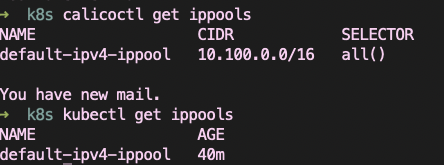
Hi,I have same problem here.
cat /proc/sys/net/ipv4/ip_forward # 1
Was install flannel ,and uninstall flannel ,retry install calico v3.9.2
kubeadm reset
calico.yaml add two line:
            - name: IP_AUTODETECTION_METHOD
              value: "interface=eth0"
Yes, eth0 is my real network.
change CIDR :
```
- name: CALICO_IPV4POOL_CIDR
value: "10.100.0.1/16"
````

I do A lot kubectl delete -f calico.yaml and kubectl apply -f calico.yaml ,also rm -rf /var/lib/cni before kubectl command .
In calico-node-controllers-, get same Events:

In any calico-node-,get BGP not ready Events:

Has been tossing for 3 days, almost from getting started to giving up...
 54853315
on 11 Dec 2019
54853315
on 11 Dec 2019
@54853315 Please open a new issue as this looks different than the original. I believe your primary issue is calico-node BGP not ready since your get pods output shows that kube-controllers is ready (1/1).
What platform are your hosts running on? Is BGP traffic (port 179) allowed between your hosts?
 tmjd
on 11 Dec 2019
tmjd
on 11 Dec 2019
@tmjd
Thanks Reply.
Later I found out that this was because I installed calico 3.7. *, Then uninstalled calico, installed flannel, and then uninstalled flannel. Reinstall calico3.9, problems encountered.
At this point I found that my iptables had become confusing.
So ,I have to do this .... I have to !
kubeadm reset -f
ptables -F && iptables -t nat -F && iptables -t mangle -F && iptables -X
reboot
Then execute kubectl apply -f calico3.9.yaml and everything is resolved.
54853315
on 21 Dec 2019
Related issues
caseydavenport
·
3Comments
 lwr20
·
5Comments
lwr20
·
5Comments
 vans88
·
5Comments
vans88
·
5Comments
 winromulus
·
3Comments
winromulus
·
3Comments
 venomwaqar
·
5Comments
venomwaqar
·
5Comments
Most helpful comment
Fixed it by removing leftover files in
/var/lib/cni. I believe that's a bug for users upgrading from earlier Calico versions.