Describe the bug/problem
I am attempting to connect Calibre-web to G Suite via LDAP and receive the following error. I've Googled the hell out of Simple LDAP error 71 but can't find anything useful about it. I'm hoping you can shed more light on it. This is not an urgent issue and I understand there are more important things to attend to. It would be nice in order to import users from G Suite. Cheers! 👍
ERROR {cps.services.simpleldap:71} Working outside of application context.
This typically means that you attempted to use functionality that needed
to interface with the current application object in some way. To solve
this, set up an application context with app.app_context(). See the
documentation for more information.
To Reproduce
I followed the instructions at https://support.google.com/a/answer/9089736 to setup LDAP and the instructions on the wiki. LDAP works for local AD so I know that LDAP works on this system.
This error is described as:
LDAP_AFFECTS_MULTIPLE_DSAS | Indicates that the modify DN operation moves the entry from one LDAP server to another and requires more than one LDAP server.
Log
[2020-10-01 22:50:46,884] INFO {cps.server:207} webserver stop (restart=True)
[2020-10-01 22:50:47,947] INFO {cps.server:189} Performing restart of Calibre-Web
[2020-10-01 22:50:58,779] INFO {cps:98} Starting Calibre Web...
[2020-10-01 22:50:58,829] ERROR {cps.services.simpleldap:71} Working outside of application context.
This typically means that you attempted to use functionality that needed
to interface with the current application object in some way. To solve
this, set up an application context with app.app_context(). See the
documentation for more information.
Environment (please complete the following information):
- OS: Ubuntu 20.04 on RasPi
- Python version: 3.8.2
- Calibre-Web version: 0.6.9 - a9c0bcb4a2441b0171966cfc32c60b6cf677c590
- Browser: Version 85.0.4183.121 (Official Build) (64-bit)
- Flask_SimpleLDAP | installed
- python_LDAP 3.2.0
 wgibcus
All 18 comments
71 is not an errorcode it's the line in simpleldap which failes, looks like this line:
            ldap.set_option(ldap.OPT_X_TLS_CACERTFILE,
                            current_app.config['LDAP_CERT_PATH'])
The truth is now, I fiddled around a bit with the LDAP, made the normal SSL encryption work and skipped the certification file stuff, as I didn't get it to work (on server side)
 OzzieIsaacs
on 2 Oct 2020
OzzieIsaacs
on 2 Oct 2020
Another truth is: I can't remember if I ever checked it with gevent as server (instead of tornado, the server lib calibre-web uses by default, gevent is listed in optional-requirements.txt, but is not really needed, it was instroduced for gdrive, I didn't check it at that time, and now I recommend it for people who want to upload big files).
The error message has something to do with flask
It's from this file: https://github.com/pallets/flask/blob/024f0d384cf5bb65c76ac59f8ddce464b2dc2ca1/src/flask/globals.py (line 14 onwards).
Would it be possible for you to uninstall gevent and try again? (And if possible skip the CA_CERTFILE parameter?)
OzzieIsaacs
on 2 Oct 2020
Ah! That's given me a new line of inquiry :) Thank you. I'll investigate this further and get back to you. I need gevent because I have massive files but I'll set up a test environment and get back to you with results.
wgibcus
on 3 Oct 2020
As long as you don‘t upload files, there should be no differences for a quick test
OzzieIsaacs
on 3 Oct 2020
Thanks for the quick response. No luck I'm afraid. I'll look into Flask and see what I can find.
WebServer | Tornado 6.0.4
[2020-10-03 19:53:32,306] INFO {cps.server:168} Starting Tornado server on :8083
[2020-10-03 19:55:17,537] INFO {cps.server:219} webserver stop (restart=True)
[2020-10-03 19:55:17,591] INFO {cps.server:201} Performing restart of Calibre-Web
[2020-10-03 19:55:28,338] INFO {cps:98} Starting Calibre Web...
[2020-10-03 19:55:28,387] ERROR {cps.services.simpleldap:71} Working outside of application context.
This typically means that you attempted to use functionality that needed
to interface with the current application object in some way. To solve
this, set up an application context with app.app_context(). See the
documentation for more information.
According to https://support.google.com/a/answer/9100761 The certificate is required -
Why do I need both a certificate and access credentials to authenticate LDAP clients?
Only the certificate authenticates the LDAP client. The access credentials only exist if the client insists upon also sending a username and password. On their own, the access credentials don’t confer any access to the LDAP server or user data, but they should be kept secret to prevent them from being used to log in to certain LDAP clients.
In the case where an LDAP client requires access credentials, we authenticate LDAP clients with both certificates and access credentials.
wgibcus
on 3 Oct 2020
Looks like it's simply not working.
I'll have a look at it
OzzieIsaacs
on 3 Oct 2020
I did get it to run with my testing server, but I think I found it:
Please update calibre-web to the newest nightly version (admin -> basic configuration -> server configuration -> nightly, then admin -> search for update -> perform update)
Furthermore there is a bug in flask-simpleldap library. So please search for the location where you installed flask-simpleldap:
If you choose the vendor option from readme: calibre-web-root-path/vendor/flask_simpleldap
If you choose the virtual environment option: calibre-web-root-path/venv/flask_simpleldap (or whatever path you choosed)
...
Please open the __init__.py file. Go to line 69/70 and change it:
            ldap.set_option(ldap.OPT_X_TLS_CACERTFILE,
                            current_app.config['LDAP_CERT_PATH'])
to
            ldap.set_option(ldap.OPT_X_TLS_CACERTFILE,
                             app.config['LDAP_CERT_PATH'])
(make current_app to app)
After a restart of calibre-web the error message about "Working outside of application context" is gone.
Please enter the path and filename of the certificate you got from google in the LDAP Certificate Path setting (before the update calibre-web requested a path there, now it's requesting a file).
I hope it's working afterwards. Would be great if you could give me feedback if it's working afterwards, so I can file a issue for flask-simpleldap
OzzieIsaacs
on 4 Oct 2020
Ok, that has resolved the issue with the error message however I still can't connect, despite being able to connect using an LDAP browser. I can only connect with the LDAP browser by using SSL (this is not a problem) but if I use TLS, the connection just hangs and times out. I know my credentials work so that's not the issue. The problem seems to be that when connecting via SSL, Google demands a Google Trust Services server certificate in addition to the client certificate supplied when the LDAP client is set up in G Suite. I installed the supplied certificate from G Suite (.crt and .key) by using 'sudo update-ca-certificates' but it seems like another certificate is required.
Settings:
Server: ldap.google.com
Port: 636
Encryption: SSL
LDAP cert path: /etc/ssl/certs/Google_redacted.pem
LDAP type: Simple
Admin name: uid=admin,ou=Users,dc=mydomain,dc=com
Password: definitely working
DN: dc=mydomain,dc=com
wgibcus
on 5 Oct 2020
I'm only having limited knowldege about this ssl encryption stuff. Especially this certifying stuff remains something of a mystery to me. I tried to get a python server working to simulate the behavior over the weekend, but I didn't succeed.
I read some documentationon on the web and now I'm more confused than before. From some documentation it looks to me that the certificates are on per user base and have to have certain content which match to informations of the user account, which would not match to how calibre-web and the flask-simpleldap handles the certificate.
OzzieIsaacs
on 5 Oct 2020
I got my demo application to connect by presenting:
A (signed) Client certificate, a client private key and also the CA root certificate.
According to your description you are having 3 files, right?
Which would correspond according to my guesses as follows:
Supplied certificate from G Suite (.crt and .key) -> Client certificate, a client private key (currently not possible to enter it in calibre-web)
Google Trust Services server certificate -> CA root certificate
I will try to implement the missing inputs (will probably take till Friday) and we can try it again.
If you don't have 3 files, please give me feedback, then I'm searching for more knowledge on the internet and another idea..
OzzieIsaacs
on 5 Oct 2020
Thank you so much for this. I'm not terribly good with certificates either :)
When downloading the certificates from G Suite, a .crt and .key file is provided. When I connect using an SNI enabled LDAP browser, the Google Trust Services certificate is demanded, which I think you're on the right track with being the CA root certificate. I found this, but I'm not sure if it's relevant - https://pki.goog/repository/
wgibcus
on 7 Oct 2020
Just to clarify, copying the key and crt file to /usr/local/share/ca-certificates/ and then running "sudo update-ca-certificates" creates a .pem file in /etc/ssl/certs I believe this creates the cert with the key applied. I then point the LDAP cert path to that pem file.
wgibcus
on 9 Oct 2020
I haven‘t forgot you. I will create a small testscript to check what is needed. (Will be easier for both of us to figure out the problem/solution)
OzzieIsaacs
on 9 Oct 2020
Please:
- rename the file at the end of this post to test.py after downloading
- copy it to calibre-web's root folder (the one with the cps subfolder)
- open the file with the editor of your choice and change the variables according to your installation:
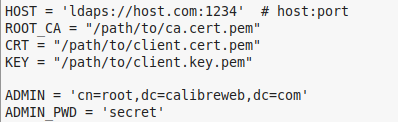
- start the script with the python interpreter you normaly start calibre-web with the script as parameter (..python3 test.py)
- If it works you should get freaky outputs like (the last 2 rows are the ones to have a look at):
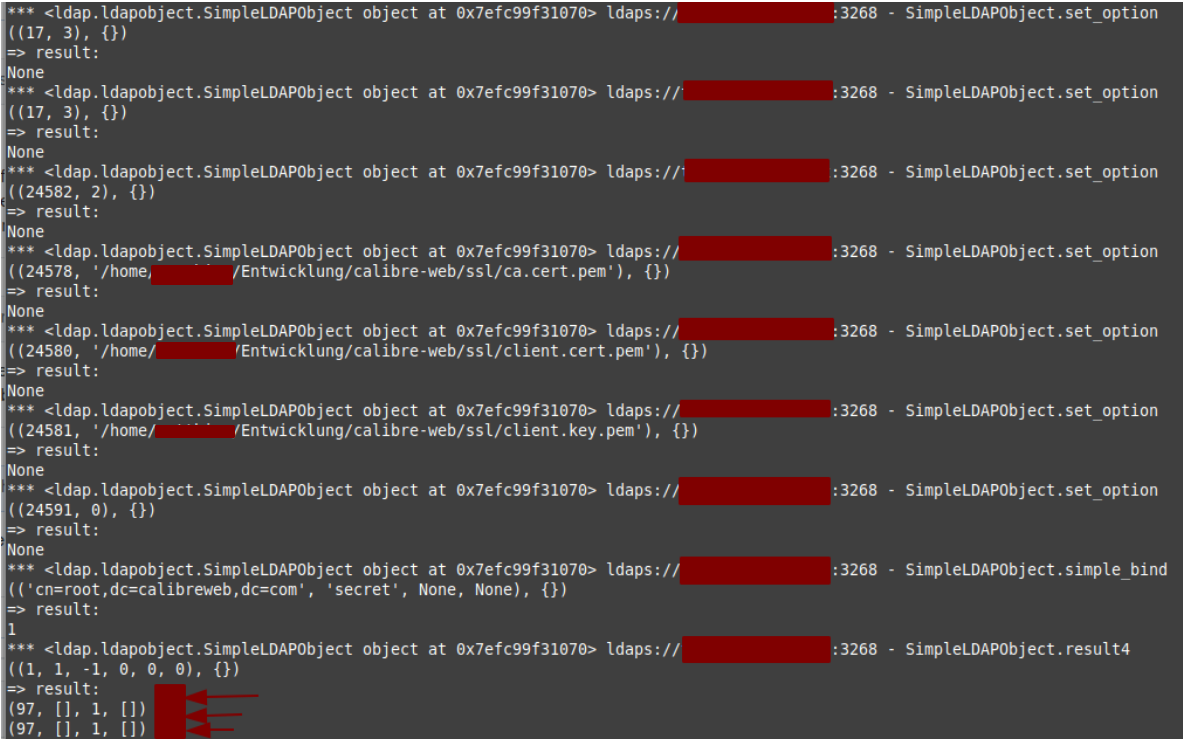
- if it's not working you'll get a stacktrace:
...
*** <ldap.ldapobject.SimpleLDAPObject object at 0x7f5866e84070> ldaps://exsample.com:3268 - SimpleLDAPObject.set_option
((24581, '/..../...pem'), {})
=> result:
None
*** <ldap.ldapobject.SimpleLDAPObject object at 0x7f5866e84070> ldaps://exsample.com:3268 - SimpleLDAPObject.simple_bind
(('cn=root,dc=calibreweb,dc=com', 'secret', None, None), {})
=> LDAPError - SERVER_DOWN: {'result': -1, 'desc': "Can't contact LDAP server", 'ctrls': [], 'info': '(unknown error code)'}
Traceback (most recent call last):
  File "tes.py", line 18, in <module>
    test = connect.simple_bind_s(ADMIN, ADMIN_PWD)
  File "/home/ozzie/Entwicklung/calibre-web/venv/lib/python3.8/site-packages/ldap/ldapobject.py", line 454, in simple_bind_s
    msgid = self.simple_bind(who,cred,serverctrls,clientctrls)
  File "/home/ozzie/Entwicklung/calibre-web/venv/lib/python3.8/site-packages/ldap/ldapobject.py", line 448, in simple_bind
    return self._ldap_call(self._l.simple_bind,who,cred,RequestControlTuples(serverctrls),RequestControlTuples(clientctrls))
  File "/home/ozzie/Entwicklung/calibre-web/venv/lib/python3.8/site-packages/ldap/ldapobject.py", line 340, in _ldap_call
    reraise(exc_type, exc_value, exc_traceback)
  File "/home/ozzie/Entwicklung/calibre-web/venv/lib/python3.8/site-packages/ldap/compat.py", line 46, in reraise
    raise exc_value
  File "/home/ozzie/Entwicklung/calibre-web/venv/lib/python3.8/site-packages/ldap/ldapobject.py", line 324, in _ldap_call
    result = func(*args,**kwargs)
ldap.SERVER_DOWN: {'result': -1, 'desc': "Can't contact LDAP server", 'ctrls': [], 'info': '(unknown error code)'}
If this one is working we should do some last tests to figure out what is really needed of the settings (I like to present as less options as possible to the users), by removing some lines
OzzieIsaacs
on 9 Oct 2020
@wgibcus could you check it already?
OzzieIsaacs
on 13 Oct 2020
Apologies for the lateness of the reply, I had a run in with the dreaded covid. Here's the output
*
((17, 3), {})
=> result:
None
((17, 3), {})
=> result:
None
((24582, 2), {})
=> result:
None
((24578, '/etc/ssl/certs/Google_2023_07_29_2696.pem'), {})
=> result:
None
((24580, '/etc/ssl/certs/Google_2023_07_29_2696.pem'), {})
=> result:
None
((24581, '/etc/ssl/certs/Google_2023_07_29_2696.pem'), {})
=> result:
None
((24591, 0), {})
Traceback (most recent call last):
File "test.py", line 23, in
connect.set_option(ldap.OPT_X_TLS_NEWCTX,0)
File "/usr/lib/python3/dist-packages/ldap/ldapobject.py", line 921, in set_option
return self._ldap_call(self._l.set_option,option,invalue)
File "/usr/lib/python3/dist-packages/ldap/ldapobject.py", line 315, in _ldap_call
result = func(*args,
ValueError: option error
wgibcus
on 26 Oct 2020
Sorry for the late reply, I currently busy with another project. I hope you are well.
The script shows an problem which I don't have, but google knew an answer. So I updated the script. Could you please try the updated one (same procedure as above):
test.txt
I hope afterwards we got it.
OzzieIsaacs
on 31 Oct 2020
I added the needed config options to Calibre-Web:
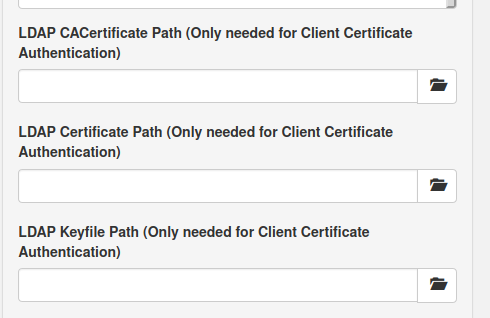
I also added a workaround for the simpleldap bug, so it's no longer necessary to edit the file
OzzieIsaacs
on 2 Dec 2020
Related issues
 pjortiz
·
9Comments
pjortiz
·
9Comments
 christophwolff
·
6Comments
christophwolff
·
6Comments
 thomasbra1
·
6Comments
thomasbra1
·
6Comments
 ghost
·
7Comments
ghost
·
7Comments
 simkin
·
8Comments
simkin
·
8Comments