Calibre-web: Linux Mint 20 - Unable to get Calibre-Web set as a service
I am so sorry, as this is likely user error, but I have been trying to migrate from Windows to Linux Mint and am still trying to pick up on everything. I have been able to get Calibre-Web set up and it works when I manually start the cps.py, but nothing happens when I try to run as a service. I have my cps.service file set as:
[Unit]
Description=Calibre-Web

[Service]
Type=simple
User=root
ExecStart=/usr/bin/python3 /home/mikraphne/Documents/calibre-web-master/cps.py
WorkingDirectory=/home/mikraphne/Documents/calibre-web-master/

[Install]
WantedBy=multi-user.target
I am guessing that I am missing something here, but after a reboot, or manually resetting the service never starts Calibre-Web for me..
 MReprogle1
All 9 comments
Just had a short look, but having user root running it in the users home directory doesn‘t look very consistent to me
 OzzieIsaacs
on 2 Sep 2020
OzzieIsaacs
on 2 Sep 2020
The command journalctl -u cps Should show the log of the service and hopefully should give a hint what’s going wrong
OzzieIsaacs
on 2 Sep 2020
Hi, I am also having issues when I try to set up calibre web as a service. This is my service file:
`[Unit]
Description=Calibre-Web
After=network.target
[Service]
Type=simple
User=suciocerdo
Group=suciocerdo
ExecStart=/usr/bin/python3 /usr/local/calibre-web/cps.py
WorkingDirectory=/usr/local/calibre-web/
[Install]
WantedBy=multi-user.target`
the log says that my settings database is not writable. I have given CHMOD 755 to app.db but still doesn't work
-- Logs begin at Mon 2020-10-05 11:42:38 CEST, end at Mon 2020-10-05 12:34:49 CEST. --
Oct 05 11:57:51 skynet-server systemd[1]: Started Calibre-Web.
Oct 05 11:57:55 skynet-server python3[1181]: Settings database is not writeable. Exiting...
Oct 05 11:57:55 skynet-server systemd[1]: cps.service: Main process exited, code=exited, status=1
Oct 05 11:57:55 skynet-server systemd[1]: cps.service: Failed with result 'exit-code'.
-- Reboot --
Oct 05 12:14:20 skynet-server systemd[1]: Started Calibre-Web.
Oct 05 12:14:24 skynet-server python3[1498]: Settings database is not writeable. Exiting...
Oct 05 12:14:25 skynet-server systemd[1]: cps.service: Main process exited, code=exited, status=1
Oct 05 12:14:25 skynet-server systemd[1]: cps.service: Failed with result 'exit-code'.
 suciocerdo
on 5 Oct 2020
suciocerdo
on 5 Oct 2020
According to my experience this is normally a pure access rights problem.
What happens if the user suciocerdostarts the command /usr/bin/python3 /usr/local/calibre-web/cps.py from the terminal?
One problem could be that you started calibre-web with another user and the file app.db is now owned by somebody else (maybe root?).
It's also an option to move the app.db to somewhere else and start calibre-web with parameter -p and point to the new app.db
OzzieIsaacs
on 5 Oct 2020
Is there a file app.db in the /usr/local/calibre-web/ folder? What are the permissions of this file?
OzzieIsaacs
on 5 Oct 2020
Thanks for your comments. If I run the command from the terminal I get the message:
"Settings database is not writeable. Exiting..."
Yes, app.db exists in the /usr/local/calibre-web/ folder. The permissions of the file are in the screenshot.
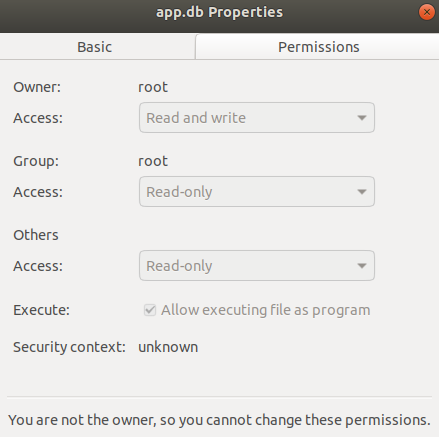
I also suspect that the problem is an access right issue but I don't know how to fix it. I copied calibre-web to a different folder (home) but I get the same error.
suciocerdo
on 5 Oct 2020
Yeah, the owner is root and not suciocerdo.
Could you please change to owner to suciocerdo by:
sudo chown suciocerdo:suciocerdo app.db
And it should work. I guess you started it first time by user root, so the app.db is owned by root and not the normal user.
OzzieIsaacs
on 5 Oct 2020
that fixed it. Actually I needed to change the ownership of the whole folder and now it is working. thanks a lot!
suciocerdo
on 5 Oct 2020
No feedback for long time on initial request, so I will close the issue
OzzieIsaacs
on 6 Oct 2020
Related issues
 gerroon
·
9Comments
gerroon
·
9Comments
 ground7
·
4Comments
ground7
·
4Comments
 candidodmv
·
4Comments
candidodmv
·
4Comments
 armandoss
·
7Comments
armandoss
·
7Comments
 InsOpDe
·
4Comments
InsOpDe
·
4Comments