Calibre-web: Imagemagick policy prevents generating thumbnails for pdfs during upload
many (? all) uploaded pdfs display 'Cover not available'. if possible display page one as a 'cover' similar to what nextcloud does.
 tim-moody
All 26 comments
You seem to suffer from the recent security improvements of ghostscript. You should check the ghostscript config file as described in https://github.com/janeczku/calibre-web/issues/789#issuecomment-462038341.
After you change that file the cover generation should work as before.
Another possibility would be that you haven't installed imagemagick library which is necessary for extracting cover-files.
 OzzieIsaacs
on 26 Feb 2019
OzzieIsaacs
on 26 Feb 2019
imagemagick was not installed, but after installing it I still have the same result.
I don't see that ghostscript is installed either, actually. Nor do I see any reference to the config file in #789
root@iiab-demo:~# apt list ghostscript*
Listing... Done
ghostscript/bionic-security 9.26~dfsg+0-0ubuntu0.18.04.7 amd64 [upgradable from: 9.26~dfsg+0-0ubuntu0.18.04.6]
ghostscript-dbg/bionic-security 9.26~dfsg+0-0ubuntu0.18.04.7 amd64
ghostscript-doc/bionic-security,bionic-security 9.26~dfsg+0-0ubuntu0.18.04.7 all
ghostscript-x/bionic-security 9.26~dfsg+0-0ubuntu0.18.04.7 amd64
root@iiab-demo:~#
Does our playbook have all the dependencies? I only want calibre-web, not calibre itself as this is a headless server. I only know these packages by name and have not really worked with them.
tim-moody
on 26 Feb 2019
Could you please check:
Imagemagick recently changed their security policy, they now deny per default pdf operations, so covers can't extracted anymore, you have to allow it in the policy.xml file of Imagemagick (located in etc/Imagemagick-6) by changing line:
<policy domain="coder" rights="none" pattern="PDF" />
to
<policy domain="coder" rights="read" pattern="PDF" />
OzzieIsaacs
on 26 Feb 2019
And yes, has nothing to do with calibre, a headless server is absolutly perfect
OzzieIsaacs
on 26 Feb 2019
To make the cover extraction work calibre-web should list the following "green arrowed" libs (exact version numbers don't really matter):
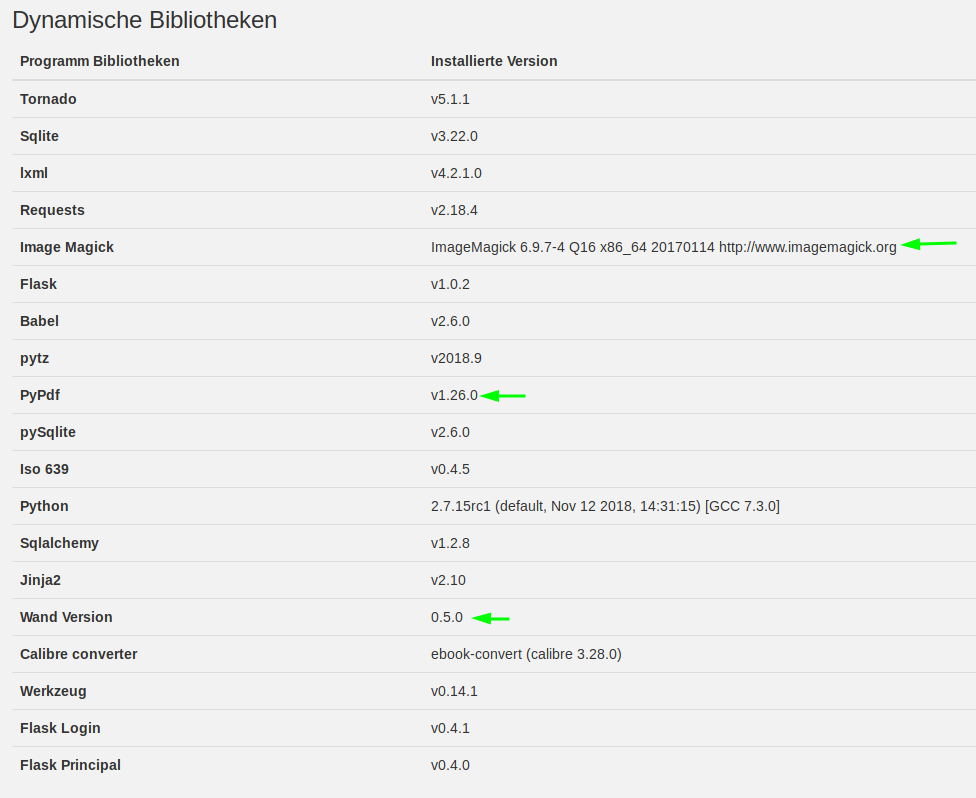
(Can be checked on "/stats" page (click on the "about" button on the main page, left bottom side)
OzzieIsaacs
on 26 Feb 2019
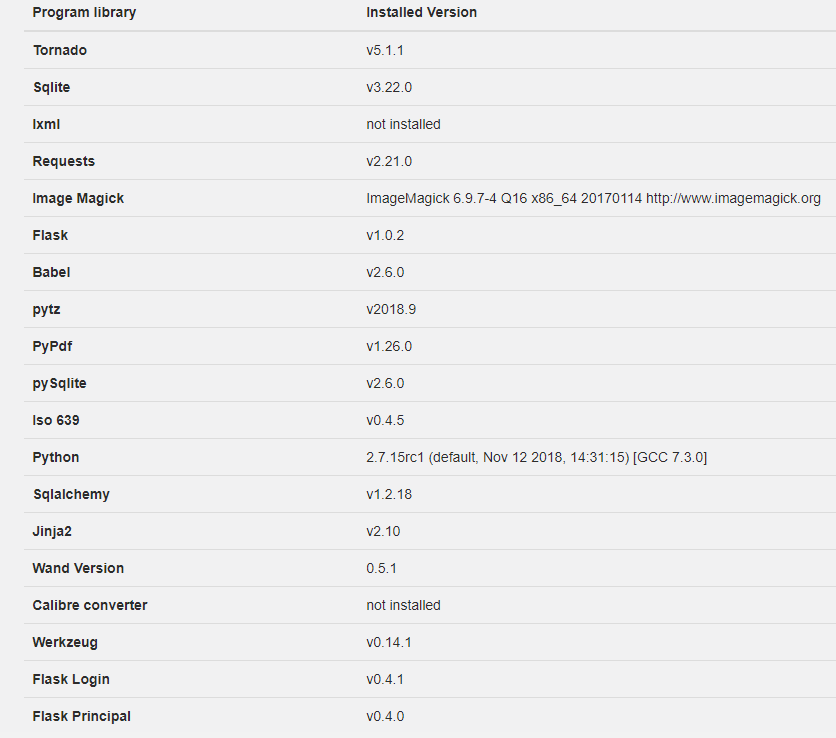
<!-- disable ghostscript format types -->
  <policy domain="coder" rights="none" pattern="PS" />
  <policy domain="coder" rights="none" pattern="EPI" />
  <policy domain="coder" rights="read" pattern="PDF" />
  <policy domain="coder" rights="none" pattern="XPS" />
uploaded a new pdf and still have no cover
tim-moody
on 26 Feb 2019
Does it matter if the OS is Raspbian on Raspberry Pi?
...versus Ubuntu 18.04 or Debian 9/10 on x86_64 ?
(Internet-in-a-Box would like to support all 3 OS's if possible!)
 holta
on 27 Feb 2019
holta
on 27 Feb 2019
From my point of view there is no restriction in using Raspberry Pi.
I'll try to take a look at it this weekend.
OzzieIsaacs
on 27 Feb 2019
To be clear, the problem I reported was on a NUC running Ubuntu 18.04.1. The machine is publicly visible if you would like access.
tim-moody
on 27 Feb 2019
Ironically Raspbian might work better for now? Lacking all those recent Ghostscript patches etc?
_Many Thanks @OzzieIsaacs_
holta
on 27 Feb 2019
Not really. My Ubuntu 18.04.2 is working perfect in uploading pdfs with covers. I'm just trying to find differences between your installation and my installation.
OzzieIsaacs
on 27 Feb 2019
My ghostscript status
root@xxx:/xxx# apt list ghostscript*
Auflistung... Fertig
ghostscript/bionic-updates,bionic-security 9.26~dfsg+0-0ubuntu0.18.04.7 amd64 [aktualisierbar von: 9.26~dfsg+0-0ubuntu0.18.04.6]
ghostscript-dbg/bionic-updates,bionic-security 9.26~dfsg+0-0ubuntu0.18.04.7 amd64
ghostscript-doc/bionic-updates,bionic-updates,bionic-security,bionic-security 9.26~dfsg+0-0ubuntu0.18.04.7 all
ghostscript-x/bionic-updates,bionic-security 9.26~dfsg+0-0ubuntu0.18.04.7 amd64 [aktualisierbar von: 9.26~dfsg+0-0ubuntu0.18.04.6]
root@xxx:/xxx# gs
GPL Ghostscript 9.26 (2018-11-20)
Copyright (C) 2018 Artifex Software, Inc.  All rights reserved.
This software comes with NO WARRANTY: see the file PUBLIC for details.
GPL Ghostscript 9.26: Cannot open X display `(null)'.
**** Unable to open the initial device, quitting.
root@dusty:/home/server#
Are there any relevant outputs in the calibre-web.log file (root folder of the program) after an upload of
a pdf file?
What is the version-info stating on the admin page if you are changing the update channel to nightly (admin page -> basic-setup -> server config)
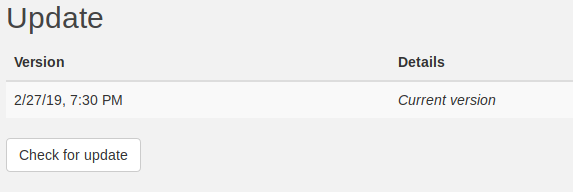
(Everything from 2019 should be okay and comparable to my installation, and what I read above I think it's mid of february)
OzzieIsaacs
on 27 Feb 2019
I reran apt list ghostscript*
ghostscript/bionic-updates,bionic-security,now 9.26~dfsg+0-0ubuntu0.18.04.7 amd64 [installed,automatic]
ghostscript-dbg/bionic-updates,bionic-security 9.26~dfsg+0-0ubuntu0.18.04.7 amd64
ghostscript-doc/bionic-updates,bionic-updates,bionic-security,bionic-security 9.26~dfsg+0-0ubuntu0.18.04.7 all
ghostscript-x/bionic-updates,bionic-security 9.26~dfsg+0-0ubuntu0.18.04.7 amd64
I am right that you have 9.26~dfsg+0-0ubuntu0.18.04.6 not upgraded, whereas I have the upgrade?
I have automatic security updates turned on.
tim-moody
on 27 Feb 2019
here's from the log
[2019-02-27 17:24:48,081] {/usr/local/calibre-web/cps/book_formats.py:141} WARNING - Pdf extraction forbidden by Imagemagick policy: not authorized `/tmp/calibre_web/4dfddbb21692f4c6e9e2ce89378f5579' @ error/constitute.c/ReadImage/412
but I have <policy domain="coder" rights="read" pattern="PDF" /> in /etc/ImageMagick-6/policy.xml
Is there something that needed restarting?
tim-moody
on 27 Feb 2019
Version | Details
-- | --
0.6.1 | Current version
tim-moody
on 27 Feb 2019
could running in a venv have any influence on the ImageMagick settings?
tim-moody
on 27 Feb 2019
Okay, our problem is the imagemagick policy.
I stumpled over this imagemagick setting by accident, and I'm not really familiar with all the settings. We have to google, which setting is into effect, how to find the right one and how to change it.
I have automatic updates switched on, it's permamently updating ghostscript at the moment:
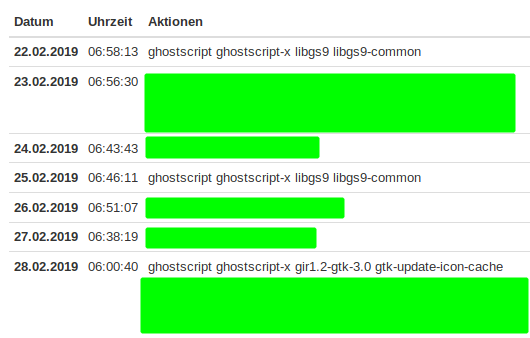
OzzieIsaacs
on 28 Feb 2019
I also noticed the flood of ghostscript-like changes over the past ~2 weeks, on Ubuntu machines especially. We're catching this bug at exactly the right time — whether "future-proofing" this functionality is possible or not?
(Is it possible ghostscript/Imagemagick are documenting their new security spec and future directions?)
holta
on 28 Feb 2019
You could try the tips from:
https://stackoverflow.com/questions/52703123/override-default-imagemagick-policy-xml
On the github page of imagemagick all possible custom paths for the policy.xml file are listed:
https://github.com/ImageMagick/ImageMagick/issues/1342
OzzieIsaacs
on 28 Feb 2019
@holta I did a little research.
If pdf documents embed pictures (as jpg, png, and so on) they can be extracted just by parsing the pdf file. But it still relays on imagemagick (which could be replaced by python pillow library). The first image would be extracted no matter where the picture is in the pdf file.
The contraindications would be that pdf's with no cover afterwards would not have any cover. Now ghostscript would create a image picture from the first page in the pdf document. And furthermore nobody can guarantee that imagemagick once again would not change their policy maybe against converting jpg files. The conversion function is mandatory in this case, because pictures in pdf files tend to be big, so they have to be downsized.
I tend to have the extraction routines as fallback solution (better than No cover), but implementing it will take some time, as I'm busy with other issues.
OzzieIsaacs
on 28 Feb 2019
Hi @OzzieIsaacs I've fallen behind and am just checking in before heading to Southern Calif Linux Expo starting tomorrow (https://www.socallinuxexpo.org/scale/17x is a huge conference) where I'm hoping to share good news with many others!
Are Calibre-Web's PDF thumbnail previews working on your end on fully-updated Ubuntu 18.04.2 at this time? (No worries if it's not quite there yet, am just checking in to help others navigate this :)
holta
on 7 Mar 2019
Yes, for me it's working. (After changing the policy.xml file a restart of calibre-web was necessary to accept the new settings)
OzzieIsaacs
on 8 Mar 2019
OK. I guess I didn't restart calibre-web. I now restarted it and uploaded another pdf and I see the thumbnail.
tim-moody
on 8 Mar 2019
Will now test on rpi
tim-moody
on 8 Mar 2019
On rpi W after apt install imagemagick I have a policy.xml in /etc/ImageMagick-6 but it has no policy domain="coder" lines.
When I upload a pdf I see the upload progress and then the message 'Upload done, processing, please wait ...'. I have waited up to 10 minutes and never seen it disappear and so concluded that the image magick processing failed.
However, if I open another tab and access books, the pdf is there and has a thumbnail. (The thumbnail is often distorted as far as height and width are concerned on the main page, but not on the pdf detail screen.) I can do this within a minute or two of the upload done message appearing even if I don't cancel the message.
And the pdf may be viewed, though it has no metadata other than author unknown, and I can now edit the metadata.
tim-moody
on 8 Mar 2019
Should be fixed now with the newest commit.
OzzieIsaacs
on 9 Mar 2019
Related issues
 jvimedia
·
9Comments
jvimedia
·
9Comments
 wv1124
·
3Comments
wv1124
·
3Comments
 ground7
·
4Comments
ground7
·
4Comments
 gramakri
·
4Comments
gramakri
·
4Comments
 sirprancelot
·
4Comments
sirprancelot
·
4Comments