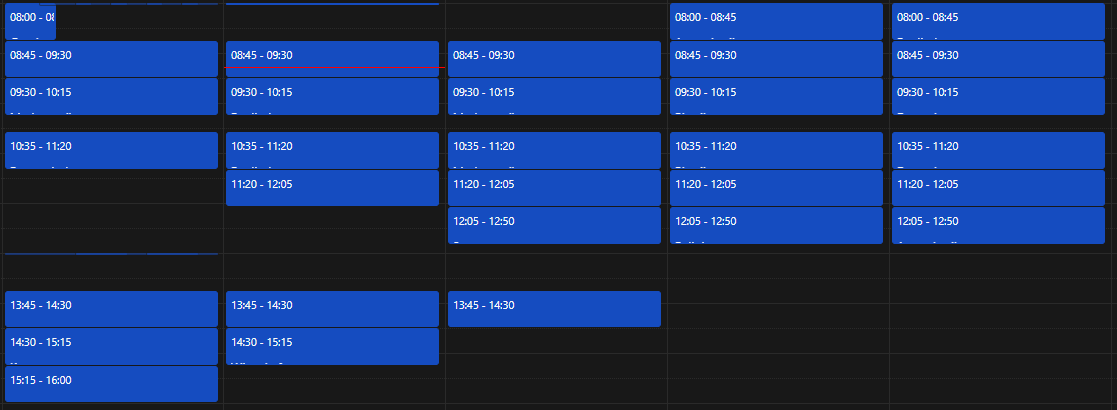
Calendar: Event text is cut off in day/week view
Steps to reproduce
- Update to Nextcloud 20.0.0 beta
- Create an event with a time duration which will cause the text to get cut off. (0mins, 20mins, 40mins, 50mins, etc...)
Expected behaviour
I expected that despite the time duration of the event, the time and title should be visible. This was the case when using Nextcloud 19.
Actual behaviour
Various event time duration ranges cause the event text and or time to be completely hidden or cut off.

Calendar app
App version: 2.1.2
CalDAV-clients used: N/A
Client configuration
Browser: Firefox 81.0
Operating system: Kubuntu 20.04
Server configuration
Operating system: Ubuntu Server 20.04
Web server: Nginx
Database: MariaDB
PHP version: 7.4.3
Nextcloud Version: 20.0.0 (beta)
Updated from an older installed version or fresh install: Upgraded from 19
List of activated apps:
Enabled:
  - activity: 2.13.1
  - admin_audit: 1.10.0
  - analytics: 3.0.0
  - breezedark: 19.0.5
  - calendar: 2.1.2
  - cloud_federation_api: 1.3.0
  - contactsinteraction: 1.1.0
  - dav: 1.16.0
  - drawio: 0.9.7
  - extract: 1.2.4
  - federatedfilesharing: 1.10.1
  - files: 1.15.0
  - files_pdfviewer: 2.0.1
  - files_rightclick: 0.17.0
  - files_sharing: 1.12.0
  - files_trashbin: 1.10.1
  - files_versions: 1.13.0
  - files_videoplayer: 1.9.0
  - groupfolders: 8.1.0
  - keeweb: 0.6.3
  - logreader: 2.5.0
  - lookup_server_connector: 1.8.0
  - metadata: 0.12.0
  - oauth2: 1.8.0
  - photos: 1.2.0
  - previewgenerator: 3.0.1
  - provisioning_api: 1.10.0
  - richdocuments: 3.7.4
  - serverinfo: 1.10.0
  - settings: 1.2.0
  - theming: 1.11.0
  - twofactor_backupcodes: 1.9.0
  - twofactor_totp: 5.0.0
  - user_status: 1.0.0
  - video_converter: 0.1.4
  - viewer: 1.4.0
  - weather_status: 1.0.0
  - workflowengine: 2.2.0
Nextcloud configuration:
{
    "system": {
        "instanceid": "***REMOVED SENSITIVE VALUE***",
        "passwordsalt": "***REMOVED SENSITIVE VALUE***",
        "secret": "***REMOVED SENSITIVE VALUE***",
        "trusted_domains": [
            "MY_DOMAIN_DOT_COM",
            "192.168.2.100"
        ],
        "datadirectory": "***REMOVED SENSITIVE VALUE***",
        "dbtype": "mysql",
        "version": "20.0.0.9",
        "overwrite.cli.url": "https:\/\/MY_DOMAIN_DOT_COM",
        "dbname": "***REMOVED SENSITIVE VALUE***",
        "dbhost": "***REMOVED SENSITIVE VALUE***",
        "dbport": "",
        "dbtableprefix": "oc_",
        "dbuser": "***REMOVED SENSITIVE VALUE***",
        "dbpassword": "***REMOVED SENSITIVE VALUE***",
        "mysql.utf8mb4": true,
        "installed": true,
        "auth.bruteforce.protection.enabled": true,
        "trashbin_retention_obligation": "auto",
        "versions_retention_obligation": "disabled",
        "updater.release.channel": "beta",
        "memcache.locking": "\\OC\\Memcache\\Redis",
        "memcache.local": "\\OC\\Memcache\\APCu",
        "redis": {
            "host": "***REMOVED SENSITIVE VALUE***",
            "port": 0
        },
        "enable_previews": true,
        "maintenance": false,
        "filelocking.enabled": true,
        "integrity.check.disabled": true,
        "theme": "",
        "loglevel": 2,
        "app_install_overwrite": [
            "keeweb",
            "files_clipboard",
            "occweb",
            "group_everyone",
            "issuetemplate",
            "files_reader",
            "groupfolders",
            "ocsms",
            "video_converter",
            "files_photospheres",
            "audioplayer",
            "extract",
            "metadata",
            "richdocuments",
            "discoursesso",
            "onlyoffice",
            "drawio",
            "breezedark",
            "documentserver_community"
        ],
        "updater.secret": "***REMOVED SENSITIVE VALUE***",
        "has_rebuilt_cache": true,
        "onlyoffice": {
            "verify_peer_off": true,
            "jwt_header": "AuthorizationJwt"
        }
    }
}
Logs
Web server error log (e.g. /var/log/apache)
Too large to paste
Log file (data/nextcloud.log)
Too large to paste
Browser log
Insert your browser log here, this could for example include:

a) The javascript console log
Content Security Policy: Couldn’t process unknown directive “default-src:”
Content Security Policy: The page’s settings blocked the loading of a resource at inline (“script-src”). content-fontface.js:50:25
Content Security Policy: The page’s settings blocked the loading of a resource at inline (“script-src”). content-script.js:40:65
Content Security Policy: The page’s settings blocked the loading of a resource at inline (“script-src”). content-script.js:40:65
No OC found main.js:1:323308
JQMIGRATE: Migrate is installed, version 1.4.1 main.js:1:917387
jQuery is deprecated: The global jQuery is deprecated. It will be updated to v3.x in Nextcloud 21. In later versions of Nextcloud it might be removed completely. Please ship your own. main.js:1:1407020
$ is deprecated: The global jQuery is deprecated. It will be updated to v3.x in Nextcloud 21. In later versions of Nextcloud it might be removed completely. Please ship your own. main.js:1:1407020
jQuery is deprecated: The global jQuery is deprecated. It will be updated to v3.x in Nextcloud 21. In later versions of Nextcloud it might be removed completely. Please ship your own. 2 main.js:1:1407020
[INFO] calendar:
Initial settings:
    - AppVersion: 2.1.2
    - EventLimit: false
    - FirstRun: false
    - ShowWeekNumbers: false
    - ShowTasks: true
    - ShowWeekends: true
    - SkipPopover: true
    - SlotDuration: 00:30:00
    - TalkEnabled: false
    - TasksEnabled: false
    - Timezone: automatic

Object { app: "calendar", uid: "Cole" }
calendar.js:2:2164605
[DEBUG] calendar: The calendar app is using version 2.2019c of the timezone database
Object { app: "calendar", uid: "Cole" }
calendar.js:2:2164534
Fallback to locale en calendar.js:2:1099917
[INFO] calendar: Updated moment locale: en
Object { app: "calendar", uid: "Cole" }
calendar.js:2:2164605
Source map error: Error: JSON.parse: unexpected character at line 1 column 1 of the JSON data
Resource URL: https://MY_DOMAIN_DOT_COM/nextcloud/core/js/dist/main.js?v=02e0a362-32
Source Map URL: main.js.map
jQuery is deprecated: The global jQuery is deprecated. It will be updated to v3.x in Nextcloud 21. In later versions of Nextcloud it might be removed completely. Please ship your own. 4 main.js:1:1407020
session heartbeat polling started main.js:1:711925
$ is deprecated: The global jQuery is deprecated. It will be updated to v3.x in Nextcloud 21. In later versions of Nextcloud it might be removed completely. Please ship your own. 2 main.js:1:1407020
jQuery is deprecated: The global jQuery is deprecated. It will be updated to v3.x in Nextcloud 21. In later versions of Nextcloud it might be removed completely. Please ship your own. 4 main.js:1:1407020
Source map error: Error: JSON.parse: unexpected character at line 1 column 1 of the JSON data
Resource URL: https://MY_DOMAIN_DOT_COM/nextcloud/apps/calendar/js/calendar.js?v=02e0a362-32
Source Map URL: calendar.js.map
[DEBUG] unified-search: Unified Search initialized with the following providers
Object { 0: {…}, 1: {…}, 2: {…}, 3: {…}, 4: {…}, 5: {…}, 6: {…}, app: "unified-search", uid: "Cole" }
unified-search.js:1:271869
jQuery is deprecated: The global jQuery is deprecated. It will be updated to v3.x in Nextcloud 21. In later versions of Nextcloud it might be removed completely. Please ship your own. 7 main.js:1:1407020
jQuery is deprecated: The global jQuery is deprecated. It will be updated to v3.x in Nextcloud 21. In later versions of Nextcloud it might be removed completely. Please ship your own. main.js:1:1407020
jQuery is deprecated: The global jQuery is deprecated. It will be updated to v3.x in Nextcloud 21. In later versions of Nextcloud it might be removed completely. Please ship your own. 144 main.js:1:1407020
[DEBUG] calendar: Current user principal is /nextcloud/remote.php/dav/principals/users/Cole/
Object { app: "calendar", uid: "Cole" }
calendar.js:2:2164534
Source map error: Error: JSON.parse: unexpected character at line 1 column 1 of the JSON data
Resource URL: https://MY_DOMAIN_DOT_COM/nextcloud/core/js/dist/unified-search.js?v=02e0a362-32
Source Map URL: unified-search.js.map
jQuery is deprecated: The global jQuery is deprecated. It will be updated to v3.x in Nextcloud 21. In later versions of Nextcloud it might be removed completely. Please ship your own. 4 main.js:1:1407020
 cole8888
All 10 comments
I have the same Problem:
I use Nextcloud Calendar 2.1.2 with Nextcloud 20.0.2.
I am not sure if the cause is the same, but the problem looks the same.
 JonathanTreffler
on 10 Dec 2020
JonathanTreffler
on 10 Dec 2020
I can confirm this bug is still present in calendar 2.1.3 with Nextcloud 20.0.4
@georgehrke can you change the title to "Event text is cut off in day/week view" and add the label "regression"? Maybe also assign a milestone?
Usability is significiantly decreased because of this. Nextcloud claims it puts a big emphasis on usability. This was reported three months ago.
 alexanderdd
on 19 Jan 2021
alexanderdd
on 19 Jan 2021
Maybe @jancborchardt could get involved.
The problem still exists in the current version and pretty much every event in my calendar is 45 Minutes long -> pretty much every event name is not visible.
JonathanTreffler
on 19 Jan 2021
can you change the title to "Event text is cut off in day/week view" and add the label "regression"
done
JonathanTreffler
on 19 Jan 2021
@jancborchardt @georgehrke this is a serious UX issue and has been open for four months now.
Who can do the triage? (so "to triage" is removed and "to develop" gets added?)
alexanderdd
on 23 Feb 2021
alexanderdd
on 11 Apr 2021
Who can do the triage? (so "to triage" is removed and "to develop" gets added?)
done
JonathanTreffler
on 11 Apr 2021
(this is not really my corner of nextcloud developement, so i hope nobody gets mad that i took the liberty of changing the labels 🤣)
JonathanTreffler
on 11 Apr 2021
Since #2696 was closed, adding
.fc-v-event {
    min-height: 2em;
}
to nextcloud/apps/calendar/css/fullcalendar.scs is a workaround for me.
 mafgh
on 11 Apr 2021
mafgh
on 11 Apr 2021
Since #2696 was closed, adding
.fc-v-event {
    min-height: 2em;
}
to
nextcloud/apps/calendar/css/fullcalendar.scsis a workaround for me.
Still works with 2.2.1
 daCaPo
on 29 Apr 2021
daCaPo
on 29 Apr 2021
Related issues
 raimund-schluessler
·
3Comments
raimund-schluessler
·
3Comments
 deanforrest
·
4Comments
deanforrest
·
4Comments
 mauritslamers
·
4Comments
mauritslamers
·
4Comments
 bcag2
·
4Comments
bcag2
·
4Comments
 ad1rie1
·
3Comments
ad1rie1
·
3Comments
Most helpful comment
I have the same Problem:
I use Nextcloud Calendar 2.1.2 with Nextcloud 20.0.2.
I am not sure if the cause is the same, but the problem looks the same.