Calendar: Calendar settings menu has wrong title
Steps to reproduce
- Open the Calendar
- Look at the settings menu bottom-left
Expected behaviour
The title should be "Settings & import"
Actual behaviour
The title is "Settings & import"
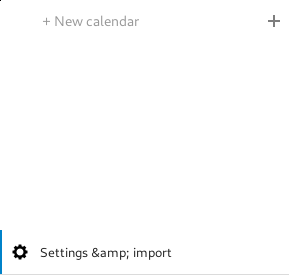
Calendar app
Calendar app version: (see apps admin page, e.g. 2.0.1) 2.0.0 beta 3
Client configuration
Browser: (e.g. Firefox 48) Firefox 70.0
Operating system: (e.g. Arch Linux) Fedora 29
Server configuration
Operating system: (e.g. Debian 8) DSM 6.2
Web server: (e.g. Apache, Nginx,...) Apache
Database: (e.g. MariaDB, SQLite or PostgreSQL) MariaDB
PHP version: (e.g. 7.0.3) 7.3
Nextcloud Version: (see admin page, e.g. 17.0.2) 18.0.0 Beta 3
Updated from an older installed version or fresh install: Updated
List of activated apps: N/A
 sciurius
All 23 comments
@ChristophWurst @skjnldsv This seems to be an issue with nextcloud-vue, because I don't see how else i should do it: https://github.com/nextcloud/calendar/blob/master/src/components/AppNavigation/Settings.vue#L23
How should we handle this? Should we add an additional properly :title-vhtml="true"?
 georgehrke
on 5 Jan 2020
georgehrke
on 5 Jan 2020
Isn't it coming from the t() function?
 skjnldsv
on 6 Jan 2020
skjnldsv
on 6 Jan 2020
Yes, t() is automatically escaping it: "Settings & Import".
That's why my suggestion was to allow to use vhtml for the Settings title, but I'm open for other solutions.
georgehrke
on 6 Jan 2020
@georgehrke or automatically urldecode the text?
skjnldsv
on 6 Jan 2020
@georgehrke or automatically urldecode the text?
Doesn't do anything, because it's not URI encoded:

georgehrke
on 6 Jan 2020
I meant htmldecode :p
skjnldsv
on 6 Jan 2020
Not sure if we have our own implementation that I'm not aware of, but there is no method to decode HTML in the standard javascript libs.
You can write your own using document.createElement(), innerHTML and innerText.
I guess simply using .replace(/&/g, '&'); is the cleaner approach here.
georgehrke
on 6 Jan 2020
Looks like this is the same issue with the app tokens header in your personal settings. The & is escaped there as well. Couldn't figure out why, though.
 ChristophWurst
on 7 Jan 2020
georgehrke
on 7 Jan 2020
ChristophWurst
on 7 Jan 2020
georgehrke
on 7 Jan 2020
Fix or workaround? :see_no_evil:
ChristophWurst
on 7 Jan 2020
What happens to umlauts and other HTML-escaped characters?
ChristophWurst
on 7 Jan 2020
What happens to umlauts and other HTML-escaped characters?
Only the ampersand is causing problems:
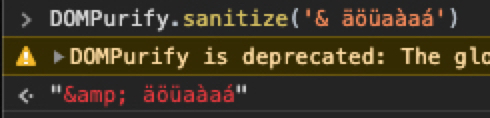
ref https://github.com/nextcloud/server/blob/master/core/src/OC/l10n.js#L125
georgehrke
on 7 Jan 2020
I'm not exactly sure why we call DOMPurify.sanitize there anyway.
We already escape all the variables above: https://github.com/nextcloud/server/blob/master/core/src/OC/l10n.js#L100L113
Edit: It obviously prevents any errors, when you are using characters like<, > in the translatable text, but that leaves us with the conflict that the result of translate and translatePlural always has to be treated as html, not as text that needs to be escaped again.
georgehrke
on 7 Jan 2020
I'm not exactly sure why we call
DOMPurify.sanitizethere anyway.
We already escape all the variables above: https://github.com/nextcloud/server/blob/master/core/src/OC/l10n.js#L100L113
Me neither. And this is a regression. Any clue where this is coming from? Did we add the escaping recently? The & in the app password settings used to work.
ChristophWurst
on 7 Jan 2020
The DOMPurify itself has been there for years now: https://github.com/nextcloud/server/commit/6c8d48b0f6faac5d5b832a70d0245941a912f78b#diff-45c3b58acdf48f696d3ffe092e58e33cR176
georgehrke
on 7 Jan 2020
The & in the app password settings used to work.
But that's related to your vue-refactoring? Isn't it?
translate returns Devices & session, and since you are using it inside curly brackets, vue is escaping the & to &amp;
https://github.com/nextcloud/server/commit/4b72475#diff-f57c51aacf630692a4a5d90e51cf3f11R24
Before it was just PHP:
https://github.com/nextcloud/server/commit/4b72475#diff-060894acdc1f2f2a9f681015e65b9f51L97
georgehrke
on 7 Jan 2020
I don't have a 16 instance at hand but I don't think it was broken when I switched to Vue.
ChristophWurst
on 7 Jan 2020
My only other guess would be that we most likely had a heavily outdated DOMPurify and it broke, when we added it to our package.json and updated it to a new version.
georgehrke
on 7 Jan 2020
Yes it was some weird dompurify stuff I remember.
 rullzer
on 7 Jan 2020
rullzer
on 7 Jan 2020
There is an issue in server for this as well https://github.com/nextcloud/server/issues/18662
 raimund-schluessler
on 7 Jan 2020
raimund-schluessler
on 7 Jan 2020
So basically @rullzer fixed this with https://github.com/nextcloud/server/pull/17254 but it broke again. Thanks for the ref, @raimund-schluessler.
ChristophWurst
on 7 Jan 2020
Can't find where or why that behavior changed in dompurify. Temporarily reverted to v1 and that solves the issue in settings, hence it must be a change in the lib.
ChristophWurst
on 7 Jan 2020
Submitted upstream because it could also be a regression https://github.com/cure53/DOMPurify/issues/379
ChristophWurst
on 7 Jan 2020
Related issues
 bcag2
·
4Comments
bcag2
·
4Comments
 GLLM
·
4Comments
georgehrke
·
4Comments
GLLM
·
4Comments
georgehrke
·
4Comments
 ml94
·
3Comments
ml94
·
3Comments
 mauritslamers
·
4Comments
mauritslamers
·
4Comments
Most helpful comment
Fix or workaround? :see_no_evil: