Calendar: Scroll bar not long enough. Last calendar hidden from "Settings & Import"
Steps to reproduce
A scroll bar is displayed for many calendars. In this case, the last subscribed calendar can no longer be reached via the scroll bar.
Expected behaviour
Normally, the last calendar should appear when you scroll down.
Actual behaviour
The last calendar is hidden by the link "Settings & Import".
 nrgeen
All 8 comments
@nrgeen
please use the issue template as described in our contributing guidelines
You didnt tell us what version you use, what browser, what version of that browser, etc ...
 georgehrke
on 17 Feb 2018
georgehrke
on 17 Feb 2018
Your are right. Sorry.
Here's the information:
Server configuration detail
Operating system: Linux 4.4.97-040497-generic #201711081042 SMP Wed Nov 8 10:43:28 UTC 2017 x86_64
Webserver: Apache (cgi-fcgi)
Database: mysql 5.7.20
PHP version: 7.1.14
Modules loaded: Core, date, libxml, pcre, filter, hash, Reflection, SPL, session, standard, cgi-fcgi, limiter, bcmath, bz2, calendar, ctype, curl, dba, dom, enchant, mbstring, fileinfo, ftp, gd, gettext, gmp, iconv, imagick, imap, intl, json, exif, mcrypt, mysqlnd, mysqli, openssl, pcntl, PDO, pdo_mysql, pdo_sqlite, zlib, posix, pspell, readline, shmop, SimpleXML, soap, sockets, sqlite3, sysvmsg, sysvsem, sysvshm, tidy, tokenizer, wddx, xmlreader, xmlrpc, xml, xmlwriter, xsl, zip, Phar, SourceGuardian, ionCube Loader, Zend OPcache
Nextcloud version: 13.0.0 - 13.0.0.14
Updated from an older Nextcloud/ownCloud or fresh install:
Where did you install Nextcloud from: unknown
Signing status
Array
List of activated apps
Enabled:
 - activity: 2.6.1
 - bruteforcesettings: 1.0.3
 - calendar: 1.6.0
 - caniupdate: 0.1.2
 - comments: 1.3.0
 - contacts: 2.1.0
 - dav: 1.4.6
 - deck: 0.3.0
 - federatedfilesharing: 1.3.1
 - federation: 1.3.0
 - files: 1.8.0
 - files_downloadactivity: 1.2.0
 - files_markdown: 2.0.1
 - files_pdfviewer: 1.2.0
 - files_sharing: 1.5.0
 - files_texteditor: 2.5.1
 - files_trashbin: 1.3.0
 - files_versions: 1.6.0
 - files_videoplayer: 1.2.0
 - firstrunwizard: 2.2.1
 - gallery: 18.0.0
 - groupfolders: 1.2.0
 - issuetemplate: 0.3.0
 - logreader: 2.0.0
 - lookup_server_connector: 1.1.0
 - nextcloud_announcements: 1.2.0
 - notifications: 2.1.2
 - oauth2: 1.1.0
 - password_policy: 1.3.0
 - provisioning_api: 1.3.0
 - serverinfo: 1.3.0
 - sharebymail: 1.3.0
 - systemtags: 1.3.0
 - theming: 1.4.1
 - twofactor_backupcodes: 1.2.3
 - updatenotification: 1.3.0
 - workflowengine: 1.3.0
Disabled:
 - admin_audit
 - encryption
 - files_external
 - mail
 - spreed
 - survey_client
 - user_external
 - user_ldap
Configuration (config/config.php)
{
    "instanceid": "***REMOVED SENSITIVE VALUE***",
    "passwordsalt": "***REMOVED SENSITIVE VALUE***",
    "secret": "***REMOVED SENSITIVE VALUE***",
    "datadirectory": "***REMOVED SENSITIVE VALUE***",
    "dbtype": "mysql",
    "version": "13.0.0.14",
    "dbname": "***REMOVED SENSITIVE VALUE***",
    "dbhost": "***REMOVED SENSITIVE VALUE***",
    "dbport": "",
    "dbtableprefix": "oc_",
    "dbuser": "***REMOVED SENSITIVE VALUE***",
    "dbpassword": "***REMOVED SENSITIVE VALUE***",
    "logtimezone": "UTC",
    "installed": true,
    "maintenance": false,
    "theme": "",
    "loglevel": 2,
    "updater.release.channel": "stable",
    "mail_smtpmode": "smtp",
    "mail_smtpsecure": "ssl",
    "mail_smtpauthtype": "LOGIN",
    "mail_smtphost": "***REMOVED SENSITIVE VALUE***",
    "mail_smtpauth": 1,
    "mail_smtpname": "***REMOVED SENSITIVE VALUE***",
    "mail_smtppassword": "***REMOVED SENSITIVE VALUE***",
    "mail_from_address": "***REMOVED SENSITIVE VALUE***",
    "mail_domain": "***REMOVED SENSITIVE VALUE***",
    "mail_smtpport": "465"
}
Are you using external storage, if yes which one: local/smb/sftp/...
Are you using encryption: no
Are you using an external user-backend, if yes which one: LDAP/ActiveDirectory/Webdav/...
LDAP configuration (delete this part if not used)
With access to your command line run e.g.:
sudo -u www-data php occ ldap:show-config
from within your Nextcloud installation folder

Without access to your command line download the data/owncloud.db to your local
computer or access your SQL server remotely and run the select query:
SELECT * FROM `oc_appconfig` WHERE `appid` = 'user_ldap';


Eventually replace sensitive data as the name/IP-address of your LDAP server or groups.
Client configuration
Browser: Mozilla/5.0 (Windows NT 10.0; Win64; x64; rv:58.0) Gecko/20100101 Firefox/58.0
Operating system: Windows 10
Logs
Browser log
Insert your webserver log here
Nextcloud log
Insert your Nextcloud log here
Browser log
Insert your browser log here, this could for example include:
a) The javascript console log
b) The network log
c) ...
I assume the problem is with Firefox 58. I can't reproduce the problem in Google Chrome v. 64.0.3282.167.
nrgeen
on 17 Feb 2018
I can reproduce the problem in Firefox 58. But the behaviour will only aper on "foreign" calendars, listet below the add subscription button (+ Neues Abonnement in German).
When I drag the bottom windows edge up, at a certain point the foreign calenders will flip to invisible.
 RailsViceRoads
on 19 Feb 2018
RailsViceRoads
on 19 Feb 2018
Here is a picture for illustration...
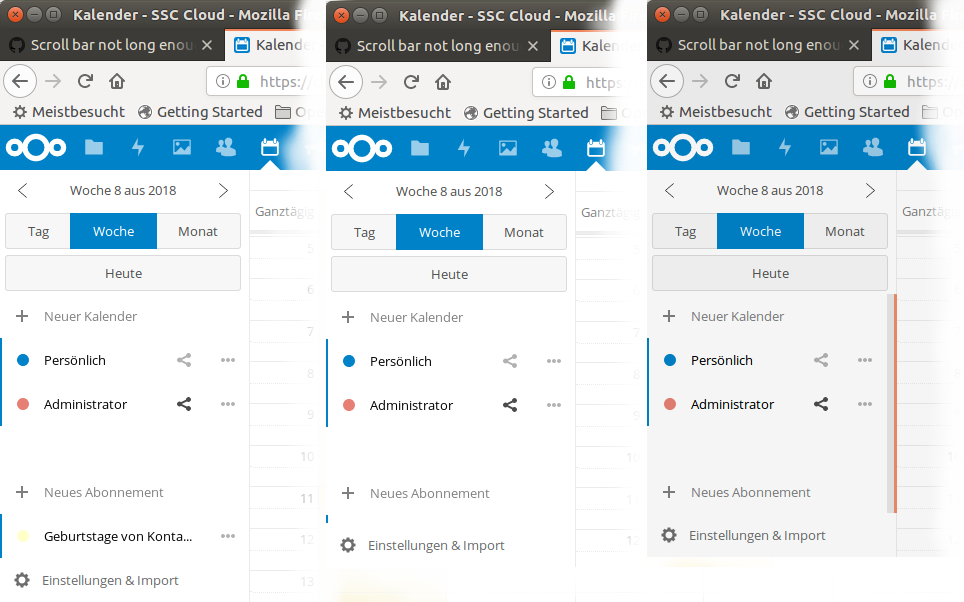
Step 1: All calendars visible
Step 2: "Geburtstage von..." is hidden by setting & import
Step 3: At this point the scrollbar is visible, but with 100% length.
RailsViceRoads
on 19 Feb 2018
Got the same issue on Firefox Nightly 2018-02-20. I presume the "unconfirmed" tag can be removed?
 yan12125
on 21 Feb 2018
yan12125
on 21 Feb 2018
@yan12125 We remove "unconfirmed" when one of the developers was able to reproduce it. This way we know that we got all the information needed to reproduce it :)
georgehrke
on 26 Feb 2018
Same issue here, NC 13.0.1, Firefox 59.0.2
 daCaPo
on 28 Mar 2018
daCaPo
on 28 Mar 2018
Related issues
 deanforrest
·
4Comments
deanforrest
·
4Comments
 mauritslamers
·
4Comments
mauritslamers
·
4Comments
 scorewinner
·
3Comments
scorewinner
·
3Comments
 gschenck
·
4Comments
gschenck
·
4Comments
 bcag2
·
4Comments
bcag2
·
4Comments
Most helpful comment
Here is a picture for illustration...
Step 1: All calendars visible
Step 2: "Geburtstage von..." is hidden by setting & import
Step 3: At this point the scrollbar is visible, but with 100% length.