Calendar: Public calendar iframe has issues on some browsers
OS | Linux | Windows
----|----|----
Firefox | Works | Works
Chrome 54 | Displays the grid, not the events. When refreshed, redirect issue. | Displays the grid, not the events. When refreshed, redirect issue.
Chromium 53 | Works | Not tested
Chromium 54 | Not tested | Displays the grid, not the events. When refreshed, redirect issue.
Edge | Not available | Works
IE 12 | Not available | Displays the grid, not the events
Want to back this issue? Post a bounty on it! We accept bounties via Bountysource.
 tcitworld
All 52 comments
@georgehrke Can you test on Safari ?
tcitworld
on 7 Nov 2016
The Chrome error is ERR_TOO_MANY_REDIRECTS
tcitworld
on 7 Nov 2016
@tcitworld Do you have some example code for me?
Did you just include the iframe into an otherwise blank html file?
 georgehrke
on 6 Dec 2016
georgehrke
on 6 Dec 2016
ping @tcitworld ^ :)
georgehrke
on 17 Dec 2016
For instance this one works with Firefox and Chromium but not Chrome on Linux : http://www.berrylab36.org/Ouverture
Here it's embeed within SPIP but I've heard of the same issue with a Wordpress. Will try myself.
tcitworld
on 17 Dec 2016
Safari 10 on macOS works just fine for me.
georgehrke
on 21 Dec 2016


I see a few issues here.
To my knowledge there is no X-FRAME-OPTIONS: ALLOW. There is only DENY, SAMEORIGIN and ALLOW-FROM https://...
Further Chrom(e|ium) doesn't support X-Frame-Options.
It expects something like Content-Security-Policy: frame-ancestors my-trusty-site.com
Source: https://www.owasp.org/index.php/Content_Security_Policy_Cheat_Sheet#Preventing_Clickjacking
Also Chrom(e|ium) got more strict about https lately.
Maybe it's related to the fact, the berrylab36.org is http, but framagenda.org is https. (at least when sending requests like PROPFIND or so)
Maybe @LukasReschke has more insights here
georgehrke
on 21 Dec 2016
IE doesn't work for the same reason the calendar app itself doesn't work in Internet explorer.
Should we display some overlay asking the user to use a different webbrowser?
georgehrke
on 24 Dec 2016
I guess this needs some tweaking.
tcitworld
on 27 Dec 2016
Will see how https://github.com/nextcloud/server/issues/1472 handles things.
tcitworld
on 27 Dec 2016
I can confirm this. Got redirected to many times Chrome version 56.0.2924.87 (64-bit)
 enoch85
on 12 Mar 2017
enoch85
on 12 Mar 2017
Maybe my Ǹextcloud is to secure?
Firefox
Load denied by X-Frame-Options: https://cloud.techandme.se/apps/calendar/public/G1ZXEIKC3AGL8X4S does not permit cross-origin framing.
Maybe @LukasReschke has more insights here
@LukasReschke ping :)
georgehrke
on 19 Mar 2017
IE doesn't work for the same reason the calendar app itself doesn't work in Internet explorer.
Should we display some overlay asking the user to use a different webbrowser?
At least IE 11 should be fixed by now
georgehrke
on 19 Mar 2017
Seeing the same "
 flips
on 21 Mar 2017
flips
on 21 Mar 2017
We don't support Opera. Will definitely look into the Chrome and Firefox issue
georgehrke
on 21 Mar 2017
When I used http://www.tinywebgallery.com/blog/advanced-iframe/free-iframe-checker
it also complained about the X-FRAME-OPTIONS ... (As mentioned previously here)
Placing my test.html file on the same domain as my NextCloud installation, the iFrame started working in Firefox, but not in Safari (10.0.3) or Chrome (where they are now both blank, I don't get the framing or anything, and not the same too many redirects error).
flips
on 21 Mar 2017
This requires changes to the Nextcloud server, to be released with Nextcloud 12.
Rescheduling this ticket to Calendar 1.7.0
georgehrke
on 2 Apr 2017
Still seeing this issue on Nextcloud 12 and Chrome. tl; dr - firefox and safari work, Chrome throws a redirect error.
 law
on 1 Aug 2017
law
on 1 Aug 2017
Error still exists.
I'd really love to add the iframe to my webpage, but sadly it still doesn't work.
Any fixes or workarounds?
 Ich5003
on 29 Jan 2018
Ich5003
on 29 Jan 2018
@Ich5003 What Browser, Nextcloud version, calendar app version?
georgehrke
on 29 Jan 2018
@georgehrke
Calendar app version is 1.5.7
Nextcloud Version is 12.0.5
Google Chrome (newest version) shows "too many redirects" error in iframe (mobile and Desktop)
Microsoft Edge (newest version) shows the correct IFrame.
//EDIT: Firefox (newest version) shows correct IFrame.
Opening the embedded link in chrome directly works aswell.
Do you need some more information?
Ich5003
on 29 Jan 2018
I'm having the problem too.
framagenda embedded in yeswiki displays correctly on Firefox 58.0 but not on Chrome 63.0
Nextcloud version 12. (where do I find the subversion?)
 PeteKirkham
on 30 Jan 2018
PeteKirkham
on 30 Jan 2018
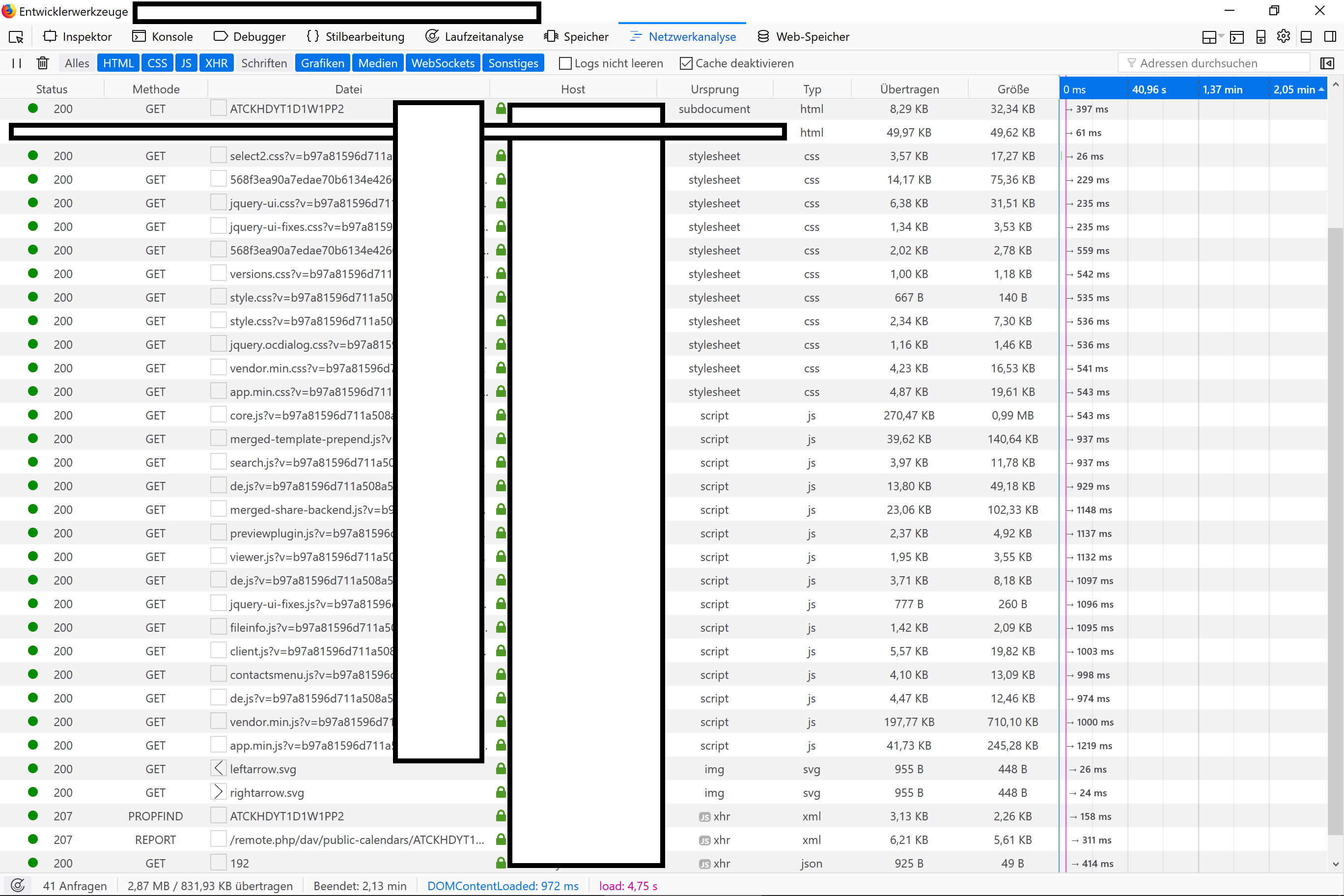
This is my network log (excluding fonts) in Firefox
Can't see why chrome throws the redirect error.
Ich5003
on 30 Jan 2018
I can’t see your network log.
This redirect error seems to have been around for a while on Chrome but I don’t understand why Firefox is unaffected if it is a real problem. Unfortunately I do know that some browsers are more strict on following the “rules” than others.
De : Lucas [mailto:[email protected]]
Envoyé : mardi 30 janvier 2018 17:47
À : nextcloud/calendar calendar@noreply.github.com
Cc : PeteKirkham pete.kirkham@orange.fr; Comment comment@noreply.github.com
Objet : Re: [nextcloud/calendar] Public calendar iframe has issues on some browsers (#169)
This is my network log (excluding fonts) in Firefox
Can't see why chrome throws the redirect error.
https://user-images.githubusercontent.com/1706621/35578868-888b69a8-05e5-11e8-9a31-608184a2806a.PNG
—
You are receiving this because you commented.
Reply to this email directly, view it on GitHub https://github.com/nextcloud/calendar/issues/169#issuecomment-361656188 , or mute the thread https://github.com/notifications/unsubscribe-auth/AEwitPZDjPzHQhYdQCRtR_Wxe0NqAAkxks5tP0eHgaJpZM4KrgFF . https://github.com/notifications/beacon/AEwitCMWY1wWittm-zGKzmjzKpT_WZBrks5tP0eHgaJpZM4KrgFF.gif
PeteKirkham
on 30 Jan 2018
I just tested again with Edge.
It's interesting that in the networking log of Edge the login page is called multiple times in a row.
This may be the reason for "too many redirects".
I guess the problem is something like this:
Any part of the page (maybe not even visible in foreground of the iframe) is responsible for an endless redirect loop.
While Chrome shows an error message on this, Edge and Firefox simply stop redirecting those background tasks and show the visible part.
I'll try to investigate this even further.
Ich5003
on 30 Jan 2018
And I found something even more interesting.
Let's say my nextcloud instance runs on aaa.example.com
Embedding the iframe on bbb.example.com (same server as aaa.example.com): Works a expected in all browsers
Embedding the iframe on example.com (different server): Works as expected
Embedding the iframe on someotherdomain.com: Does not work in Chrome.
So it mus be something domain specific.
Ich5003
on 30 Jan 2018
It seems to be related to X-Frame-Options in that case 🙈
georgehrke
on 30 Jan 2018
@tcitworld Does https://github.com/nextcloud/server/pull/5462 help here?
It only does if the admin whitelists all the sites that may include the iframe, right?
Edit: And just setting it to * doesnt work afaik
georgehrke
on 30 Jan 2018
Hey @georgehrke
You're right, this may be possible.
I tried using jsloader and allow the other domain, but it still does not work.
Maybe I'll find another way to edit those X-Frame-Options.
Ich5003
on 30 Jan 2018
Filtered x-frame-options from header in my apache conf.
Still doesn't work. Really confusing.
Ich5003
on 30 Jan 2018
We now have another issue.
Since we're inside an iframe, we seem to have issues with the SameSiteCookieCheck introduced at https://github.com/nextcloud/server/pull/6630. For some reason the request does not pass the LaxSameSiteCookie check and it 302 redirects endlessly to itself.
This can be kinda fixed by adding @NoSameSiteCookieRequired to our public routes, but then the core css isn't delivered for the same reason, unless we have this kind of patch against server, which is rather dirty.
diff --git a/lib/private/AppFramework/Middleware/Security/SameSiteCookieMiddleware.php b/lib/private/AppFramework/Middleware/Security/SameSiteCookieMiddleware.php
index 22a9246d66..0098090cfd 100644
--- a/lib/private/AppFramework/Middleware/Security/SameSiteCookieMiddleware.php
+++ b/lib/private/AppFramework/Middleware/Security/SameSiteCookieMiddleware.php
@@ -44,9 +44,21 @@ class SameSiteCookieMiddleware extends Middleware {
        }

        public function beforeController($controller, $methodName) {
+               $pathInfo = $this->request->getPathInfo();
+               $parts = explode('/', $pathInfo);
+               $parts = $parts[1];
                $requestUri = $this->request->getScriptName();
                $processingScript = explode('/', $requestUri);
                $processingScript = $processingScript[count($processingScript)-1];
+
+               if ($parts === 'css') {
+                       return;
+               }

                if ($processingScript !== 'index.php') {
                        return;
AFAIK this is the only app that has a public page and allows embeding it (and this is quite a requested feature).
I'm asking for advice to @rullzer @LukasReschke @MorrisJobke here since they were linked to the server change.
tcitworld
on 7 Aug 2018
Do you have some steps for me to run to trigger the error? Else it is hard to see what is going on.
 rullzer
on 7 Aug 2018
rullzer
on 7 Aug 2018
Sure, this should be it:
- Share a public link from a calendar
- open the public link
- Take the embed html iframe code on the left
- include it in any basic html page
- access the html page
tcitworld
on 8 Aug 2018
@tcitworld same issue here
 tplusm
on 14 Aug 2018
tplusm
on 14 Aug 2018
So I had some time to look into this.
The issue indeed our samesite cookie check. In an IFRAME the lax cookies are not send. Resulting in the check to fail because we do send the other cookies.
Now we could do a lot of nasty hacks and exceptions. But I think the cleaner approach here would be to migrate to lax samesite cookies for all our cookies. This only makes the cookies more secure. Plus it makes sure that if you embed some public page somewhere everbody will see the exact same thing. (as the IFRAME won't send any cookies then resulting in a true 'publicpage' rendering).
I'll track this in the server.
rullzer
on 17 Aug 2018
Thanks to https://github.com/nextcloud/server/pull/11433 we should be good with NC15.
tcitworld
on 2 Oct 2018
Yes you should.
Would be good of course if somebody coould setup a test server and test it :wink:
rullzer
on 2 Oct 2018
@rullzer I tested and we're still blocked by https://github.com/nextcloud/server/blob/master/lib/private/AppFramework/Middleware/Security/SameSiteCookieMiddleware.php#L60-L61 which triggers 302s for every request.
tcitworld
on 7 Oct 2018
Ah ok. So the check I had in mind doesn't fully work. As that would with the current logic log you out of your nextcloud if you embed a page.
Thinking more this would need a few adjustments
- calendar endpoint must of course be marked with
@NoSameSiteCookieRequired - The css and js endpoint should be marked as such I don't think this hurts as this is public info anyway
- The theming endpoints should be marked as such. Also should not be that much of an issue as they just serve generic theming info
rullzer
on 16 Oct 2018
Works perfectly ! Will send PRs. :)
tcitworld
on 17 Oct 2018
Got the same problem as described in #1861
 pReya
on 19 Jan 2020
pReya
on 19 Jan 2020
I have this same issue as described in #1861
 ghost
on 16 Feb 2020
ghost
on 16 Feb 2020
Same issue. Embed code generate this error :`
The page is not redirected correctly
An error occurred while connecting to framagenda.org.
The cause of this problem can be the deactivation or refusal of cookies.
```
 FredMa01
on 19 Feb 2020
FredMa01
on 19 Feb 2020
Using the embed link on a recent NC 18, I am receiving
Content-Security-Policy: ... 'self';frame-ancestors 'self'; ...
Consequently Firefox block the content loading, even from a parent domain (X-Frame-Option is ignored when CSP is defined). Afaik there is no option in NC to define a « trusted embeder ». Moreover, may be the embed link should allow anyone to embed.
I overcame the situation by munging Content-Security-Policy by this kludge on my reverse proxy:
       location / {
               proxy_pass http://xxx.xxx.xxx.xxx;
               location /nextcloud/apps/calendar/embed/ {
                       proxy_pass http://xx.xx.xx.xx;
                       proxy_hide_header Content-Security-Policy;
                       add_header Content-Security-Policy "frame-ancestors 'self' https://ourwebsite.com https://www.ourwebsite.com";
               }
       }
 fpoulain
on 2 Apr 2020
fpoulain
on 2 Apr 2020
A fixis already in master. and will be in the next release.
CC: @georgehrke
rullzer
on 2 Apr 2020
Hello, NC 18.0.6 and I still have this problem.
Is it supposed to be fixed with the latest releases ?
I even added the headers mentionned by @fpoulain (Content-Security-Policy "frame-ancestors 'self' https://ourwebsite.com") but nada...
 nd-
on 9 Jun 2020
nd-
on 9 Jun 2020
Same here.
 nderambure
on 9 Jun 2020
nderambure
on 9 Jun 2020
It should work on Nextcloud 19. There are known issues with Nextcloud 18 and below.
georgehrke
on 9 Jun 2020
I updated to NC 19 (on the beta channel), it still doesn't work.
With Chrome, I still see these errors in the console coming from the calendar url when I browse the page with an iframe:
Failed to load resource: the server responded with a status of 503 (Service Unavailable)
Failed to load resource: net::ERR_TOO_MANY_REDIRECTS
nd-
on 10 Jun 2020
It should work on Nextcloud 19. There are known issues with Nextcloud 18 and below.
We updated to NC19 and still have the same issue; firefox requests still returning a 503; chrome is fine.
 gelmio
on 21 Sep 2020
gelmio
on 21 Sep 2020
There are also a problem with embeding it in wordpress
 ashnansen
on 20 Jan 2021
ashnansen
on 20 Jan 2021
Related issues
 raimund-schluessler
·
3Comments
raimund-schluessler
·
3Comments
 bcag2
·
4Comments
bcag2
·
4Comments
 mauritslamers
·
4Comments
mauritslamers
·
4Comments
 archont00
·
4Comments
archont00
·
4Comments
 GLLM
·
4Comments
GLLM
·
4Comments
Most helpful comment
We don't support Opera. Will definitely look into the Chrome and Firefox issue