Calculator: Support defining custom variables and functions in Windows Calculator
Problem Statement
The Calculator currently lags behind when we have to do a calculation several times or a calculation involving several steps. For example, suppose I own a company that manufactures plastic buckets. Now we have to calculate the amount of water each bucket holds, given that we have many buckets of different sizes. So I have to calculate the volume of a conical frustum. The formula is as follows:
V((r_1), (r_2)) = 1/3 x π x h x ((r_1)^2 + (r_2)^2 + (r_1)(r_2)), where r_1 and r_2 are the radii of the conical frustum.
Now I have to enter this difficult formula again and again for every bucket size. This is a laborious task. It would have been simpler if the Calculator had allowed me to define my own function and I would just have to pass different values to it for getting the volumes of all the buckets:
V(12, 15), V(10,12) and so on.
And similarly it goes for custom variables which could be used in a number of situations. For example, suppose I wish to use the number 8.85e-12 many times. Now it's difficult for me to type this again and again. It would have been easier if I could assign it to a variable, say ϵ = 8.85e-12. Now I can use it as many times as I want.
All we have right now is the Calculator Memory with a few functions — M+, M-, MR, MC. It is very limited and it it is very difficult to use them for such tasks.
Evidence or User Insights
As I highlighted above this feature can be really useful when we have to deal with a complex calculation involving several steps or a calculation several times. In short, it enhances a user's efficiency. They don't need to switch to Microsoft ® Excel in order to get their work done.
Here is what the makers of Excel say on this:
Although Excel includes a multitude of built-in worksheet functions, chances are it doesn’t have a function for every type of calculation you perform. The designers of Excel couldn’t possibly anticipate every user's calculation needs. Instead, Excel provides you with the ability to create custom functions.
Courtesy: Microsoft
You can read more here.
But this is not limited to Microsoft Excel. Many of the calculators already have this.
Let's take the example of Desmos Calculator for Android:

Courtesy: Desmos Inc
This limitation has also been noted on the Wikipedia page for Windows Calculator:
It does not provide support for user-defined functions, complex numbers, storage variables for intermediate results (other than the classic accumulator memory of pocket calculators), automated polar-cartesian coordinates conversion, or support for two-variables statistics.
Proposal
The Windows Calculator should support defining custom variables and functions. These should be implemented in such a way that it is easy for the user to define, discover and use them.
Users should be able to define custom functions of the type f(...) with the help of already existing functions.
Some examples are shown below:
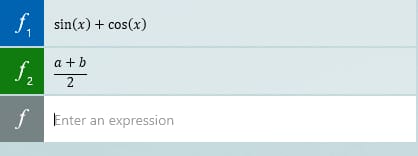
f(x) = sin(x) + cos(x)
g(x, y) = xy^2 + yx^2
h(a, b) = (a + b)/2
v(x, y, z) = sin(x) + cos(xy) + sin(z)
The users should be able to use them as follows:
f(π/2), g(1, 2), h(3, 7), v(π/4, π, π/2)
Similarly, the users should be able to define custom variables:
a = 5.71
ϕ = 1.61803399
α = tan(15)
Now they can use them as follows:
5a - 4ϕ - 7α
The result should be calculated accordingly.
I guess we will have to make significant changes to the UI in order to implement this.
After the work for the proposed Settings page is complete, we can also have a setting to preserve them so that they don't get lost when we close the Calculator.
Goals
- To have support for defining custom variables and functions in Windows Calculator
- After the implementation of complex numbers is complete, we can support assigning complex numbers to variables.
For examplez = -5 + 7i.
Non Goals
- Adding more built-in functions to the Calculator
Low Fidelity Concept
We can implement a third category apart from History and Memory where we can keep all the defined variables and functions. The user should be able to edit previously defined variables or functions.
We can borrow some UI code from the Graphing Calculator. For the new panel that we wish to design, we can take inspiration from the equation input panel of the Graphing Calculator. It can have two sections – one for the variables and the other one for functions.
Requested Assignment
I'm just suggesting this idea. I don't want to implement it.
 ghost
ghost
All 5 comments
This is your friendly Microsoft Issue Bot. I've seen this issue come in and have gone to tell a human about it.
 MicrosoftIssueBot
on 21 Aug 2020
MicrosoftIssueBot
on 21 Aug 2020
@grochocki I believe that this should only be available in the Scientific mode of the Windows Calculator. Do you think that the Standard/Programmer modes need this?
As per me, Standard Calculator is aimed for quick calculations and does not need such advanced features.
ghost
on 22 Aug 2020
I LOVE the Desmos calculator! It's incredible. It's what the Windows Calculator should be.
 Poopooracoocoo
on 1 Sep 2020
Poopooracoocoo
on 1 Sep 2020
This pitch looks like it has everything it needs for review. In the meantime, we'll keep this idea open for discussion so the community has the chance to provide feedback. Check out our New Feedback Process for more info on the user-centered process we follow for new feature development.
![msftbot[bot] picture](https://avatars2.githubusercontent.com/in/26612?v=4&s=40) msftbot[bot]
on 5 Sep 2020
msftbot[bot]
on 5 Sep 2020
@Rahul-Dixit erm. why the downvote?
I feel that Desmos is really easy to use; manipulating it is like a CAS calculator while the Windows Calculator feels like a standard calculator. When you have advanced input methods like touchscreens, mice and keyboards, CAS-like calculators feel natural as they're designed for it. And Demos and CAS calculators - are of course - powerful, as we're talking about in this issue
Poopooracoocoo
on 6 Sep 2020
Related issues
 Diggsey
·
20Comments
Diggsey
·
20Comments
 grochocki
·
25Comments
grochocki
·
25Comments
 Cerlancism
·
23Comments
Cerlancism
·
23Comments
 ivadham
·
18Comments
ivadham
·
18Comments
 drizo72
·
28Comments
drizo72
·
28Comments