Calculator: Programmer mode should allow for input and bit toggling without switching input modes
Problem Statement
- The calculator of win32 version (for example the calculator in Windows 7), can both type numbers and edit all binary bits in the same interface without switching tabs, while the Windows store (UWP) version does not. You must switch to bit toggling keypad to view and edit the binary bits, and go back to type numbers again, not such convenient.
Evidence or User Insights
Everyone who had used knows.
Proposal
Reference some better ideas and designs from win32 legacy calculator...
Goals
Make the calculator more powerful than the previous versions, not vice versa.
Note: A team member edited this comment for clarity based on conversation below.
 xenoplastic
All 10 comments
Perhaps any mode changes can appear when the window is made wide enough to display?
 mdtauk
on 9 May 2019
mdtauk
on 9 May 2019
Hi @137729898!
You should split your diff in two, so we can discuss each problem separately and let Microsoft decide to approve or reject one issue without affecting the other.
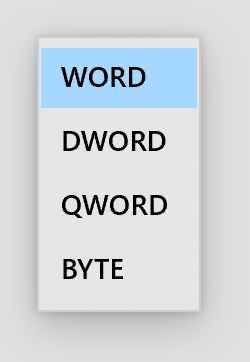
The calculator of win32 version can switch integer bit width freely, while the Windows store (UWP) version could only in fixed order: QWORD, DWORD, WORD, BYTE, not such convenient also.
I agree, we should probably use a styled Combobox instead:
Mockup:

 rudyhuyn
on 9 May 2019
rudyhuyn
on 9 May 2019
This is your friendly Microsoft Issue Bot. I've seen this issue come in and have gone to tell a human about it.
 MicrosoftIssueBot
on 9 May 2019
MicrosoftIssueBot
on 9 May 2019
Thanks for the idea!
The calculator of win32 version can switch integer bit width freely, while the Windows store (UWP) version could only in fixed order: QWORD, DWORD, WORD, BYTE, not such convenient also.
I _think_ this is covered by #116 (see my note in the discussion). If you agree, perhaps we can focus this issue on the other suggestion? Otherwise, we should treat this as two separate suggestions.
 grochocki
on 10 May 2019
grochocki
on 10 May 2019
For the drop-down piece, it probably makes sense to use the Split Button control.
Then the drop-down is available, but you can also click to cycle through them?
 michael-hawker
on 22 May 2019
michael-hawker
on 22 May 2019
Use a SplitButton when you want the user to be able to initiate an immediate action or choose from additional options independently.
We certainly could continue to support cycling through them, but I would argue that even being able to cycle through the options we have today feels like a bit odd of an interaction.
You got me thinking, though, and I don't think ComboBox makes the most sense either. Since the list of options is small, perhaps DropDownButton makes more sense?
grochocki
on 22 May 2019
You could always install the old, superior, one, from winaero.
[link removed]
 gbjbaanb
on 26 May 2019
gbjbaanb
on 26 May 2019
Updating pitch and title to reflect the first piece of feedback. Part of the original pitch is covered in #116.
grochocki
on 12 Jun 2019
@137729898 We reviewed this pitch closer and believe the part that is not already covered by #116 (pitch approved) is covered by #478 (pitch also approved), so going to close this as a duplicate. Lets continue the conversation in those issues. If we missed something, and there is more to your idea than what is in scope for those issues, feel free to call those things out, and we can revisit them here. Thanks again for your contribution!
grochocki
on 13 Aug 2019
Thanks again for submitting your idea! However, after reviewing this pitch more closely, we do not believe it is a great fit for the product at this time. Thank you for your contribution to Calculator!
![msftbot[bot] picture](https://avatars2.githubusercontent.com/in/26612?v=4&s=40) msftbot[bot]
on 13 Aug 2019
msftbot[bot]
on 13 Aug 2019
Related issues
 drizo72
·
28Comments
MicrosoftIssueBot
·
16Comments
drizo72
·
28Comments
MicrosoftIssueBot
·
16Comments
 ivadham
·
18Comments
ivadham
·
18Comments
 ialhashim
·
14Comments
ialhashim
·
14Comments
 ThiefMaster
·
30Comments
ThiefMaster
·
30Comments
Most helpful comment
Hi @137729898!
You should split your diff in two, so we can discuss each problem separately and let Microsoft decide to approve or reject one issue without affecting the other.
I agree, we should probably use a styled Combobox instead:
Mockup:
