Calcite-components: Bug: calcite-input (number) has no locale support
Summary
In French e.g. the decimal separator needs to be a comma and date separator needs to be a dot. I can't find a way to make this happen.


Outside of those input boxes...
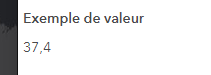
Also, where does that (English) text come from when I hover over the input? I'm not adding a step property and what it says is not true.

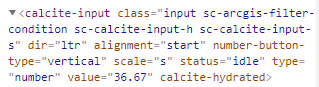
cc @jcfranco @macandcheese
Actual Behavior
Expected Behavior
Reproduction Steps
1.
Relevant Info
 AdelheidF
All 28 comments
You can set step to "any" to get rid of that hover tip @AdelheidF , if it is not set it defaults to 1.
 ethanbdev
on 19 Mar 2021
ethanbdev
on 19 Mar 2021
You can set step to "any"
Thanks, that works.
AdelheidF
on 19 Mar 2021
What is the plan for a French UI that uses calcite-input with step:1 when the user enters a decimal value? I assume the message won't be translated. The browser language might be different than the language we use in the UI.
I think Franco tested and didn't see the text change with another browser language either.
AdelheidF
on 19 Mar 2021
@paulcpederson @macandcheese is this doable for beta.52?
AdelheidF
on 22 Mar 2021
@AdelheidF date picker can already do this. For example, try fr-CH as lang. Not sure why the fr locale doesn't use the dot separator, but would be easy to just remove fr and replace it with fr-CH. Maybe @raje9276 can comment on the distinction between these two regions.
 paulcpederson
on 22 Mar 2021
paulcpederson
on 22 Mar 2021
fr-CH is French spoken in Switzerland.
de ("dd.mm.yyyy") or nl ( "dd-mm-yyyy") are not any better:
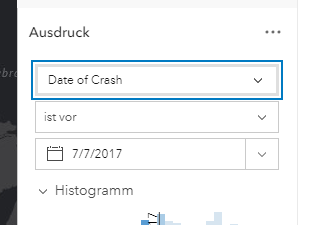
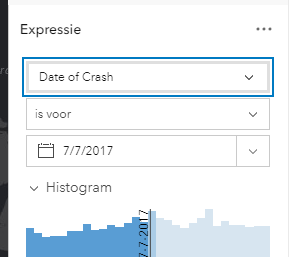
would be easy to just remove fr and replace it with fr-CH
Who would do this?
AdelheidF
on 22 Mar 2021
de seems to render . correctly. Set locale to de on the storybook docs: https://esri.github.io/calcite-components/?path=/story/components-controls-inputdatepicker--simple
paulcpederson
on 22 Mar 2021
Never mind, fixing the date issue on my side. (I removed that part of the issue from the description.)
AdelheidF
on 23 Mar 2021
Playing around with the demo pages, setting lang on the html tag works. Wondering if this is a race condition or something? The lang must be set prior to the component being initialized or rendered in the DOM. This is a one-time lookup at initialization (it's not "live" and won't re-render the component if the lang changes later).
paulcpederson
on 23 Mar 2021
Looks like it should be easy to update the display number in the input with Intl.NumberFormat, but as far as restricting invalid characters based on locale, that would be a bit more involved, and would likely need to be tackled in maybe a second pass. I'll update once I have more information.
 eriklharper
on 24 Mar 2021
eriklharper
on 24 Mar 2021
I'll close it once it's verified. Testing now with next.161
AdelheidF
on 14 Apr 2021
[x] 1. It no longer shows the initial value that I set when creating the component. I can reproduce this with my Stencil and Maquette components. If I then hit up/down the value shows up.
[x] 2. If a value shows up or it's empty and I then change the value through another way, e.g. by picking a unique value or clicking on the histogram, the value that shows or doesn't show in the input doesn't change. This worked before so I'm pretty sure my component sets it correctly. Another proof is that if I click up/down it changes to the correct value just one higher/lower than what was set internally.
AdelheidF
on 14 Apr 2021
- [x] 3. It's kind of nice that if I type 1 and then a bunch of 0s the thousand commas show up automatically. But this feature needs to be optional, because for some numbers a thousander comma doesn't make any sense, e.g. a year value. I don't see a property to hide it in the doc. So it might be better to not do this for now and add it later.
AdelheidF
on 14 Apr 2021
- [x] 2. Also, if a value shows up or it's empty and I then change the value through another way, e.g. by picking a unique value or clicking on the histogram, the value that shows or doesn't show in the input doesn't change. This worked before so I'm pretty sure my component sets it correctly.
Seeing this one too. Have a case where the value of a number input can be "reset". After it is changed with user interaction -> changed programmatically to a different value -> it is not reflected in the input. If the user nudges the number, it uses the set value to base the increase off. It seems to just be visual, maybe the component not re-rendering properly?
- [x] 4. Could be related, but also after the
calciteInputInputevent, the input changes visually butfontSizeInputElement.valuehas the old value. The event detail looks right.
ethanbdev
on 14 Apr 2021
- [x] 3. It's kind of nice that if I type 1 and then a bunch of 0s the thousand commas show up automatically. But this feature needs to be optional, because for some numbers a thousander comma doesn't make any sense, e.g. a year value. I don't see a property to hide it in the doc. So it might be better to not do this for now and add it later.
Should be able to set format-locale="false" in the cases where you need to set something like a year.
eriklharper
on 14 Apr 2021
Can we update that to be opt-in so we don't have a "false" ? Something like enable-locale-formatting ?
 macandcheese
on 14 Apr 2021
macandcheese
on 14 Apr 2021
Quick poll: What do people think of these prop names for opting into locale number formatting? (we're going to make it false by default)
locale-formatformat-localeenable-locale-formattingnumber-localizedlocalizedlocale-awarelocale-in-acapulco🤪
eriklharper
on 14 Apr 2021
What do people think of these prop names for opting into locale number formatting?
Just to clarify. Number formatting should never be optional. With a French UI we always want to see a decimal comma. The part that should be optional is automatically displaying thousandth separators, even if you don't type it in.
AdelheidF
on 15 Apr 2021
Sounds like we should just not automatically format the input as the user types, or are you saying there should be a way to opt-out of thousandth separators entirely while retaining decimal separators, even when the user is not actively typing?
eriklharper
on 15 Apr 2021
I noticed that some locales when using Intl.NumberFormat.prototype.formatToParts will omit the thousandth separator on a 4-digit number, but then include it when the number increases to 5 digits and beyond.
eriklharper
on 15 Apr 2021
Sounds like we should just not automatically format the input as the user types, or are you saying there should be a way to opt-out of thousandth separators entirely while retaining decimal separators, even when the user is not actively typing?
Not automatically add thousandth separators as the user types. The user might still copy/paste a number with a thousandth separator, then just leave it there (or remove it if it's easier).
AdelheidF
on 15 Apr 2021
Created separate issues, as asked for
1 . https://github.com/Esri/calcite-components/issues/1972 (fixed)
2 . https://github.com/Esri/calcite-components/issues/1982 (fixed)
4 . https://github.com/Esri/calcite-components/issues/1983 (fixed)
AdelheidF
on 15 Apr 2021
If I set localFormat to false then I see dot decimals for a French UX, so I can't do that. On a side note: with localeFormat set to false all problems go away but we're back at the very beginning.
AdelheidF
on 15 Apr 2021
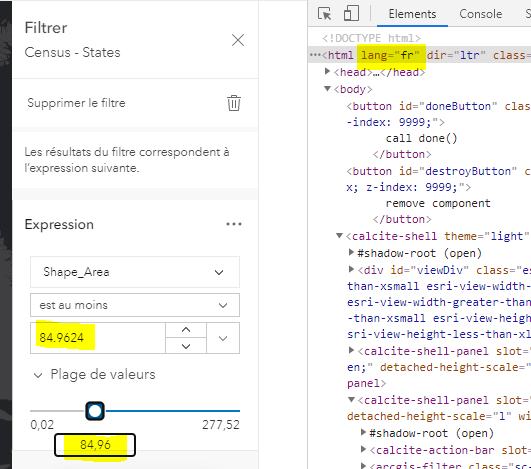
localFormat = false, decimal sign is wrong
localeFormat = true, decimal sign is correct, but value doesn't update
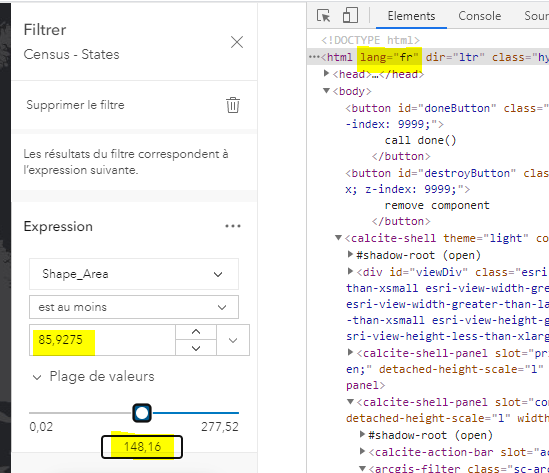
localeFormat should have no effect on the decimal sign of the input value. For French is needs to always be a comma.
AdelheidF
on 15 Apr 2021
Can we update that to be opt-in so we don't have a
"false"? Something likeenable-locale-formatting?
Made this prop opt-in in #1969
eriklharper
on 15 Apr 2021
related issue about decimal and group separators https://github.com/Esri/calcite-components/issues/1988 - installed
AdelheidF
on 15 Apr 2021
This is installed and working. Very nice!
We'll track little issues separately.
AdelheidF
on 21 Apr 2021
🎉 🎉 🎉 🎉 🎉
paulcpederson
on 21 Apr 2021
Related issues
 jcfranco
·
3Comments
jcfranco
·
3Comments
 driskull
·
3Comments
AdelheidF
·
4Comments
driskull
·
3Comments
AdelheidF
·
4Comments
 joeyHarig
·
4Comments
joeyHarig
·
4Comments
 rslibed
·
3Comments
rslibed
·
3Comments
Most helpful comment
This is installed and working. Very nice!
We'll track little issues separately.