Calcite-components: Bug: calcite-radio-button and calcite-radio-group-item issues
Summary
In both cases I have 2 buttons or group-items. I only listen to the change event handler of the first button or group-item and enter different async workflows depending if event.target.checked is true or false.
Note: all these issues go away if I use event.stopPropagation() and listen to the change event for both buttons and group-items and only act if checked is true. Also, I need to add name, scale, span to radio-buttons.
Issues 1. and 2. must have started after beta.37, which is what we use in MVB on production.
I mostly tested with beta.40 and next.9 from today with a test app outside of MVB, but with using Maquette.
[x] 1.
calcite-radio-group-item(moved to https://github.com/Esri/calcite-components/issues/1058)
I seem to have to call event.stopPropagation() in the change event handler, otherwise the change event gets called 3 times in a row with different event.target.checked settings _after_ the component gets recreated in Marquette in the afterCreate property. I verified, via a timestamp, that the event handler that is called 3 times is the one that was created last by afterCreate. No event handler left-overs from the original creation of the component. Maybe this has something to do with the clean-up not working correctly.
True/false is the checked state, the last 3 change event calls come from a single click.


[x] 2.
calcite-radio-button
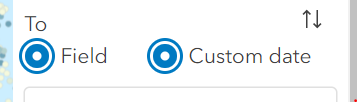
This only happens if I start with the second button checked, the one that doesn't listen to the change event. After the second toggle it gets in the state that both radio buttons are checked. I noticed that in this case it does not call the un-check change event on the first button.
-> this is expected now, no more change event on un-check; double check is fixed
[x] 3.
calcite-radio-button
This is new with next.9, didn't happen with beta.40. It no longer calls the change event for a radio button that gets un-checked.
-> it seems this is purpose now[x] 4.
calcite-radio-button
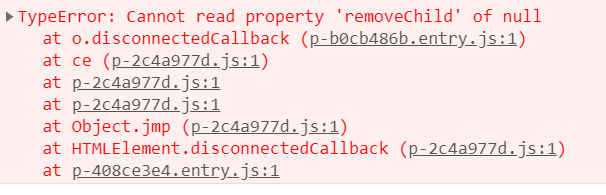
When removing my component I see this.
Might be related to this https://github.com/Esri/calcite-components/issues/977
[x] 5.
calcite-radio-button
Tested with next.9. Kevin mentioned to addnameandscaleto calcite-radio-button and add the label inside aspanelement.
Without it this is what I see: Size/font is messed up the second time the radio buttons load because the text is not wrapped in calcite-label.
first time
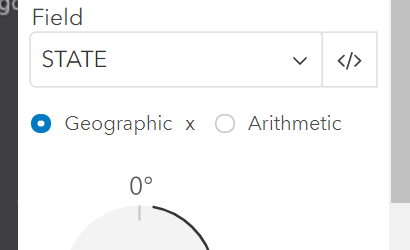
second time

Do we need to update the doc and mention the span?


- [x] 6.
calcite-radio-button
When I add text for a radio-button like<calcite-radio-button>{text}</calcite-radio-button>the text is wrapped inside a calcite-label component. This is fine. When I use it this way in my code<calcite-radio-button>{text1}{text2}</calcite-radio-button>then text1 and text2 are each wrapped in a calcite-label, not together in a single calcite-label. Is this ok? When I do this<calcite-radio-button>{`${text1}${text2}`}</calcite-radio-button>it's just one calcite-label. Resolved by #1195
Not sure if any of this makes sense, but I don't quite understand what's going on exactly behind the scene.
Also, it might be related to it being used with Maquette. Timing seems to be a bit different there.
Actual Behavior
Expected Behavior
Reproduction Steps
1.
Relevant Info
 AdelheidF
All 14 comments
cc: @eriklharper - I think this is the same one we were trying to figure out last week
 kevindoshier
on 24 Sep 2020
kevindoshier
on 24 Sep 2020
This might fix this issue, not completely sure yet
kevindoshier
on 24 Sep 2020
added 5.
AdelheidF
on 24 Sep 2020
added 6.
AdelheidF
on 24 Sep 2020
Issues 2, 4 and 5 seem to be addressed on next.10 with the fixes I applied on #1011. I verified this locally and could not reproduce those issues with that next.10 version.
 eriklharper
on 25 Sep 2020
eriklharper
on 25 Sep 2020
Tested with next.10 locally. MVB on devext has a workaround, you can't reproduce the issue there.
Test case for #3 and #4, because of this issue I can't get to test #2 anymore.
code change (removed workaround)
/src/smartMapping/support/Age/index.tsx
  private _rendererAgeField(tsx: H) {
    const { restDateFields } = this.props;
    const authVisVar = this._getAuthVisVar();
    const { field, startTime, endTime } = authVisVar;
    const value = startTime === field ? endTime : startTime;
    const isField = typeof value === "string";
    const fieldInfo = isField ? getField(value, this.props) : undefined;
    return (
      <div key={`age-variable-${authVisVar}`}>
        {restDateFields.length > 0 ? (
          <calcite-radio-button-group class={CSS.variableFieldRadio} name="variableType" scale="s">
            <calcite-radio-button
              checked={isField}
              value="field"
              afterCreate={(node: HTMLElement) => {
                node.addEventListener("calciteRadioButtonChange", (event: CustomEvent) => {
                  event.stopPropagation();
                  console.log("calciteRadioButtonChange (for Field radio) checked:", (event.target as any).checked);
                  if ((event.target as any).checked) {
                    this.handleTypeChange("field");
                  } else {
                    this.handleTypeChange("date");
                  }
                });
              }}
            >
              {i18n.ui.field}
            </calcite-radio-button>
            <calcite-radio-button checked={!isField} value="date">{i18n.ui.customDate}</calcite-radio-button>
          </calcite-radio-button-group>
        ) : null}
        {typeof value === "string" ? (
          restDateFields.length > 1 ? (
            <div
              class={`${CSS.fieldSelect} ${CSS.fieldSelectEdit}`}
              onclick={this.handleFieldEditClick.bind(this)}
              role="button"
              tabIndex="0"
              aria-labelledby="color-symbol-title"
              aria-haspopup="true"
              //aria-expanded={!!symbolSelected}
              afterCreate={(element: HTMLElement) => {
                element.addEventListener("keyup", (event: KeyboardEvent) => {
                  if (event.keyCode === 13 || event.keyCode === 32) {
                    this.handleFieldEditClick(event);
                  }
                });
              }}
            >
              <div key="age-variable-field-label" class={CSS.fieldSelectLabel} aria-hidden="true">
                {fieldInfo?.label}
              </div>
              <div key="age-variable-field-button" aria-hidden="true">
                <div
                  key="age-variable-field-button-edit"
                  class={CSS.symbolButton}
                  onClick={this.handleFieldEditClick.bind(this)}
                >
                  <calcite-icon scale="s" icon="chevron-down"></calcite-icon>
                </div>
              </div>
            </div>
          ) : (
            <div key={`age-variable-field-${authVisVar}`} class={CSS.fieldSelect}>
              {fieldInfo?.label}
            </div>
          )
        ) : (
          this._rendererAgeFieldDate(tsx)
        )}
      </div>
    );
  }
http://devext.arcgis.com/apps/mapviewer/index.html?url=https://servicesdev.arcgis.com/f126c8da131543019b05e4bfab6fc6ac/ArcGIS/rest/services/USA%20Drilling%20Platforms/FeatureServer/0
Click Styles
Click x after 'Water Depth` to remove it
Wait, scroll down to Age (color) and click on tile to select it
Click again on tile to open advance options
Notice the date display
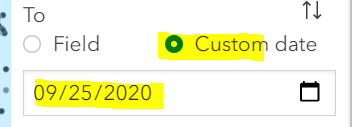
Click on Field, notice the field display
Also look at console, it correctly calls the change event

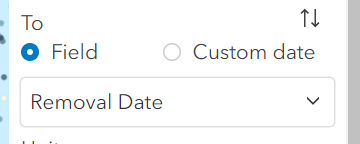
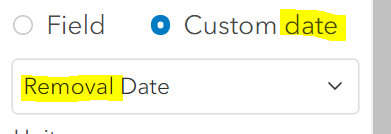
Click on Custom Date, Now field display doesn't become date display because the change event does not get called. Console message for change event does not appear.
AdelheidF
on 25 Sep 2020
Tested with next.10 locally. MVB on devext has a workaround, you can't reproduce the issue there.
Test case for #5 and #4.
code change (removed workaround)
/src/smartMapping/support/Rotation/index.tsx
  private _renderRotationType(tsx: H) {
    const { layer } = this.props;
    const renderer = layer.renderer as any;
    const rotationVisVar: RotationVariable = getVisVar(renderer, "rotation") as RotationVariable;

    let leadingDegree = false;
    if (i18n.ui.rotateZeroDegrees.indexOf("°") === 0) {
      leadingDegree = true;
    }

    return (
      <div class={`${CSS.rotationType} ${CSS.blockContentPadding}`}>
        <calcite-radio-button-group class={CSS.rotationTypeSelection} name="rotationType" scale="s">
          <calcite-radio-button
            checked={rotationVisVar.rotationType === "geographic"}
            value="geographic"
            afterCreate={(node: HTMLElement) => {
              node.addEventListener("calciteRadioButtonChange", (event: CustomEvent) => {
                  this.handleTypeChange("geographic");
              });
            }}
          >
            {i18n.ui.geographic}
          </calcite-radio-button>
          <calcite-radio-button
            checked={rotationVisVar.rotationType === "arithmetic"}
            value="arithmetic"
            afterCreate={(node: HTMLElement) => {
              node.addEventListener("calciteRadioButtonChange", (event: CustomEvent) => {
                  this.handleTypeChange("arithmetic");
              });
            }}
          >
            {i18n.ui.arithmetic}
          </calcite-radio-button>
        </calcite-radio-button-group>

        <div class={CSS.rotationTypeDisplay} aria-hidden="true">
          {rotationVisVar.rotationType === "arithmetic"
            ? leadingDegree
              ? this._renderRotationSVG_Ari_leading(tsx)
              : this._renderRotationSVG_Ari(tsx)
            : leadingDegree
            ? this._renderRotationSVG_Geo_leading(tsx)
            : this._renderRotationSVG_Geo(tsx)}
          <div
            key={renderer}
            class={CSS.rotationTypeSymbol}
            afterCreate={this._afterCreateSymbol.bind(this)}
          />
        </div>
      </div>
    );
  }
http://devext.arcgis.com/apps/mapviewer/index.html?url=https://services1.arcgis.com/4yjifSiIG17X0gW4/arcgis/rest/services/FatalAccidents2017/FeatureServer/0
Click Styles
Click on Location tile to get to advanced option
Click on Rotation section, look at font of radio buttons
Click Cancel at bottom of the panel
Click on Location tile to get to advanced option
Click on Rotation section, look at font of radio buttons
Sometimes you get the wrong font the first time and sometimes the second time.
It seems sometimes it uses calcite-label and sometimes it doesn't. Also, if there is a calcite-label, sometimes the scale of it matches the scale of the radio-button and sometimes it's different ('m').
AdelheidF
on 25 Sep 2020
Tested with next.10 locally. MVB on devext has a workaround, you can't reproduce the issue there.
Test case for #1 .
code change (removed workaround of event.stopPropagation())
/src/smartMapping/Size/index.tsx
  private _renderSizeRange(tsx: H) {
    const { layer, mapImageSublayer } = this.props;
    const renderer = layer.renderer as ClassBreaksRenderer;
    const sizeVisVar = getVisVar(renderer, "size") as SizeVariable;
    const isNull = sizeVisVar ? !isDefined(sizeVisVar.minSize) : false; // then we have stops (= fixed)
    const isNumber = sizeVisVar ? typeof sizeVisVar.minSize === "number" : false;
    const isAutomatic = !isNull && !isNumber;

    if (sizeVisVar && !mapImageSublayer) {
      return (
        <div key="size-range" class={`${CSS.sizeRange} ${CSS.blockContentPadding}`}>
          <div key="size-range-label" class={CSS.sizeRangeLabel}>
            {i18n.ui.sizeRange}
          </div>
          <calcite-radio-group class={CSS.sizeRangeButtons} name="sizeRange" scale="s">
            <calcite-radio-group-item
              checked={isAutomatic}
              value="automatic"
              class={CSS.sizeRangeButton}
              afterCreate={(node: HTMLElement) => {
                node.addEventListener("calciteRadioGroupItemChange", (event: CustomEvent) => {
                  console.log("calciteRadioGroupItemChange (for Automatic item) checked:", (event.target as any).checked);
                  if ((event.target as any).checked) {
                    this.handleSizeRangeChange("automatic");
                  } else {
                    this.handleSizeRangeChange("fixed");
                  }
                });
              }}
            >
              {i18n.ui.automatic}
            </calcite-radio-group-item>
            <calcite-radio-group-item
              checked={!isAutomatic}
              value="fixed"
              class={CSS.sizeRangeButton}
            >
              {i18n.ui.custom}
            </calcite-radio-group-item>
          </calcite-radio-group>
          {isNull || isNumber ? this._renderSizeRangeFixed(tsx) : null}
        </div>
      );
    } else {
      return (
        <div key="size-range" class={`${CSS.sizeRange} ${CSS.blockContentPadding}`}>
          <div key="size-range-label" class={CSS.sizeRangeLabel}>
            {i18n.ui.sizeRange}
          </div>
          {this._renderSizeRangeFixed(tsx)}
        </div>
      );
    }
  }
http://devext.arcgis.com/apps/mapviewer/index.html?url=https://services1.arcgis.com/4yjifSiIG17X0gW4/arcgis/rest/services/FatalAccidents2017/FeatureServer/0
Click Styles
Click +Field, select Fatalities and click Add
Wait, then click first orange dotted tile.
Look below the slider at the 2 buttons, click Custom and watch the console messages. You'll see one change handler message. Good.
Click Done at the bottom of the panel.
Click first orange dotted tile again.
Now the Custom button is selected, this is the one without the change handler.
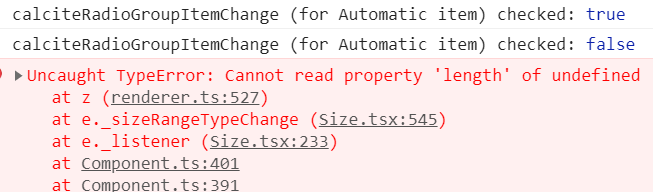
Clear your console then click the Automatic button and watch the console, especially the messages for the change handler. You should see only one, but you'll see many. The error you get in the console is a result of this issue because the renderer has not changed between those change calls.
AdelheidF
on 26 Sep 2020
Issue https://github.com/Esri/calcite-components/issues/1027#issuecomment-699121744 fixed by #1056 and requires code modification outlined in issue #1041
eriklharper
on 2 Oct 2020
2,3,5 verified with 1.0.0-beta.41.
AdelheidF
on 8 Oct 2020
2,3,5 verified with
1.0.0-beta.41.
Does verified mean resolved?
eriklharper
on 8 Oct 2020
Does verified mean resolved?
yes, all good now with the new calciteRadioButtonGroupChange event too. Also, single radio buttons no longer get the change event on un-check.
4 is still reproducible for me.
AdelheidF
on 8 Oct 2020
This issue has been automatically marked as stale because it has not had recent activity. It will be closed if no further activity occurs. Thank you for your contributions.
![github-actions[bot] picture](https://avatars.githubusercontent.com/in/15368?v=4&s=40) github-actions[bot]
on 28 Nov 2020
github-actions[bot]
on 28 Nov 2020
This can be closed as the items have all been addressed in separate issues.
eriklharper
on 30 Nov 2020
Related issues
 driskull
·
3Comments
driskull
·
3Comments
 joeyHarig
·
4Comments
joeyHarig
·
4Comments
 nwhittaker
·
5Comments
AdelheidF
·
4Comments
nwhittaker
·
5Comments
AdelheidF
·
4Comments
 jcfranco
·
4Comments
jcfranco
·
4Comments