Calcite-components: Lower opacity on Disabled Slider
It is difficult to tell visually that the slider component is disabled.
https://github.com/Esri/calcite-components/tree/master/src/components/calcite-slider
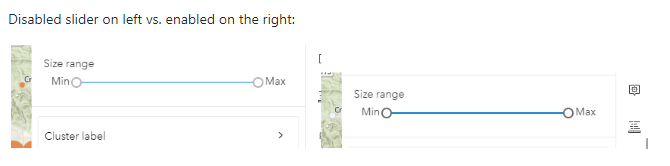
@asangma suggested considering dropping the opacity from 50% to 33%
 zaramatheson
All 13 comments
@macandcheese @bstifle @paulcpederson Any issues with this?
 asangma
on 20 Jun 2020
asangma
on 20 Jun 2020
Fine by me, I think we can get away with this because of Section 1.4.3's "Incidental" explanation (emphasis mine):
Text or images of text that are part of an inactive user interface component, that are pure decoration, that are not visible to anyone, or that are part of a picture that contains significant other visual content, have no contrast requirement.
However, I would go a step further, and say that disabled sliders should also be gray, not blue for the active parts. We should also ensure we're setting the disabled prop and cursor: not-allowed in this state.
 paulcpederson
on 20 Jun 2020
paulcpederson
on 20 Jun 2020
Agree we can make it grey as well as lower the opacity and change cursor.
Currently every other disabled component gets a 0.4 opacity value. Would that work in conjunction with changing from blue to grey?
 macandcheese
on 22 Jun 2020
macandcheese
on 22 Jun 2020
I'll make a draft PR, cool?
asangma
on 22 Jun 2020
Recommend making anything that is ui-blue to use blk-140 #6A6A6A for disabled.
 bstifle
on 22 Jun 2020
bstifle
on 22 Jun 2020
@bstifle copy that.
asangma
on 22 Jun 2020
plus the 0.4 opacity like adam said!
bstifle
on 22 Jun 2020
~--calcite-ui-text-3 yeah?~
asangma
on 22 Jun 2020
@paulcpederson re: cursor: not-allowed
This cursor change will only show if I remove pointer-events: none from :host([disabled]).
I can do that, but setting pointer-events: none on children, e.g. * seems ineffective.
asangma
on 22 Jun 2020
@zaramatheson Lemme know if you need anything re: verifying.
asangma
on 24 Jun 2020
@asangma Looks good to me! Much clearer that it's disabled now.
zaramatheson
on 24 Jun 2020
@macandcheese Zara and Russ are cool with visual updates. Would you mind verfeeing?
asangma
on 24 Jun 2020
LGTM ✅
macandcheese
on 24 Jun 2020
Related issues
bstifle
·
3Comments
 nwhittaker
·
5Comments
nwhittaker
·
5Comments
 joeyHarig
·
4Comments
joeyHarig
·
4Comments
 kevindoshier
·
4Comments
kevindoshier
·
4Comments
 rslibed
·
3Comments
rslibed
·
3Comments