Calcite-components: Accessibility: calcite-dropdown-item uses unsupported ARIA attribute
The Accessibility Insights for Web tool reports that the aria-selected attribute is not allowed for calcite-dropdown-items: Elements must only use allowed ARIA attributes. Maybe this is why NVDA does not report which item is selected?
E.g., using page https://esri.github.io/calcite-components/?path=/story/components-dropdown--groups-and-selection-modes:
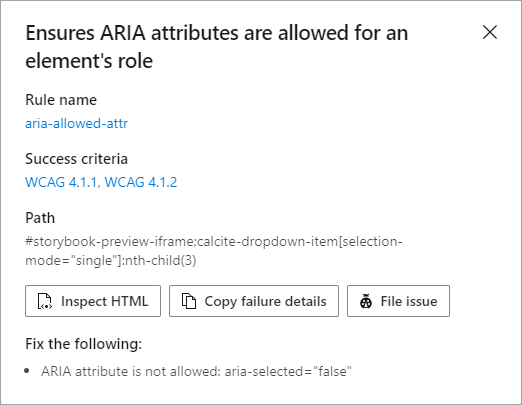
If we change the calcite-dropdown-items' role from "menuitem" to "menuitemradio" (for selection-mode="single"; for "multi", "menuitemcheckbox") and aria-selected to aria-checked, we pass the accessibility test and get information about which item is selected.
 MikeTschudi
All 9 comments
That article is a little confusing in that is lists menuitemradio in the applicable uses for both aria-checked and aria-selected - but it seems like it also suggests to use aria-checked for both?
Can you confirm the following @MikeTschudi :
selection-mode:singleshould haverole="menuitemradio"and usearia-checked, andselection-mode:multishould haverole="menuitemcheckbox"and usearia-checkedselection-mode:noneshouldn't have a role or any aria-select/checked status.
 macandcheese
on 7 Jul 2020
macandcheese
on 7 Jul 2020
@macandcheese, I agree that it was confusing to list menuitemradio in both places, but decided that the "but this is not a correct use of the property" was telling me to use aria-checked instead for the radio buttons.
In the W3C Recommendation Accessible Rich Internet Applications (WAI-ARIA) 1.1 section 5.4 Definition of Roles, it lists
An option in a set of choices contained by a menu or menubar.
menuitemcheckbox
A menuitem with a checkable state whose possible values are true, false, or mixed.
menuitemradio
A checkable menuitem in a set of elements with the same role, only one of which can be checked at a time.
Under the inherited sttes and properties for each, aria-selected does not appear for any of them, and aria-checked is listed as a required property for menuitemcheckbox and menuitemradio.
I think that you summed up the situation perfectly.
MikeTschudi
on 7 Jul 2020
Thanks for clarifying! It seems like perhaps:
selection-mode:noneshould actuallyrole=menuitembut without checked / select?
I'm also moving the "menu" role to the group-level from the containing dropdown (which I think was causing the issue here #674)
macandcheese
on 7 Jul 2020
This issue has been automatically marked as stale because it has not had recent activity. It will be closed if no further activity occurs. Thank you for your contributions.
![github-actions[bot] picture](https://avatars.githubusercontent.com/in/15368?v=4&s=40) github-actions[bot]
on 26 Nov 2020
github-actions[bot]
on 26 Nov 2020
This issue has been automatically closed due to inactivity.
github-actions[bot]
on 3 Dec 2020
At calcite-components version 1.0.0-beta.46, the latest on unpkg.com,
- The change from
aria-selectedtoaria-checkedsuccessfully solved the attribute flag - Still need to change role from "menuitem" to "menuitemradio" (for selection-mode="single"; for "multi", "menuitemcheckbox"; for "none", no role) to complete the connection
<!doctype html>
<html lang="en" dir="ltr">
<head>
  <link rel="stylesheet" type="text/css" href="https://unpkg.com/@esri/calcite-components/dist/calcite/calcite.css" />
  <script type="module" src="https://unpkg.com/@esri/calcite-components/dist/calcite/calcite.esm.js"></script>
  <script nomodule="" src="https://unpkg.com/@esri/calcite-components/dist/calcite/calcite.js"></script>
</head>
<body>
  <!-- https://esri.github.io/calcite-components/?path=/story/components-dropdown--groups-and-selection-modes -->
  <calcite-dropdown>
    <calcite-button slot="dropdown-trigger">Open Dropdown</calcite-button>
    <calcite-dropdown-group>
      <calcite-dropdown-item>Relevance</calcite-dropdown-item>
      <calcite-dropdown-item active>Date modified</calcite-dropdown-item>
      <calcite-dropdown-item>Title</calcite-dropdown-item>
    </calcite-dropdown-group>
  </calcite-dropdown>
</body>
</html>
Using the test code in 77ae6f2ab1d56c95c8393125db966ce0f4bc7e6d,
<!doctype html>
<html lang="en" dir="ltr">
<head>
  <link rel="stylesheet" type="text/css" href="https://unpkg.com/@esri/calcite-components/dist/calcite/calcite.css" />
  <script type="module" src="https://unpkg.com/@esri/calcite-components/dist/calcite/calcite.esm.js"></script>
  <script nomodule="" src="https://unpkg.com/@esri/calcite-components/dist/calcite/calcite.js"></script>
</head>
<body>
  <calcite-dropdown>
    <calcite-button slot="dropdown-trigger" id="trigger">Open dropdown</calcite-button>
    <calcite-dropdown-group id="group-1" selection-mode="multi">
      <calcite-dropdown-item id="item-1">Dropdown Item Content</calcite-dropdown-item>
      <calcite-dropdown-item id="item-2" active>Dropdown Item Content</calcite-dropdown-item>
      <calcite-dropdown-item id="item-3" active>Dropdown Item Content</calcite-dropdown-item>
    </calcite-dropdown-group>
    <calcite-dropdown-group id="group-2" selection-mode="single">
      <calcite-dropdown-item id="item-4">Dropdown Item Content</calcite-dropdown-item>
      <calcite-dropdown-item id="item-5" active>Dropdown Item Content</calcite-dropdown-item>
    </calcite-dropdown-group>
    <calcite-dropdown-group id="group-3" selection-mode="none">
      <calcite-dropdown-item id="item-6">Dropdown Item Content</calcite-dropdown-item>
      <calcite-dropdown-item id="item-7" href="google.com">Dropdown Item Content</calcite-dropdown-item>
    </calcite-dropdown-group>
  </calcite-dropdown>
</body>
</html>
shows the following in the Chrome debugger:
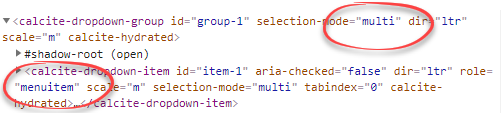
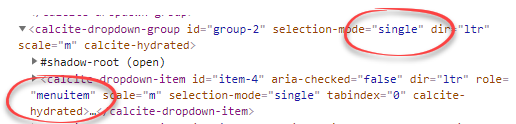
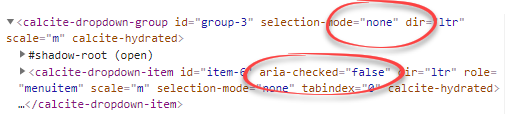
If I manually change these in the debugger and re-run the a11y checker, the warnings go away.
MikeTschudi
on 8 Dec 2020
Ok - is role of menu still applicable for each containing group? Or the whole drop down? I know even between safari and chrome in voiceover those are interpreted differently, to say nothing of windows
macandcheese
on 8 Dec 2020
It percolates the role of the menu into the menu items, and works in Chrome, Firefox, Edge, Safari
MikeTschudi
on 9 Dec 2020
Related issues
 driskull
·
4Comments
driskull
·
4Comments
 jcfranco
·
3Comments
jcfranco
·
3Comments
driskull
·
3Comments
jcfranco
·
4Comments
jcfranco
·
3Comments
jcfranco
·
3Comments
driskull
·
3Comments
jcfranco
·
4Comments