Cake: StartProcess cannot find specified file using native StartProcess or using Powershell version.
What You Are Seeing?
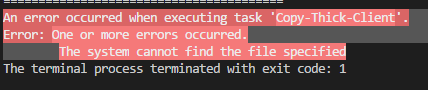
Using StartProcess returns "An error occurred when executing task 'taskName'.
Error: One or more errors occurred.
The system cannot find the file specified"
StartProcess("//ComputerName/SomeFolder/Some.exe")
This same error appears when using the Powershell addin that uses a script file that invokes Start-Process.
What is Expected?
The process should be started. As it works outside of cake just using straight powershell.
What version of Cake are you using?
26.1.0
Are you running on a 32 or 64 bit system?
64
What environment are you running on? Windows? Linux? Mac?
Windows
Are you running on a CI Server? If so, which one?
Not yet, just local testing
How Did You Get This To Happen? (Steps to Reproduce)
Task("taskName")
    .Description("start exe")
    .Does(() =>
    {
        StartProcess(@"\\PCName\SomeFolder\Some.exe");
    });
Output Log
GIST LINK - Please create a gist and link to that gist here
OR
~sh
PLACE LOG CONTENT HERE
~
 jenaewhitmore
All 3 comments
@jenaewhitmore Cake currently doesn't support UNC paths. Possible workarounds for this at this moment are i.e.
- Mount network share to drive letter
- Utilize cmd to start, something like
StartProcess("cmd", @"/c \\PCName\SomeFolder\Some.exe"); - Use .NET Build in process start
 devlead
on 4 Apr 2018
devlead
on 4 Apr 2018
I have a similar issue except I'm not using UNC paths.
The parameter I pass to StartProcess is like so:
var code = StartProcess("npm",
new ProcessSettings
{
Arguments = new ProcessArgumentBuilder()
.Append("run")
.Append("build-all-prod"),
});
Even though I'm able to get the process to work in powershell or in any other command line I'm unable to call it in the cake build.
When I use "git" as a parameter it works as a normal shell command would.
 pdubb29
on 27 Jun 2018
pdubb29
on 27 Jun 2018
I was able to get this figured out - I just pushed the npm into the arguments appended. It was able to trigger off the step I was requesting.
Now the code looks like this for those interested:
var code = StartProcess("powershell",
        new ProcessSettings
        {
            Arguments = new ProcessArgumentBuilder()
                .Append("npm")
                .Append("run")
                .Append("build-all-prod"),
         });
Related issues
 tompazourek
·
3Comments
tompazourek
·
3Comments
 RichardJFoster
·
4Comments
RichardJFoster
·
4Comments
 johncrim
·
4Comments
johncrim
·
4Comments
 georgehemmings
·
4Comments
georgehemmings
·
4Comments
 Gargony
·
3Comments
Gargony
·
3Comments
Most helpful comment
I was able to get this figured out - I just pushed the npm into the arguments appended. It was able to trigger off the step I was requesting.
Now the code looks like this for those interested: