Caffe: Cmake could not find url for MSVC version
Hello,
I am a new user of Caffe and I got this error when I wanted to build Caffe on windows:
```
INFO: Summary:
INFO: ============================================================
INFO: MSVC_VERSION = 12
INFO: WITH_NINJA = 0
INFO: CMAKE_GENERATOR = "Visual Studio 12 2013 Win64"
INFO: CPU_ONLY = 0
INFO: CUDA_ARCH_NAME = Auto
INFO: CMAKE_CONFIG = Release
INFO: USE_NCCL = 0
INFO: CMAKE_BUILD_SHARED_LIBS = 0
INFO: PYTHON_VERSION = 2
INFO: BUILD_PYTHON = 1
INFO: BUILD_PYTHON_LAYER = 1
INFO: BUILD_MATLAB = 1
INFO: PYTHON_EXE = "python"
INFO: RUN_TESTS = 0
INFO: RUN_LINT = 0
INFO: RUN_INSTALL = 0
INFO: ============================================================
-- The C compiler identification is MSVC 18.0.40629.0
-- The CXX compiler identification is MSVC 18.0.40629.0
-- Check for working C compiler: C:/Program Files (x86)/Microsoft Visual Studio 12.0/VC/bin/x86_amd64/cl.exe
-- Check for working C compiler: C:/Program Files (x86)/Microsoft Visual Studio 12.0/VC/bin/x86_amd64/cl.exe -- works
-- Detecting C compiler ABI info
-- Detecting C compiler ABI info - done
-- Check for working CXX compiler: C:/Program Files (x86)/Microsoft Visual Studio 12.0/VC/bin/x86_amd64/cl.exe
-- Check for working CXX compiler: C:/Program Files (x86)/Microsoft Visual Studio 12.0/VC/bin/x86_amd64/cl.exe -- works
-- Detecting CXX compiler ABI info
-- Detecting CXX compiler ABI info - done
-- Detecting CXX compile features
-- Detecting CXX compile features - done
-- Found PythonInterp: C:/Users/Reza Alikhani/AppData/Local/Programs/Python/Python35/python.exe (found suitable version "3.5.2", minimum required is "2.7")
CMake Error at cmake/WindowsDownloadPrebuiltDependencies.cmake:40 (message):
Could not find url for MSVC version = 1800 and Python version = 3.5.
Call Stack (most recent call first):
CMakeLists.txt:77 (include)
```
Is there anybody here who can help me?
 mohamadalian
All 23 comments
There are no precompiled dependencies for VS 2013 and Python 3.5. You can:
- Build the dependencies yourself with caffe-builder
- Use Visual Studio 2015
- Use python 2.7
_Please do not post usage, installation, or modeling questions, or other requests for help to Issues._
Use the caffe-users list instead. This helps developers maintain a clear, uncluttered, and efficient view of the state of Caffe.
 willyd
on 8 Jun 2017
willyd
on 8 Jun 2017
Cant understand how to : Build the dependencies yourself with caffe-builder
And what is this dependencies , why do I need them . . . why they are not in the git repository why I should care about compiling or building anything I just want to use caffe with python .
I just want to be able to : import caffe !!!!
 stavBodik
on 14 Dec 2017
stavBodik
on 14 Dec 2017
Have you solved your problem?
 Hirosora
on 15 Jan 2018
Hirosora
on 15 Jan 2018
@Haotian9508 Yes I did by using Visual Studio 2015 , the cl.exe which comes with vs 2015 works with python 3.5 in the build step using cmake for windows.
Thanks to @willyd
But this still frustrating because for me all this build things (like in unix based operation systems) was very new...I was sure that I can download project from git with .sln files and just run it...without carrying to compile and build ...
stavBodik
on 15 Jan 2018
@stavBodik Could you tell me how did you solve the error?
I have visual studio 2015
python 3+
but its giving me the same error
 kathanvyas
on 8 Feb 2018
kathanvyas
on 8 Feb 2018
@kathanvyas I found this prebuilt binaries, if you just want to use caffe in your project, this may help you.
Visual Studio 2015, CPU only, Python 3.5: Caffe Release
Visual Studio 2015, CUDA 8.0, Python 3.5
Hirosora
on 8 Feb 2018
@Haotian9508 Thank you so much. But I am fairly new with all this. I downloaded the Visual Studio 2015, CUDA 8.0, Python 3.5 version of caffe. Could you help me out with what steps to follow after this
kathanvyas
on 8 Feb 2018
Just copy ~/caffe/python/caffe to ~/python35/Lib/site-packages/caffe and import caffe in your python file.
As for CUDA, I never used it so I don't know how to configure it, maybe you can google for an answer.
Hirosora
on 9 Feb 2018
@Haotian9508
Thank you so much for helping. I did what you said. I use Anaconda, so pasted caffe in my lib in anaconda. when i try importing caffe, it gives me following error:
" Module use of python35.dll conflicts with this version of Python."
I have python 2.7 as well as python 3.4 working
kathanvyas
on 9 Feb 2018
This version of caffe support only python 3.5, you can use anaconda to create a virtual python 3.5 environment. Remember to paste caffe in the venv's lib.
Hirosora
on 9 Feb 2018
@Haotian9508 Thank you for your help. It now works.
kathanvyas
on 9 Feb 2018
add the following line to the cmake section in the build_win.cmd
-DPYTHON_EXECUTABLE:FILEPATH=C:\Users\xyz\Anaconda3\envs\py35\python.exe ^
eg.
:: Configure using cmake and using the caffe-builder dependencies
:: Add -DCUDNN_ROOT=C:/Projects/caffe/cudnn-8.0-windows10-x64-v5.1/cuda ^
:: below to use cuDNN
cmake -G"!CMAKE_GENERATOR!" ^
-DBLAS=Open ^
-DCMAKE_BUILD_TYPE:STRING=%CMAKE_CONFIG% ^
-DBUILD_SHARED_LIBS:BOOL=%CMAKE_BUILD_SHARED_LIBS% ^
-DBUILD_python:BOOL=%BUILD_PYTHON% ^
-DBUILD_python_layer:BOOL=%BUILD_PYTHON_LAYER% ^
-DBUILD_matlab:BOOL=%BUILD_MATLAB% ^
-DCUDNN_ROOT=C:Program Files\NVIDIA GPU Computing Toolkit\CUDA\v9.1 ^
-DCPU_ONLY:BOOL=%CPU_ONLY% ^
-DCOPY_PREREQUISITES:BOOL=1 ^
-DINSTALL_PREREQUISITES:BOOL=1 ^
-DUSE_NCCL:BOOL=!USE_NCCL! ^
-DCUDA_ARCH_NAME:STRING=%CUDA_ARCH_NAME% ^
-DPYTHON_EXECUTABLE:FILEPATH=C:\Users\xyz\Anaconda3\envs\py35\python.exe ^
"%~dp0.."
 brokeback
on 23 Apr 2018
brokeback
on 23 Apr 2018
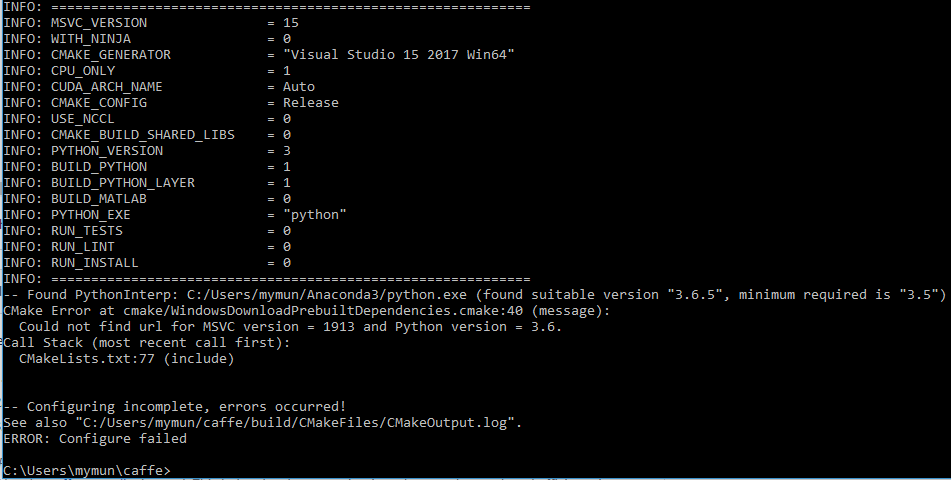
I am getting the same error:
CMake Error at cmake/WindowsDownloadPrebuiltDependencies.cmake:40 (message):
Could not find url for MSVC version = 1913 and Python version = 3.6.
Call Stack (most recent call first):
CMakeLists.txt:77 (include)
I am completely new in Caffe. I need to use caffe for my masters thesis. It seems very diificult for me to install caffe in windows .So I would really appreciate.Trying for two days to install the caffe........
I am using:
Visual Studio 2017,
Python 3.6.5
Cmake 3.11.1
NO CUDA
 EhtashamBillah
on 30 Apr 2018
EhtashamBillah
on 30 Apr 2018
@EhtashamBillah I have the same setup and the same error. Did you solve it?
 ilyamochalov
on 11 Jun 2018
ilyamochalov
on 11 Jun 2018
@rezaalikhani - if there are no precompiled dependencies, you can try to use CK framework to build Caffe with all sub-dependencies. It was designed to detect your environment and automatically build missing dependencies for your specific compiler and libraries. See related discussion #5631 (https://github.com/BVLC/caffe/issues/5631#issuecomment-351760909) . You can try it as follows:
$ pip install ck
$ ck pull repo --url=https://github.com/dividiti/ck-caffe
$ ck install package:lib-caffe-bvlc-master-cuda-universal --env.CAFFE_BUILD_PYTHON=ON
$ ck run program:caffe
Hope it's of any help ...
 gfursin
on 11 Jun 2018
gfursin
on 11 Jun 2018
prebuilt binaries is good!
 lvZic
on 11 Jul 2018
lvZic
on 11 Jul 2018
@gfursin Hello, can I import caffe in my python scripts if I install it using ck?
 suleymanov
on 26 Jul 2018
suleymanov
on 26 Jul 2018
Hi @suleymanov. Yes, you can import caffe in your python scripts after installing it via CK. CK just automates detection of already installed software on different platforms, installation of missing dependencies, and then feeding environment variables to caffe cmake. After that you can use caffe as usual.
After building Caffe via CK, you can test it as follows (if you installed Caffe with python3):
$ ck virtual env --tags=lib,caffe
> python3
import caffe
CK also creates env.sh with all PATHs, LD_LIBRARY_PATH, PYTHONPATH, etc for any installation via CK. You can see it for caffe as follows:
$ ck cat env --tags=lib,caffe
You can read a bit more about all that here:
gfursin
on 27 Jul 2018
@EhtashamBillah @ilyamochalov The problem is solved. You should open cmake\WindowsDownloadPrebuiltDependencies.cmake
and add
set(DEPENDENCIES_URL_1913_27 "${DEPENDENCIES_URL_BASE}/v${DEPENDENCIES_VERSION}/${DEPENDENCIES_NAME_1900_27}${DEPENDENCIES_FILE_EXT}")
set(DEPENDENCIES_SHA_1913_27 "17eecb095bd3b0774a87a38624a77ce35e497cd2")
 dumyCq
on 12 Nov 2018
dumyCq
on 12 Nov 2018
@EhtashamBillah @ilyamochalov Since we have the VS2017 version 1913. You should change the number in C:/Users/
add
elseif(MSVC_VERSION EQUAL 1913)
set(OpenCV_RUNTIME vc14)
dumyCq
on 12 Nov 2018
add the following line to the cmake section in the build_win.cmd
-DPYTHON_EXECUTABLE:FILEPATH=C:\Users\xyz\Anaconda3\envs\py35\python.exe ^eg.
:: Configure using cmake and using the caffe-builder dependencies
:: Add -DCUDNN_ROOT=C:/Projects/caffe/cudnn-8.0-windows10-x64-v5.1/cuda ^
:: below to use cuDNN
cmake -G"!CMAKE_GENERATOR!" ^
-DBLAS=Open ^
-DCMAKE_BUILD_TYPE:STRING=%CMAKE_CONFIG% ^
-DBUILD_SHARED_LIBS:BOOL=%CMAKE_BUILD_SHARED_LIBS% ^
-DBUILD_python:BOOL=%BUILD_PYTHON% ^
-DBUILD_python_layer:BOOL=%BUILD_PYTHON_LAYER% ^
-DBUILD_matlab:BOOL=%BUILD_MATLAB% ^
-DCUDNN_ROOT=C:Program Files\NVIDIA GPU Computing Toolkit\CUDA\v9.1 ^
-DCPU_ONLY:BOOL=%CPU_ONLY% ^
-DCOPY_PREREQUISITES:BOOL=1 ^
-DINSTALL_PREREQUISITES:BOOL=1 ^
-DUSE_NCCL:BOOL=!USE_NCCL! ^
-DCUDA_ARCH_NAME:STRING=%CUDA_ARCH_NAME% ^
-DPYTHON_EXECUTABLE:FILEPATH=C:\Users\xyz\Anaconda3\envs\py35\python.exe ^
"%~dp0.."
solved!
CMake Error at cmake/WindowsDownloadPrebuiltDependencies.cmake:40 (message):
Could not find url for MSVC version = 1800 and Python version = 3.6.
 wangruicsu
on 24 Dec 2018
wangruicsu
on 24 Dec 2018
@kathanvyas I found this prebuilt binaries, if you just want to use caffe in your project, this may help you.
Visual Studio 2015, CPU only, Python 3.5: Caffe Release
Visual Studio 2015, CUDA 8.0, Python 3.5
@Hirosora
These pre built binaries are not there. I cannot download them
 SupunArunoda
on 6 Feb 2019
SupunArunoda
on 6 Feb 2019
I am using:
Visual Studio 2017,(1916)
Python 3.7.1
Cmake 3.14.0
NO CUDA
 cutxyz
on 5 May 2019
cutxyz
on 5 May 2019
Related issues
 iamhankai
·
3Comments
iamhankai
·
3Comments
 Ruhjkg
·
3Comments
Ruhjkg
·
3Comments
 serimp
·
3Comments
serimp
·
3Comments
 erogol
·
3Comments
erogol
·
3Comments
 hawklucky
·
3Comments
hawklucky
·
3Comments
Most helpful comment
Cant understand how to : Build the dependencies yourself with caffe-builder
And what is this dependencies , why do I need them . . . why they are not in the git repository why I should care about compiling or building anything I just want to use caffe with python .
I just want to be able to : import caffe !!!!