Caffe: libcudart.so.8.0: cannot open shared object file: No such file or directory
.......
[==========] 2081 tests from 277 test cases ran. (324463 ms total)
[ PASSED ] 2081 tests.
i have make runtest,as it is showed above,the runtest have passed.But when i try to run mnist example,the error happened as below:
``:~/caffe$ sudo sh ./examples/mnist/create_mnist.sh
Creating lmdb...
build/examples/mnist/convert_mnist_data.bin: error while loading shared libraries: libcudart.so.8.0: cannot open shared object file: No such file or directory
many people said i should add the path in the bashrc document,and i have added as below:
export LD_LIBRARY_PATH=/usr/local/cuda-8.0/lib64:$LD_LIBRARY_PATH
export PATH=/usr/local/cuda-8.0/bin:$PATH
export PATH
but i try again,the error happened again.i do not know what i did wrong,if anyone know,please tell me what i should do,thanks in advance.
 ghost
ghost
All 11 comments
Hard to understand why is this one closed ? the issue still exists.
.build_release/tools/caffe
.build_release/tools/caffe: error while loading shared libraries: libopenblas.so.0: cannot open shared object file: No such file or directory
Makefile:533: recipe for target 'runtest' failed
make: *** [runtest] Error 127
 Shubhamcl
on 10 Mar 2017
Shubhamcl
on 10 Mar 2017
I met the same error, please help me
 Edwardmark
on 14 May 2017
Edwardmark
on 14 May 2017
@Edwardmark
As @fujihuang mentioned, just add the path
export LD_LIBRARY_PATH=/usr/local/cuda-8.0/lib64:$LD_LIBRARY_PATH
export PATH=/usr/local/cuda-8.0/bin:$PATH
However, fujihuang adds the third comment which makes his PATH to be empty.
 zhenni
on 23 May 2017
zhenni
on 23 May 2017
Thank you @zhenni . It helped
 martianvenusian
on 8 Aug 2017
martianvenusian
on 8 Aug 2017
thank you @zhenni. You saved my day
martianvenusian
on 15 Sep 2017
hi @zhenni,
your solution does not work. do you have other suggestion how to solve it?
 zimenglan-sysu-512
on 6 Dec 2017
zimenglan-sysu-512
on 6 Dec 2017
sudo ldconfig /usr/local/cuda/lib64
Fine for me.
Please refer this link for more information.
https://github.com/tensorflow/tensorflow/issues/5343
 SelenaKong
on 14 Mar 2018
SelenaKong
on 14 Mar 2018
if the first method mentioned above can't help,maybe you can try this,
go into the dir /usr/local/cuda/include/host_config.h, then comments"#error-- unsupported GNU version! gcc versions later than 4.9 are not supported!"
like this "//#error-- unsupported GNU version! gcc versions later than 4.9 are not supported!"
 calf1in1cup
on 5 Apr 2018
calf1in1cup
on 5 Apr 2018
@ghost, I would like to bring some more information to resolve the error as i was also facing the same issue. First of all as zhenni said you need to add the path in the file .bashrc (ubuntu user). For example see the below line I have added in my .bashrc file.
LD_LIBRARY_PATH=/usr/local/lib
export LD_LIBRARY_PATH=/usr/local/cuda-10.0/lib64:${LD_LIBRARY_PATH:+:${LD_LIBRARY_PATH}}
Please do add one more point once you added these files in the .bashrc it is important to reflect the changes in the file using the command .bashrc. Now, restart the terminal to see the change. Please run the below command in the terminal
echo $LD_LIBRARY_PATH
You will see the output like this
/usr/local/cuda-10.0/lib64::/usr/local/lib
Once, you are successfully in running these steps successfully, please go to the following path
cd $HOME/cudnn_samples_v7/mnistCUDNN
Please run the below command
make clean && make
This command is very important before running the command ./mnistCUDNN.
You will get the message as shown below
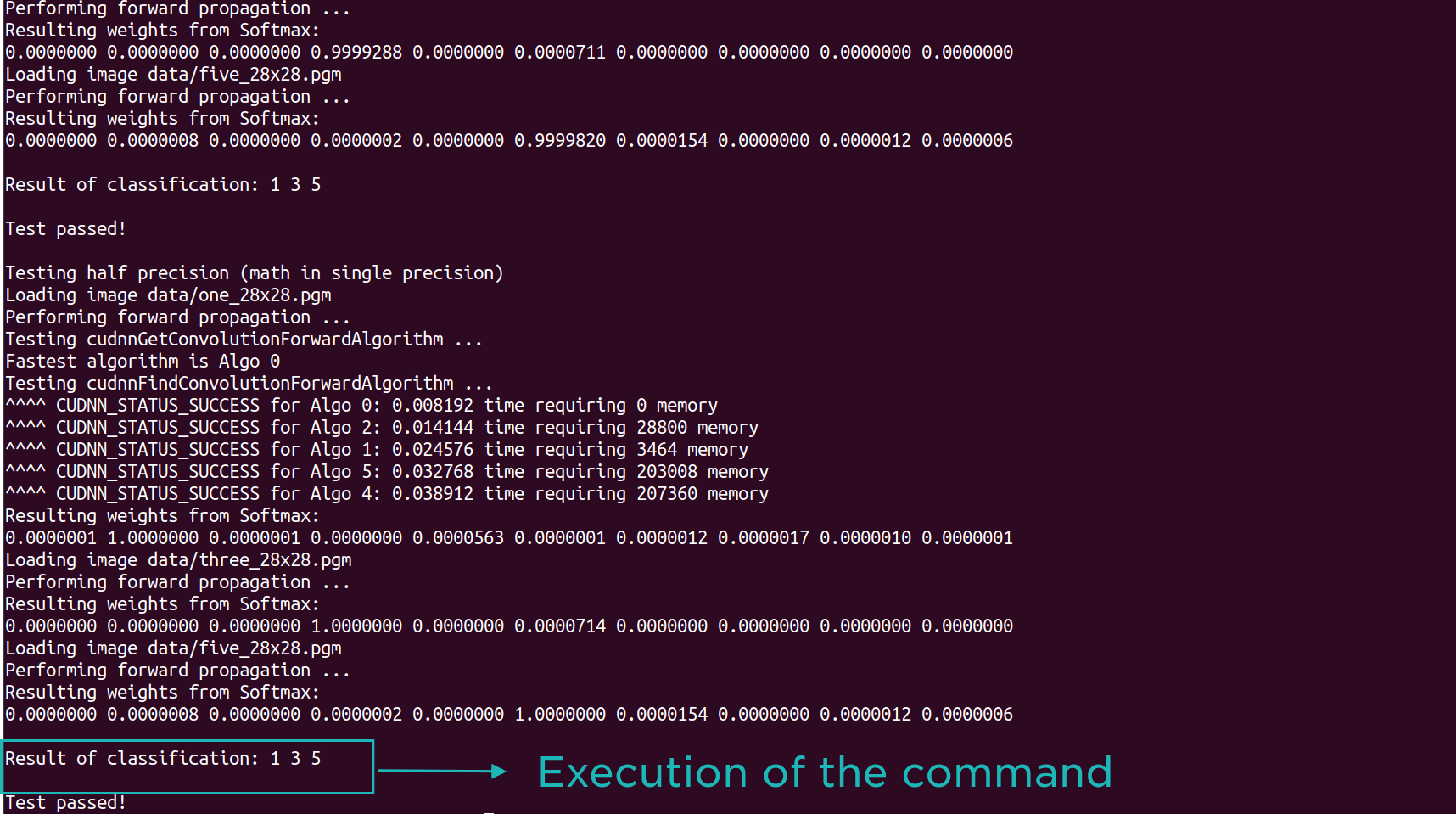
Reference to compose this answer
https://docs.nvidia.com/deeplearning/sdk/cudnn-install/index.html#verify
With regards
Sanpreet Singh
 sanpreet
on 2 Jul 2019
sanpreet
on 2 Jul 2019
sudo ldconfig /usr/local/cuda/lib64
Fine for me.
Please refer this link for more information.
tensorflow/tensorflow#5343
works for me!!
Thanks~~
 LongruiDong
on 9 Jan 2020
LongruiDong
on 9 Jan 2020
how to install on ubuntu 20?
 chovy
on 25 Jan 2021
chovy
on 25 Jan 2021
Related issues
 LarsHH
·
3Comments
LarsHH
·
3Comments
 shiorioxy
·
3Comments
shiorioxy
·
3Comments
 greatgao
·
3Comments
greatgao
·
3Comments
 hawklucky
·
3Comments
hawklucky
·
3Comments
 OpenHero
·
3Comments
OpenHero
·
3Comments
Most helpful comment
@Edwardmark
As @fujihuang mentioned, just add the path
export LD_LIBRARY_PATH=/usr/local/cuda-8.0/lib64:$LD_LIBRARY_PATHexport PATH=/usr/local/cuda-8.0/bin:$PATHHowever, fujihuang adds the third comment which makes his
PATHto be empty.