Cadvisor: High CPU usage with low number of containers
Environment
Version: v0.24.1 (note: we are using this version due to the Prometheus label issues in later versions)
OS: Ubuntu 16.04, 4.4.0-31-generic, x86_64
Docker: Docker version 1.12.6, build 78d1802
Containers: 4 (including cadvisor)
Cores: 2
Docker
Dockerfile:
FROM google/cadvisor:v0.24.1

ENTRYPOINT ["/usr/bin/cadvisor", "-logtostderr", "-profiling=true"]
Docker command:
docker run --volume=/:/rootfs:ro --volume=/var/run:/var/run:rw --volume=/sys:/sys:ro --volume=/var/lib/docker/:/var/lib/docker:ro --publish=8085:8080 --detach=true --name=test-cadvisor docker-registry:5000/test/test-cadvisor:latest
Problem
cAdvisor CPU usage is extremely high, such that it impacts the performance of the other containers. Typical CPU usage is between 20 - 110%, usually sitting at around 60-80%.
Output of the following profiling is attached:
go tool pprof -png -output=out.png http://localhost:8085/debug/pprof/profile
Note that I ran the profiling twice, just to compare results. I won't presume to interpret the results, other than to say that they look somewhat similarish, with a lot of time being spent in syscall.Syscall / syscall.Syscall6 as well as memory allocations and what I presume is garbage collection.
At first I thought it might be the same issue as https://github.com/google/cadvisor/issues/735 or https://github.com/kubernetes/kubernetes/issues/23255 , but I haven't seen any invocations of du show up in the output of ps.
It's also interesting to note that we don't see this same CPU hit on all of our nodes. To date, we see it mostly on instances that are running containers that are using net=host and that spawn a significant number of process/threads within their containers. These containers wrap some legacy monolith applications that deviate from the "usual" operational model of web apps.


 matt-jordan
All 41 comments
A number of performance tweaks have been made since then. From a quick scan, it looks like a large amount of that time is spent handling external requests. Might be worth measuring the number of requests cadvisor is serving, and seeing what its resource usage is when it is not handling any requests.
 dashpole
on 30 Nov 2017
dashpole
on 30 Nov 2017
Same issue: 8core x2 CPU with 9 running containers ~ CAdvisor take 13% of processor resources
 ZOXEXIVO
on 17 Mar 2018
ZOXEXIVO
on 17 Mar 2018
Same here: 1core VM with ~10 containers (running but doing nothing). CAdvisor takes 18% cpu.
 schabrolles
on 14 Apr 2018
schabrolles
on 14 Apr 2018
Same here. Lots of iowait. cadvisor USED mem (top) > 2G. Running cAdvisor version v0.27.4 (492322b). Turned out there were too many open files.
 elsbrock
on 1 May 2018
elsbrock
on 1 May 2018
I'm seeing something similar (CPU usage consistently 30-70%). Profile below:

This profile is on a machine running only 12 containers, and we've seen it on machines with even fewer, but there doesn't seem to be a clear pattern. Restarting cadvisor doesn't resolve the problem, but rebooting the machine does. We have noticed that the affected machines have been gradually losing available memory over time, which /proc/meminfo shows is going into Slab memory, and slabtop shows the slab memory is about 80%+ dentry. We're not sure which direction the causality is i.e. whether cadvisor is hammering the FS and causing lots of dentries to be cached, or if something else on the machine is causing memory issues and that is making cadvisor CPU-heavy. The machine from which that profile was taken is also not showing the same memory leak, so it may be a red herring.
We're running cadvisor 0.29.0 with /usr/local/bin/cadvisor --port 5003 --logtostderr=true. Some Docker info from the machine from which the profile was taken:
Containers: 71
 Running: 12
 Paused: 0
 Stopped: 59
Images: 80
Server Version: 18.03.1-ce
Storage Driver: overlay2
 Backing Filesystem: extfs
 Supports d_type: true
 Native Overlay Diff: true
Logging Driver: json-file
Cgroup Driver: cgroupfs
Plugins:
 Volume: local
 Network: bridge host ipvlan macvlan null overlay
 Log: awslogs fluentd gcplogs gelf journald json-file logentries splunk syslog
Swarm: inactive
Runtimes: runc
Default Runtime: runc
Init Binary: docker-init
containerd version: 773c489c9c1b21a6d78b5c538cd395416ec50f88
runc version: 4fc53a81fb7c994640722ac585fa9ca548971871
init version: 949e6fa
Security Options:
 apparmor
 seccomp
  Profile: default
Kernel Version: 4.13.0-41-generic
Operating System: Ubuntu 16.04.4 LTS
OSType: linux
Architecture: x86_64
CPUs: 8
Total Memory: 125.9GiB
Name: lab1
ID: GRBO:TBRS:Z5BJ:4RVS:HBEA:V24X:Q33J:66JI:7D4F:XX2O:ZD2M:WPYS
Docker Root Dir: /var/lib/docker
Debug Mode (client): false
Debug Mode (server): false
Registry: https://index.docker.io/v1/
Labels:
Experimental: true
Insecure Registries:
 127.0.0.0/8
Live Restore Enabled: false

WARNING: No swap limit support
 bmerry
on 2 Jul 2018
bmerry
on 2 Jul 2018
@bmerry the graph you show looks like about what I would expect. Assuming your containers don't have anything in their r/w layer, most cpu usage generally comes from reading from cgroup files, of which there are many for the memory cgroup.
Not sure about the memory leak. I'm not super familiar with the cgroup implementation, but I know they aren't real files, and are "stored" at least partially in the dentry cache. Accessing cgroup files repeatedly should make the dentry cache grow, but it should be reclaimed when free memory gets low.
dashpole
on 2 Jul 2018
@dashpole thanks for taking a look. I've noticed that the pprof report claims ~4% CPU usage, which doesn't match what top reports (40%+). I've confirmed by taking another profile and the graph header reports ~4% while top showed 30%+ over the entire 30s. So there is something odd in the way the profiler is working - perhaps it only profiles user time? htop shows the CPU usage is mostly in the kernel.
Running perf top, the top hits are
  31.04%  [kernel]                                      [k] memcg_stat_show
  18.61%  [kernel]                                      [k] memcg_sum_events.isra.22
   9.41%  [kernel]                                      [k] mem_cgroup_iter
   6.94%  [kernel]                                      [k] css_next_descendant_pre
   6.11%  [kernel]                                      [k] _find_next_bit
   3.96%  [kernel]                                      [k] mem_cgroup_usage.part.43
   1.75%  [kernel]                                      [k] find_next_bit
   1.38%  [kernel]                                      [k] mem_cgroup_node_nr_lru_pages
   1.22%  [kernel]                                      [k] nmi
which does seem to confirm your idea that it's related to cgroups.
The machine with the graph (using ~40% CPU) has 14669 files in /sys/fs/cgroup (counted with find . | wc), while another machine using ~1% CPU has 9935. So the file count alone doesn't seem to explain the order-of-magnitude differences in CPU usage.
FWIW, I've just tried with cadvisor 0.30.2 and --disable_metrics=tcp,udp,disk,network - no improvement. Is there anything else I should try turning off?
Accessing cgroup files repeatedly should make the dentry cache grow, but it should be reclaimed when free memory gets low.
I'm hoping so - for now it's been "leaking" slowly enough that there hasn't been any memory pressure. On one machine the memory was in SUnreclaim rather than SReclaimable, but when I dropped the dentry cache manually the memory was returned.
bmerry
on 2 Jul 2018
It seems like it's definitely some slow path in the kernel. Simply time cat /sys/fs/cgroup/memory/memory.stat takes 0.376s on the affected machine, and 0.002s on an unaffected machine. The affected machine has about 50% more cgroups, but that doesn't explain a >100x slowdown.
That sounds more like a kernel issue than cadvisor's problem and if I get time I may try to take it up on the LKML, but if you have any suggestions on fixing or diagnosing it, I'll be happy to hear them.
This is probably a separate issue from the original report, where pprof showed high CPU usage. @ZOXEXIVO @schabrolles are you seeing the same behaviour I am?
bmerry
on 2 Jul 2018
After some discussions on the linux-mm mailing list and some tests, it sounds like the problem may be "zombie" cgroups: cgroups that have no processes and have been deleted but still have memory charged to them (in my case, from the dentry cache, but it could also be from page cache or tmpfs). These are still iterated over when computing the top-level memory stats. We had a service that was repeatedly failing and being restarted (by systemd), which probably churned through a lot of cgroups over a few weeks.
I still need to experiment with ways to fix the underlying problem (including checking if it is better in newer kernels), but I'd like to find out if there is a way to work around it. In particular, we tend to use it only to get per-Docker-container metrics into Prometheus, and not so much for aggregate or system metrics (we have node-exporter for that). So if there is a way we can turn off collection of /sys/fs/cgroup/memory/memory.stats and /sys/fs/cgroup/memory/system.slice/memory.stats while still collecting memory stats on individual Docker containers that would probably help.
bmerry
on 19 Jul 2018
We don't have the option to disable collection of the root cgroup. We have an option --docker_only, but that keeps the root cgroup around.
dashpole
on 19 Jul 2018
We don't have the option to disable collection of the root cgroup. We have an option --docker_only, but that keeps the root cgroup around.
Do you think that would be reasonably easy for someone not familiar with the code to implement as a command-line option, or is it pretty core?
bmerry
on 19 Jul 2018
I would rather not add a flag for that, but you can just remove the registration of the raw factory here: https://github.com/google/cadvisor/blob/master/manager/manager.go#L335, and that would turn off collection for all cgroups that are not containers. I am planning to introduce a command line flag to control which factories are used in the future, which should allow this behavior without rebuilding cAdvisor
dashpole
on 19 Jul 2018
That didn't work for me:
F0726 15:36:56.808759 7808 cadvisor.go:168] Failed to start container manager: no known factory can handle creation of container
I also tried taking out the / case in this line and running with --docker_only: it runs, but from strace I can see that it is still opening /sys/fs/cgroup/memory/memory.stat (as well as a bunch of cgroups under /sys/fs/cgroup/memory/system.slice, despite the --docker_only).
bmerry
on 26 Jul 2018
@bmerry curious if you have made any progress debugging this since July?
 SamSaffron
on 17 Sep 2018
SamSaffron
on 17 Sep 2018
I never did get all the way to the bottom of it. Some step in creating and destroying cgroups interacts in a non-deterministic way with the reads that cadvisor does to cause cached dentries that keep the cgroups alive as zombies. There is a patch (which I assume will go into the next Linux release) which makes the stats collection a lot faster and thus reduces the impact, but doesn't prevent the zombies in the first place.
I gave up trying to fix the problem, and now we have a cron job that times reading /sys/fs/cgroup/memory/memory.stat and if it takes too long, drops the dentry cache.
bmerry
on 17 Sep 2018
Thanks a lot @bmerry dropping the dentry cache fully fix my cadvisor cpu issue.
I've done that using the following command:
echo 2 > /proc/sys/vm/drop_caches
More information about drop_caches here.
 WnP
on 5 Oct 2018
WnP
on 5 Oct 2018
Hopping in to say thank you @bmerry and @WnP on how you diagnosed and fixed this. We're seeing the same thing, on the same kernel, unrelated to cadvisor, and clearing the pagecache fixed it.
 awestendorf
on 28 Nov 2018
awestendorf
on 28 Nov 2018
I am seeing the same on Ubuntu 16.04 even after clearing all caches. cadvisor goes up to 50% CPU every few seconds.
CONTAINER ID        NAME                                                                                    CPU %               MEM USAGE / LIMIT     MEM %               NET I/O             BLOCK I/O           PIDS
57571530dfa5        cadvisor.fia8k180v3zlerr6zct851eh2.zhxr0g6bt2mh63x8t2mx462e8                            53.56%              58.35MiB / 128MiB     45.58%              690B / 0B           22.7MB / 0B         26
d1372924fdbe        gabrielle-web-v1-test.1.q6l14fnvkibdyvlr2d0zogph5                                       0.00%               5.445MiB / 2GiB       0.27%               184kB / 8.77MB      10.6MB / 8.19kB     3
c7f9a50145cb        eg-giulia-services-vehicles-v1-test.1.jqwh5iqtduf9gm4vczkxse20k                         1.13%               212.6MiB / 1.219GiB   17.04%              15.1MB / 4.36MB     328kB / 32.8kB      29
117d19335355        xena-seges-webapp-v1-test.1.wpgwtwhksvnr3c3jue0off8ig                                   0.00%               5.758MiB / 2GiB       0.28%               159kB / 7.15MB      0B / 8.19kB         3
54e4f759865c        xena-identityserver-v1-test.2.1g8rqmk2beap8iulc9nrw8bmw                                 0.63%               282.2MiB / 480MiB     58.80%              85.6MB / 106MB      2.7MB / 1.13MB      78
3d3d4b3299d3        eg-emma-frontend-v1-production.1.rze5xi565td665cd2vath17tt                              0.00%               4.539MiB / 2GiB       0.22%               558kB / 13.5MB      0B / 0B             2
c00dd9323968        xena-seges-services-login-v1-test.1.0kh148klp61kutkj5dxgb6g6c                           0.91%               140MiB / 256MiB       54.68%              274MB / 95.1MB      598kB / 16.4kB      27
75b88775e556        xena-seges-apigateway-v1-test.1.02ahxufzqq6wahf1gi0vynrhy                               0.77%               641.5MiB / 2GiB       31.32%              53.9MB / 41.6MB     803kB / 197kB       25
22c696046ef1        eg-scalepoint-frontend-v1-test.1.l2wlfrz2xp57xw9214a4uuxr3                              0.00%               3.098MiB / 1GiB       0.30%               249kB / 0B          0B / 8.19kB         3
50ece1bf9c38        eg-emma-services-settings-v1-production.1.s6ssn8z28ycb2dcdtgi6uxhkb                     0.27%               191.5MiB / 2GiB       9.35%               215MB / 36.5MB      7.08MB / 360kB      29
f97ea262491f        eg-emma-apigateway-v2-production.2.b3hbkwjzxqfpcoovt37nldz4o                            0.51%               113.2MiB / 2GiB       5.53%               185kB / 826B        2.79MB / 0B         24
ca8f6201e056        eg-one-payroll-frontend-v1-production.1.u86sazda8lctzndsfruh0q2d7                       0.00%               5.004MiB / 32MiB      15.64%              464kB / 2.02MB      8.19kB / 8.19kB     3
450aba876826        xena-identityserver-v2-production.1.eoumb3vrhtafsltsjw52hqt0x                           0.71%               269.8MiB / 1GiB       26.35%              1.58GB / 2.67GB     3.87MB / 238kB      45
e902bf65f1c2        eg-emma-services-xena-v1-production.1.j68n82fhd592ioia8lu6er59y                         0.69%               136.8MiB / 2GiB       6.68%               3.92MB / 3.82MB     2.91MB / 0B         28
e4bc84719061        eg-gaia-services-importers-v1-test.1.qhg5jop1h2y71ayjvihrnbejo                          1.00%               180.4MiB / 2GiB       8.81%               412MB / 86.6MB      115kB / 0B          29
db532afa31d9        eg-one-storage-api-v1-production.1.jojhb7irnodi5fcuhzuk7jaa0                            0.07%               210MiB / 2GiB         10.25%              411MB / 85.8MB      5.18MB / 6.03MB     28
8f5ec434f67b        xena-identityserver-developerconsole-plugin-v1-production.1.wo9zkx3cdkcnl0qwf60k6llhx   0.04%               152.4MiB / 512MiB     29.76%              1.07MB / 1.11MB     29.5MB / 213kB      23
627634e2cd23        xena-summaxmocksite-v1-test.1.uh8v9r2yepsbdq4mfcts27t2q                                 0.00%               4.652MiB / 2GiB       0.23%               281kB / 725kB       8.19kB / 0B         2
2db550e1f31d        codezoo-public-web-v1-production.1.n3js3xf8avq511zpwsdzlw64v                            0.00%               5.055MiB / 32MiB      15.80%              2.34MB / 2.04MB     1.26MB / 0B         2
be769c18d100        eg-nbl-onboardingfrontend-v1-production.1.j8drb639m1hrii0wvycjdmlvq                     0.00%               6.152MiB / 32MiB      19.23%              444kB / 1.87MB      4.52MB / 8.19kB     3
b1425127ddeb        eg-giulia-services-signalr-v1-test.1.smm685n54hz9w87n5f8pdvyt0                          0.97%               69.7MiB / 256MiB      27.22%              8.74MB / 7.2MB      1.82MB / 0B         29
de3a74e719d6        eg-gaia-services-ingress-v1-test.1.62x06sfrhe2hedl55yo3x51cl                            1.02%               53.27MiB / 2GiB       2.60%               3.88MB / 3.82MB     623kB / 0B          26
5736687c3827        eg-one-payroll-api-v1-test.1.ka5atlimjxhogtsxp0gk2b6f8                                  0.55%               254.7MiB / 2GiB       12.44%              15.3MB / 4.02MB     105MB / 0B          27
281e5c816764        eg-one-fiscalhelper-api-v1-production.2.chu2axoeu80wkcbka949rhjbu                       0.06%               205.3MiB / 2GiB       10.02%              25.4MB / 14.7MB     15.6MB / 16.4kB     21
8ecfc17d7124        eg-emma-apigateway-v2-test.1.4dh5u50ob35h088dycwtfavl0                                  0.56%               129.4MiB / 256MiB     50.53%              274kB / 0B          31.2MB / 0B         23
6fb65c0380d9        eg-byg-mail-v1-production.1.kxty1uatk8r9i8xzu4wvhapq4                                   0.00%               40.85MiB / 2GiB       1.99%               439kB / 45.7kB      7.75MB / 0B         16
cd798045f74d        kong-gateway.1.kimumy5kzn4jtnluhalgrukpp                                                0.36%               303.4MiB / 23.53GiB   1.26%               11.8GB / 11.5GB     729kB / 98.3kB      5
bbc3948e3e5f        health-aggregator-v1-production.1.ke6jg6keaydxvtvz6yj58ag2w                             0.22%               253.4MiB / 256MiB     99.00%              290MB / 299MB       1.86GB / 1.55GB     35
584bd86deb69        kong-tool.1.2zjt4kg95j6p94d1wow4c5zth                                                   0.02%               156.6MiB / 23.53GiB   0.65%               643MB / 242MB       0B / 32.8kB         11
e11e89702a19        logstash                                                                                2.92%               1.358GiB / 23.53GiB   5.77%               37.3GB / 103GB      186MB / 11.8MB      53
 michaelkrog
on 17 Jan 2019
michaelkrog
on 17 Jan 2019
Same issue here on Ubuntu 18.04.1 4.15.0-43 . Cadvisor options and echo 2 > /proc/sys/vm/drop_caches doenst help for me :( Any updates for the Issue?
 Aschenbecher
on 3 Feb 2019
Aschenbecher
on 3 Feb 2019
+1
 zerthimon
on 19 Feb 2019
zerthimon
on 19 Feb 2019
@Aschenbecher then your high CPU load issue is not related to memory stats, you need to profile cadvisor using pprof in order to find what cause those high CPU loads.
@zerthimon +1 comment are always useless, use github comments thumbs up feature. Please do not pollute issues with useless comments, Thanks
WnP
on 19 Feb 2019
@Aschenbecher then your high CPU load issue is not related to memory stats, you need to profile cadvisor using pprof in order to find what cause those high CPU loads.
@zerthimon +1 comment are always useless, use github comments thumbs up feature. Please do not pollute issues with useless comments, Thanks
thanks, I will take a look into it!
Aschenbecher
on 20 Feb 2019
I think I'm incurring in a similar issue even if the CPU utilization is not that high.
I'm posting this comment mainly because it might be useful to other people with a more impacting behavior.
cadvisor is showing CPU usage between 5% and 15%, a perf record of 2 minutes produced the following flamegraph.
Running 23 containers (cadvisor included).

Gui is not being used, Prometheus was scraping every 5 seconds. We have relaxed the scraping period to 15 seconds and it helped reduce average CPU utilization to 4% and reduce the amount of CPU spent dealing with HTTP connection.

Now, most of the CPU is spent in the housekeeping getting container stats I guess.
Disabling the dynamic housekeeping and setting it to 5s (3 time smaller then our polling interval from prom) rebalanced the housekeeping and http connection cpu utilization and further lowered CPU utilization to about 2-3%

The following graph shows cadvisor container cpu utilization for the three scenarios described above.

 GiovanniPaoloGibilisco
on 9 Apr 2019
GiovanniPaoloGibilisco
on 9 Apr 2019
+1 cpu 200% when housekeeping func is runing
 dylexplorer
on 24 Apr 2019
dylexplorer
on 24 Apr 2019
+1
 bhaweshintouch
on 13 May 2019
bhaweshintouch
on 13 May 2019
We found this issue while tracking down sporadic 100ms+ latency to services on a bare metal kube cluster. We narrowed it down to any packets arriving on the system, and as far as system-level NIC RX queue processing stalls that caused packets to batch up and then process suddenly around 100ms later on random CPU cores at certain intervals.
Some bcc later, we noticed the correlation where cadvisor was always running on the given core just prior to this, and noticed that the read() syscall was taking hundreds of ms to complete, thus preventing that core and NIC RX queue from processing any packets (in this case, from ksoftirqd getting scheduled) until it finished (multi-core system with NIC RX queues pinned to cores by irqbalance, and enough packets for the kernel to use softirq to poll for packets).
This work-around mentioned above did work for us, making the read() fast again and removing the sporadic latency spikes on the system:
echo 2 > /proc/sys/vm/drop_caches
It's worth noting that syscalls that are as slow as this can likely cause worse follow-on effects than high CPU, like what we observed. Hopefully the above might help some future person find this issue more quickly for the more insidious symptom.
 theojulienne
on 14 Jun 2019
theojulienne
on 14 Jun 2019

scan tcp stats hang, which conflicted with volume manager to mount, And leading to kubernetes node Unhealthy
 KielChan
on 16 Oct 2019
KielChan
on 16 Oct 2019
long-term-issue (note to self)
 dims
on 16 Oct 2019
dims
on 16 Oct 2019
Nice write-up of @ theojulienne
https://github.blog/2019-11-21-debugging-network-stalls-on-kubernetes/
 nielsole
on 12 Dec 2019
nielsole
on 12 Dec 2019
Hi, same problem here on a raspberry pi 3b+
grafana cpu:

Dockerfile:
FROM golang:1.13-alpine

ENV CADVISOR_VERSION "v0.35.0"

run apk add --no-cache --virtual .build-deps gcc git make bash libc-dev \
 && go get -d github.com/google/cadvisor \
 && cd $GOPATH/src/github.com/google/cadvisor \
 && git checkout ${CADVISOR_VERSION} \
 && go fmt ./... \
 && make build \
 && mv cadvisor /cadvisor \
 && apk del .build-deps

# reference : https://github.com/google/cadvisor/blob/master/deploy/Dockerfile
FROM alpine:latest

RUN apk --no-cache add libc6-compat device-mapper findutils && \
    apk --no-cache add zfs || true && \
    apk --no-cache add thin-provisioning-tools --repository http://dl-3.alpinelinux.org/alpine/edge/main/ && \
    echo 'hosts: files mdns4_minimal [NOTFOUND=return] dns mdns4' >> /etc/nsswitch.conf && \
    rm -rf /var/cache/apk/*

COPY --from=0 /cadvisor /usr/bin/cadvisor

EXPOSE 8080

HEALTHCHECK --interval=30s --timeout=3s \
  CMD wget --quiet --tries=1 --spider http://localhost:8080/healthz || exit 1

ENTRYPOINT ["/usr/bin/cadvisor", "-logtostderr"]
y tried commands: command: --disable_metrics=disk --docker_only
if i can pass you more useful info please tell me.
 tmp2810
on 30 Jan 2020
tmp2810
on 30 Jan 2020
try using --disable_metrics=sched,percpu,diskIO,disk,network,tcp,advtcp,udp,process, which includes all optional metrics.
dashpole
on 30 Jan 2020
@dashpole
same result with --disable_metrics=sched,percpu,diskIO,disk,network,tcp,advtcp,udp,process :

tmp2810
on 31 Jan 2020
@tmpjg how many cores is your node?
dashpole
on 31 Jan 2020
@dashpole 4 cores.
processor       : 0
model name      : ARMv7 Processor rev 4 (v7l)
BogoMIPS        : 38.40
Features        : half thumb fastmult vfp edsp neon vfpv3 tls vfpv4 idiva idivt vfpd32 lpae evtstrm crc32
CPU implementer : 0x41
CPU architecture: 7
CPU variant     : 0x0
CPU part        : 0xd03
CPU revision    : 4

processor       : 1
model name      : ARMv7 Processor rev 4 (v7l)
BogoMIPS        : 38.40
Features        : half thumb fastmult vfp edsp neon vfpv3 tls vfpv4 idiva idivt vfpd32 lpae evtstrm crc32
CPU implementer : 0x41
CPU architecture: 7
CPU variant     : 0x0
CPU part        : 0xd03
CPU revision    : 4

processor       : 2
model name      : ARMv7 Processor rev 4 (v7l)
BogoMIPS        : 38.40
Features        : half thumb fastmult vfp edsp neon vfpv3 tls vfpv4 idiva idivt vfpd32 lpae evtstrm crc32
CPU implementer : 0x41
CPU architecture: 7
CPU variant     : 0x0
CPU part        : 0xd03
CPU revision    : 4

processor       : 3
model name      : ARMv7 Processor rev 4 (v7l)
BogoMIPS        : 38.40
Features        : half thumb fastmult vfp edsp neon vfpv3 tls vfpv4 idiva idivt vfpd32 lpae evtstrm crc32
CPU implementer : 0x41
CPU architecture: 7
CPU variant     : 0x0
CPU part        : 0xd03
CPU revision    : 4

Hardware        : BCM2835
Revision        : a020d3
Serial          : 00000000e14271a3
Model           : Raspberry Pi 3 Model B Plus Rev 1.3
there is a dicussion about a cgroup bug, see Showing /sys/fs/cgroup/memory/memory.stat very slow on some machines, maybe useful for this issue
 qingwave
on 11 Feb 2020
qingwave
on 11 Feb 2020
centos: 4.4.180-2.el7.elrepo.x86_64
Kubernetes v1.12.3
the kubelet high cpu, pprof cadvisor used cpu time long ,cost systemcall get cgroup mem
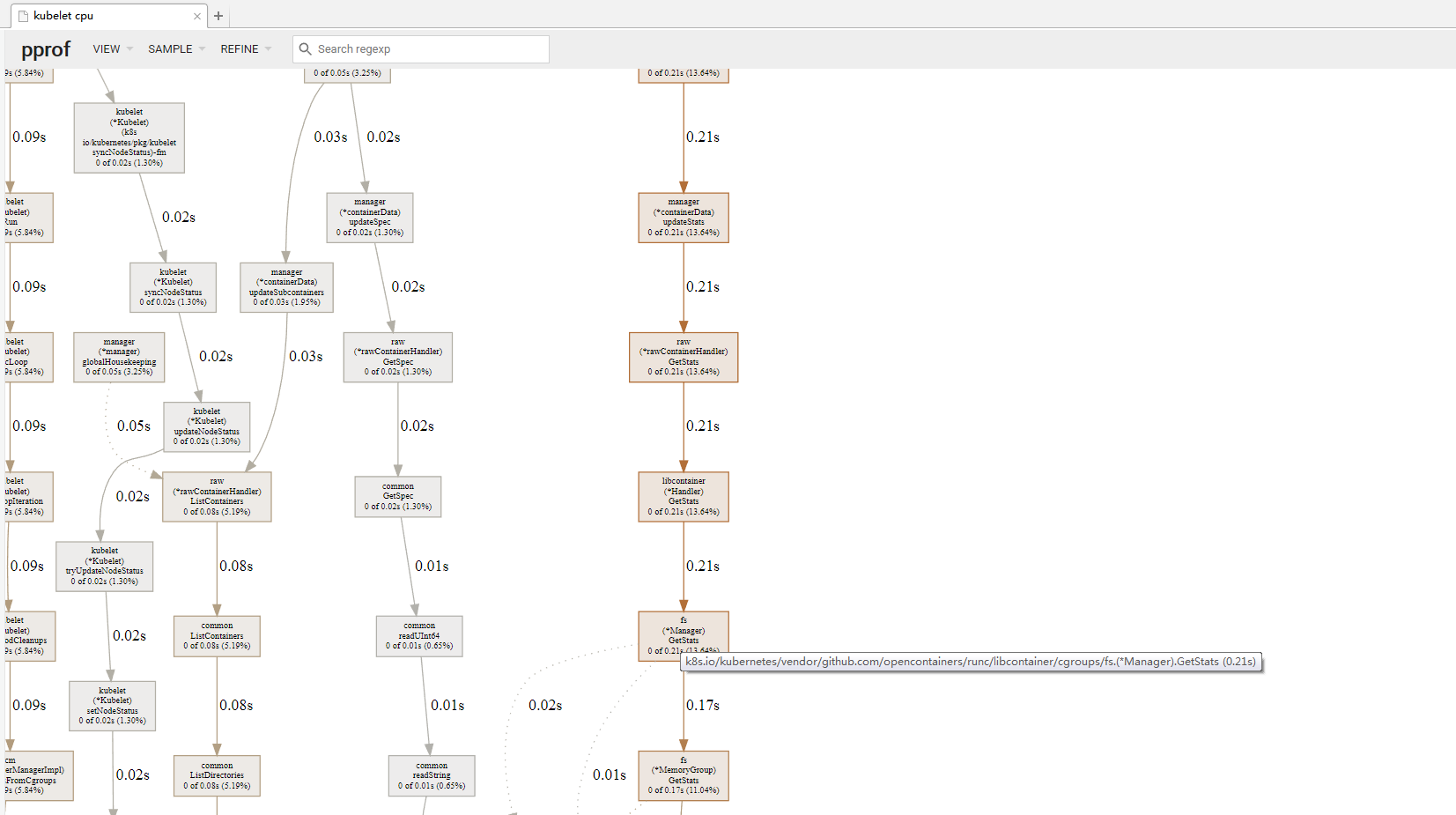
 futianshi1314
on 29 Feb 2020
futianshi1314
on 29 Feb 2020
@theojulienne @bmerry
Hi, I have the same issure,
CentOS Linux release 7.6.1810 (Core)
kernel:4.4.180-2.el7.elrepo.x86_64
Kubernetes v1.12.3
but echo 2 > /proc/sys/vm/drop_caches will without stop, and cpu load high,too many "kworker" kernel processing, which kernal version can use echo 2 drop_caches? I will reinstall the system.thanks
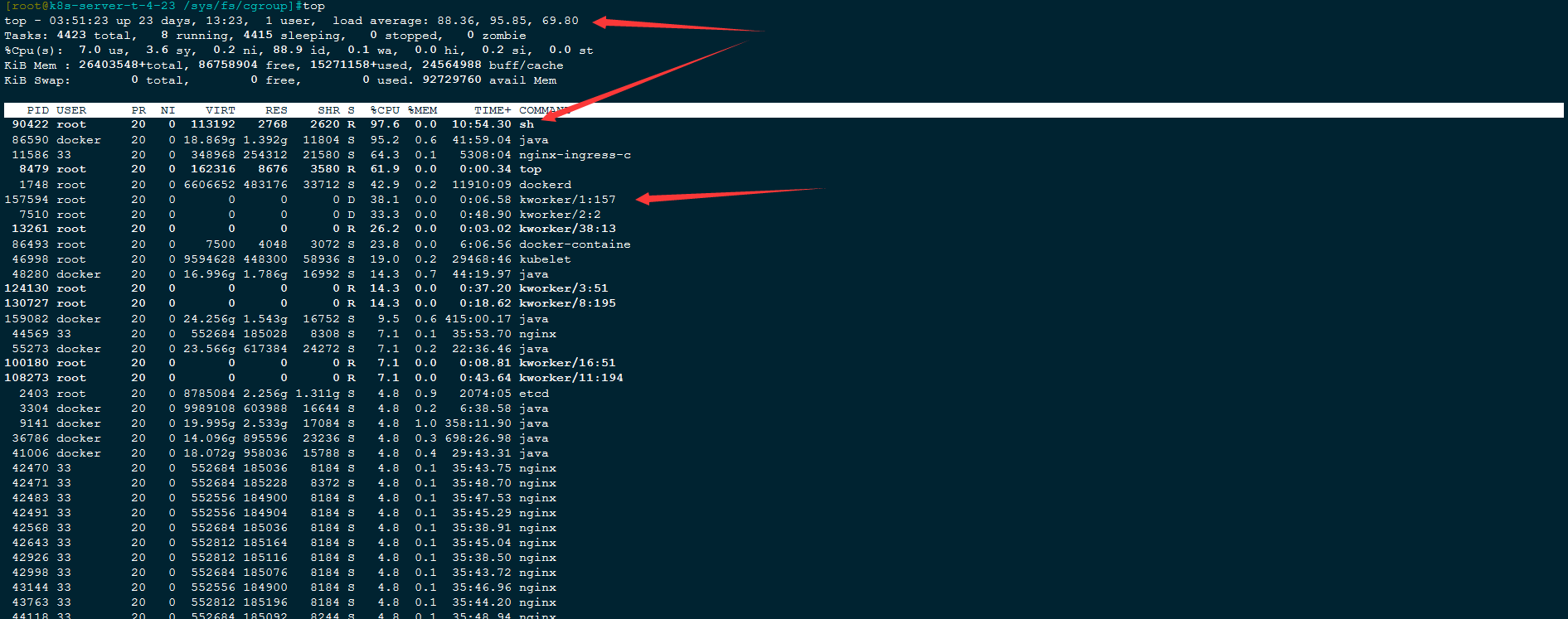
futianshi1314
on 29 Feb 2020
I would suggest either upgrading to a newer kernel or disabling the code that is polling this stat file if that's not an option.
There's some more details of this from the kernel side from the RHEL folks here, which has a nice summary of the patches and trace scripts: https://bugzilla.redhat.com/show_bug.cgi?id=1795049
The bpftrace script they used to check for this also got published which might be useful for folks wanting to determine if this is the issue they are observing.
theojulienne
on 29 Feb 2020
@theojulienne OK , I'll try it later and get back to you soon .Thanks
futianshi1314
on 1 Mar 2020
bugfix kernel release version can click https://bugzilla.redhat.com/show_bug.cgi?id=1795049
I never did get all the way to the bottom of it. Some step in creating and destroying cgroups interacts in a non-deterministic way with the reads that cadvisor does to cause cached dentries that keep the cgroups alive as zombies. There is a patch (which I assume will go into the next Linux release) which makes the stats collection a lot faster and thus reduces the impact, but doesn't prevent the zombies in the first place.
I gave up trying to fix the problem, and now we have a cron job that times reading
/sys/fs/cgroup/memory/memory.statand if it takes too long, drops the dentry cache.
 fengpeiyuan
on 24 Aug 2020
fengpeiyuan
on 24 Aug 2020
Performance of memory.stat was improved in https://spinics.net/lists/cgroups/msg21876.html
 mikedanese
on 8 Oct 2020
mikedanese
on 8 Oct 2020
Related issues
 sylr
·
7Comments
sylr
·
7Comments
 jlec
·
5Comments
jlec
·
5Comments
 NichUK
·
5Comments
NichUK
·
5Comments
 Thermi
·
6Comments
Thermi
·
6Comments
 wololock
·
5Comments
wololock
·
5Comments
Most helpful comment
We found this issue while tracking down sporadic 100ms+ latency to services on a bare metal kube cluster. We narrowed it down to any packets arriving on the system, and as far as system-level NIC RX queue processing stalls that caused packets to batch up and then process suddenly around 100ms later on random CPU cores at certain intervals.
Some
bcclater, we noticed the correlation wherecadvisorwas always running on the given core just prior to this, and noticed that theread()syscall was taking hundreds of ms to complete, thus preventing that core and NIC RX queue from processing any packets (in this case, fromksoftirqdgetting scheduled) until it finished (multi-core system with NIC RX queues pinned to cores byirqbalance, and enough packets for the kernel to usesoftirqto poll for packets).This work-around mentioned above did work for us, making the
read()fast again and removing the sporadic latency spikes on the system:It's worth noting that syscalls that are as slow as this can likely cause worse follow-on effects than high CPU, like what we observed. Hopefully the above might help some future person find this issue more quickly for the more insidious symptom.